Free Lessons
Courses
Seminars
TechHelp
Fast Tips
Templates
Topic Index
Forum
ABCD
 
Home   Courses   TechHelp   Help   Contact   Merch   Join   Order   Logon   Forums   
 
Home > Forums > Access Developers > Virtual Desktop by A Glenn Yesner
Back to Access Developers    Comments List
Upload Images   @Reply   Bookmark    Link   Email   Next Unseen 
Virtual Desktop
A Glenn Yesner 
     
3 years ago
Not a problem but something I thought Richard could bring to MicroSoft's attention RE: Access 365

When I open a new virtual desktop (Windows Key + Ctrl + D) if I have an Access database open on my original desktop and double click on a database shortcut in the virtual desktop it opens the database in the original desktop. If, in the virtual desktop, I open Access first then open a database using the "Open" menu item I can open the database in the virtual desktop, even if it's another copy of the same database in the original desktop.

Other programs I have on my original desktop don't have this limitation. If Visual Studio Code is open on my original desktop I can just double click on the shortcut in my virtual desktop and Visual Studio Code opens in he virtual desktop.

MS Excel won't let me open an instance of Excel in the virtual desktop if it is already open in the original desktop.

Now that I know about this virtual desktop I'll be using it, a fair bit. It would be nice if I could just double click on my shortcuts in the virtual desktop and open databases and spreadsheets.

I used to have to close or minimize various windows to work on a new problem but with the virtual desktop I think I'll get "lost" less frequently when going back and forth between the various programs I have open. So, if you can Richard, bring this to MS Office's attention and see if they can resolve it (they did it with VSC).
Thank you, Ed
Kevin Yip  @Reply  
      
3 years ago
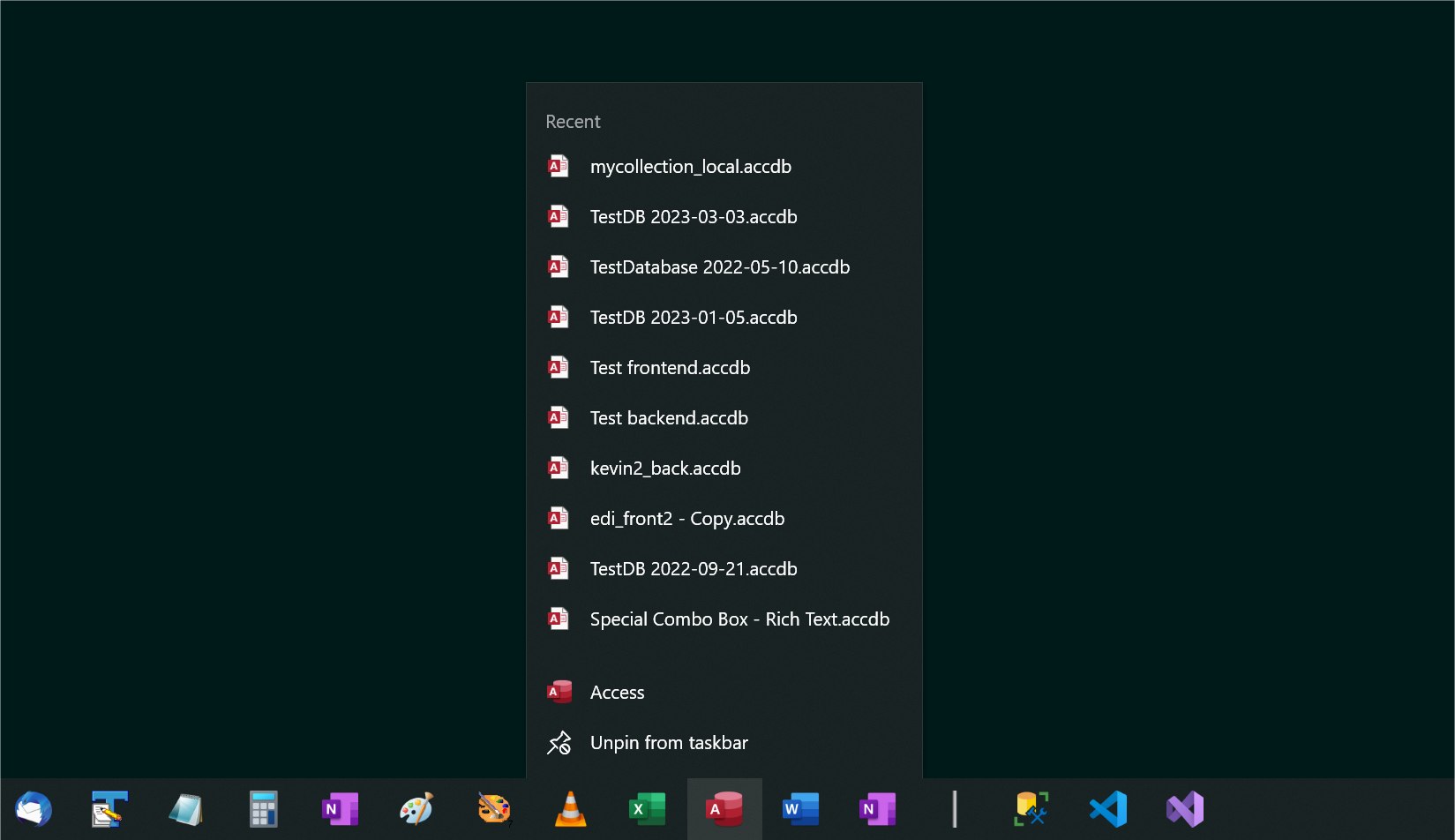
This doesn't happen if I open an Access DB from a taskbar shortcut (see picture below).  But if I open an Access DB in File Explorer or a desktop shortcut, it opens in the first desktop, like you saw.  I always use taskbar shortcuts, so this is not a problem for me, and I can always open DBs on the desktop I'm on.
Kevin Yip  @Reply  
      
3 years ago

A Glenn Yesner OP  @Reply  
     
3 years ago
Kevin, thank you for the tip, works for me too. Didn't know right clicking on the Access icon on the task bar would give me the list of recent databases, this will be beneficial to me :-)
Scott Axton  @Reply  
      
3 years ago
In addition to Kevin's suggestion:

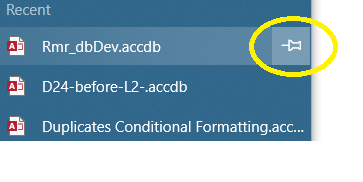
If you constantly use a particular db, you can pin the database to the list by clicking the push pin icon when you hover over it.  That way it will remain on top always available no matter how many others you open.
Scott Axton  @Reply  
      
3 years ago

Scott Axton  @Reply  
      
3 years ago
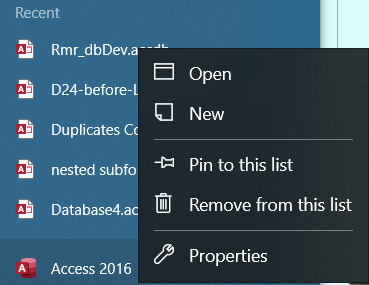
If you right click the right click menu you get even more options available.
Scott Axton  @Reply  
      
3 years ago

A Glenn Yesner OP  @Reply  
     
3 years ago
Thank you Scott. Also found the virtual desktop remains when I turn off my computer and start it up again. I'll be using this a lot, I'm frequently having to stop on one project to do a quick problem resolution then come back to the original project.
Scott Axton  @Reply  
      
3 years ago
You are welcome.  Glad it helped.

This thread is now CLOSED. If you wish to comment, start a NEW discussion in Access Developers.
 

Next Unseen


What's This?


The following is a paid advertisement
Computer Learning Zone is not responsible for any content shown or offers made by these ads.
 

Learn
 
Access - index
Excel - index
Word - index
Windows - index
PowerPoint - index
Photoshop - index
Visual Basic - index
ASP - index
Seminars
More...
Customers
 
Login
My Account
My Courses
Lost Password
Memberships
Student Databases
Change Email
Info
 
Latest News
New Releases
User Forums
Topic Glossary
Tips & Tricks
Search The Site
Code Vault
Collapse Menus
Help
 
Customer Support
Web Site Tour
FAQs
TechHelp
Consulting Services
About
 
Background
Testimonials
Jobs
Affiliate Program
Richard Rost
Free Lessons
Mailing List
PCResale.NET
Order
 
Video Tutorials
Handbooks
Memberships
Learning Connection
Idiot's Guide to Excel
Volume Discounts
Payment Info
Shipping
Terms of Sale
Contact
 
Contact Info
Support Policy
Mailing Address
Phone Number
Fax Number
Course Survey
Email Richard
[email protected]
Blog RSS Feed    YouTube Channel

LinkedIn
Copyright 2026 by Computer Learning Zone, Amicron, and Richard Rost. All Rights Reserved. Current Time: 9/21/2026 5:11:06 PM. PLT: 1s