Free Lessons
Courses
Seminars
TechHelp
Fast Tips
Templates
Topic Index
Forum
ABCD
 
Home   Courses   TechHelp   Help   Contact   Merch   Join   Order   Logon   Forums   
 
Back to Access Forum    Comments List
Upload Images | @Reply | Bookmark | Link | Email | Next Unseen |
Academic Grading System
Ptzzy Cool 
    
3 years ago
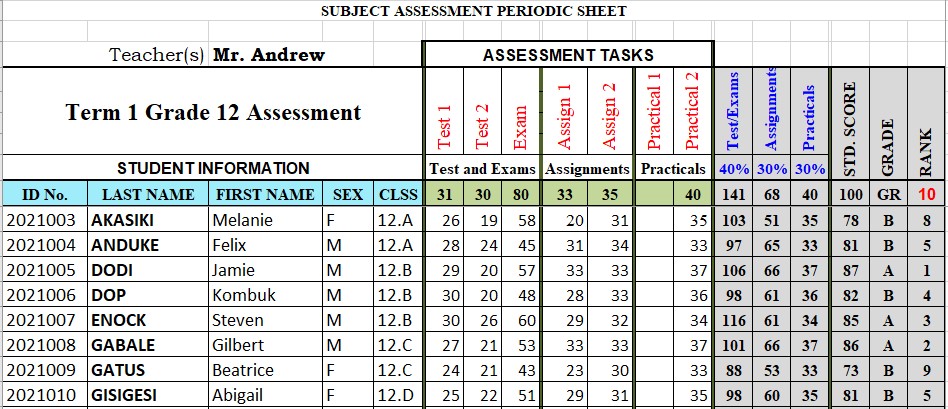
I watch a lot of the videos from Access Learning Zone and they always help a lot. Today I have a request if a fast tip video can be posted on the Students Assessment Processing System if I can call it as that. I have a working example which is prepared in Ms Excel but I like it to be done in Ms Access as it helps so much when we want to print the report with images and also it saves a lot of time as we do not need to do mail merge in Ms Word. I could send the excel version but I do not know how to post it up here. In the excel version, the fields used includes the mean, standard deviation, max and min of each of the assessed items like, tests, assignments, projects, practicals, quizes etc. There could be certain number of tests given eg. test1, test2 etc and the same with the other assessment types. Then to do the final grading and ranking, each type of assement type is given certain % score, eg. all tests: 20%, assignments: 30%, quiz: 10% and so on. And all of these percentages should add up to 100%. How can this be put together in Ms Access. Thanks.
Ptzzy Cool OP  @Reply  
    
3 years ago

Scott Axton  @Reply  
      
3 years ago
This is definitely do able.  There isn't a magic bullet though.  Your best bet is to start out with the free Access Beginner 1 and work through at least the Expert courses in order to get the most out of the learning.

Also watch IIF Function and Many-to-Many.

These may be a bit beyond you at the moment depending on your Access knowledge.
Kevin Yip  @Reply  
     
3 years ago
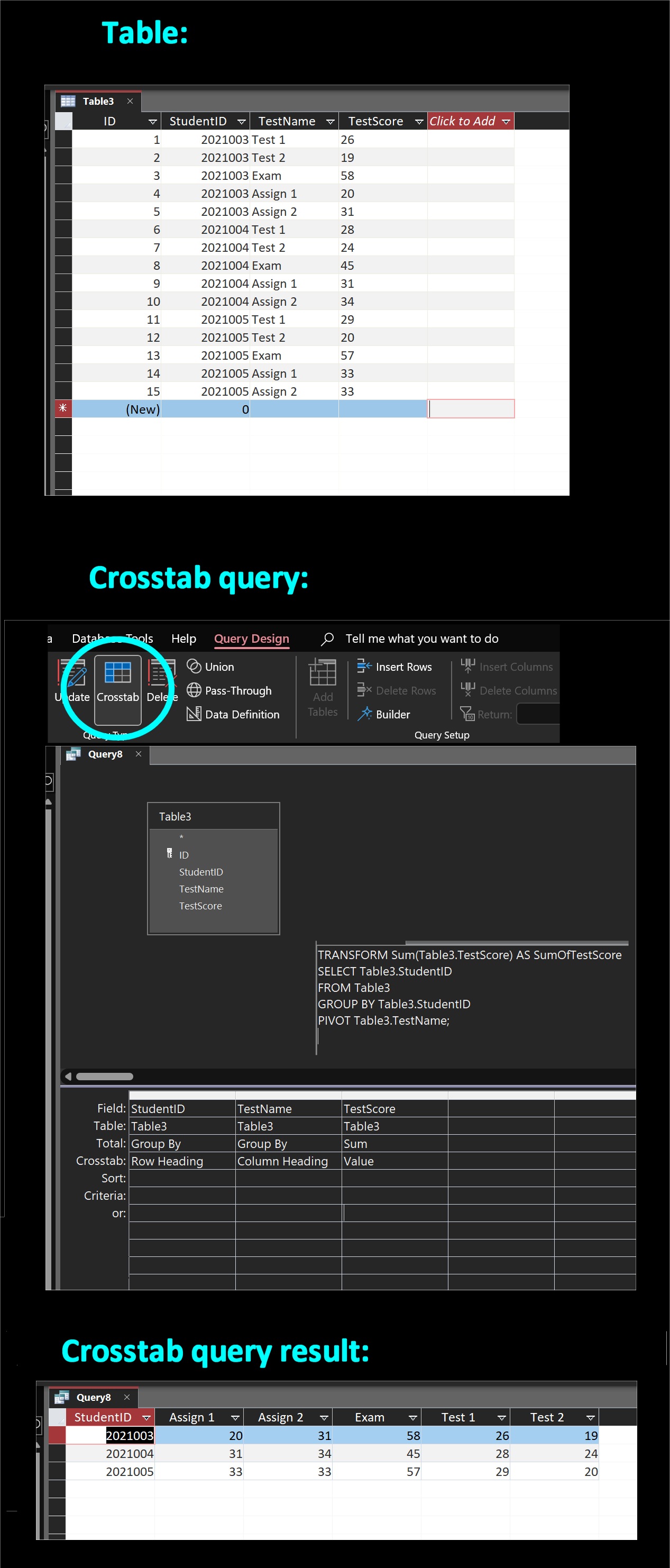
To get that kind of result in Excel, you need a crosstab query in Access.  But to create a crosstab query, you need a "normalized" table.  See pictures show.  Your Access table needs to look like that, with data stored in the manner shown.  Then you can create a crosstab query as shown in the second picture.  The third picture shows the result, with data expanding in columns (Test 1, Test 2, etc.) as well as in rows.  On Excel, you can type data wherever you want.  But in Access, you need to store data in a structured manner known as "normalization".  This site has courses on that important topic.
Kevin Yip  @Reply  
     
3 years ago

Ptzzy Cool OP  @Reply  
    
3 years ago
Thank you so much for the responses provided so far. The diagrams posted gives at least some light into how I could set the whole thing up especially with the use of crosstab query.

This thread is now CLOSED. If you wish to comment, start a NEW discussion in Access Forum.
 

Next Unseen


What's This?


The following is a paid advertisement
Computer Learning Zone is not responsible for any content shown or offers made by these ads.
 

Learn
 
Access - index
Excel - index
Word - index
Windows - index
PowerPoint - index
Photoshop - index
Visual Basic - index
ASP - index
Seminars
More...
Customers
 
Login
My Account
My Courses
Lost Password
Memberships
Student Databases
Change Email
Info
 
Latest News
New Releases
User Forums
Topic Glossary
Tips & Tricks
Search The Site
Code Vault
Collapse Menus
Help
 
Customer Support
Web Site Tour
FAQs
TechHelp
Consulting Services
About
 
Background
Testimonials
Jobs
Affiliate Program
Richard Rost
Free Lessons
Mailing List
PCResale.NET
Order
 
Video Tutorials
Handbooks
Memberships
Learning Connection
Idiot's Guide to Excel
Volume Discounts
Payment Info
Shipping
Terms of Sale
Contact
 
Contact Info
Support Policy
Mailing Address
Phone Number
Fax Number
Course Survey
Email Richard
[email protected]
Blog RSS Feed    YouTube Channel

LinkedIn
Copyright 2026 by Computer Learning Zone, Amicron, and Richard Rost. All Rights Reserved. Current Time: 11/9/2026 2:38:56 PM. PLT: 1s