Free Lessons
Courses
Seminars
TechHelp
Fast Tips
Templates
Topic Index
Forum
ABCD
 
Home   Courses   TechHelp   Forums   Help   Contact   Merch   Join   Order   Logon  
 
Back to Access Forum    Comments List
Upload Images   @Reply   Bookmark    Link   Email   Next Unseen 
Combo field selects combo 2
William Kennedy 
    
3 years ago
Actually, I sorry to send this email but Ive been working this issue now for a couple weeks and it is driving me crazy.  Usually I just review your training until it finally makes since.  I believe your Video and Paid Templet Access Zip Code Templet is the answer to my problem but after reviewing it a number of times and reviewing the Templet, I still cant get it to work as I need.  Hopefully it is something simple and you will help.

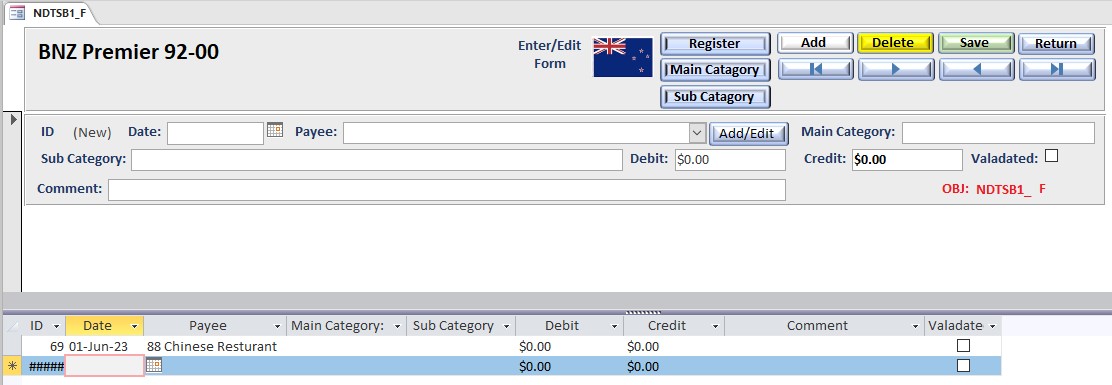
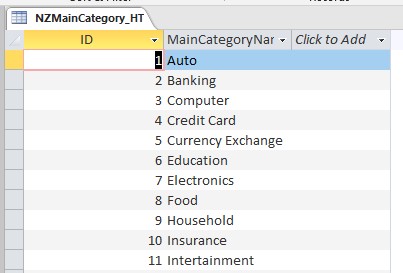
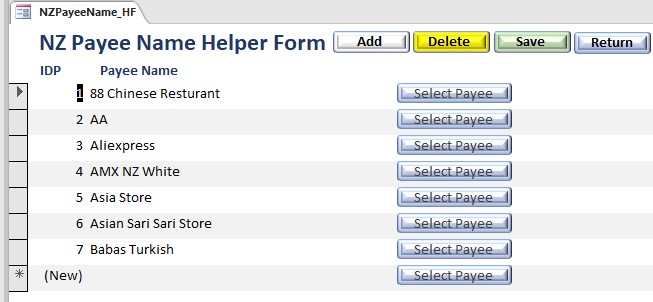
Im doing a, what I thought was a simple accounting system.  It has many different accounts in three different countries.  The key issue I am working on is a Linked Payee, MainCategory and SubCategor.  Instead of a zip code entered, I need to use a combo to select payees from a list, as over time the Payees recure.  Often an Accounting event will use a payee and that payee can have multiple Main Categories and the Main Category can have more than one Sub Category to select.  But often the user needs to add new Payees, MainCategories if required, and or Sub Categories.  This is very similar to your Templet video.
Both the categories are used to generate reports so consistency is required.  The rest of the Database seems to work great and my wife likes it, but data consistency is an issue.  Plus, the Payee List is fairly long, so a combo is required.   Can you quickly review my database and point me to where I have made mistakes.
Ive sent only the part of the database required to test out the solution.  Dont think it is too confusing.  Thanks for any help on this. Have not started VBA yet, trying to get into it.  Learned a lot of VBA and SQL in the last three months trying to get some things done correctly.  I can send the part of the database for this issue if required.  Just let me know where.
William Kennedy OP  @Reply  
    
3 years ago

William Kennedy OP  @Reply  
    
3 years ago

William Kennedy OP  @Reply  
    
3 years ago

William Kennedy OP  @Reply  
    
3 years ago

William Kennedy OP  @Reply  
    
3 years ago

William Kennedy OP  @Reply  
    
3 years ago

Dan Jackson  @Reply  
            
3 years ago
Instead of using a combo, have you thought about using a Continuous Form and using Many-to-Many relationship?

It'll give much more flexibility. If you dont want to embed a continuous form into your main form, you could use a Modal & Popup instead
William Kennedy OP  @Reply  
    
3 years ago
Hello Dan no it would not work as I need to populate the fields in a Cascading Combo method.
Kevin Robertson  @Reply  
           
3 years ago
William Kennedy OP  @Reply  
    
3 years ago
Hello Kevin,  I'm sure I'm not communicating this very well.  Sorry.  I've reviewed the Cascading Videos many times and it was not able to do what was needed in the Database.  The Zip Code templet Paid solution is what I am trying to implement.  Reviewed it many time and have been working on this issue for a couple weeks now.  From the description of the video it does exactly what I want.  With one change to the process.  I need to use a Combo box instead of a Text Box for what Richard calls the ZIP field.  Mine is Payee, City is MainCategory and State is SubCategory.  That works.  But the VBA code, though I understand some it.  Is not working.  I'm finishing up Expert very soon but would like to give my wife this database to make it easier for her to do the accounting before I move on to the next training level.  Everything else in the database seems to work well.  I just need to add this feature.  I can send the parts of the database File Combostest1.accbd that is not working.  I think I'm missing something simple.  Just need an email address.
Scott Axton  @Reply  
        
3 years ago
Go watch the Relational Combo video.
After that watch the Multi Field Combo.

It kind of appears that you are putting the cart before the horse to me.  You mention going to a lot of different seminars and other courses with out having a firm understanding behind what is happening.  I encourage you to not get too far a head of
yourself.  Make sure to continue on with the courses in order.

The On Not In List in the extended cut of the Relational Combo (as well as in the Zip Template) shows how to get and return the values to your form.   DLookup and NZ Function are also a must have regarding knowledge.

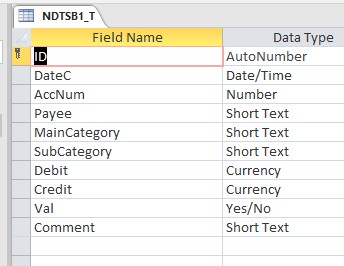
Based on your table structure in the (Short Text) it appears that you are storing the actual category name and subcategory name.  You don't want to do that to have a properly relational db.  You should be storing the IDs relating back to the lookup tables.  I believe that is part of where your issue is.
William Kennedy OP  @Reply  
    
3 years ago
Hi Scott,  as per Richards Video "Access Zip code Templet" which was also discussed in his cascading Combo box video; the user sometimes needs Text rather then an ID.  The user will sometimes inter a a new Payee, MainCatgeory, Subcategory that was not found in the table.  Also In the Access Zip code Templet the user just enters text for the Zip code.  In my database the user can enter or pull from a combo the correct Payee.  Richard's video specifically sets up those fields in a non-normalized manner.   When I talk about seminars, i'm talking about Richards seminars, Calendar, Fiscal Year, SQL 1, and Zip Code Lookup.  I'm pretty confident that his Paid Zip Code lookup templet is the answer.  But so much of his magic is in VBA.  I'm at Access course 29 so i'm just beginner to see and use some VBA.   This data base is working well except for the Cascading Combo boxes, Payee, MainCatgeory and Subcategory.  It is difficult to show you all the VBA as it is link to a number of forms and command buttons.  I sent an email to Richard with that part of the database hoping that he world quickly identify my mistake.  I would like to get the done as the user, my wife, would be happy.
Scott Axton  @Reply  
        
3 years ago
William sorry for being a bit getting back to you.  I was trying to find the courses appropriate to your current knowledge level. (No or minimal VBA)

Two videos that will help you accomplish what you are looking to do.
Access Expert 2 Lesson 4
and
Customer Discount  << this one primarily.

You may need to create a query bringing together the Payee, MainCategory, and Subcategory to get it to look like you want.
This should work for you.  I think the Zip Lookup Seminar was a good idea but the VBA is  a little beyond you currently.

Think of the Customer Form as your PayeeF where you set the defaults.  
Think of the Order Form as your form where the PayeeCombo is that you are filling in the values.
If you have a hard time relating what is being taught in these videos and how to convert it over to bringing in the data you need let me know.  I'll do what I can to help out.
William Kennedy OP  @Reply  
    
3 years ago
Again Thanks Scott.  I'M reviewing Richards training on Zip Lookup again.  Hope to find the mistake.  Again Thanks
Scott Axton  @Reply  
        
3 years ago
William I thinking that maybe I don't understand exactly what you are trying to get done.
Could you walk us through a couple of specific examples, in words, the scenarios that you are trying to handle?

William Kennedy OP  @Reply  
    
3 years ago
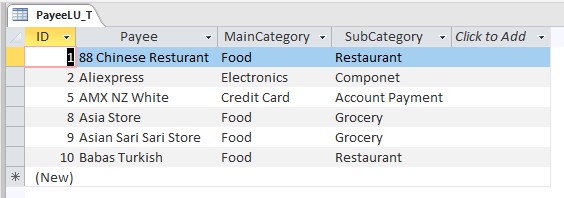
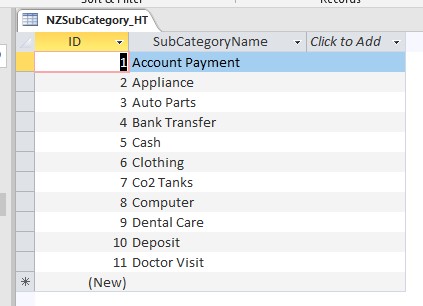
Sorry Scott.  I will try to be more specific.  I have a check register database.  Along with Payee field, I have a MainCategory field and a SubCategory field. What I want to do is when a payee field is entered, either by typing or Combo that selects Payees from a PayeeName table.  Richard developed two Zip Cade Templet video that does everything but select the payee by a combo.  The three fields he use, Zip = Payee,  City = MainCategory, State = SubCategory are not normalized they are text.  I made the PayeeCbo bound to 2.  He uses lots of VBA which I believe I understand have have converted to my Database,  He uses an SQL statement that selects only those fields in a table that correspond to the Forms payee Field.  He pulls that date from another table that he calls ZipLookupt, (I call it PayeeLU_T) that table has Payee, MainCategory and Subcategory in multiple combinations, One Payee has None, One or Many combinations of the other two fields.  He then loads the data into the form and then into the table.  I could send you just that part of the Database to look at if you like.
Scott Axton  @Reply  
        
3 years ago
Now it is my turn at not being clear.  What I meant is examples of what you want to enter.

company        main         sub
xyz                 cat          sub
pdq                cat          sub
pdq                cat2 ?       sub2?
or is main always the same and sub is what changes?

In other words what are your "rules" going to be?
You can go ahead and email me your db part.  That might be easier and we'll quit clogging up this forum.
Email:    [email protected]
William Kennedy OP  @Reply  
    
3 years ago
Both Main and Sub can Change

This thread is now CLOSED. If you wish to comment, start a NEW discussion in Access Forum.
 

Next Unseen

 
New Feature: Comment Live View


The following is a paid advertisement
Computer Learning Zone is not responsible for any content shown or offers made by these ads.
 

Learn
 
Access - index
Excel - index
Word - index
Windows - index
PowerPoint - index
Photoshop - index
Visual Basic - index
ASP - index
Seminars
More...
Customers
 
Login
My Account
My Courses
Lost Password
Memberships
Student Databases
Change Email
Info
 
Latest News
New Releases
User Forums
Topic Glossary
Tips & Tricks
Search The Site
Code Vault
Collapse Menus
Help
 
Customer Support
Web Site Tour
FAQs
TechHelp
Consulting Services
About
 
Background
Testimonials
Jobs
Affiliate Program
Richard Rost
Free Lessons
Mailing List
PCResale.NET
Order
 
Video Tutorials
Handbooks
Memberships
Learning Connection
Idiot's Guide to Excel
Volume Discounts
Payment Info
Shipping
Terms of Sale
Contact
 
Contact Info
Support Policy
Mailing Address
Phone Number
Fax Number
Course Survey
Email Richard
[email protected]
Blog RSS Feed    YouTube Channel

LinkedIn
Copyright 2026 by Computer Learning Zone, Amicron, and Richard Rost. All Rights Reserved. Current Time: 6/22/2026 2:42:26 PM. PLT: 1s