Free Lessons
Courses
Seminars
TechHelp
Fast Tips
Templates
Topic Index
Forum
ABCD
 
Home   Courses   TechHelp   Forums   Help   Contact   Merch   Join   Order   Logon  
 
Back to Access Forum    Comments List
Upload Images   @Reply   Bookmark    Link   Email   Next Unseen 
More Combo Box Problems
Richard Van Wagoner 
      
3 years ago
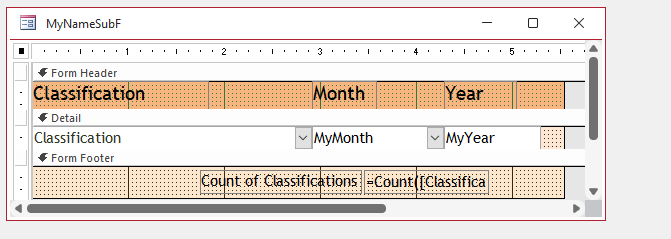
I am experiencing problems with the two combo boxes in my subform. I cannot type the choice I have to use the dropdown arrow and select it that way. This has got me scratching my head because they worked fine for a while and then stopped. Today they worked for one record then quit. Do I have something that is conflicting with this?
Scott Axton  @Reply  
        
3 years ago
The latest Windows update seems to have introduced some issues.  
In Access go to File  > Account.  Click the Microsoft 365 and Office Updates button.

Install any update if there is any.

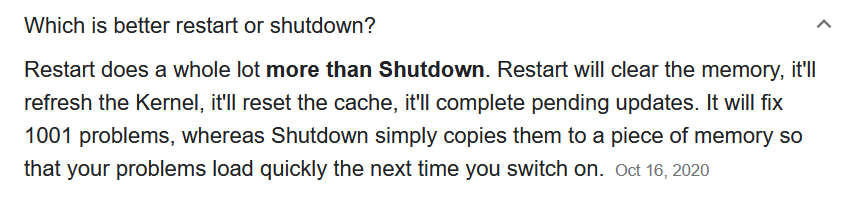
Next perform a Restart of the computer.  Don't just Shut Down.  The Restart will cause the programs to reload.
That's all I needed.  Hopefully it will take care of you too.
Scott Axton  @Reply  
        
3 years ago

Richard Van Wagoner OP  @Reply  
      
3 years ago
I got the updates and installed them. Then I restarted my PC, but I still have problems with the combo boxes.
Scott Axton  @Reply  
        
3 years ago
Have you made any changes recently that would lock the text?
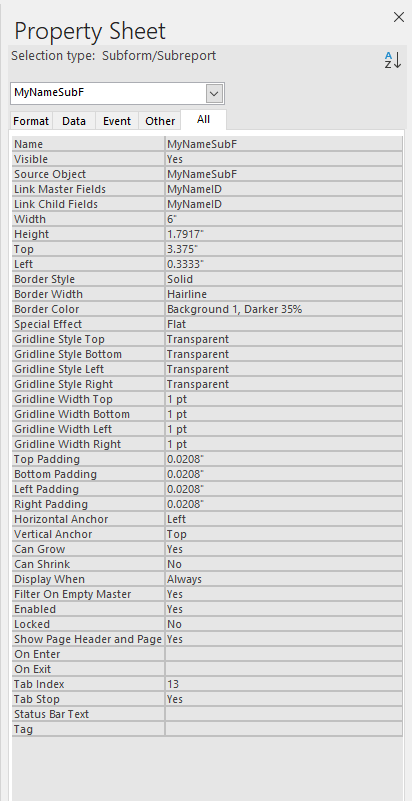
Check the Locked and Enabled properties.

If you create  a new combo box does it do the same thing?
Richard Van Wagoner OP  @Reply  
      
3 years ago
I have deleted and created new combo boxes and it does the same thing. I will check the locked and enabled properties.
Richard Van Wagoner OP  @Reply  
      
3 years ago
The Enabled property is yes and the Locked is No.
Richard Van Wagoner OP  @Reply  
      
3 years ago
This is my subform and property sheet
Richard Van Wagoner OP  @Reply  
      
3 years ago

Richard Van Wagoner OP  @Reply  
      
3 years ago

Richard Van Wagoner OP  @Reply  
      
3 years ago
I finally Narrowed it down to one of my queries. I don't know which one so I deleted all queries in my database, good thing there are only a few, I rebuilt the one for the subform and it seems to work ok for now. Thanks for your help. I needed to upgrade Office anyway.
Richard Van Wagoner OP  @Reply  
      
3 years ago

Richard Van Wagoner OP  @Reply  
      
3 years ago
I rebuilt all the queries now I get this error message. I have checked the indexes for the table that the subform is attached to and have set all except autonumber to No. The combo box works fine I can type and pick but I get this error.
Scott Axton  @Reply  
        
3 years ago
That error usually occurs when you have a composite key defined.  Check your indexes in design mode.

The other possibility is you are trying to insert a value into a primary key (autonumber) field.

see Prevent Duplicates
also covered in
Access Expert 23
Richard Van Wagoner OP  @Reply  
      
3 years ago
I don't have composite keys in the table that the subform is linked to. Also, I can go directly into the table and add information. I just had to try that and see.
Scott Axton  @Reply  
        
3 years ago
From all of the problems that are popping up and the fact that you are saying things that did work now aren't I'm starting to suspicion that you have become corrupted.

I would get into the code window and do a Compile then a Compact & Repair.
If your issues don't go away run down the Troubleshooter to see if maybe we aren't missing something.

I'm sorry I'm not being more of a help.  I'm kind of at a loss too at this point.
Richard Van Wagoner OP  @Reply  
      
3 years ago
Where is the code window?
Scott Axton  @Reply  
        
3 years ago
The Compile video will show you where to go and what to do.  
Even if you are not using VBA yet that can catch errors.
Richard Van Wagoner OP  @Reply  
      
3 years ago
I found the VBA editor when I click on debug I can't choose the database it is not selectable. Other Choices are (Add Watch and Clear Breakpoints).
Richard Van Wagoner OP  @Reply  
      
3 years ago
I went through the decompile steps but I can't compile again still grayed out.
Richard Van Wagoner OP  @Reply  
      
3 years ago
I have now moved my tables and forms to a new database. I set all my forms and reports up again, but when I tried to use the subform I could enter one record now I am locked out of the subform. I cannot add by typing or trying to pick from the dropdown box. No error messages just a beep.
Richard Van Wagoner OP  @Reply  
      
3 years ago
I am Back to my original problem again I have to use the dropdown box to choose my option. No typing again.
Kevin Yip  @Reply  
     
3 years ago
When you say "no typing", does that mean that when you type, nothing appears inside the combo box?  Or does it mean that when you type, the matching item in the combo box does not appear?  If it's the latter, know that when you type inside a combo box, it always tries to match the leftmost visible column (with non-zero width) in the combo box.  If you have to use the dropdown everytime, it likely means that what you type doesn't match anything in the leftmost visible column.

For your other problem regarding your subform not letting you enter rows, make sure your subform has an updateable record source.  A single table is guaranteed to be an updateable.  Any data entry form should use a single table (or a query made of a single table) as record source for this reason.
Richard Van Wagoner OP  @Reply  
      
3 years ago
What I mean by no typing is, I cannot start typing and have my list appear and go to the item I am typing. But anyway I don't know why but it started working again, just like it is supposed to. I don't know why I really didn't do anything except change the default value on the form for one of the combo boxes. I don't think that was the fix I think I have something in my computer. I was watching the Troubleshooting video and have tried most of the steps in there. My next step will be to try another computer. As I don't have another one I am waiting for my daughter to Come from Nevada with her Laptop next month. But for now, it is working fine. Thanks!
Kevin Yip  @Reply  
     
3 years ago
As I said, if it doesn't go to the item on your list, that means what you are typing doesn't match anything on the list.  If it works now and didn't work before, maybe the list has changed, and the matching item didn't exist, but now does.
Richard Van Wagoner OP  @Reply  
      
3 years ago
I don't think that was my problem. I know what is on the list 6 items on one and 12 on the other. I have spelled them out completely and checked the spelling. One is month names and one is the different classes that I have. But now it quit again I have to pick from the dropdown list. I didn't change anything.
Richard Van Wagoner OP  @Reply  
      
3 years ago
I think I have finally solved my problem. A few days ago I was working with my database when I did something I really didn't want to do. I Deleted it as well as my backups. So my only option was to start from scratch and rebuild it. Unlike before where I had some tables in another database that I exported so I wouldn't have to type so much. Anyway, I am not sure what it was but now my combo boxes are working fine. It is just a pain to reenter all the info I lost. I just thought you might like to know and thanks for your time.

This thread is now CLOSED. If you wish to comment, start a NEW discussion in Access Forum.
 

Next Unseen

 
New Feature: Comment Live View


The following is a paid advertisement
Computer Learning Zone is not responsible for any content shown or offers made by these ads.
 

Learn
 
Access - index
Excel - index
Word - index
Windows - index
PowerPoint - index
Photoshop - index
Visual Basic - index
ASP - index
Seminars
More...
Customers
 
Login
My Account
My Courses
Lost Password
Memberships
Student Databases
Change Email
Info
 
Latest News
New Releases
User Forums
Topic Glossary
Tips & Tricks
Search The Site
Code Vault
Collapse Menus
Help
 
Customer Support
Web Site Tour
FAQs
TechHelp
Consulting Services
About
 
Background
Testimonials
Jobs
Affiliate Program
Richard Rost
Free Lessons
Mailing List
PCResale.NET
Order
 
Video Tutorials
Handbooks
Memberships
Learning Connection
Idiot's Guide to Excel
Volume Discounts
Payment Info
Shipping
Terms of Sale
Contact
 
Contact Info
Support Policy
Mailing Address
Phone Number
Fax Number
Course Survey
Email Richard
[email protected]
Blog RSS Feed    YouTube Channel

LinkedIn
Copyright 2026 by Computer Learning Zone, Amicron, and Richard Rost. All Rights Reserved. Current Time: 6/16/2026 6:52:59 PM. PLT: 0s