I've set up a m-m relationship with three tables, a main form and a subform - all working fine. [Audio files <-> playlists]
But I need to have aggregate values from the subform appear on the main form [eg. total playing time for a given playlist]. I've tried everything I can think of and can't find it described anywhere. Any ideas?
Also, I need to aggregate a text field over a group of records [to produce a comma separated list of filenames for a playlist]. Stumped again! Any ideas?
For your first question, let me see a sample (mock up in Excel if you want) of what the data looks like and what you want the final form to look like. It's easier if you tell me what you WANT in plain terms.
As far as the comma separated list, that requires some recordset programming. I have a DLookupPlus function that does this.
Kevin Robertson
@Reply 3 years ago
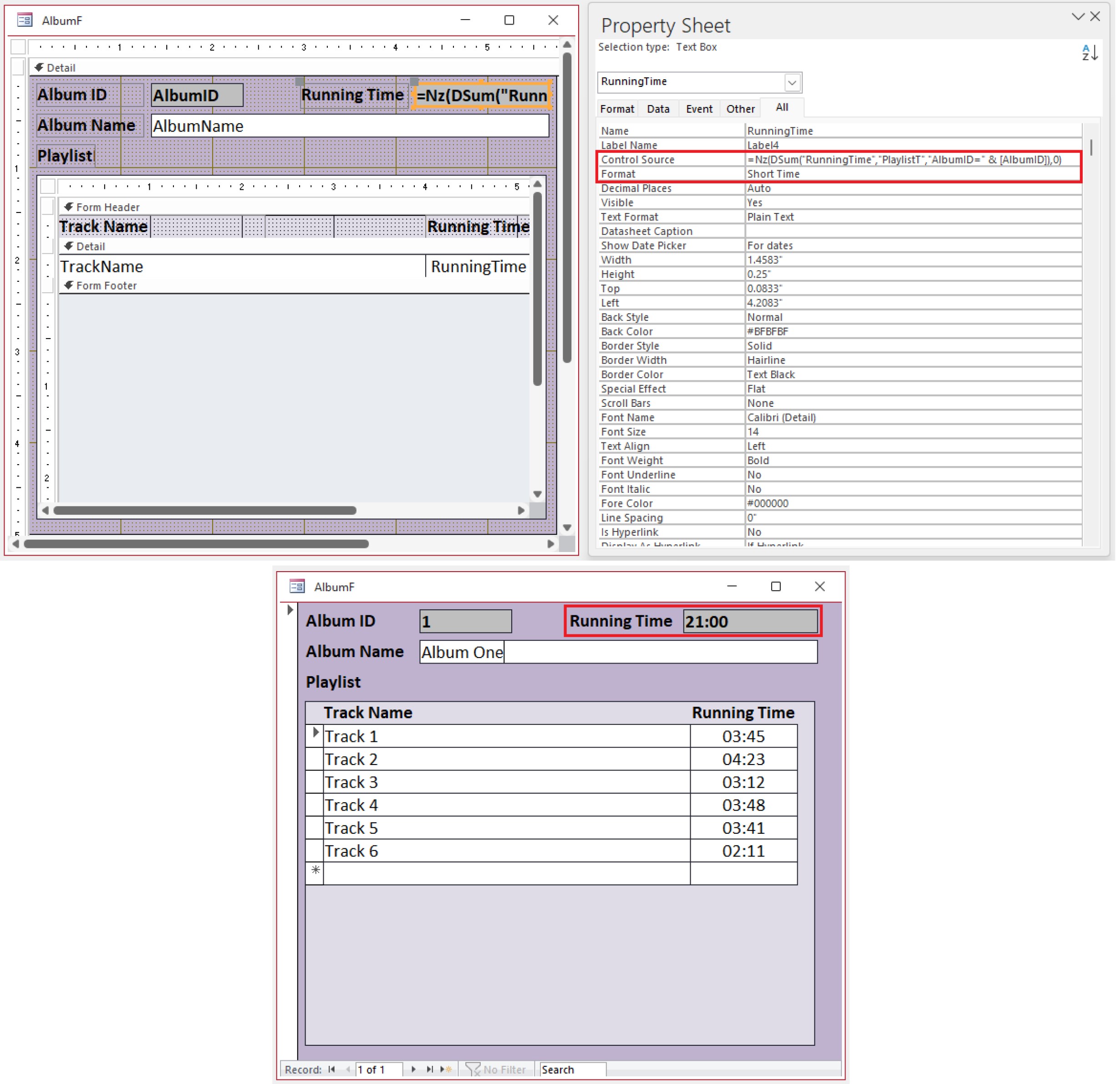
I would use DSum to total up the playing time. Remember to format the text box as Short Time.
I threw together a sample for you (see screenshot).
Is this similar to what you are looking for?
Yep. What Kevin said is perfect. Or as an alternative. you could do a Form Footer Total in the subform and just display that value there, or bring it up to your parent form. Value From Subform
Carl NicholsonOP
@Reply 3 years ago
Thanks - that's great. I'm going to go with Kevin's suggestion; looks like it's exactly what I want!
As far as the aggregate text concatenation goes, I'll stick with my current cut and paste from datasheet view; it's a good workaround as I haven't got time to revisit VBA coding right now. At the end of the day these refinements are just a neat way to produce a few lines of Python code...
Thanks for your help.
Carl
Sorry, only students may add comments.
Click here for more
information on how you can set up an account.
If you are a Visitor, go ahead and post your reply as a
new comment, and we'll move it here for you
once it's approved. Be sure to use the same name and email address.
This thread is now CLOSED. If you wish to comment, start a NEW discussion in
Access Expert 7.