Free Lessons
Courses
Seminars
TechHelp
Fast Tips
Templates
Topic Index
Forum
ABCD
 
Home   Courses   TechHelp   Forums   Help   Contact   Merch   Join   Order   Logon  
 
Back to Access Forum    Comments List
Upload Images   @Reply   Bookmark    Link   Email   Next Unseen 
Using an Image
William Kennedy 
    
3 years ago
We have a multi country accounts database.  We have a Table Accts_HT that Generally describes the Account.   IDA, AccountName, Obj, Type$, Image.  IDA holds the AutoNumber key that is stored as a default number in each Account.  That number is used by combo fields in a form for each account; AccountName has the text that describes the Account, Obj holds the starting text data that indicates the different accounts Table, Query, Form and Report; ie, NDTSB1_ ending in T, F, Q or R to indicate the different objects, Type$ is text field that indicates the Currency type within the Account.
The problem I have is that the Image field holds the Address of an Image used in the forms and all reports for that account.  How to I store the image within the form and Report Headers.
IDA     AccountName              Obj              Type$         Image
1          BNZ Premier 92-00     NDTSB1_     US$            C:\Users\WJK\Desktop\KAcct\Images\Logo1.JPG
Alex Hedley  @Reply  
           
3 years ago
What do you mean by
'How to I store the image within the form and Report Headers.'
Do you want to display the image on these?
Alex Hedley  @Reply  
           
3 years ago
William Kennedy OP  @Reply  
    
3 years ago
Yes in the header of a form and also the header of a report
William Kennedy OP  @Reply  
    
3 years ago
I tried that before and it is not what I need.  I have an Account Directory table. 'Accts_HT.  With a Naming structure and some key info on each account.  I use that to make similar Tables, Forms, Queries, and reports but with unique data. Copy table form Query and Report structure I only need to change a couple fields and a new account is developed.
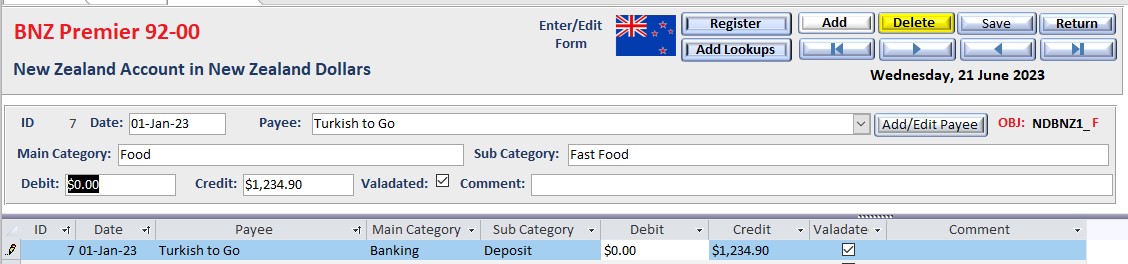
If you look at the Account Entry and Edit form you will see a couple of fields that I use a combo to pull data that describe this account.  You see in red BNZ Premier 92-00. That comes from the AccountName field in the Accts_HT table.  If you look at the field OBJ you will see the Naming Structure of the Account.  What I want to do is put an image of the Country Flag assigned to the account in the header area of the for automatically. I can't do it the same way I did the other two fields because it is an image.
William Kennedy OP  @Reply  
    
3 years ago

William Kennedy OP  @Reply  
    
3 years ago

William Kennedy OP  @Reply  
    
3 years ago

William Kennedy OP  @Reply  
    
3 years ago

Alex Hedley  @Reply  
           
3 years ago
Firstly you have the textbox showing the path correctly?
Did you bind an image control to that field also?
William Kennedy OP  @Reply  
    
3 years ago
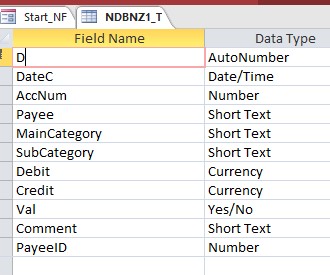
The Path is correct.  The Image control needs to get the image indirectly,  The Number In AccNum Within form points to a record in the Accounts Director File Accts_HT,  In that record is the Image field that holds the location of the image.  This way every form and report automatically gets the correct flag,  Some reports will have US flag, Some Austrailian Flag and some New Zealand Flag depending on the data in the Accts_HT and the number that points to correct record in the present record of the form.
Alex Hedley  @Reply  
           
3 years ago
You could use a DLookup to find that info
Kevin Yip  @Reply  
     
3 years ago
Hi William, you need VBA for this, at least that's the most straightforward way.  In the form's Current event procedure, assign the image file path to the image control's Picture property.  On a report, if you are printing out data of multiple countries, you need to print multiple flags on the report, so you can't use the reporter's header -- because a report can only have one reporter header.  You need a group header.  Group and sort the report's data by country.  Then put the image control in the group header.  You use VBA here again.  In the group header's Format event, assign the image file path to the image control's Picture property.
William Kennedy OP  @Reply  
    
3 years ago
Fixed it Thanks all

This thread is now CLOSED. If you wish to comment, start a NEW discussion in Access Forum.
 

Next Unseen

 
New Feature: Comment Live View


The following is a paid advertisement
Computer Learning Zone is not responsible for any content shown or offers made by these ads.
 

Learn
 
Access - index
Excel - index
Word - index
Windows - index
PowerPoint - index
Photoshop - index
Visual Basic - index
ASP - index
Seminars
More...
Customers
 
Login
My Account
My Courses
Lost Password
Memberships
Student Databases
Change Email
Info
 
Latest News
New Releases
User Forums
Topic Glossary
Tips & Tricks
Search The Site
Code Vault
Collapse Menus
Help
 
Customer Support
Web Site Tour
FAQs
TechHelp
Consulting Services
About
 
Background
Testimonials
Jobs
Affiliate Program
Richard Rost
Free Lessons
Mailing List
PCResale.NET
Order
 
Video Tutorials
Handbooks
Memberships
Learning Connection
Idiot's Guide to Excel
Volume Discounts
Payment Info
Shipping
Terms of Sale
Contact
 
Contact Info
Support Policy
Mailing Address
Phone Number
Fax Number
Course Survey
Email Richard
[email protected]
Blog RSS Feed    YouTube Channel

LinkedIn
Copyright 2026 by Computer Learning Zone, Amicron, and Richard Rost. All Rights Reserved. Current Time: 6/17/2026 10:38:52 AM. PLT: 0s