Free Lessons
Courses
Seminars
TechHelp
Fast Tips
Templates
Topic Index
Forum
ABCD
 
Home   Courses   TechHelp   Forums   Help   Contact   Merch   Join   Order   Logon  
 
Back to Access Forum    Comments List
Upload Images   @Reply   Bookmark    Link   Email   Next Unseen 
show Data in Columns Report
Nathan Maturine 
   
3 years ago
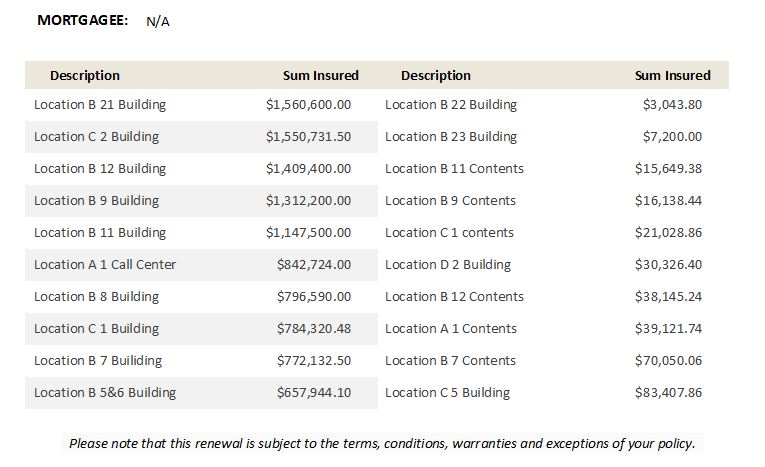
I would like to add a subreport to a report that lists details (Type and value) of an account in columns. As a work around, I created two queries using select Top (x%) and sorted one Asc and the other Desc.
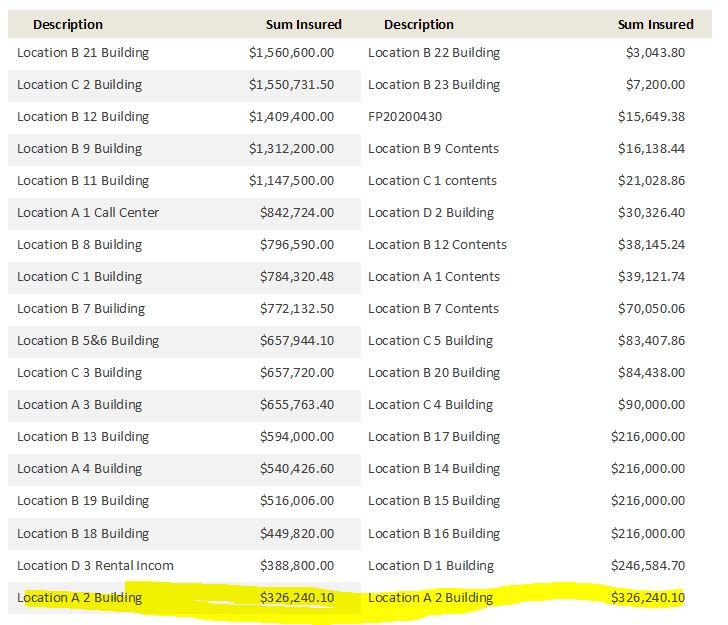
This works as long as an account has 20 or more entries, but for accounts with less activity that has a few entries, I'm getting rows repeating in my second list.
I've tried to count the number of entries and hide the second list if it's under 20, but i cannot get it to work properly.

I would like to think there's a simpler way to do this.
Can you suggest a process or strategy?
Thanks
Juan C Rivera  @Reply  
            
3 years ago
Can you show us what it looks like?  Pictures help a lot in trying to help others.
Nathan Maturine OP  @Reply  
   
3 years ago

Nathan Maturine OP  @Reply  
   
3 years ago
I would also like the data to rollover to next page as needed
Juan C Rivera  @Reply  
            
3 years ago
Still not sure what you need let me point you towards a report video and see if this helps.  
Designing Reports in Access Beginner 1
Kevin Yip  @Reply  
     
3 years ago
Hi Nathan, please show a picture of the subreport with "rows repeating."  I want to see how it looks exactly.  Also, show us the SQL statement as well.  SELECT TOP N or SELECT TOP N PERCENT should not show repeating records, so something is amiss there.

To have a subreport expand to the next page, set its "Can Grow" property to Yes.
Nathan Maturine OP  @Reply  
   
3 years ago
Here is the first Select statement.
SELECT TOP 50 PERCENT RiskItems.strRiskItemType, RiskItems.curRiskItemValue FROM RiskItems WHERE (((RiskItems.strPolicyNumber)=[Reports]![RenewalEndorsementPropertyR]![strEndorsePolicyNum])) ORDER BY RiskItems.curRiskItemValue DESC;

Here is the second statement
SELECT TOP 50 PERCENT RiskItems.strRiskItemType, RiskItems.curRiskItemValue FROM RiskItems WHERE (((RiskItems.strRiskItemType) Is Not Null) AND ((RiskItems.curRiskItemValue) Is Not Null) AND ((RiskItems.strPolicyNumber)=[Reports]![RenewalEndorsementPropertyR]![strEndorsePolicyNum])) ORDER BY RiskItems.curRiskItemValue;
Nathan Maturine OP  @Reply  
   
3 years ago

Nathan Maturine OP  @Reply  
   
3 years ago
I looked at the video and ticket from Juan's response.
Using the Address label report works, Kinda! In that I can get the data to display in columns, but once it's placed as a subreport, it reverts to a single column.
So, my issue persists.
In a nutshell, I need to display data in columns on a report (As a subreport).
Kevin Yip  @Reply  
     
3 years ago
Hi Nathan, when you have odd number rows, then "50%" or the rows will not give you exactly half the rows, so some row(s) will appear on both queries.  So what you see is expected.  For instance, if your records are 1, 2, 3, 4, 5, then SELECT TOP 50 PERCENT in ascending order will yield 1, 2, 3.  It's not like you could split the "3" into two halves.  In descending order it will return 5, 4, 3.  So 3 will appear in both queries.

There is another instance that can cause repeated rows.  If your records are 1, 2, 3, 3, 3, then *all five* records will be returned -- because there is a tie in the lowest-ranked item.  It sounds confusing, but that's what "50%" means in this case.  It's like in the Olympics; when 6 of the 8 swimmers tied for the 3rd best finish, then the "top 3" (or top 30%) performers are all 8 swimmers!

This thread is now CLOSED. If you wish to comment, start a NEW discussion in Access Forum.
 

Next Unseen

 
New Feature: Comment Live View


The following is a paid advertisement
Computer Learning Zone is not responsible for any content shown or offers made by these ads.
 

Learn
 
Access - index
Excel - index
Word - index
Windows - index
PowerPoint - index
Photoshop - index
Visual Basic - index
ASP - index
Seminars
More...
Customers
 
Login
My Account
My Courses
Lost Password
Memberships
Student Databases
Change Email
Info
 
Latest News
New Releases
User Forums
Topic Glossary
Tips & Tricks
Search The Site
Code Vault
Collapse Menus
Help
 
Customer Support
Web Site Tour
FAQs
TechHelp
Consulting Services
About
 
Background
Testimonials
Jobs
Affiliate Program
Richard Rost
Free Lessons
Mailing List
PCResale.NET
Order
 
Video Tutorials
Handbooks
Memberships
Learning Connection
Idiot's Guide to Excel
Volume Discounts
Payment Info
Shipping
Terms of Sale
Contact
 
Contact Info
Support Policy
Mailing Address
Phone Number
Fax Number
Course Survey
Email Richard
[email protected]
Blog RSS Feed    YouTube Channel

LinkedIn
Copyright 2026 by Computer Learning Zone, Amicron, and Richard Rost. All Rights Reserved. Current Time: 5/6/2026 1:21:55 PM. PLT: 1s