Free Lessons
Courses
Seminars
TechHelp
Fast Tips
Templates
Topic Index
Forum
ABCD
 
Home   Courses   TechHelp   Help   Contact   Merch   Join   Order   Logon   Forums   
 
Back to Access Forum    Comments List
Upload Images   @Reply   Bookmark    Link   Email   Next Unseen 
Problem with Logon Form
Jorge Restrepo 
     
3 years ago
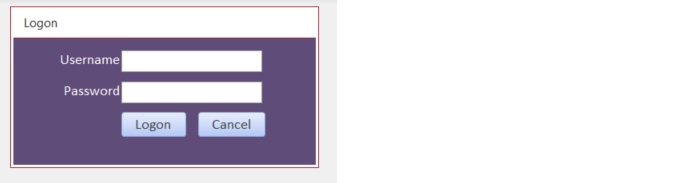
Hello.  I followed the Video "How to Add Simple User-Level Security to Microsoft Access Databases", and created a Logon Form. It works very well except when the user does not type anything in the the password field. When nothing is typed the program does not quit and continues.  Apparently the VBA line If PW <> Password Then   does not work when the password field in the Logon Form is left empty.  Any ideas what may be happening ?  Thanks.
Adam Schwanz  @Reply  
           
3 years ago
Would need to see the full code to see what's happening. Does anyone have a blank password field?

The easiest solution is just to stop it at the top.

If IsNull(PasswordField) Then
Msgbox "Enter password"
Exit Sub
End If
Jorge Restrepo OP  @Reply  
     
3 years ago
Option Compare Database
Option Explicit

Private Sub CancelBtn_Click()

    Quit

End Sub

Private Sub LogonBtn_Click()

    Dim Id As Long, PW As String
    
    Id = Nz(DLookup("UserID", "UserT", "Username=""" & Username & """"), 0)
    If Id = 0 Then
        MsgBox "User not found"
        Quit
    End If
    
    PW = Nz(DLookup("Password", "UserT", "UserID=" & Id), "")
    If PW <> Password Then
        MsgBox "Error de Credenciales"
        Quit
    End If
    
    TempVars("Username") = Username.Value
    DoCmd.OpenForm "Frm_PanelControl"
    DoCmd.Close acForm, Me.Name, acSaveYes

End Sub
Jorge Restrepo OP  @Reply  
     
3 years ago

Adam Schwanz  @Reply  
           
3 years ago
Yea so your saying if the password dlookup finds a null, make it "", if the password block is empty it's also equal to null or "". So PW does equal Password then, ""=""

I'd have to see the table data/setup to see how it's getting passedthe username portion but yea the simplest way is just to copy/paste that code at the top.


If IsNull(Password) Then
Msgbox "Enter password"
Exit Sub
End If
Kevin Yip  @Reply  
     
3 years ago
Hi Jorge, if the Password field is empty, it equals to Null.  You can't compare Null to anything, because the comparison PW <> Password will be neither true nor false, *but null*.  That is essentially a "false", because anything that is not true is false.  That is why your form doesn't quit.  You need to make sure the Password field doesn't become null even if it's empty.  E.g.:

     If PW <> Nz(Password, "") Then
Jorge Restrepo OP  @Reply  
     
3 years ago
Adam, Kevin thanks for your help.  Now it works !!!!
Gary James  @Reply  
      
3 years ago

Gary James  @Reply  
      
3 years ago

Gary James  @Reply  
      
3 years ago

Jorge Restrepo OP  @Reply  
     
3 years ago
Thanks Gary
Jorge Restrepo OP  @Reply  
     
3 years ago
As a followup to the above.  When a user hits a button designed to display a form or report, and he is not authorized to see that form or report, the message 'not authorized'is displayed.  I would like to explore the possibility that the form DOES NOT SHOW the buttons for which the user is not authorized.  In other words, if a button is programed to display a form or report for which the user is not authorized, I would prefer that the button is not displayed at all, so its not an option for the user to depress the button. Is there an easy way to do that or video that explains it ?
Adam Schwanz  @Reply  
           
3 years ago
Access Security Seminar covers it. Basically you just check to see who the logged in user is with the current event and then set buttons visible to false when they aren't supposed to see them. (Note if you do this, I would set everything to not visible, and instead set them to what they can see instead of what they cant, Ive had a few weird bugs come up where the code didn't fire correctly and it allowed all the buttons to show for people who shouldn't see them, luckily there was still a check on the other forms when they were opened to close if they weren't supposed to be viewed by this person).
Jorge Restrepo OP  @Reply  
     
3 years ago
Adam, I thought about this.  But doesn't an invisible button still work if the mouse is hit in the region the button is supposed to be located ?
Adam Schwanz  @Reply  
           
3 years ago
Nope, that is if you made it transparent. Invisible is gone.
Jorge Restrepo OP  @Reply  
     
3 years ago
Thanks Adam.

This thread is now CLOSED. If you wish to comment, start a NEW discussion in Access Forum.
 

Next Unseen

 
New Feature: Comment Live View


The following is a paid advertisement
Computer Learning Zone is not responsible for any content shown or offers made by these ads.
 

Learn
 
Access - index
Excel - index
Word - index
Windows - index
PowerPoint - index
Photoshop - index
Visual Basic - index
ASP - index
Seminars
More...
Customers
 
Login
My Account
My Courses
Lost Password
Memberships
Student Databases
Change Email
Info
 
Latest News
New Releases
User Forums
Topic Glossary
Tips & Tricks
Search The Site
Code Vault
Collapse Menus
Help
 
Customer Support
Web Site Tour
FAQs
TechHelp
Consulting Services
About
 
Background
Testimonials
Jobs
Affiliate Program
Richard Rost
Free Lessons
Mailing List
PCResale.NET
Order
 
Video Tutorials
Handbooks
Memberships
Learning Connection
Idiot's Guide to Excel
Volume Discounts
Payment Info
Shipping
Terms of Sale
Contact
 
Contact Info
Support Policy
Mailing Address
Phone Number
Fax Number
Course Survey
Email Richard
[email protected]
Blog RSS Feed    YouTube Channel

LinkedIn
Copyright 2026 by Computer Learning Zone, Amicron, and Richard Rost. All Rights Reserved. Current Time: 8/12/2026 5:10:59 PM. PLT: 1s