Free Lessons
Courses
Seminars
TechHelp
Fast Tips
Templates
Topic Index
Forum
ABCD
 
Home   Courses   TechHelp   Help   Contact   Merch   Join   Order   Logon   Forums   
 
Back to Access Expert 25    Comments List
Upload Images   @Reply   Bookmark    Link   Email   Next Unseen 
IIF and Query Criteria
Tom DeJonge 
   
3 years ago
In a query I have a calculated field with alias A1. FormSearch1 is a multi field search form with 8 different fields to choice from.

A1: IIf(IsNull([Forms]![FormSearch1]![TypeIDS]),"Like "*"",[Forms]![FormSearch1]![TypeIDS])

Then in a different field TypeID from table AssetDetails I place [A1] in its criteria - but it does not work. [A1] should get the value from alias A1 correct?

Part 2 of question: if I uncheck show field that field is removed from the query by access even after I save it, close and reopen query in design mode.
Richard Rost  @Reply  
           
3 years ago
This would be easier if I could see some screen shots of what you've got there.
Richard Rost  @Reply  
           
3 years ago
And I can see from your criteria that you're not using double-double quotes correctly.

"Like "*""

Should be

"Like ""*"""

See Double Double Quotes
Tom DeJonge OP  @Reply  
   
3 years ago
I changed to double double quotes but I still have an issue.
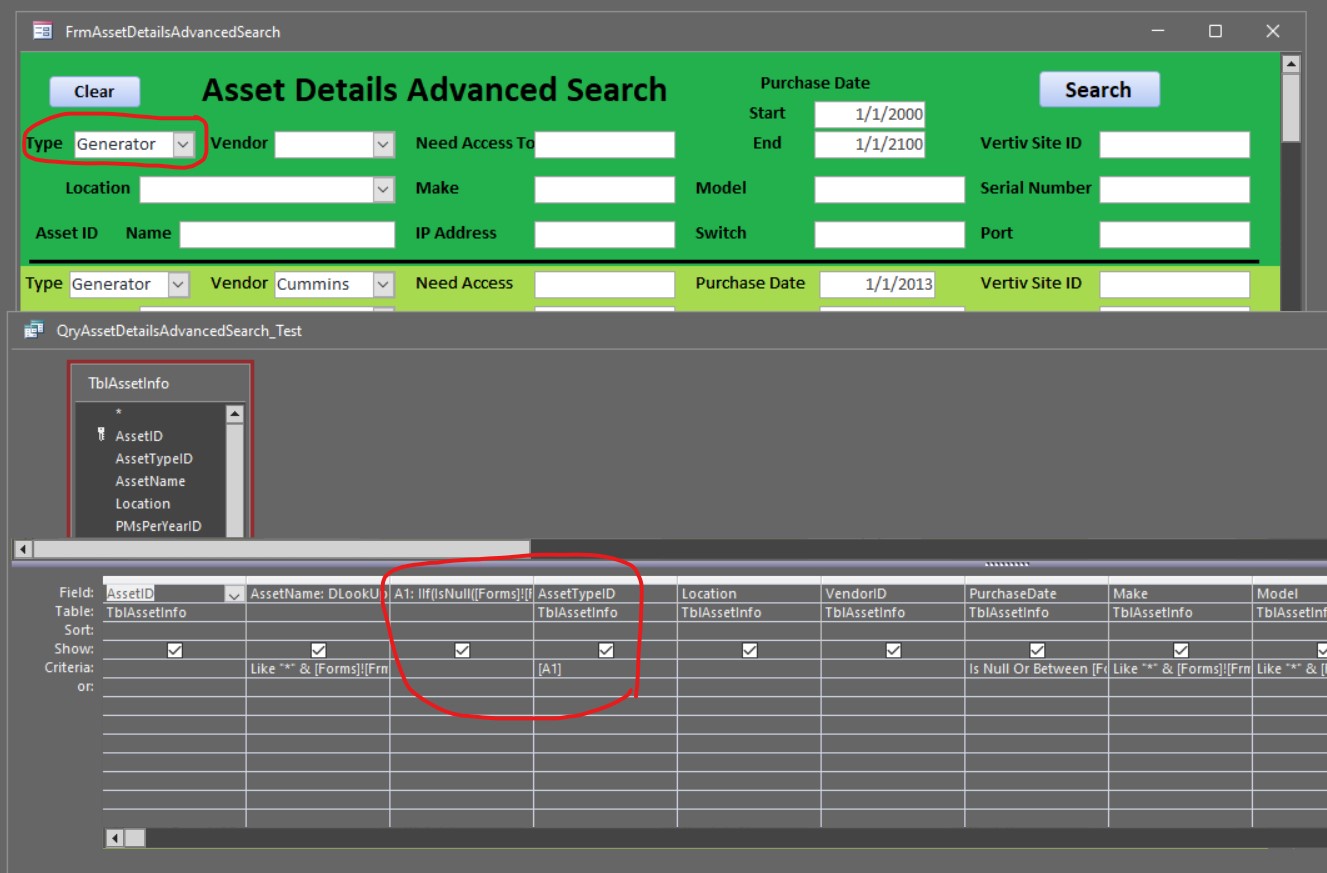
A1: IIf(IsNull([Forms]![FrmAssetDetailsAdvancedSearch]![AssetTypeIDS]),"Like ""*""",[Forms]![FrmAssetDetailsAdvancedSearch]![AssetTypeIDS])
I have included a pic. The green is the form and the grey is the query.
The [A1] is asking for a parameter. It should be alias A1.
I am sure I am not using the correct syntax.
Tom DeJonge OP  @Reply  
   
3 years ago

Richard Rost  @Reply  
           
3 years ago
Sometimes you can't refer to an alias in the same query that the Alias is created in but what you can do is put the stuff in there for the criteria that you have after a one instead of creating that alias so your criteria will literally be what you're trying to make a one equal to. Replace that and it should work.
Tom DeJonge OP  @Reply  
   
3 years ago
That worked, thank you.
I purchased your expert classes and in 5 months went from knowing very little about Access to building an Asset Tracking DB for our company with over 600 assets, 14 tables, 5 change log tables, 23 forms, 28 queries and 9 reports.
Thank You for all the great videos.
Richard Rost  @Reply  
           
3 years ago
Awesome. Glad to help. This will also make a great TechHelp video. I've been asked this before a few times. :)

This thread is now CLOSED. If you wish to comment, start a NEW discussion in Access Expert 25.
 

Next Unseen


What's This?


The following is a paid advertisement
Computer Learning Zone is not responsible for any content shown or offers made by these ads.
 

Learn
 
Access - index
Excel - index
Word - index
Windows - index
PowerPoint - index
Photoshop - index
Visual Basic - index
ASP - index
Seminars
More...
Customers
 
Login
My Account
My Courses
Lost Password
Memberships
Student Databases
Change Email
Info
 
Latest News
New Releases
User Forums
Topic Glossary
Tips & Tricks
Search The Site
Code Vault
Collapse Menus
Help
 
Customer Support
Web Site Tour
FAQs
TechHelp
Consulting Services
About
 
Background
Testimonials
Jobs
Affiliate Program
Richard Rost
Free Lessons
Mailing List
PCResale.NET
Order
 
Video Tutorials
Handbooks
Memberships
Learning Connection
Idiot's Guide to Excel
Volume Discounts
Payment Info
Shipping
Terms of Sale
Contact
 
Contact Info
Support Policy
Mailing Address
Phone Number
Fax Number
Course Survey
Email Richard
[email protected]
Blog RSS Feed    YouTube Channel

LinkedIn
Copyright 2026 by Computer Learning Zone, Amicron, and Richard Rost. All Rights Reserved. Current Time: 9/5/2026 6:45:04 PM. PLT: 1s