Free Lessons
Courses
Seminars
TechHelp
Fast Tips
Templates
Topic Index
Forum
ABCD
 
Home   Courses   TechHelp   Help   Contact   Merch   Join   Order   Logon   Forums   
 
Back to Access Developers    Comments List
Pending Approval    Upload Images   @Reply   Bookmark    Link   Email   Next Unseen 

Anonymous 
 
Kevin Yip  @Reply  
     
3 years ago
You don't need to use GotFocus and LostFocus for that.  Go to the button's property sheet and set these properties: Hover Color, Pressed Color, Hover Fore Color, Pressed Fore Color.  Set them to the colors that make the button more noticeable for you.  Remove the GotFocus and LostFocus events so they don't interfere with the Click event.
Gregory Clancey  @Reply  
    
3 years ago
Thanks. Looks like a wrong-minded error of many years. I'll give this method a try.

I have an old database that I used to use at my disposal. I don't need it any more, but it proves useful as a kind of sandbox in which I can try out new techniques I learn from you guys.
Gregory Clancey  @Reply  
    
3 years ago
Hi, Kevin. I commented out the code in both events mentioned, but found that "hover" and "pressed" gave the desired cue but only after the mouse found the button. I think I want the button to react to its receiving the focus as it fell to the control according to the form's tab order. The action didn't alter the "premature" code execution anyway. It doesn't matter. I removed the comment restrictions and the resulting functionality works just find for my purposes.
Sometimes I think I fight Access because I try to make it do something other than what it has been engineered to do by default. Why not row the skiff WITH the current instead of against it whenever possible?
Gregory Clancey  @Reply  
    
3 years ago
Thinking out loud, this may be an issue if I decide to add and "Abort Changes and Close Form" button. As it stands, I am forced to accept an erroneous input not seen until the SAVE.
Kevin Yip  @Reply  
     
3 years ago
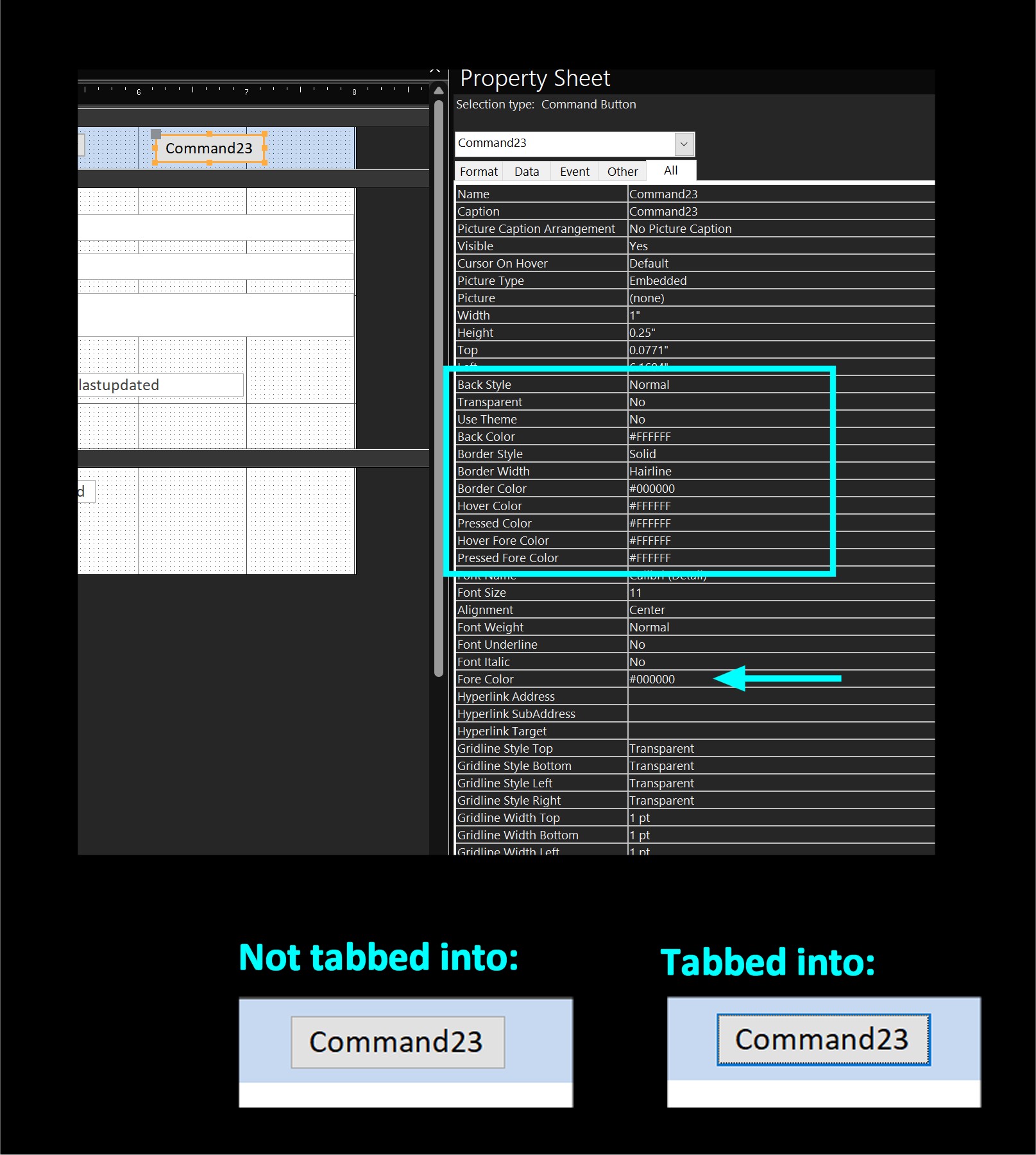
You may consider the button format in the picture below.  By formatting the button with the properties shown, the button's border is much more noticeable when you tab into it.  Basically, you disable any theme and just use plain colors and hairline border for the button.  The color #000000 is black, and #FFFFFF is white.  You may have to type them in manually into the boxes.  This is to make sure you don't use any theme color.  Make sure the "Use Theme" property is No before you leave the screen.  Access may set it to Yes without your knowing, if you accidentally picked a theme color.

I came up with this method a long while ago in my old job, so I must have had the same issue you are having.  I used Tab very often while doing data entry, and I felt the same way you do: it's not always obvious that a button has the focus when you Tab into it.

If this method is not satisfactory for you, you may have to use VBA, most likely with GotFocus and LostFocus.

P.S. Web pages don't have this problem.  You may notice in data entry forms on websites, the textbox that has the focus gets a noticeable border.  That is built-in into HTML.
Kevin Yip  @Reply  
     
3 years ago

Gregory Clancey  @Reply  
    
3 years ago
Thanks for the great information. I have an old database that I've been modifying with new things I've learned on this site as a way of reinforcing and practicing them. I'll have at this in my next session. I'm reminded that Rick himself mentions this sort of thing for toggle buttons somewhere in his course presentation.
I really have to wonder why MS has neglected this. The last photo I've seen of their aging execs showed lots of thick reading glasses.
Kevin Yip  @Reply  
     
3 years ago
Access was made at a time when Internet and cloud operations were not yet "a thing" and that's why it has so many features missing.  When Access came out, it replaced other database programs like dBase, Alpha, etc.  Now the tables are turned and Access is shown the door.
Gregory Clancey  @Reply  
    
3 years ago
Yes, this makes sense. I was active during the era -- enthusiastically engaged in the world of pre-Correl "Paradox." Is this the reason for the DAO/ADO split personality? I find the software very accessible and living well up to its RAD promise.
Gregory Clancey  @Reply  
    
3 years ago
I like this idea. I still want to fool with it a bit. I've been "GOTFOCUS / LOSTFOCUS" for several decades, I fear. It's going to be a slow transition. I tend also to make a similar color toggle to the BackColor of TextBoxes and ComboBoxes - and for the same "tracking" reason.
It's good to open the window and let in fresh air once in a while. Thank you.
Gregory Clancey  @Reply  
    
3 years ago
Kevin, for the record: THIS CHANGE HAS WORKED COMPLETELY! Thanks for the help!

This thread is now CLOSED. If you wish to comment, start a NEW discussion in Access Developers.
 

Next Unseen

 
New Feature: Comment Live View


The following is a paid advertisement
Computer Learning Zone is not responsible for any content shown or offers made by these ads.
 

Learn
 
Access - index
Excel - index
Word - index
Windows - index
PowerPoint - index
Photoshop - index
Visual Basic - index
ASP - index
Seminars
More...
Customers
 
Login
My Account
My Courses
Lost Password
Memberships
Student Databases
Change Email
Info
 
Latest News
New Releases
User Forums
Topic Glossary
Tips & Tricks
Search The Site
Code Vault
Collapse Menus
Help
 
Customer Support
Web Site Tour
FAQs
TechHelp
Consulting Services
About
 
Background
Testimonials
Jobs
Affiliate Program
Richard Rost
Free Lessons
Mailing List
PCResale.NET
Order
 
Video Tutorials
Handbooks
Memberships
Learning Connection
Idiot's Guide to Excel
Volume Discounts
Payment Info
Shipping
Terms of Sale
Contact
 
Contact Info
Support Policy
Mailing Address
Phone Number
Fax Number
Course Survey
Email Richard
[email protected]
Blog RSS Feed    YouTube Channel

LinkedIn
Copyright 2026 by Computer Learning Zone, Amicron, and Richard Rost. All Rights Reserved. Current Time: 7/15/2026 11:50:53 AM. PLT: 1s