Free Lessons
Courses
Seminars
TechHelp
Fast Tips
Templates
Topic Index
Forum
ABCD
 
Home   Courses   TechHelp   Forums   Help   Contact   Merch   Join   Order   Logon  
 
Back to Access Developer Forum    Comments List
Upload Images   @Reply   Bookmark    Link   Email   Next Unseen 
requery Form after ComboUpdate
Gregory Clancey 
    
3 years ago
Okay. I'm still crawling -- but aspire to be an eventual walker.

I've a Form bound to a query generated from an underlying table. Since this table has many foreign keys which would have little meaning displayed in the Form's fields, the query uses related source tables to expose the corresponding string values. These are the data suitable for display in the Form's fields.

However, obviously, should it be needed, I can't alter the text in any of these fields (I assume). And so, to do that I have a Control Button adjacent to the TextBox, which, upon clicking, "unhides" a ComboBox which dropsdown to reveal available alternatives. This 2-field Combo shows the ShortText but has the AutoNumber as the bound field from its source table.

Here's the good part. On this Combo's AFTERUPDATE event (<ENTER>) I execute an Update-ActionQuery to place the new foreign key into the underlying table. For this value to display as part of the associated query, I think I need to requery the Form.

If I place a "Form.Requery" in the Combo's ONLOSTFOCUS event (and then hide the Combo once more) Great! There's the new text, but only after <ENTER>. How can I trigger the requery without having to move out of the Combo? The Combo's ONCHANGE is giving me a warning like "can't change the LimitToList value. I can live with requiring <ENTER>, but is there another way?
Kevin Yip  @Reply  
     
3 years ago
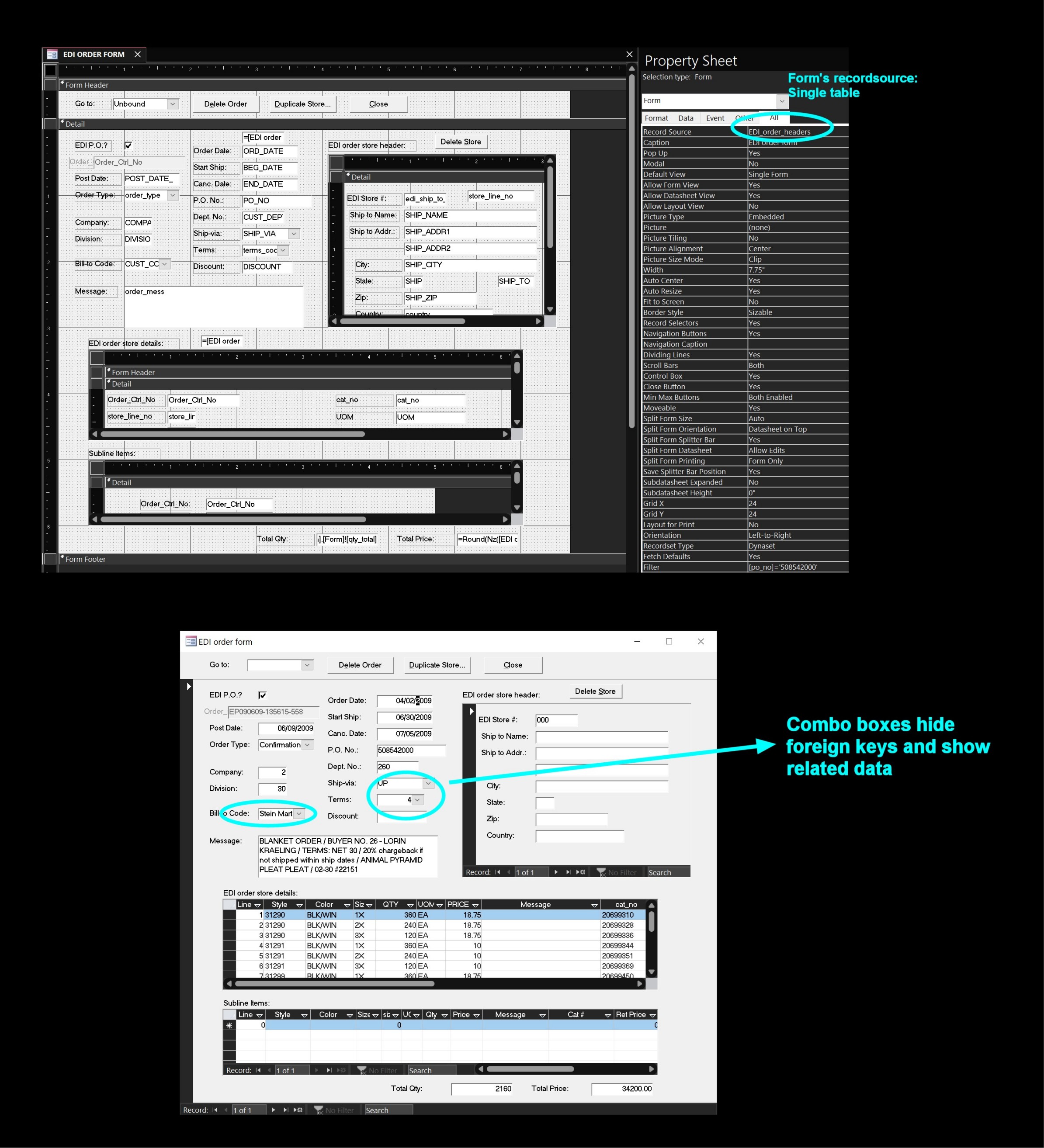
If the form is for data entry, I wouldn't bind the form to such a complicated query, which would make the data non-updateable, as you found out.  I would bind the form to a SINGLE TABLE, to ensure the data would be updateable.  To bring in related data, I would use combo boxes, which can also hide the foreign keys.  See the pictures below from my old job.  I had several foreign keys on the form too, but I used combo boxes to bring the related data in, not queries.  Queries are useful for displaying data, like in a report; but they are often not updateable, so they are not good for data entry.
Kevin Yip  @Reply  
     
3 years ago

Gregory Clancey OP  @Reply  
    
3 years ago
Thanks, Kevin. This makes sense. I think I'm just being stubborn trying to avoid bloating a bound table with string data instead of the leaner foreign keys. This would seem to be prudent in certain circumstances, but experience with such may supersede the mania for saving space. I have plenty of HD storage and this really no longer the priority that it once may have been. I think it's trouble whenever I try to make Access do something that confounds its design. I'll redesign my Form and see what happens. It's only a test database anyway -- specifically intended for this kind of experimentation. In the end, this approach seems obvious, doesn't it? Sometimes you just have to admit that you've put your pants on backwards. Thanks again.

This thread is now CLOSED. If you wish to comment, start a NEW discussion in Access Developer Forum.
 

Next Unseen

 
New Feature: Comment Live View


The following is a paid advertisement
Computer Learning Zone is not responsible for any content shown or offers made by these ads.
 

Learn
 
Access - index
Excel - index
Word - index
Windows - index
PowerPoint - index
Photoshop - index
Visual Basic - index
ASP - index
Seminars
More...
Customers
 
Login
My Account
My Courses
Lost Password
Memberships
Student Databases
Change Email
Info
 
Latest News
New Releases
User Forums
Topic Glossary
Tips & Tricks
Search The Site
Code Vault
Collapse Menus
Help
 
Customer Support
Web Site Tour
FAQs
TechHelp
Consulting Services
About
 
Background
Testimonials
Jobs
Affiliate Program
Richard Rost
Free Lessons
Mailing List
PCResale.NET
Order
 
Video Tutorials
Handbooks
Memberships
Learning Connection
Idiot's Guide to Excel
Volume Discounts
Payment Info
Shipping
Terms of Sale
Contact
 
Contact Info
Support Policy
Mailing Address
Phone Number
Fax Number
Course Survey
Email Richard
[email protected]
Blog RSS Feed    YouTube Channel

LinkedIn
Copyright 2026 by Computer Learning Zone, Amicron, and Richard Rost. All Rights Reserved. Current Time: 4/30/2026 6:56:55 AM. PLT: 1s