Free Lessons
Courses
Seminars
TechHelp
Fast Tips
Templates
Topic Index
Forum
ABCD
 
Home   Courses   TechHelp   Help   Contact   Merch   Join   Order   Logon   Forums   
 
Back to Access Forum    Comments List
Upload Images   @Reply   Bookmark    Link   Email   Next Unseen 
Email Customer for Bid Status
Caleb Hansen 
        
3 years ago
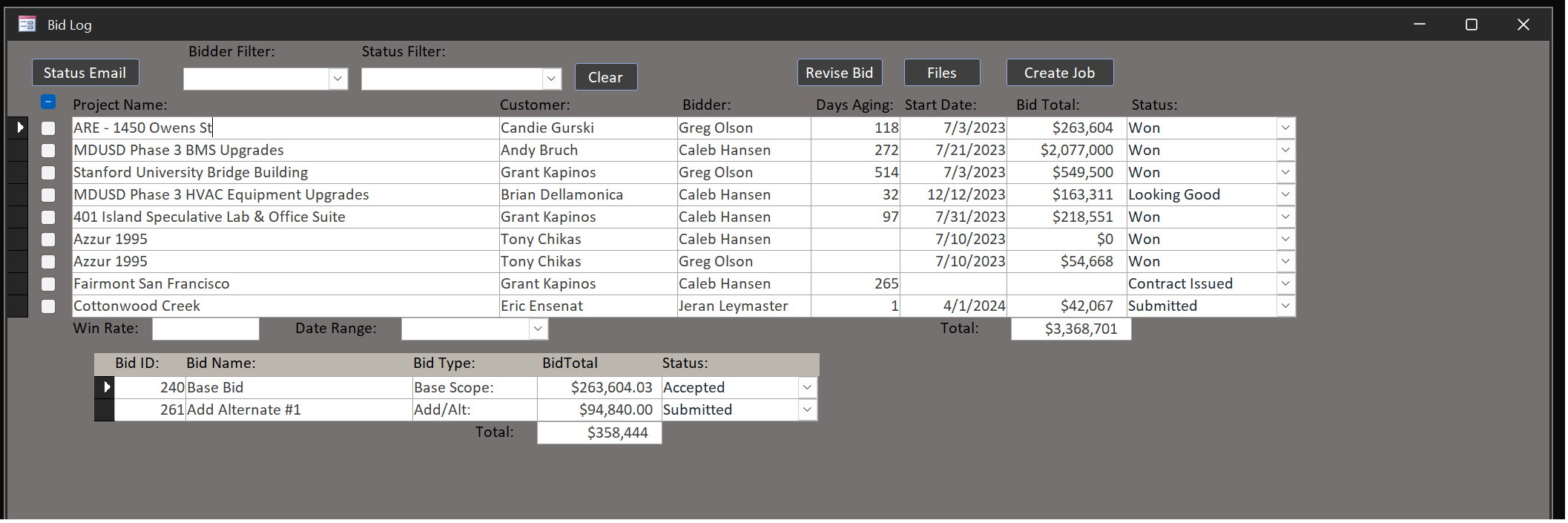
I have a Bid Log form with a button to email the customer for a status update of every bid that I select the box for in the log. See image below. I'd like for each customer that is associate with the selected bids to get a list of all the Bids that we have submitted to them instead of individual emails for each. The list would simply have the <BidName>: on the left with a combobox on the right for them to select 4 options for that bid: Won, Looking Good, Not Looking Good, and Lost. Is it possible to have this button create the email entirely from Access? or perhaps open a template email or word doc template and populate the BidName and the combobox from Access? I'm not sure what is possible here, but this ability would be very helpful for us.
Caleb Hansen OP  @Reply  
        
3 years ago

Kevin Yip  @Reply  
     
3 years ago
You may run reports with the desired queried results, then email PDF files of the reports as attachments to your users.  If you want to put that info directly on the email, then note that emails use plain text or HTML format.  If you want to show a table on an email in HTML format, the table needs to be formatted in HTML code.  E.g. <table><tr><td>...  So, it's easier to just email PDF reports.
Caleb Hansen OP  @Reply  
        
3 years ago
Understood. I figured it was a longshot. I am having trouble with another issue on this status email. Here it the code behind the button:

Private Sub StatusEmailBtn_Click()

    Dim rs As Recordset
    Dim OutApp As Object
    Dim OutMail As Object
    Dim strBody As String
    Dim customerBids As Scripting.Dictionary
    Dim customerFirstNames As Scripting.Dictionary

    Set rs = CurrentDb.OpenRecordset("SELECT * FROM BidLogQ WHERE IsSelected = True ORDER BY ContactID")
    Set OutApp = CreateObject("Outlook.Application")
    Set customerBids = New Scripting.Dictionary
    Set customerFirstNames = New Scripting.Dictionary

    ' Iterate over all the bids, collecting those for the same customer
    If rs.EOF = False Then
        rs.MoveFirst
        Do Until rs.EOF = True
            If Not customerBids.Exists(rs!ContactID) Then
                customerBids.Add rs!ContactID, New Collection
                customerFirstNames.Add rs!ContactID, rs!FirstName
            End If
            customerBids(rs!ContactID).Add rs!BidGroupName
            ' Inside your loop over Recordset records
            Debug.Print "Current record - ContactID: " & rs!ContactID & ", FirstName: " & rs!FirstName & ", BidGroupName: " & rs!BidGroupName
            ' Move to the next record
            rs.MoveNext
        Loop
    End If
    
    ' For each customer, send a single email with all their bids
    Dim CustKey As Variant
    For Each CustKey In customerBids.Keys
        Dim Customer As Collection
        Set Customer = customerBids(CustKey)
        Debug.Print "Processing customer: " & CustKey  ' Debugging statement

        Dim Bids As String
        Dim bid As Variant
        For Each bid In Customer
            Debug.Print "Processing bid: " & bid  ' Debugging statement
            Bids = Bids & bid & ": " & vbCrLf
        Next bid

        ' Prepare the body of the email
        strBody = customerFirstNames(CustKey) & "-" & vbCrLf & vbCrLf & _
                   "Please find below the list of bids submitted to you:" & vbCrLf & _
                   Bids & vbCrLf & _
                   "Kindly reply to this email with the status for each bid using the options: Won, Looking Good, Not Looking Good, Lost." & vbCrLf & vbCrLf & _
                   "Best regards," & vbCrLf & _
                   rs!EmplFL

        Set OutMail = OutApp.CreateItem(0)
        With OutMail
            .To = rs!Email
            .CC = ""
            .BCC = ""
            .Subject = "Bid Status Update Request"
            .Body = strBody
            '.Send
            .Display
        End With

        ' Print debug info
        Debug.Print "Processing bids for customer: " & CustKey & ", " & Customer.Count & " bids found"
    Next CustKey

    rs.Close
    Set OutMail = Nothing
    Set OutApp = Nothing
    Set rs = Nothing

End Sub

I keep getting a no current record on this part of the code: Debug.Print "Processing customer: " & CustKey  ' Debugging statement
Kevin Yip  @Reply  
     
3 years ago
When you click the button, the record you just put a checkmark on may not be saved.  See if that record still has that "pencil icon" next to it when you click the button.  If your checkmark isn't saved, then naturally your collection is blank.

Creating this whole collection may not be necessary.  The Dictionary and Collection objects are for unorganized data.  In Access, all data are already organized into tables, which are collections themselves.
Caleb Hansen OP  @Reply  
        
3 years ago
Gotcha. Ya, it's not in "dirty" mode. I've checked several boxes at the same time with the same result. Any idea how I would go about this? Would I need to create an array of arrays or something? I basically need to have all the records that are selected grouped by customer so that I send just one email to each customer with all their bids listed.
Kevin Robertson  @Reply  
           
3 years ago
Kevin Yip  @Reply  
     
3 years ago
Set a break point at the line Debug.Print "Processing customer: " & CustKey.  When the execution pauses there, use the immediate window to check the values all the variables, properties, etc. at that instant.  If CustKey is blank, are customerBids and Keys blank also, things like that.  But the main issue is that do you really need to use collections for this?  Collections are for cases when the data aren't stored in databases, and/or the user has no access to any database tools, such as Visual Studio users making a non-database app.  You are already in Access, and you can simply loop through the table with Recordset to check field values directly.  You don't have to "fill in" a collection every time you look at a table, which is like double work.

This thread is now CLOSED. If you wish to comment, start a NEW discussion in Access Forum.
 

Next Unseen

 
New Feature: Comment Live View


The following is a paid advertisement
Computer Learning Zone is not responsible for any content shown or offers made by these ads.
 

Learn
 
Access - index
Excel - index
Word - index
Windows - index
PowerPoint - index
Photoshop - index
Visual Basic - index
ASP - index
Seminars
More...
Customers
 
Login
My Account
My Courses
Lost Password
Memberships
Student Databases
Change Email
Info
 
Latest News
New Releases
User Forums
Topic Glossary
Tips & Tricks
Search The Site
Code Vault
Collapse Menus
Help
 
Customer Support
Web Site Tour
FAQs
TechHelp
Consulting Services
About
 
Background
Testimonials
Jobs
Affiliate Program
Richard Rost
Free Lessons
Mailing List
PCResale.NET
Order
 
Video Tutorials
Handbooks
Memberships
Learning Connection
Idiot's Guide to Excel
Volume Discounts
Payment Info
Shipping
Terms of Sale
Contact
 
Contact Info
Support Policy
Mailing Address
Phone Number
Fax Number
Course Survey
Email Richard
[email protected]
Blog RSS Feed    YouTube Channel

LinkedIn
Copyright 2026 by Computer Learning Zone, Amicron, and Richard Rost. All Rights Reserved. Current Time: 8/8/2026 7:12:53 AM. PLT: 1s