Free Lessons
Courses
Seminars
TechHelp
Fast Tips
Templates
Topic Index
Forum
ABCD
 
Home   Courses   TechHelp   Forums   Help   Contact   Merch   Join   Order   Logon  
 
Back to Access Forum    Comments List
Upload Images   @Reply   Bookmark    Link   Email   Next Unseen 
New Data
Nigel Hancock 
    
3 years ago
I have setup my DB and with the data currently in my tables every thing works fine, and I can run a query to make a report. However when I now go to add more information when I run the report the data is not picked up.

I cannot work it out because all the previous data is still pulled through. Am I missing something?
Kevin Robertson  @Reply  
          
3 years ago
The record will be 'Dirty'.
You need to refresh the record before opening the report.

Me.Refresh
Nigel Hancock OP  @Reply  
    
3 years ago
I have closed the db down and reopened it and still have the problem
Kevin Robertson  @Reply  
          
3 years ago
Are you using VBA or a Macro to open the Report?

With VBA:
    Me.Refresh
    DoCmd.OpenReport "CustomerR", acViewPreview, , "CustomerID=" & CustomerID


With Macro:
    See screenshot below

If this doesn't help we will need to see some screenshots of what you have.
Kevin Robertson  @Reply  
          
3 years ago

Nigel Hancock OP  @Reply  
    
3 years ago
Nope, It is not showing in the underlying query, but the data is in the tables and all refreshed.

Kevin Robertson  @Reply  
          
3 years ago
If the data is not showing in the Query check your join types (Outer Joins) and your criteria.
Nigel Hancock OP  @Reply  
    
3 years ago
But the old data from the same tables is coming through just not the new entry
Kevin Yip  @Reply  
     
3 years ago
If it's not showing in the query, obviously the problem is with the query.  Post the SQL here, the query result, and what and where you expect the new data to be.
Nigel Hancock OP  @Reply  
    
3 years ago
if the query is working properly for the data in the table already why would it not work for new data in the table?
Kevin Yip  @Reply  
     
3 years ago
Any number of things can go wrong.  Seeing the query will help us find out why.
Nigel Hancock OP  @Reply  
    
3 years ago

Nigel Hancock OP  @Reply  
    
3 years ago

Nigel Hancock OP  @Reply  
    
3 years ago

Nigel Hancock OP  @Reply  
    
3 years ago

Nigel Hancock OP  @Reply  
    
3 years ago
Not sure if this helps
Kevin Yip  @Reply  
     
3 years ago
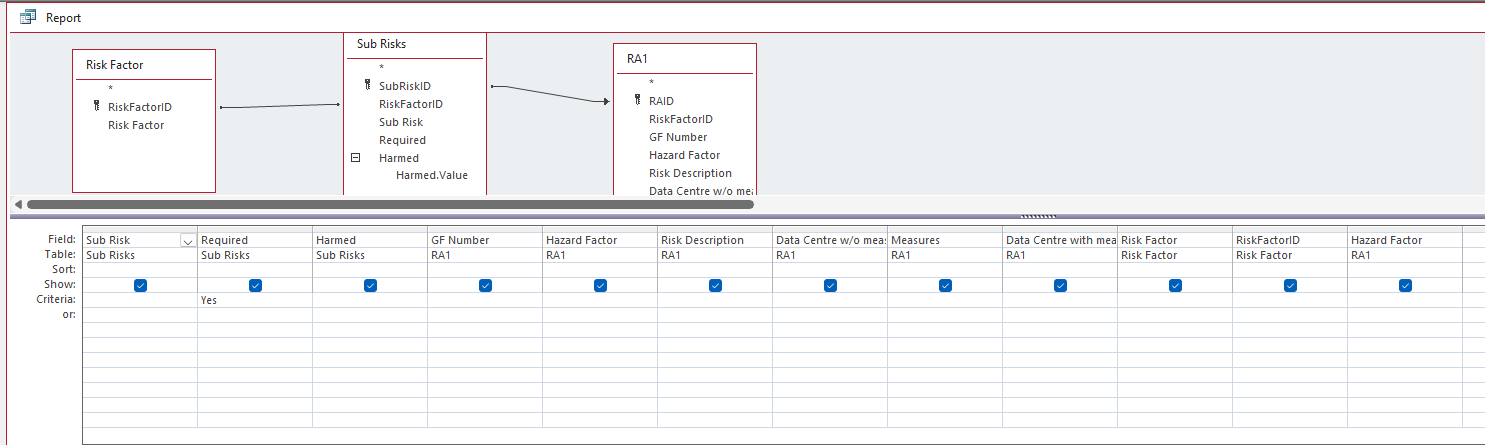
You said your query (named "Report") is missing data.  What data do you expect to be there?  Showing your table with the new data will help.  Your query has the criteria "Required = True."  Maybe your data have Required set to false.
Nigel Hancock OP  @Reply  
    
3 years ago
I have the following tables:

SiteT
SiteID = Auto Number
TypeofSite = Short Text


Risk Factor
RiskFactorID = Auto Number
Risk Factor = Short Test

RiskFactorSite
RiskFactorSiteID = AutoNumber
RiskFactorID = Number
SiteID = Number

Sub Risks
SubRiskID = Auto Number
RiskFactorID = Number
Sub Risk = Long Text
Required = Yes/No

RA1
RAID = Auto Number
RiskFactorID = Number
GF Number =Short Text
Hazard Factor = Short Text
Risk Description = Long text
Data Centre w/o measures = Number
Measures = Long Text
Data Centre with measures = Number

I have a form that shows Risk Factor and a sub form that shows  the Sub Risks (from a query that criteria is set to the type of site required e.g. Building

On this form is a button that then previews the report
from the Query "Report" (Screenshot sent already)


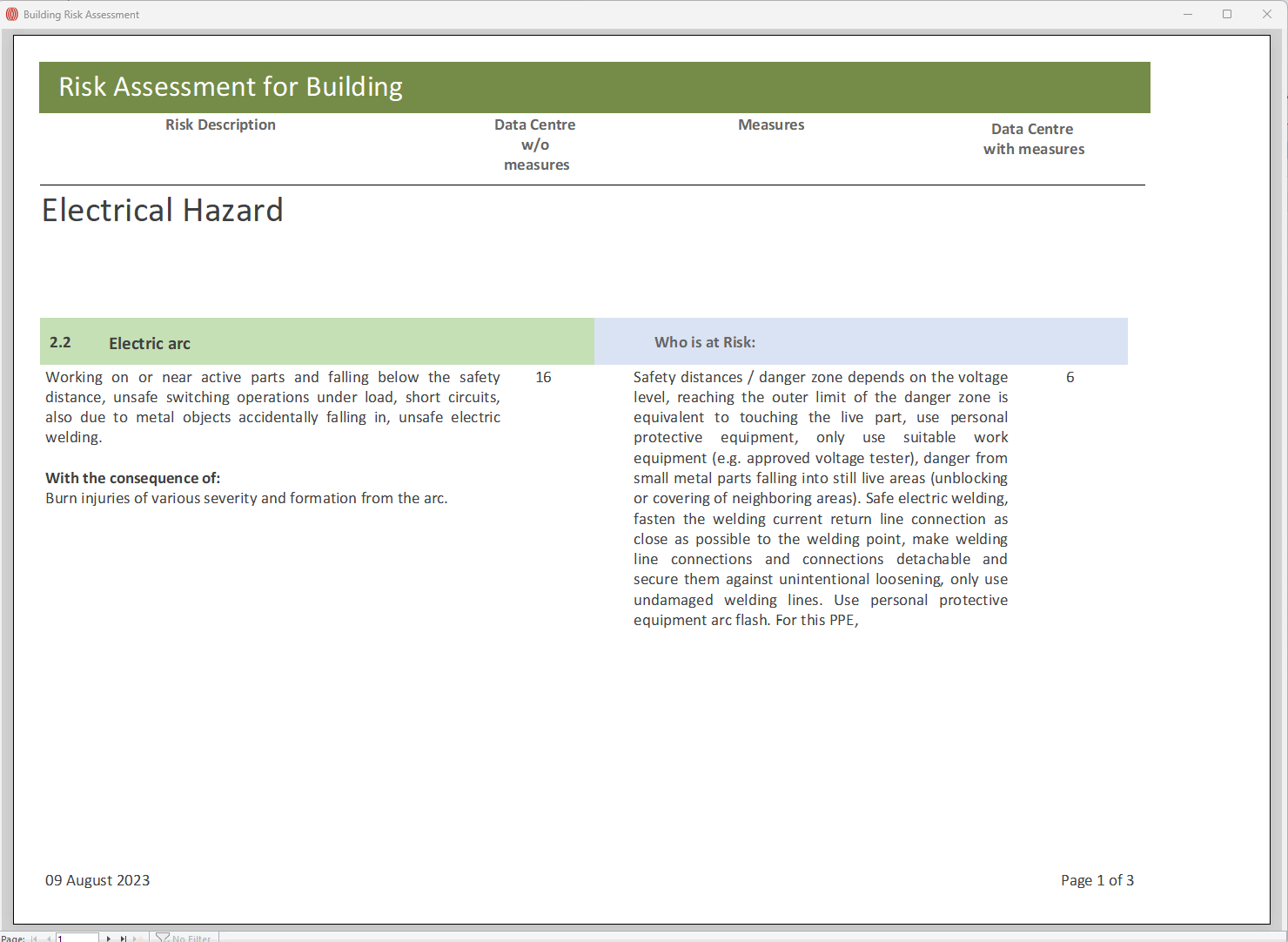
The information in the report should be  should be anything that is tcked required from the Sub Risk Form and when the report opens it lists all the related info from RA1


Kevin Yip  @Reply  
     
3 years ago
So your query is NOT missing data, correct (you said it was)?  The picture of the query you posted earlier is showing the correct data, but the report doesn't -- is that the situation?  If so, check if the report has any filtering conditions.  If the report runs any code, check that too.
Nigel Hancock OP  @Reply  
    
3 years ago
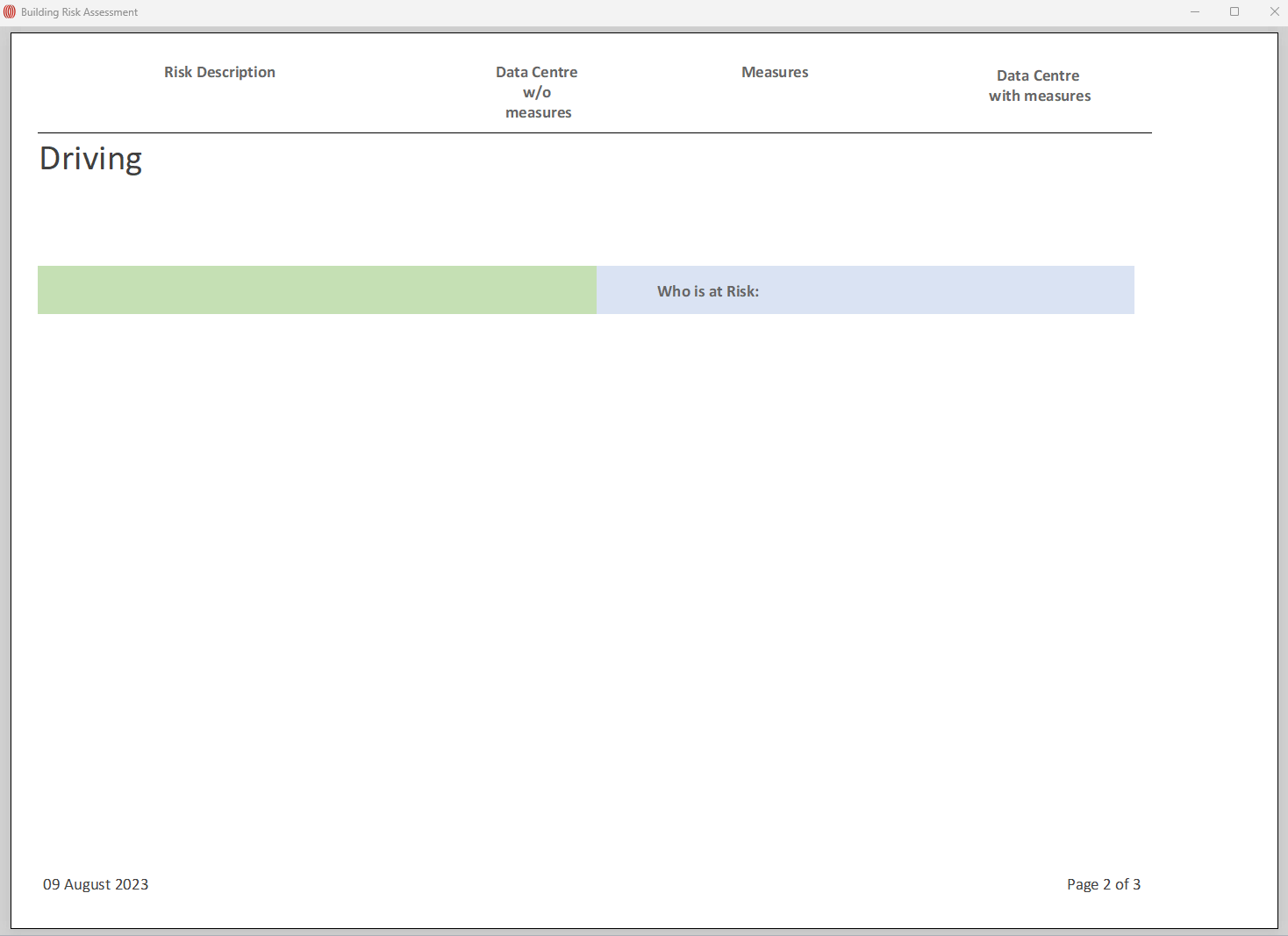
It is missing data, as you can see The GF Number , Risk description has been pulled in for Electric Arc (old data)but not for Bad driving (New data.

I don't know if it is allowed but happy to send you the database
Kevin Yip  @Reply  
     
3 years ago
The likely problem is that both the "SubRiskID" primary key field and the "RAID" primary key field are autonumber fields (as shown in your earlier post).  So they are not likely to match in values.  Two tables must have some matching key values in order to form a relationship.  Check the values of "SubRiskID" and "RAID" of the missing data.  They are probably different.  If they are different, then the two tables can't relate, hence the missing data.  Check to see if this is the case first, then we'll talk about solutions.

Nigel Hancock OP  @Reply  
    
3 years ago
I have changed the Auto number in RA1 but it is still only pulling through the old table
Nigel Hancock OP  @Reply  
    
3 years ago
I have changed the RAID to a Number, but it is still only pulling through previous data
Kevin Yip  @Reply  
     
3 years ago
You can't just change the data type.  You have to ensure there are matching values, or no relationship can be had.  For the missing data to show up, both SubRiskID and RAID have to have matching values:

SubRiskID   Required
1           Yes

RAID        GF Number    Risk Description
1           3.0          Risk is high for this material...

In the example above, both equal to 1.  This allows a join to be formed, and data to be shown.  If they are not equal, the two records are not joined, and no data will show on one side or both sides, depending on join type.

This is the most basic and fundamental aspect about relationships that you need to be fully aware before you can move forward.
Kevin Yip  @Reply  
     
3 years ago
For primary keys to match so that two tables can join, one table has to "inherit" the PK from the other table.  If SubRiskID is 1, then RAID has to be 1 too so that the two tables can join.  That is the reason why the two PKs can't both be autonumbers.  Autonumbers are created autonomously, independently.  But that can't happen here, because one table has to *inherit* the PK from the other table.
Nigel Hancock OP  @Reply  
    
3 years ago
So how is it linking to the old data and not the new?  I have been on this for around 7 hours, I think I will call it day, thanks for your time but it's beaten me
Nigel Hancock OP  @Reply  
    
3 years ago
I am linking the SubRiskID (autoNumber) table Sub Risks to the RiskFactorID (Number)Table RA1. The RiskFactorID  has the numbers that equals the Risk factor, so:

RAID=1 RiskFactorID=1 GF Number = 1.1
RAID=2 RiskFactorID=1 GF Number = 1.2
RAID=3 RISKFACTOR=2 GF Number1.3
Nigel Hancock OP  @Reply  
    
3 years ago
Kevin, Thanks for all your help, I have now resolved the issue by removing the Sub Risk table and adding the Required and Harmed by Fields into the RA1 table. It works great.

This thread is now CLOSED. If you wish to comment, start a NEW discussion in Access Forum.
 

Next Unseen

 
New Feature: Comment Live View


The following is a paid advertisement
Computer Learning Zone is not responsible for any content shown or offers made by these ads.
 

Learn
 
Access - index
Excel - index
Word - index
Windows - index
PowerPoint - index
Photoshop - index
Visual Basic - index
ASP - index
Seminars
More...
Customers
 
Login
My Account
My Courses
Lost Password
Memberships
Student Databases
Change Email
Info
 
Latest News
New Releases
User Forums
Topic Glossary
Tips & Tricks
Search The Site
Code Vault
Collapse Menus
Help
 
Customer Support
Web Site Tour
FAQs
TechHelp
Consulting Services
About
 
Background
Testimonials
Jobs
Affiliate Program
Richard Rost
Free Lessons
Mailing List
PCResale.NET
Order
 
Video Tutorials
Handbooks
Memberships
Learning Connection
Idiot's Guide to Excel
Volume Discounts
Payment Info
Shipping
Terms of Sale
Contact
 
Contact Info
Support Policy
Mailing Address
Phone Number
Fax Number
Course Survey
Email Richard
[email protected]
Blog RSS Feed    YouTube Channel

LinkedIn
Copyright 2026 by Computer Learning Zone, Amicron, and Richard Rost. All Rights Reserved. Current Time: 6/16/2026 7:00:52 PM. PLT: 0s