Free Lessons
Courses
Seminars
TechHelp
Fast Tips
Templates
Topic Index
Forum
ABCD
 
Home   Courses   TechHelp   Help   Contact   Merch   Join   Order   Logon   Forums   
 
Back to Access Forum    Comments List
Upload Images   @Reply   Bookmark    Link   Email   Next Unseen 
Adding Notes to a table
Kent Morstain 
    
3 years ago
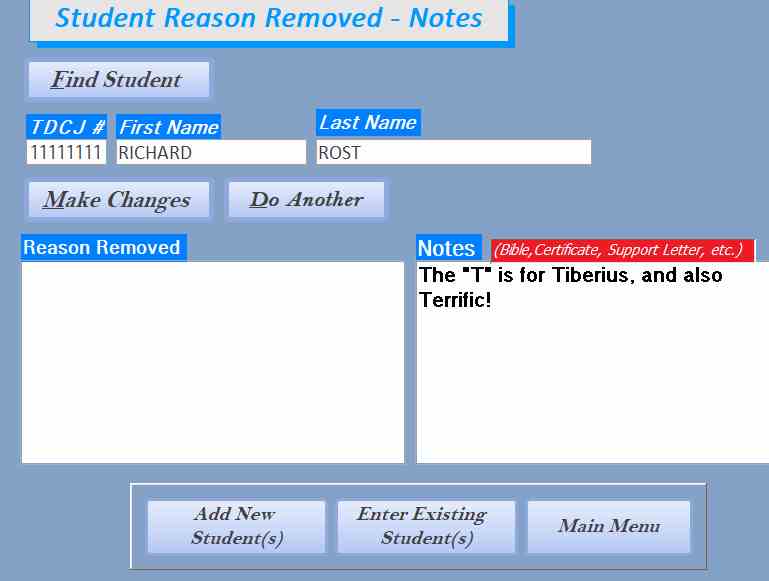
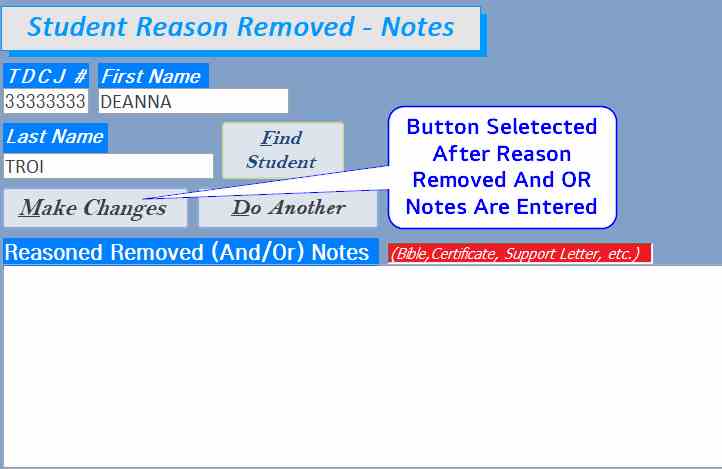
I have made some progress with my previous help requests, but now Im trying to add notes to my table from a form. The user will look up a student by the TDJC number, and if they are no longer in the study, they will be put into this Reasp removed NOtes form. Per my screenshot, the user can be found by the TDJC number but when I add notes (Reason Removed or Notes) they are not written to the table.

See my code below and my screenshots.

Please help.

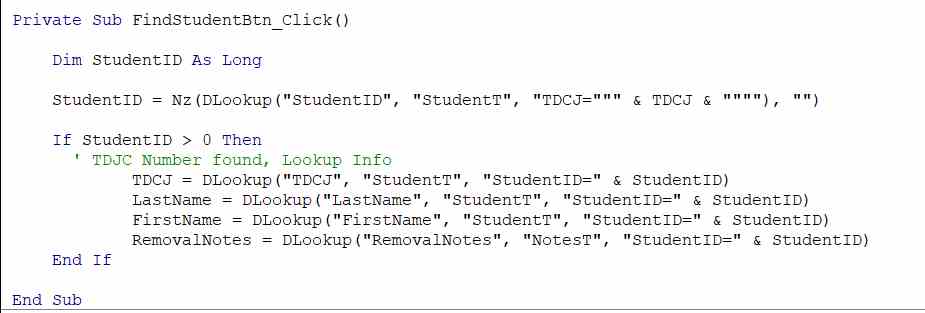
Private Sub FindStudentBtn_Click()

    Dim StudentID As Long

    Dim sTDCJ As String, sLastName As String, sFirstName As String, sDateofBirth As String, sUnit As String, sAddress As String, _
    sCity As String, sState As String, sZIP As String
    Dim SQL As String
    
    StudentID = Nz(DLookup("StudentID", "StudentT", "TDCJ=""" & TDCJ & """"), 0)
  
    If StudentID > 0 Then
      ' TDJC Number found, Lookup Info
            TDCJ = DLookup("TDCJ", "StudentT", "StudentID=" & StudentID)
            LastName = DLookup("LastName", "StudentT", "StudentID=" & StudentID)
            FirstName = DLookup("FirstName", "StudentT", "StudentID=" & StudentID)
            ReasonRemoved = DLookup("ReasonRemoved", "StudentT", "StudentID=" & StudentID)
            Notes = DLookup("Notes", "StudentT", "StudentID=" & StudentID)
        
    End If
        
End Sub

Private Sub MakeChangesBtn_Click()
                        
    CurrentDb.Execute "Insert Into StudentT (StudentID, ReasonRemoved, Notes) " & _
        "Values (" & StudentID & ", """ & ReasonRemoved & """, """ & Notes & """)"
    Me.Refresh
            
End Sub
Kent Morstain OP  @Reply  
    
3 years ago

Kent Morstain OP  @Reply  
    
3 years ago

Kevin Robertson  @Reply  
          
3 years ago
Are these notes to be saved to a record which already exists in the table?
If this is the case you would need to use an UPDATE statement, not an INSERT INTO statement.
Kent Morstain OP  @Reply  
    
3 years ago
Are you wanting me to make an Update query or use an update statement?  If it is changing the existing statement, what is the syntax for that?  Not finding it in my google searching?
Kent Morstain OP  @Reply  
    
3 years ago
As for your question, it is both.  There may be existing info in these fields or they may be new additions to the fields that were previously blank to the record.  Hope I am making sense with my answer.
Richard Rost  @Reply  
          
3 years ago
See Notes Anywhere! - the only difference will be you're putting the notes in a specific record (with an UPDATE statement like Kevin said) or an INSERT INTO statement if you're adding new notes to a table, like I do with contacts.
Kent Morstain OP  @Reply  
    
3 years ago
Thanks, gentlemen for your input.

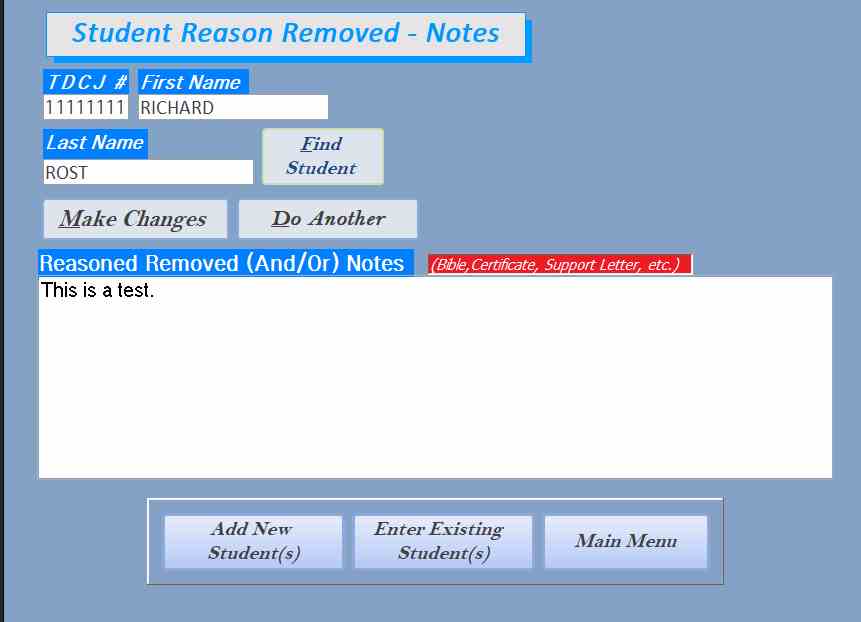
Below is my code with the changes you suggested.  A note, I've combined the ReasonRemoved and Notes into one field and added that to the StudentT table.  I do not receive an error, the code does not update the RemovalNotes field.  


Private Sub FindStudentBtn_Click()

    Dim StudentID As Long
  
    StudentID = Nz(DLookup("StudentID", "StudentT", "TDCJ=""" & TDCJ & """"), "")
  
    If StudentID > 0 Then
      ' TDJC Number found, Lookup Info
            TDCJ = DLookup("TDCJ", "StudentT", "StudentID=" & StudentID)
            LastName = DLookup("LastName", "StudentT", "StudentID=" & StudentID)
            FirstName = DLookup("FirstName", "StudentT", "StudentID=" & StudentID)
        
    End If
        
End Sub

Private Sub MakeChangesBtn_Click()
    
     If IsNull(RemovalNotes) Then Exit Sub
     CurrentDb.Execute "INSERT INTO StudentT (StudentID, RemovalNotes) " & _
        "Values (" & StudentID & ", """ & RemovalNotes & """)"
        
    Me.Refresh
            
End Sub


Please advise, what I'm doing wrong
Kent Morstain OP  @Reply  
    
3 years ago

Kent Morstain OP  @Reply  
    
3 years ago

Kent Morstain OP  @Reply  
    
3 years ago
Also any suggestions on how I would combine buttons to make it more smooth?  The idea behind this form is that when a student terminates and is dropped from the program, the grader would look up the student, enter the info, etc and their active Status would be unchecked in the Existing Student Form.
Kevin Robertson  @Reply  
          
3 years ago
You said "the code does not update the RemovalNotes field."
You don't have an Update statement...
Kent Morstain OP  @Reply  
    
3 years ago
A bad choice of words on my part.  I am using the Insert Into to write to the table.  Should I use Update instead, and if so, what would be the string syntax?  The problem Im experiencing is that I have tried variations of both Insert Into and I think update, but Im missing something.

Thanks for your help.
Kevin Robertson  @Reply  
          
3 years ago
The syntax for your Update statement would be something like this:
CurrentDB.Execute "UPDATE StudentT SET RemovalNotes=""" & RemovalNotes & """ WHERE StudentID=" & StudentID
Richard Rost  @Reply  
          
3 years ago
INSERT INTO is an APPEND query: to ADD records.
UPDATE is an UPDATE query: to CHANGE a record.
Kent Morstain OP  @Reply  
    
3 years ago
I have added Kevin's code, which works in the main section of the code where I find the student.  

However, if I move it to an after-update on the RemovalNotes field or tie it to the Make Changes button the StudentID stays at 1.  It does not select the StudentID of the new student I look up.
Kent Morstain OP  @Reply  
    
3 years ago
Kevin Robertson, does my explanation make sense? Any help would be most appreciated.  

Much thanks.
Kent Morstain OP  @Reply  
    
3 years ago
I guess Kevin is unavailable for my question.  I have watched the recorded videos but they don't seem to apply to my situation.  How do I look up a student and then have my notes apply to that student?  It's driving me crazy.

Please HELP!
Scott Axton  @Reply  
      
3 years ago
Kent
Kevin is located in the UK so time difference.  While the moderators are on here a lot of time per day we do have our wives,  kids, and jobs to deal with also. Not to mention a little sleep.   This is a volunteer thing for us and we do it because of our passion for helping others and promoting Access and specifically Richard's teachings. So...  Patience please - I'm sure he will see this.
Kevin Robertson  @Reply  
          
3 years ago
I'm really not sure what you are trying to do.
In a comment above you said the Update statement worked in your main section of code. What's your main section of code?
Please post a detailed, easy to understand description of what you need the code to do and include some screenshots.
Kent Morstain OP  @Reply  
    
3 years ago
My apologies for the angst I made toward your assistance.  I did not realize your different timezone and you being in the UK.  Let me assure you that I certainly understand what you and all the moderators are doing assisting in this endeavor because you like Access and want to see the application and Richard succeed.  So with that, I apologize.

The big picture is that this subForm ReasonRemovedNotesF is used when a student is no longer in the program AND OR has received something from the ministry, such as a bible or a note for their parole board.

So I currently look them up with their TDCJ number and name.  Once the name is found, I need to be able to add/update this record with the necessary information.  

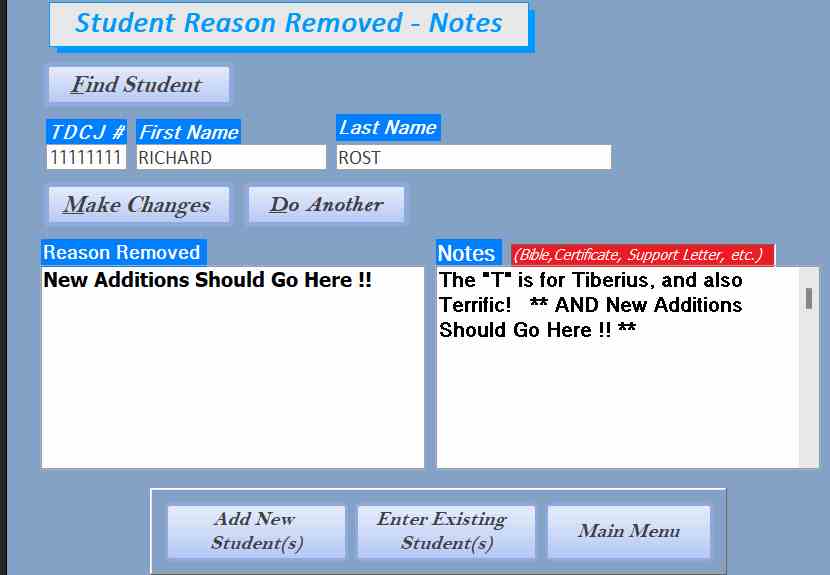
The search works fine (no errors) when I enter a particular TDCJ/Name and select Find Student.  However, When I enter information into Reason Removed and or Notes Field, and hit Make Changes button,  info is NOT written to the current record selected by the Find Student Button.  Furthermore, NO Data is written to the NotesT table.

UPLOADED PICS (.jpg) Description:

NotestData -- What should contain entered data for the Make Changes Code
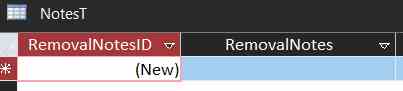
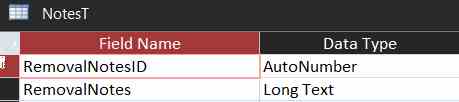
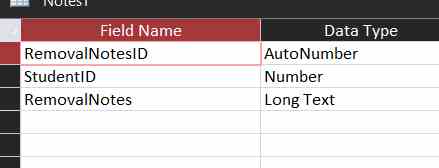
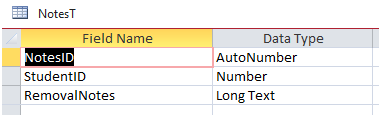
NotesT Structure -- Structure layout for the NotesT
MainCode -- Main code used to find the student for a particular note to be added to.
SubFormStudent Notes -- The Button on the form selected to write notes entered for a student is found using Find Student Button.
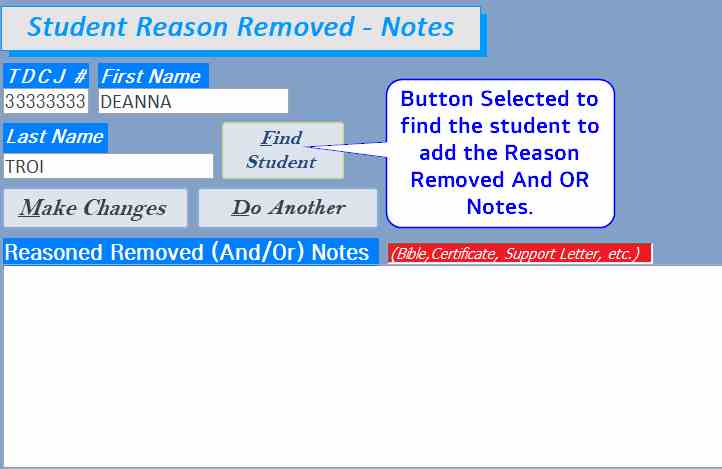
SubFormFindStudent -- Button on the form selected to Find Student to add notes too.
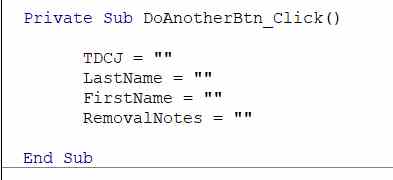
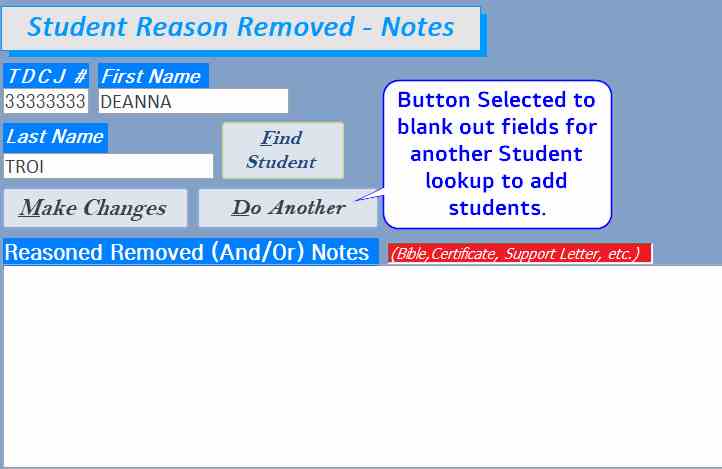
SubFormDoAnother -- Button on the form selected to the blank field for another Student find.
SubFormDoAnotherCode -- Code behind Do Another Student.
Make changes button -- Button on the form selected to commit changes of notes written for a particular student.
Make Changes Code -- Code behind the Button that commits the notes entered in the Make Changes button

Please let me know if anything is not clear or additionally info is required.
Kent Morstain OP  @Reply  
    
3 years ago

Kent Morstain OP  @Reply  
    
3 years ago

Kent Morstain OP  @Reply  
    
3 years ago

Kent Morstain OP  @Reply  
    
3 years ago

Kent Morstain OP  @Reply  
    
3 years ago

Kent Morstain OP  @Reply  
    
3 years ago

Kent Morstain OP  @Reply  
    
3 years ago

Kent Morstain OP  @Reply  
    
3 years ago

Kevin Robertson  @Reply  
          
3 years ago
It looks like you need to add the StudentID to the NotesT otherwise there is no way to relate the Notes with a particular Student.
Kent Morstain OP  @Reply  
    
3 years ago
Assuming I made the additions to the table correctly (StudentID to NotesT) it did not work as you supposed.  With that said, what suggestions do you have that I can modify my code to allow me to write notes for a particular student?  

This is the only form that I need to keep these records.
Kevin Robertson  @Reply  
          
3 years ago
In MakeChangesBtn, did you replace RemovalNotes.Tag with StudentID?
Kent Morstain OP  @Reply  
    
3 years ago
I tried both ways with the below with the same results.  Table structure to follow.

Private Sub MakeChangesBtn_Click()

     If IsNull(RemovalNotes) Then Exit Sub
     CurrentDb.Execute "UPDATE NotesT SET RemovalNotes=""" & RemovalNotes & """ WHERE StudentID=" & StudentID
     MsgBox "Here"
     MsgBox StudentID
     Me.Refresh

End Sub

AND

     CurrentDb.Execute "UPDATE NotesT SET RemovalNotes=""" & RemovalNotes & """ WHERE RemovalNotesID=" & StudentID
     MsgBox "Here"
     MsgBox StudentID
     Me.Refresh

Kent Morstain OP  @Reply  
    
3 years ago

Kevin Robertson  @Reply  
          
3 years ago
If you remove If IsNull(RemovalNotes) Then Exit Sub does it work. Other than that I really would have to see your database to help you further. Perhaps Scott Adam Alex or Richard can see the problem where I can't.
Adam Schwanz  @Reply  
            
3 years ago
Sorry, I didn't read through the posts very well so might be repeat questions.

Are your msgboxes firing so you can confirm it's making it there?

Where is StudentID on the form? Is it just a hidden field? I see you declare it as a variable in the find button but that won't work to use it in another sub if that is all there is. Add a textbox to your form and call it MyStudentID then try this.

Private Sub FindStudentBtn_Click()

    Dim StudentID As Long
  
    StudentID = Nz(DLookup("StudentID", "StudentT", "TDCJ=""" & TDCJ & """"), "")
    MyStudentID=StudentID

    If StudentID > 0 Then
      ' TDJC Number found, Lookup Info
            TDCJ = DLookup("TDCJ", "StudentT", "StudentID=" & StudentID)
            LastName = DLookup("LastName", "StudentT", "StudentID=" & StudentID)
            FirstName = DLookup("FirstName", "StudentT", "StudentID=" & StudentID)
        
    End If
        
End Sub


At this point the studentID should be showing inside of that text box that we just made called MyStudentID

Private Sub MakeChangesBtn_Click()

     If IsNull(RemovalNotes) Then Exit Sub
     CurrentDb.Execute "UPDATE NotesT SET RemovalNotes=""" & RemovalNotes & """ WHERE StudentID=" & MyStudentID
     Me.Refresh

End Sub

Kent Morstain OP  @Reply  
    
3 years ago

Kent Morstain OP  @Reply  
    
3 years ago
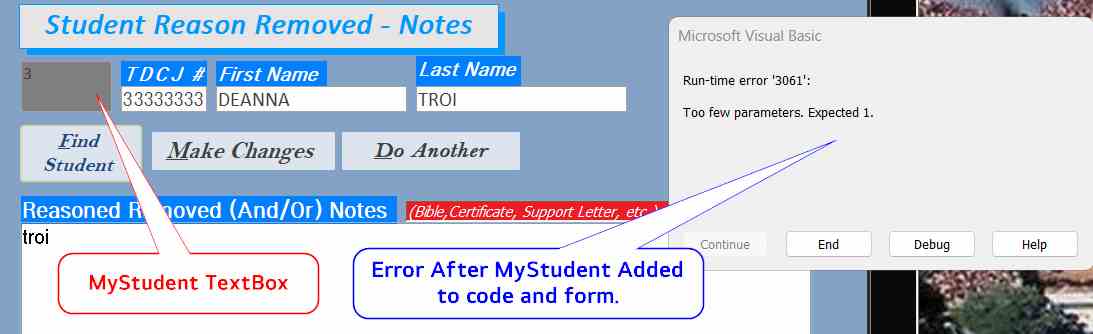
New Code below.  The form has the MyStudent Textbox in gray (see screenshot)  After adding the textbox and changing the code, I now get the error shown.

IF I change StudentID to MyStudentID (as found in the code -- WHERE MyStudentID=" & MyStudentID) the error goes away, but the MsgBox shows the values listed below.

     MsgBox StudentID = 1
     MsgBox MyStudentID = 3


Private Sub FindStudentBtn_Click()

    Dim StudentID As Long
  
    StudentID = Nz(DLookup("StudentID", "StudentT", "TDCJ=""" & TDCJ & """"), "")
    MyStudentID = StudentID
    
    If StudentID > 0 Then
      ' TDJC Number found, Lookup Info
            TDCJ = DLookup("TDCJ", "StudentT", "StudentID=" & StudentID)
            LastName = DLookup("LastName", "StudentT", "StudentID=" & StudentID)
            FirstName = DLookup("FirstName", "StudentT", "StudentID=" & StudentID)
            Rem RemovalNotes = DLookup("RemovalNotes", "NotesT", "StudentID=" & StudentID)
    End If
        
End Sub

Private Sub MakeChangesBtn_Click()

     If IsNull(RemovalNotes) Then Exit Sub
     CurrentDb.Execute "UPDATE NotesT SET RemovalNotes=""" & RemovalNotes & """ WHERE StudentID=" & MyStudentID
     MsgBox "Here"
     MsgBox StudentID
     MsgBox MyStudentID
     Me.Refresh

End Sub
Adam Schwanz  @Reply  
            
3 years ago
What line is highlighted when you push debug?

Is this how its like in your real code? Extra Rem
Rem RemovalNotes = DLookup("RemovalNotes", "NotesT", "StudentID=" & StudentID)
Kevin Robertson  @Reply  
          
3 years ago
I'd like to add StudentID is a Long but your Nz function is returning an empty string ("") if Null. This should be a zero (0)
Kent Morstain OP  @Reply  
    
3 years ago
I had the Rem RemovalNotes = DLookup("RemovalNotes", "NotesT", "StudentID=" & StudentID) for no particular reason other than I thought it might be interfering with the Notes entered.  I no longer have it Remarked out.  

I have added the zero added instead of the ""

    StudentID = Nz(DLookup("StudentID", "StudentT", "TDCJ=""" & TDCJ & """"), 0)

It seems to work if I select the first person in the table, but if I select another student it does not work.

For example, Student 2222222 should be StudentID 2 but it stays on StudentID 1.  However, MyStudent is 2 what it should be.  This results in the notes field not being written from what I can tell.
  
Is there a better way to do this?
Kent Morstain OP  @Reply  
    
3 years ago
Any ideas on how I can alter the Code/Form to get the Changes Button to document the notes to the correct StudentID/MyStudentID or is this something just not possible with Access?
Adam Schwanz  @Reply  
            
3 years ago
This should be very simple; something is missing here that we're not seeing with your setup.

I don't usually do this, but if you are able to send me the database [email protected] it's probably a 10 second fix.
Adam Schwanz  @Reply  
            
3 years ago
Number of things wrong. You can't make StudentID an autonumber in the NotesT, they'll never line up. Add a field like NotesID to be the autonumber and then make studentID a number.

Also need a way to handle whether a record exists or not in notesT for that student so you need to do both the update and an insert into

Private Sub MakeChangesBtn_Click()
    
     If IsNull(RemovalNotes) Then Exit Sub
     If DCount("*", "NotesT", "StudentID=" & MyStudentID) > 0 Then
        CurrentDb.Execute "UPDATE NotesT SET RemovalNotes=""" & RemovalNotes & """ WHERE StudentID=" & MyStudentID
     Else
        CurrentDb.Execute "INSERT INTO NotesT (StudentID,RemovalNotes) VALUES(" & MyStudentID & ",""" & RemovalNotes & """)"
     End If
     Me.Refresh
    
End Sub
Adam Schwanz  @Reply  
            
3 years ago

Kent Morstain OP  @Reply  
    
3 years ago
SUCCESS -- Adam, many many thanks....

Thanks, Richard and all the volunteers for your help.
Richard Rost  @Reply  
          
3 years ago
They are amazing. I couldn't do this without them.

This thread is now CLOSED. If you wish to comment, start a NEW discussion in Access Forum.
 

Next Unseen

 
New Feature: Comment Live View


The following is a paid advertisement
Computer Learning Zone is not responsible for any content shown or offers made by these ads.
 

Learn
 
Access - index
Excel - index
Word - index
Windows - index
PowerPoint - index
Photoshop - index
Visual Basic - index
ASP - index
Seminars
More...
Customers
 
Login
My Account
My Courses
Lost Password
Memberships
Student Databases
Change Email
Info
 
Latest News
New Releases
User Forums
Topic Glossary
Tips & Tricks
Search The Site
Code Vault
Collapse Menus
Help
 
Customer Support
Web Site Tour
FAQs
TechHelp
Consulting Services
About
 
Background
Testimonials
Jobs
Affiliate Program
Richard Rost
Free Lessons
Mailing List
PCResale.NET
Order
 
Video Tutorials
Handbooks
Memberships
Learning Connection
Idiot's Guide to Excel
Volume Discounts
Payment Info
Shipping
Terms of Sale
Contact
 
Contact Info
Support Policy
Mailing Address
Phone Number
Fax Number
Course Survey
Email Richard
[email protected]
Blog RSS Feed    YouTube Channel

LinkedIn
Copyright 2026 by Computer Learning Zone, Amicron, and Richard Rost. All Rights Reserved. Current Time: 8/1/2026 2:25:39 AM. PLT: 0s