Free Lessons
Courses
Seminars
TechHelp
Fast Tips
Templates
Topic Index
Forum
ABCD
 
Home   Courses   TechHelp   Forums   Help   Contact   Merch   Join   Order   Logon  
 
Back to Access Forum    Comments List
Upload Images   @Reply   Bookmark    Link   Email   Next Unseen 
File Picker
Giovanni Miranda 
    
3 years ago
I was told that there were videos for "File Picker" that would allow me to link and unlink folers or files so that I could turn them on and off if I needed to.

Well, I can't find any videos the last tech told me about that they were in the website.  If someone could point me into the right direction I'd appreciate it with a link to these videos.
Kevin Robertson  @Reply  
          
3 years ago
The Images Members video covers the File Picker.

When you say the last tech video, which one?
Giovanni Miranda OP  @Reply  
    
3 years ago
I was never told, the last tech who told me about it said that there were videos but never gave me a link to it.  All he said was there are videos, really no help whatsoever...
Giovanni Miranda OP  @Reply  
    
3 years ago
I don't think that's what I'm looking for in images.  I'm looking to code a folder that I can either turn on or off link/unlink.  This is for flight Simulator 2020.  I want to be able to choose either an addon of aircraft or airport that I could link to the simulator and use it and when I'm finished flying I can unlink it or turn it off as it might conflict with other addons.
Giovanni Miranda OP  @Reply  
    
3 years ago

Richard Rost  @Reply  
          
3 years ago
It sounds to me like what you want is a series of toggle buttons for your form, and you want to put images on those buttons. I do cover using toggle buttons in Access Expert Level 4, but I don't put images on them. However, that's not incredibly hard to do; it's just an image property.
Giovanni Miranda OP  @Reply  
    
3 years ago
Hi Richard,

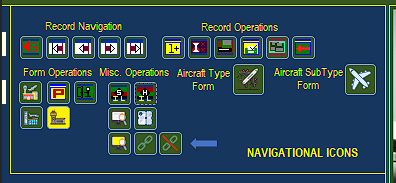
Thanks, but I believe I've got the image on the buttons covered as you can see in my image that was attached to my request.  I guess I'm not making myself clear enough for anyone to know what I'm talking about unless you are a simmer yourself.  Let me try this:

In Microsoft Flight Simulator 2020 there are ways for you to add "addons" to your sim, in other words there are third-party developers who create addons such as scenery and aircraft you can either purchase or download for free on numerous sites that support microsoft flight simulator 2020.  Okay, still with me so far?  Next, there are "sceneries" and "aircraft" that these third-party developers make that may conflict with other addons.  So, it is recommended that when you want to fly a certain "aircraft" or run a certian "scenery" addon that may conflict with other addons that you ONLY install them when you want to use them and then uninstall them when you are not using either the "aircraft" or "scenery" so they won't conflict with other "aircraft" or "scenery" that may already be installed in your flight sim.

Now, the only way to do that in MSFS 2020 - known as Microsoft Flight Simulator 2020, is to install or uninstall the applicaton for the "aircraft" or "scenery" to MSFS 2020 anytime you want to use it or not use it.  In other words you know how to install an applicaton right, then when you don't want to use it anymore or have no need for that particular application you can uninstall it, right?  Hope you are still with me, well for MSFS 2020 there are applications that can do this for you automatically, which in turn they use the phrase "link/unlink" these applications or "aircraft" and "sceneries" to MSFS 2020 anytime they want to use a particular "aircraft" or "scenery" and when they are done using them such as in a flight from one airport to another (sceneries) or (aircraft) while they are flying they can "unlink" or uninstall the "aircraft" or "scenery" so they don't conflict with other "aircraft" or "scenery" that they may conflict with in the simulator.

There's applicaiton called "Addon Linker" that is made for MSFS 2020 that users can download and use to keep track of their database of "aircraft" or "scenery" that they have in MSFS 2020 which they can turn off or on so that they don't conflict with each other.  This basically installs and uninstalls the "aircraft" or "scenery" into MSFS 2020 via the Community Folder in MSFS 2020 that the sim uses to ADD third-party developer's aircraft and sceneries to the sim.  Have I confused you yet?  Well, if not what I'm trying to do is create a database to keep track of all the "aircraft" and "scenery" a simmer has for their MSFS 2020.

All my toggles work as shown above in the image I've attached, the arrow points to the ones I want to create to allow the user to either "link-install" or "unlink-uninstall" a particular "aircraft" or "scenery" into or out of MSFS 2020.  Now, the user will have downloaded the aircraft or scenery already and have it stored on a folder on their computer.  Keep in mind, this will only be used for third-party developer's addons not ones created specifically by other Named developers like Microsoft, Aerosoft, Drzewieki Designs, etc.  They are only for those developing their software commercially, not freeware addons that all simmers use and download.

These are the only ones that conflict with MSFS 2020, if they do, one way or another due to non-programming standards that much of these third-party addon developers don't follow completely.  That's why they conflict with other aircraft or sceneries that the commercial developers create for MSFS 2020.  I hope you are getting the picture already, the toggle buttons to activate the function or "link/unlink" are not in question of how to create them, I can do that...I would like to know in VBA Coding how to be able to move one folder that has either the aircraft or scenery in it "into" the Community Folder for third party developers.  That's how the application for MSFS 2020 works - Addon Linker.

What I'd like to do is have that functionallity in database so they don't have to get that Addon Linker application that adds the "aircraft" or "scenery" into MSFS 2020 and then basically "unlink" it out of the folder so MSFS 2020 doesn't see it anymore and this will be no conflict with the rest of the software - "aircraft" or "scenery" that is already in MSFS 2020.  Whew!!! I believe I've made myself clear at this point in what I'm trying to accomplish.  I know you must be terribley busy but I've tried to look for ways in your techhelp to find a way to move one folder into another and back out again but can't seem to find anyway or anyone who knows how to do this.  Is it that difficult to do?  Really?  I would think there might be a fairly simple way to do this using VBA Coding.  Tell me if I'm wrong, and once I do get the coding then I would attache it to a toggle button as yo can see by my image where the arrow is pointing to the buttons I will use (if it's not apparant the buttons are chain links one to link and the other to unlink).

Thanks Richard.

This thread is now CLOSED. If you wish to comment, start a NEW discussion in Access Forum.
 

Next Unseen

 
New Feature: Comment Live View


The following is a paid advertisement
Computer Learning Zone is not responsible for any content shown or offers made by these ads.
 

Learn
 
Access - index
Excel - index
Word - index
Windows - index
PowerPoint - index
Photoshop - index
Visual Basic - index
ASP - index
Seminars
More...
Customers
 
Login
My Account
My Courses
Lost Password
Memberships
Student Databases
Change Email
Info
 
Latest News
New Releases
User Forums
Topic Glossary
Tips & Tricks
Search The Site
Code Vault
Collapse Menus
Help
 
Customer Support
Web Site Tour
FAQs
TechHelp
Consulting Services
About
 
Background
Testimonials
Jobs
Affiliate Program
Richard Rost
Free Lessons
Mailing List
PCResale.NET
Order
 
Video Tutorials
Handbooks
Memberships
Learning Connection
Idiot's Guide to Excel
Volume Discounts
Payment Info
Shipping
Terms of Sale
Contact
 
Contact Info
Support Policy
Mailing Address
Phone Number
Fax Number
Course Survey
Email Richard
[email protected]
Blog RSS Feed    YouTube Channel

LinkedIn
Copyright 2026 by Computer Learning Zone, Amicron, and Richard Rost. All Rights Reserved. Current Time: 5/7/2026 1:08:07 AM. PLT: 0s