Free Lessons
Courses
Seminars
TechHelp
Fast Tips
Templates
Topic Index
Forum
ABCD
 
Home   Courses   TechHelp   Forums   Help   Contact   Merch   Join   Order   Logon  
 
Back to Access Forum    Comments List
Upload Images   @Reply   Bookmark    Link   Email   Next Unseen 
Value List Box
Lee Shastid 
    
3 years ago
I started out using drop down boxes in my fields then I remembered about value list boxes. I watched the videos several times and went step by step and can not figure out what i am missing. I even went as far as connecting a second monitor and trying to do it step by step with the video. There are 2 things I can not get done. When I go into my form and add the value list box when by labels and control fields highlight with a yellow box around it it is a solid yellows line and does not have the dots around it where I it will allow me to move it around. and second I just added the new field at the bottom not necessarily where it belongs because of the issue listed above it will show up in the form as a drop down but when I close the DB and reopen it the field doe snot have the value list box in it. It will be there if I go look in the form area.
Kevin Robertson  @Reply  
          
3 years ago
Are you in Design View or Layout View? Screenshots?
Scott Axton  @Reply  
        
3 years ago

Scott Axton  @Reply  
        
3 years ago
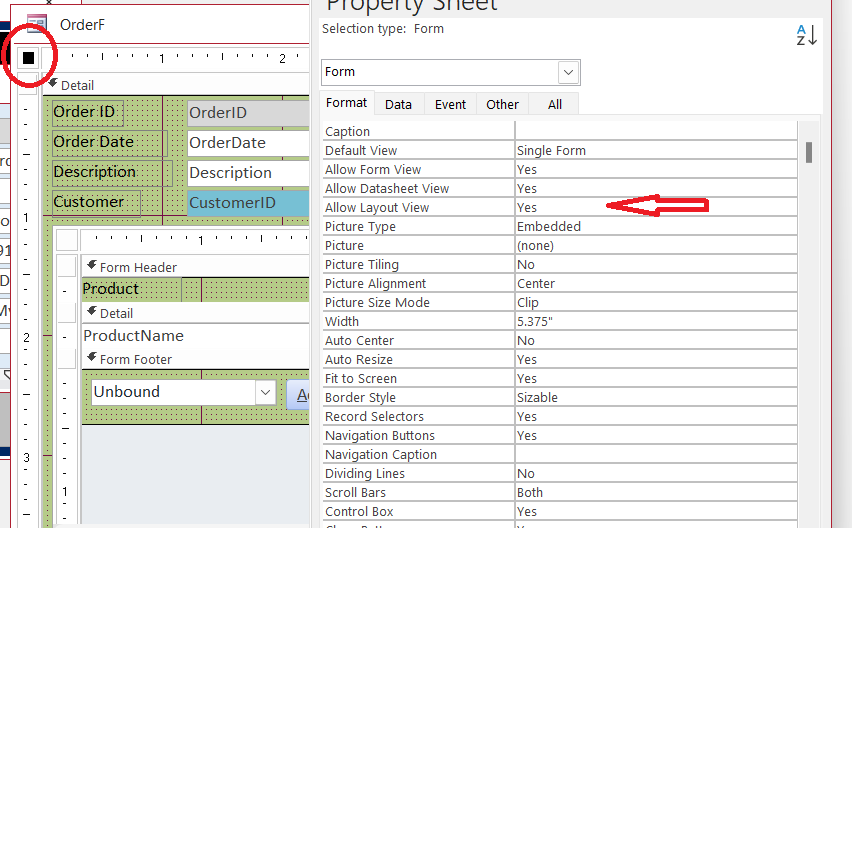
I usually turn off the Layout View because I constantly hit the wrong thing.  The pic above shows how.  In the properties for the form choose the Format Tab.  Set Layout to no.
You can always turn it back on if you need it.
Kevin Robertson  @Reply  
          
3 years ago
Yeah, I always turn that off as well.
I only turn it on again when I need it (usually to position my labels over the columns of a List Box).
Scott Axton  @Reply  
        
3 years ago
OK so i have to tell you I got a good chuckle out of the OP.
In the last line you said the field doe snot - and I read it as "Doe Snot"  I'm thinking why the heck would someone name a field that?  It was then I realized you meant  does not.

Been way to long of a day.  Time for bed.
Lee Shastid OP  @Reply  
    
3 years ago
How are you getting screen shots to appear? I have tried the snipping tool and cut and paste.
Adam Schwanz  @Reply  
           
3 years ago
Lee Shastid OP  @Reply  
    
3 years ago

Lee Shastid OP  @Reply  
    
3 years ago

Lee Shastid OP  @Reply  
    
3 years ago

Lee Shastid OP  @Reply  
    
3 years ago
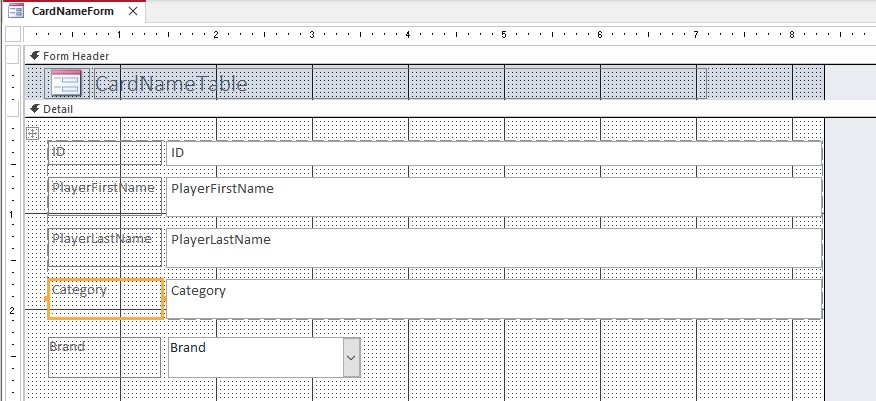
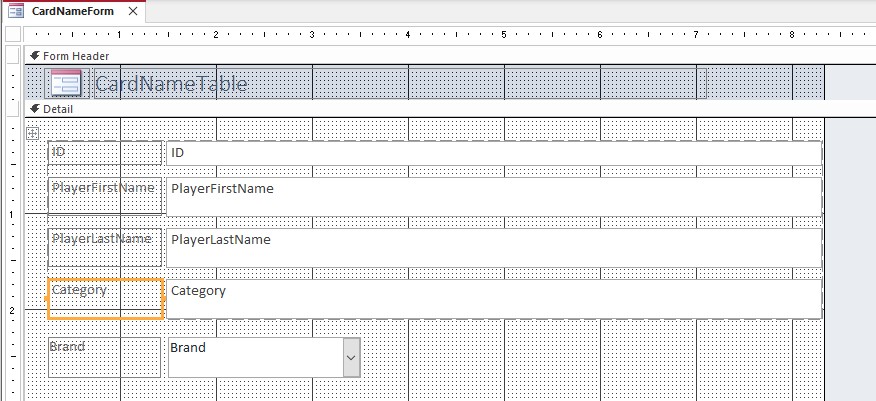
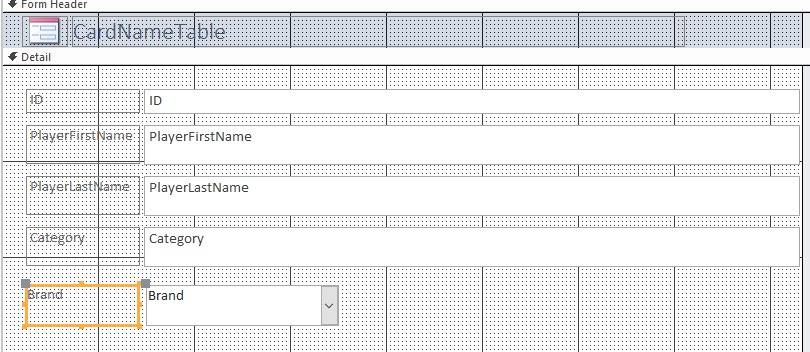
The one on the bottom is where I got it to work but that is not the placement that I want and the top the yellow outline boxes cant be moved around. The one on bottom actually shows the drop down box and the entries I made however it will populate to the table that way.
Adam Schwanz  @Reply  
           
3 years ago
You're using form instead of form design. Form is like a premade outline setup.
Scott Axton  @Reply  
        
3 years ago
Lee you definitely had it in Layout View (designing the form) or created it using the Form button on the menu bar.  This is indicated by the dashed line and the little greyed out + right next to ID. (first picture)
Layout is NOT meant for editing data at ALL.  It only serves to show you what your form looks like with actual data in it instead of the field names.  Layout is known to cause issues so best to use it very sparingly.  
Like I mentioned above I actually recommend turning it off.

To remove the layout go into DESIGN mode.  Select all of your objects.  
The easiest way is to click in the far left of the Ruler bar on top.  Hold and drag to the Right.  Everything should be selected.
On the menu click Arrange.  Then click the button that says Remove Layout.  Save and close the form.
Lee Shastid OP  @Reply  
    
3 years ago
Scott
Oh how funny the things we catch in others typing.....Okay I think I got what you are saying. That was just a small form i quickly done the actual one will have more data fields in it. I am choosing Design View but that's what I get but I know the way out of it now. Stay tuned. Thank you
Lee Shastid OP  @Reply  
    
3 years ago
Scott
All that worked like you said. It saved it but it still is not carrying it over the table side.
Lee Shastid OP  @Reply  
    
3 years ago
Alright ALL. Thank you for the help. The combo boxes have defeated me. I am going back to Excel with my sports cards. The white flag is waving. Thank you

This thread is now CLOSED. If you wish to comment, start a NEW discussion in Access Forum.
 

Next Unseen

 
New Feature: Comment Live View


The following is a paid advertisement
Computer Learning Zone is not responsible for any content shown or offers made by these ads.
 

Learn
 
Access - index
Excel - index
Word - index
Windows - index
PowerPoint - index
Photoshop - index
Visual Basic - index
ASP - index
Seminars
More...
Customers
 
Login
My Account
My Courses
Lost Password
Memberships
Student Databases
Change Email
Info
 
Latest News
New Releases
User Forums
Topic Glossary
Tips & Tricks
Search The Site
Code Vault
Collapse Menus
Help
 
Customer Support
Web Site Tour
FAQs
TechHelp
Consulting Services
About
 
Background
Testimonials
Jobs
Affiliate Program
Richard Rost
Free Lessons
Mailing List
PCResale.NET
Order
 
Video Tutorials
Handbooks
Memberships
Learning Connection
Idiot's Guide to Excel
Volume Discounts
Payment Info
Shipping
Terms of Sale
Contact
 
Contact Info
Support Policy
Mailing Address
Phone Number
Fax Number
Course Survey
Email Richard
[email protected]
Blog RSS Feed    YouTube Channel

LinkedIn
Copyright 2026 by Computer Learning Zone, Amicron, and Richard Rost. All Rights Reserved. Current Time: 5/6/2026 9:22:19 PM. PLT: 0s