Free Lessons
Courses
Seminars
TechHelp
Fast Tips
Templates
Topic Index
Forum
ABCD
 
Home   Courses   TechHelp   Forums   Help   Contact   Merch   Join   Order   Logon  
 
Back to Access Developer Forum    Comments List
Upload Images   @Reply   Bookmark    Link   Email   Next Unseen 
Prevent SQL Injection
Brian Crawford 
    
3 years ago
I have a Sub that imports an Excel spreadsheet that is produced by an export from another application.  Today, my DB got corrupted when one of the records contained a quote character (can't remember whether single or double quote).

As an example the customer name was like
    John "Jack" Smith
    or
   John 'Jack' Smith

This made the import VBA code that used SQL to blow up.  It threw a runtime error 3075 like:m"Syntax error (missing operator) in query expression "John ','Text',",','...

This was an incidental error, but raises the possibility of getting a malicious SQL injection attack that could have done worse things than corrupt the single record.  How do I best prevent this?
Kevin Yip  @Reply  
     
3 years ago
If your app only runs locally, there is less of a concern for online malicious SQL injection, unless you suspect your local users could do it.  Access is traditionally used in local environments, so there is little safeguard for this, unlike more modern tools like Visual Studio, Power Apps, etc.  For instance, Power Apps doesn't even use SQL to run queries.  In Visual Studio, SQL string concatenation is disallowed, because that is often how SQL injection is done.

One way to prevent SQL injection is to avoid using string concatenation to form SQL statements.  E.g.:

     SELECT * FROM Table1 WHERE ID = " & UserEntry

Even a simple statement like this is not safe.  If a user enters this in a textbox on a form:

     123 OR True

The SQL becomes:

     SELECT * FROM Table1 WHERE ID = 123 OR True

which will LIST EVERYTHING in the table, because the user entry is mistakenly treated as part of the code.

To prevent this, you use a parameter query:

     SELECT * FROM Table1 WHERE ID = [UserEntry]

This way, [UserEntry] is always treated as a literal value, and is never confused as part of the code.
Brian Crawford OP  @Reply  
    
3 years ago
Mr. ChatGPT recommends using a "parameterized SQL query" to prevent SQL injection attacks.  I had never heard of this before, and could not find any videos or other docs on this site.  Does anyone else have experience with parameterized SQL queries?

This was sample code that ChatGPT provided, but I have to admit I am not following how this works.  Might be a good video idea ;-)

DetailsDim strSQL As String
Dim MyText As String
Dim Field1 As String
Dim Field2 As Integer
Dim Field3 As Date
Dim Field4 As Double
Dim Field5 As Long

' Assuming you have values for each field.
MyText = "This is a text with double quotes: ""Quoted Text""."
Field1 = "Value1"
Field2 = 42
Field3 = DateValue("2023-09-21")
Field4 = 3.14
Field5 = 12345

' Create a parameterized SQL query.
strSQL = "INSERT INTO MyTable (MyField, Field1, Field2, Field3, Field4, Field5) " & _
         "VALUES (?, ?, ?, ?, ?, ?)"

' Create a Command object and set the parameters.
Dim cmd As Object
Set cmd = CreateObject("ADODB.Command")
cmd.ActiveConnection = CurrentProject.Connection
cmd.CommandText = strSQL

' Add parameters for each field and specify their data types.
Dim param As Object

' MyField (assuming it's a string)
Set param = cmd.CreateParameter("Param1", adVarWChar, adParamInput, Len(MyText), MyText)
cmd.Parameters.Append param

' Field1 (assuming it's a string)
Set param = cmd.CreateParameter("Param2", adVarWChar, adParamInput, Len(Field1), Field1)
cmd.Parameters.Append param

' Field2 (assuming it's an integer)
Set param = cmd.CreateParameter("Param3", adInteger, adParamInput, , Field2)
cmd.Parameters.Append param

' Field3 (assuming it's a date)
Set param = cmd.CreateParameter("Param4", adDate, adParamInput, , Field3)
cmd.Parameters.Append param

' Field4 (assuming it's a double)
Set param = cmd.CreateParameter("Param5", adDouble, adParamInput, , Field4)
cmd.Parameters.Append param

' Field5 (assuming it's a long)
Set param = cmd.CreateParameter("Param6", adBigInt, adParamInput, , Field5)
cmd.Parameters.Append param

' Execute the query.
cmd.Execute

' Clean up.
Set cmd = Nothing

Kevin Yip  @Reply  
     
3 years ago
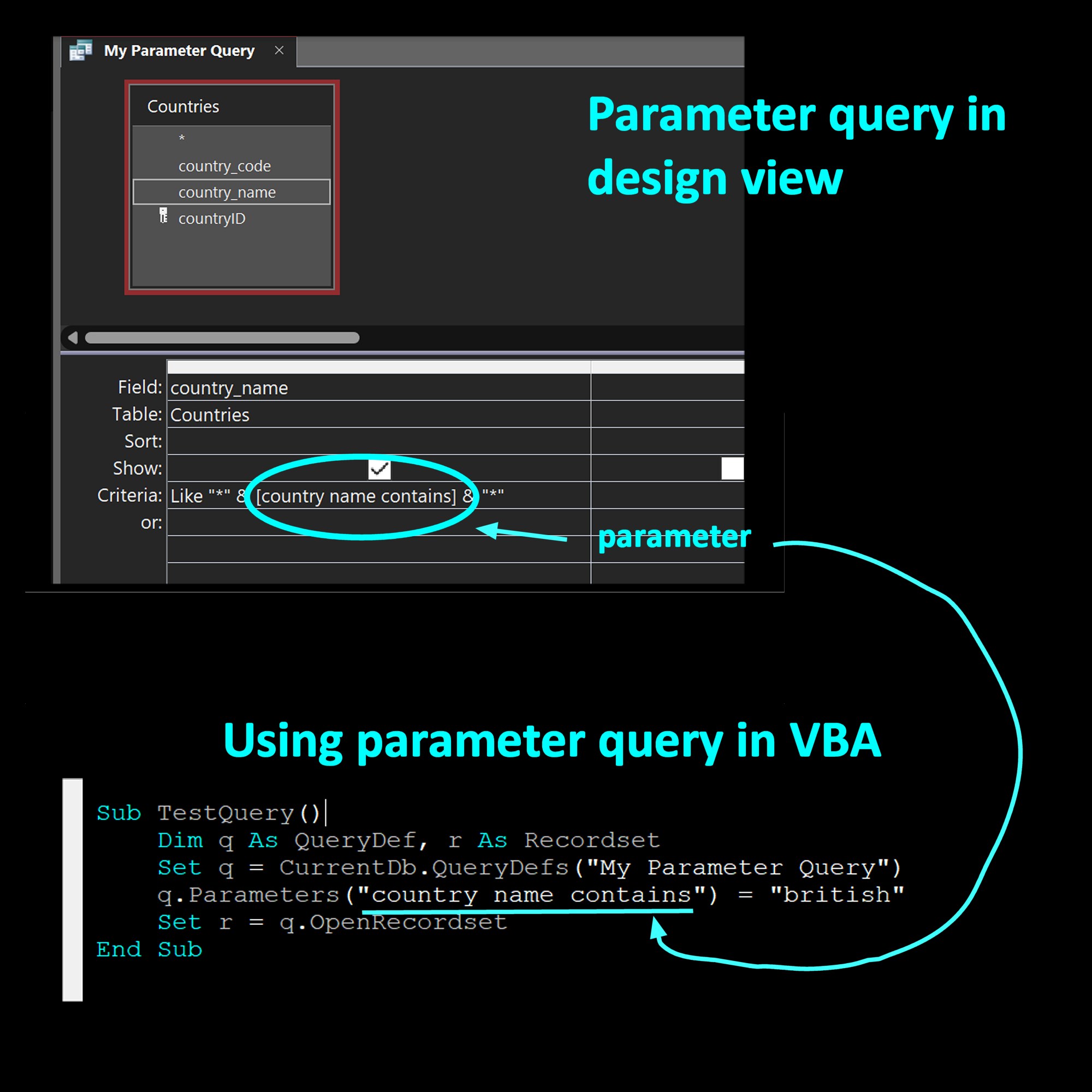
A "parameterized SQL query" is the same thing I mentioned in my earlier post, a parameter query, which this site should have videos for.  The code ChatGPT gave you is for non-Access environment.  In Access VBA, you use different code to form a parameter query, as shown in the picture below.
Kevin Yip  @Reply  
     
3 years ago

Richard Rost  @Reply  
           
2 years ago
I haven't had much of a problem with this in Access. It's a BIG issue on websites. I've got this on my list for a future video topic. Thanks for the great explanation, Kevin.
Brian Crawford OP  @Reply  
    
2 years ago
An example use case that could fix into your training narratives could be something like this:

Image you have a data source that provides updated POCs names for customers the database.  Assume this data comes from an external system or a provider in an Excel file.  Also assume that it can provide you with a customerID, FirstNamePOC, MiddleNamePOC, and LastNamePOC.
One of the POCs is: Montgomery Scott, who goes by the name "Scotty".  The Excel lists the FirstName as:
     Montgomery "Scotty"
If a SQL UPDATE query tries to process this, the quote marks will cause the SQL to fail.  The solution would need to be able to find the escape character (the quote) and encapsulate it so that it is not interpreted by SQL as an end of string.
Kevin Yip  @Reply  
     
2 years ago
That would fail even there were no attempts at code injection.  Code injection would count on the SQL to *not fail*, but instead execute differently from what the developer intended.  Code injection would not need quotes, as shown in my example above, where the user enters "123 OR True" (no quotes) and ruins the SQL.  Preventing that would need a whole lot of coding, or replacing string concatenation with a parameterized SQL system.

This thread is now CLOSED. If you wish to comment, start a NEW discussion in Access Developer Forum.
 

Next Unseen

 
New Feature: Comment Live View


The following is a paid advertisement
Computer Learning Zone is not responsible for any content shown or offers made by these ads.
 

Learn
 
Access - index
Excel - index
Word - index
Windows - index
PowerPoint - index
Photoshop - index
Visual Basic - index
ASP - index
Seminars
More...
Customers
 
Login
My Account
My Courses
Lost Password
Memberships
Student Databases
Change Email
Info
 
Latest News
New Releases
User Forums
Topic Glossary
Tips & Tricks
Search The Site
Code Vault
Collapse Menus
Help
 
Customer Support
Web Site Tour
FAQs
TechHelp
Consulting Services
About
 
Background
Testimonials
Jobs
Affiliate Program
Richard Rost
Free Lessons
Mailing List
PCResale.NET
Order
 
Video Tutorials
Handbooks
Memberships
Learning Connection
Idiot's Guide to Excel
Volume Discounts
Payment Info
Shipping
Terms of Sale
Contact
 
Contact Info
Support Policy
Mailing Address
Phone Number
Fax Number
Course Survey
Email Richard
[email protected]
Blog RSS Feed    YouTube Channel

LinkedIn
Copyright 2026 by Computer Learning Zone, Amicron, and Richard Rost. All Rights Reserved. Current Time: 4/30/2026 11:58:29 AM. PLT: 1s