Free Lessons
Courses
Seminars
TechHelp
Fast Tips
Templates
Topic Index
Forum
ABCD
 
Home   Courses   TechHelp   Help   Contact   Merch   Join   Order   Logon   Forums   
 
Back to Access Forum    Comments List
Upload Images   @Reply   Bookmark    Link   Email   Next Unseen 
Export Form Records to Excel
Chuck Duarte 

3 years ago
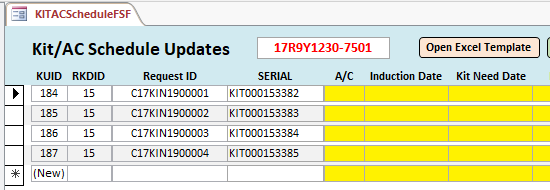
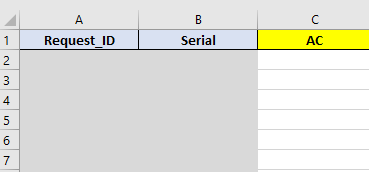
I've been trying to export form records to excel specifically 2 data fields "Request_ID" and "Serial". I have a blank spreadsheet with the same headers that I use as a template. I tried to export directly from the form but not sure if the record source local query isn't allowing it:

SELECT KitUpdates.KitUpdateID, KitUpdates.RKDID, RKD.RKDConfig, KitUpdates.Request_ID, BOXI_RawDataImport.SERIAL, KitUpdates.ACNo, KitUpdates.InductionDate, KitUpdates.KitNeedDate, KitUpdates.FinalDDD, KitUpdates.RMComments
FROM RKD INNER JOIN (KitUpdates INNER JOIN BOXI_RawDataImport ON KitUpdates.Request_ID = BOXI_RawDataImport.REQUEST_ID) ON RKD.RKDID = KitUpdates.RKDID;


Not sure if because the data is coming from 2 tables for "Request_ID" and "Serial" that is causing the issue?

The form name is KITACScheduleFSF with all records (KITUpdates = KUID label) relate to "RKDID" See Pic

The excel file should display data from the form "See Pic" the excel file has headers already contained for the end user

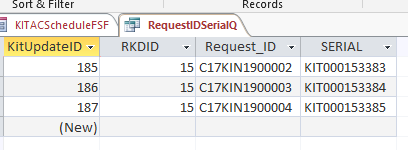
I did create a query with the same data "See Pic" in case that's an option to use here is the SQL:

SELECT KitUpdates.KitUpdateID, KitUpdates.RKDID, KitUpdates.Request_ID, BOXI_RawDataImport.SERIAL
FROM KitUpdates INNER JOIN BOXI_RawDataImport ON KitUpdates.Request_ID = BOXI_RawDataImport.REQUEST_ID;


This is what the code basically does. It opens the template "AC Schedule.slsx" then adds the data from the form then renames it and saves it to a different folder. Most works fine except for exporting the data to Excel

The code as shown is my attempt to call the query "RequestIDSerialQ" I'm sure there is a better way:


code
Sub OpenSpecific_xlFile()
    ' Late Binding (Needs no reference set)
    Dim oXL As Object
    Dim oExcel As Object
    Dim sFullPath As String
    Dim sPath As String
    Dim newFileName As String ' New filename
    
    ' Create a new Excel instance
    Set oXL = CreateObject("Excel.Application")
    
    ' Only XL 97 supports UserControl Property
    On Error Resume Next
    oXL.UserControl = True
    On Error GoTo 0
    
    ' Full path of excel file to open
    On Error GoTo ErrHandle
    sFullPath = "C:\Users\c365335\Desktop\Kit Status N Shipping DB\Template\AC Schedule.xlsx"
    '"\\NOS\Data\Retrofit_Kits\Template\AC Schedule.xlsx"
    
    ' Open it
    With oXL
        .Visible = True
        .Workbooks.Open (sFullPath)
        
        ' Collect the new filename from form fields (adjust these lines based on your form fields)
        newFileName = Me.RKDID.Value & "_" & Me.RKDConfig.Value & "_" & "AC_Schedule" & ".xlsx"

   Call ExportToExcel

    .ActiveWorkbook.SaveAs "C:\Users\c365335\Desktop\Kit Status N Shipping DB\RKD AC Schedules\" & newFileName
        '"\\NOS\Data\Retrofit_Kits\RKD AC Schedules\" & newFileName
    End With
    
ErrExit:
    Set oXL = Nothing
    Exit Sub
    
ErrHandle:
    oXL.Visible = False
    MsgBox Err.DESCRIPTION
    GoTo ErrExit
End Sub


Sub ExportToExcel()
    ' Obtain the RKDID value for the active form (you should replace "YourControlName" with the actual control or variable)
    Dim RKDID As Long
    RKDID = Forms!KITACScheduleFSF!RKDID
    
    ' Modify the SQL query to include a WHERE clause that filters records based on the RKDID
    Dim strSQL As String
    strSQL = "SELECT Request_ID, SERIAL FROM RequestIDSerialQ WHERE RKDID = " & RKDID
    
    ' Export the filtered records to an Excel file
    DoCmd.OutputTo acOutputQuery, "RequestIDSerialQ", acFormatXLSX, "newFileName", False, "", , acExportQualityPrint
    
    ' Optionally, open the exported Excel file
    ' Shell "C:\Path\To\Your\Excel\File.xlsx", vbNormalFocus


Chuck Duarte OP  @Reply  

3 years ago

Chuck Duarte OP  @Reply  

3 years ago

Chuck Duarte OP  @Reply  

3 years ago

Scott Axton  @Reply  
      
3 years ago
Did you happen to watch the Export to Excel yet?
Fairly new and it seems like it would be more simple.
Chuck Duarte OP  @Reply  

3 years ago
yes I did but its using the export function I don't want the user to use that. I need it to pass 2 fields automatically to an Excel template I have where other data has to take place then they can add their completed data to the form. I also watched the Automated Export of Data to excel that has the docmd.OutputTo method but that one is passing everything. I couldn't figure out how to pass only 2 fields. The records that I need to pass could just be a couple or up to 30+.

This thread is now CLOSED. If you wish to comment, start a NEW discussion in Access Forum.
 

Next Unseen

 
New Feature: Comment Live View


The following is a paid advertisement
Computer Learning Zone is not responsible for any content shown or offers made by these ads.
 

Learn
 
Access - index
Excel - index
Word - index
Windows - index
PowerPoint - index
Photoshop - index
Visual Basic - index
ASP - index
Seminars
More...
Customers
 
Login
My Account
My Courses
Lost Password
Memberships
Student Databases
Change Email
Info
 
Latest News
New Releases
User Forums
Topic Glossary
Tips & Tricks
Search The Site
Code Vault
Collapse Menus
Help
 
Customer Support
Web Site Tour
FAQs
TechHelp
Consulting Services
About
 
Background
Testimonials
Jobs
Affiliate Program
Richard Rost
Free Lessons
Mailing List
PCResale.NET
Order
 
Video Tutorials
Handbooks
Memberships
Learning Connection
Idiot's Guide to Excel
Volume Discounts
Payment Info
Shipping
Terms of Sale
Contact
 
Contact Info
Support Policy
Mailing Address
Phone Number
Fax Number
Course Survey
Email Richard
[email protected]
Blog RSS Feed    YouTube Channel

LinkedIn
Copyright 2026 by Computer Learning Zone, Amicron, and Richard Rost. All Rights Reserved. Current Time: 8/24/2026 9:28:45 AM. PLT: 1s