Free Lessons
Courses
Seminars
TechHelp
Fast Tips
Templates
Topic Index
Forum
ABCD
 
Home   Courses   TechHelp   Forums   Help   Contact   Merch   Join   Order   Logon  
 
Back to Access Forum    Comments List
Upload Images   @Reply   Bookmark    Link   Email   Next Unseen 
Exporting data from Excel
Chuck Duarte 

3 years ago
I'm having an issue getting specific data from Excel to import into a form. The problem I think is that it's not looping thru the rows in the worksheet. It only displays the first data row  first row contains the data header. I'm matching the Request_ID on both the form and worksheet in order to pass the data from the spreadsheet. Request_ID is NOT a key it's just information from an external system that is manually put in the DB.

This is my code:


Code
Dim xlApp As Object
Dim xlWorkbook As Object
Dim xlWorksheet As Object
Dim db As DAO.Database
Dim rs As DAO.Recordset
Dim strSQL As String
Dim rowNum As Integer
Dim REQUEST_ID As Variant
Dim lastRow As Long
'Dim strRequestID As String ' Variable to store the Request_ID from the Access form

' Open the Excel workbook and worksheet
Set xlApp = CreateObject("Excel.Application")
Set xlWorkbook = xlApp.Workbooks.Open("C:\Users\c365335\Desktop\Kit Status N Shipping DB\RKD AC Schedules\" & Me.RKDID.Value & "_" & Me.RKDConfig.Value & "_" & "AC_Schedule" & ".xlsx")
Set xlWorksheet = xlWorkbook.Worksheets("Sheet1") ' Replace "Sheet1" with the name of your worksheet

' Retrieve the Request_ID from the Access form
'strRequestID = Me.REQUEST_ID.Value

' Retrieve the data from the Excel worksheet
Set db = CurrentDb()
Set rs = db.OpenRecordset("SELECT * FROM [KitUpdates] WHERE [Request_ID]='" & Me.REQUEST_ID.Value & "'")

rowNum = 2 ' Start with the first row of data

' Loop through the rows in the Excel worksheet
Do Until rowNum > xlWorksheet.UsedRange.Rows.Count
    ' Retrieve data from Excel and assign it to form controls
    REQUEST_ID = xlWorksheet.Cells(rowNum, 3).Value

    If Not IsNull(REQUEST_ID) And REQUEST_ID <> "" Then
Set rs = db.OpenRecordset("SELECT * FROM [KitUpdates] WHERE [Request_ID]='" & xlWorksheet.Cells(rowNum, 3) & "'")
        ' Rest of your data processing code
    Else
        ' Handle the case where REQUEST_ID is empty or null
    End If

    rowNum = rowNum + 1 ' Move to the next row
Loop

' Separate loop for updating form controls and executing SQL commands
rowNum = 2 ' Reset rowNum to the beginning of the data

Do Until rowNum > xlWorksheet.UsedRange.Rows.Count
    Me.ACNo.Value = xlWorksheet.Cells(rowNum, 5) ' Replace 1 with the appropriate column number
    Me.InductionDate = xlWorksheet.Cells(rowNum, 6)
    Me.KitNeedDate = xlWorksheet.Cells(rowNum, 7)
    Me.FinalDDD = xlWorksheet.Cells(rowNum, 8)
    Me.RMComments.Value = xlWorksheet.Cells(rowNum, 9)
    
    ' Update the KitUpdates table with the new data
    strSQL = "UPDATE KitUpdates SET AC='" & Me.ACNo.Value & "', [Induction Date]='" & Me.InductionDate & "', [Kit Need Date]='" & Me.KitNeedDate & "', [Final DDD]='" & Me.FinalDDD & "', [RM Comments]='" & Me.RMComments.Value & "' WHERE [Request_ID]=" & xlWorksheet.Cells(rowNum, 3).Value & ";"
    
    Debug.Print strSQL
    db.Execute strSQL
    
    rowNum = rowNum + 1 ' Move on to the next row
Loop

xlWorkbook.Close ' Close the Excel workbook
xlApp.Quit ' Quit the Excel application
Set xlWorksheet = Nothing
Set xlWorkbook = Nothing
Set xlApp = Nothing

rs.Close ' Close the recordset
Set rs = Nothing
Set db = Nothing


This is what I get in the immediate window from a Debug.Print
UPDATE KitUpdates SET AC='P020', [Induction Date]='12/15/2023', [Kit Need Date]='11/15/2023', [Final DDD]='1/19/2024', [RM Comments]='Test 1' WHERE [Request_ID]=C17KIN1900001;

This data is correct for the first row of data only of the spreadsheet
Chuck Duarte OP  @Reply  

3 years ago

Chuck Duarte OP  @Reply  

3 years ago

Kevin Yip  @Reply  
     
3 years ago
Request_ID is text, so it needs to be enclosed with quotes in the SQL.
Chuck Duarte OP  @Reply  

3 years ago
When I enclosed "Request_ID" in quotes it didn't like it and turned the line red.
Kevin Yip  @Reply  
     
3 years ago
Use quotes for the text value, not the field name.

Instead of this:     WHERE [Request_ID]=C17KIN1900001
It should be this:   WHERE [Request_ID]='C17KIN1900001'
Chuck Duarte OP  @Reply  

3 years ago
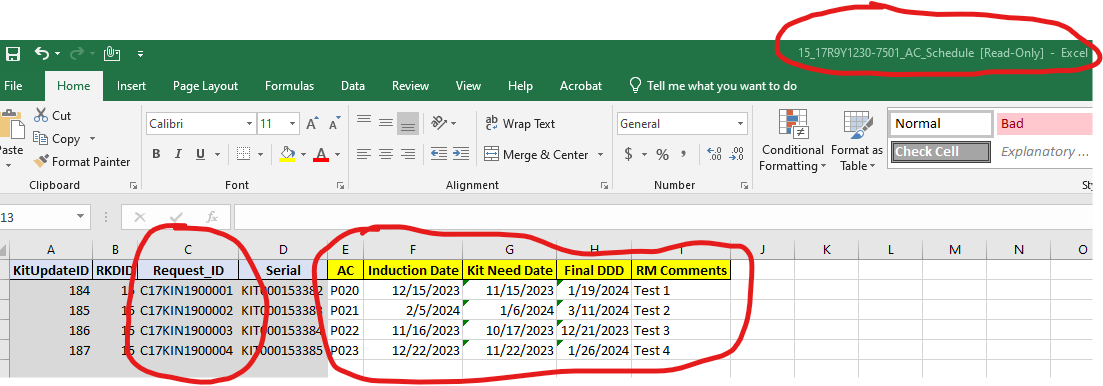
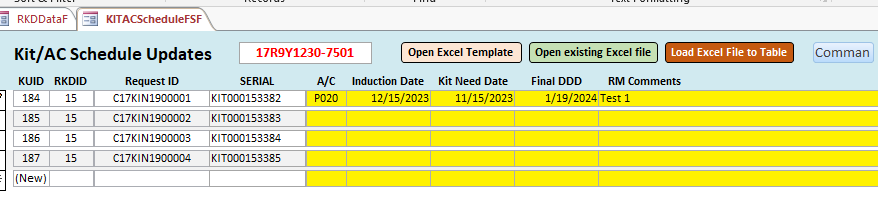
Kevin, Sorry maybe I didn't explain it effectively.  I'm not only looking for C17KIN1900001 that was just an example of what was being returned when I did the Debug.Print and what was being passed from the worksheet to the form. There are many Request_IDs on the worksheet that pertain to the current form main record. Reference the pics so you can see an example of what needs to pass from the worksheet to the form. The problem is I can't get it to loop thru the worksheet rows to pass the data. Hope that helps thanks.
Alex Hedley  @Reply  
           
3 years ago
Change this to wrap the value in quotes:
& "' WHERE [Request_ID]=" & xlWorksheet.Cells(rowNum, 3).Value & ";"

& "' WHERE [Request_ID]='" & xlWorksheet.Cells(rowNum, 3).Value & "';"

You might also want to look at {Double Double Quotes.}
Chuck Duarte OP  @Reply  

3 years ago
Alex I tried both ways and got the results in the immediate window as such:
WHERE [Request_ID]='C17KIN1900001';
WHERE [Request_ID]=" & xlWorksheet.Cells(rowNum, 3).Value & ";
it did pass the first data row in bot cases to the form.
I am getting a Run-Time Error 3061: Too few parameters. Expected 5 with db.Execute strSQL highlighted; when I tried both ways. However when I returned it back to the way I ordinally had it I got the same Runtime error but got Expected 6 with db.Execute strSQL highlighted.
So not sure if there is something wrong with that whole row; but it does pass the first row that's the confusing part.
Alex Hedley  @Reply  
           
3 years ago
Can you create a hardcoded UPDATE Query and check if that works first.
Chuck Duarte OP  @Reply  

3 years ago
I can get it to work the DoCmd.TransferSpreadsheet to a temp table then doing an Update Query to update the main table. Not sure why it's been so difficult been trying various ways for the past 2 weeks. I was trying to avoid making more queries. I also have a delete query to remove blank rows that are created when transferring the spreadsheet; Not sure why it does that since no blank rows exist before the data.
Alex Hedley  @Reply  
           
3 years ago
It's just a temporary measure.
Break the problem down into steps and get each working one at a time.
Chuck Duarte OP  @Reply  

3 years ago
ok thanks for the advise

This thread is now CLOSED. If you wish to comment, start a NEW discussion in Access Forum.
 

Next Unseen

 
New Feature: Comment Live View


The following is a paid advertisement
Computer Learning Zone is not responsible for any content shown or offers made by these ads.
 

Learn
 
Access - index
Excel - index
Word - index
Windows - index
PowerPoint - index
Photoshop - index
Visual Basic - index
ASP - index
Seminars
More...
Customers
 
Login
My Account
My Courses
Lost Password
Memberships
Student Databases
Change Email
Info
 
Latest News
New Releases
User Forums
Topic Glossary
Tips & Tricks
Search The Site
Code Vault
Collapse Menus
Help
 
Customer Support
Web Site Tour
FAQs
TechHelp
Consulting Services
About
 
Background
Testimonials
Jobs
Affiliate Program
Richard Rost
Free Lessons
Mailing List
PCResale.NET
Order
 
Video Tutorials
Handbooks
Memberships
Learning Connection
Idiot's Guide to Excel
Volume Discounts
Payment Info
Shipping
Terms of Sale
Contact
 
Contact Info
Support Policy
Mailing Address
Phone Number
Fax Number
Course Survey
Email Richard
[email protected]
Blog RSS Feed    YouTube Channel

LinkedIn
Copyright 2026 by Computer Learning Zone, Amicron, and Richard Rost. All Rights Reserved. Current Time: 5/6/2026 11:23:44 AM. PLT: 0s