Free Lessons
Courses
Seminars
TechHelp
Fast Tips
Templates
Topic Index
Forum
ABCD
 
Home   Courses   TechHelp   Forums   Help   Contact   Merch   Join   Order   Logon  
 
Back to Access Forum    Comments List
Upload Images   @Reply   Bookmark    Link   Email   Next Unseen 
Multiple Department
Kashif Bakkar 
   
3 years ago
Dear Richard,

I am creating a database for my architectural design studio, where we offer services mainly in two departments; namely designing and project management. I want to keep them in a single project table but I am confused how to generate an incremental project code for each department. Please Help!

Thanks and Regards
Kevin Robertson  @Reply  
          
3 years ago
Kashif Bakkar OP  @Reply  
   
3 years ago
Thanks! I have seen these videos previously also but not able to figure out the correct way to do so! I will watch them again!
Juan C Rivera  @Reply  
            
3 years ago
Try a combination of customer code and Letters....  D and P followed by a number.  what do you think?  Kevin is on the money just got to think outside of the box.
Kashif Bakkar OP  @Reply  
   
3 years ago
Dear Juan

Could you please explain me how to assign these Letters automatically to a field?
Juan C Rivera  @Reply  
            
3 years ago
Well nothing is automatic you need to set it up I do a combo box with D and P then when the customer code generates copy both the combo and customer code to your field. If you set it up to execute after update then make your combo and customercode unbound
combo P + customer code
txtfield = DepartmentCombo & CustomerCode

Value List Combo  This link will show you how to set up the combo box

Concatenation this will show you how to concatenat the fields

Get a Value from an Open Form Field

I think this will help if not let me know.  

V/r
Juan
Kevin Yip  @Reply  
     
3 years ago
Hi Kashif, I think the "Sequential Annual Coding" video Juan mentioned should tell you everything you need.  If you want Dept A's project numbers to be A0001, A0002, etc., and Dept B's project nums to be B0001, B0002, etc., and so on, then just substitute the years used in Richard's video with A, B, etc.  These videos don't tell you exactly what you need.  You need to be able to adapt the ideas from these videos to your exact specifications.
Kashif Bakkar OP  @Reply  
   
3 years ago

Kevin Robertson  @Reply  
          
3 years ago
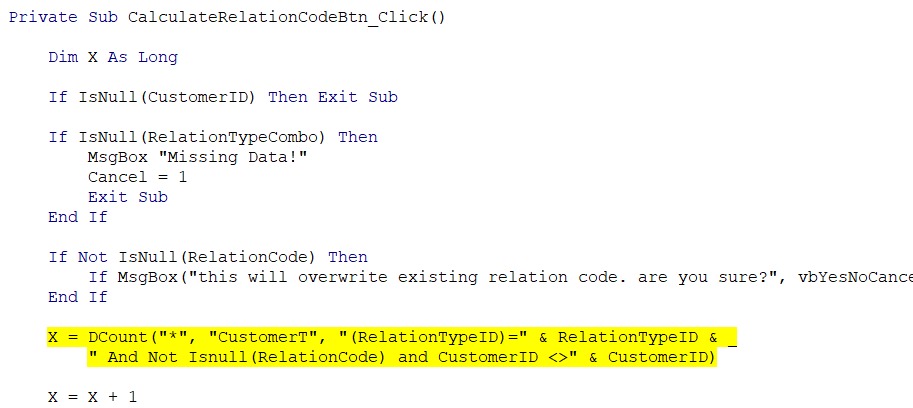
You are missing a space before you And (second line).
Kashif Bakkar OP  @Reply  
   
3 years ago
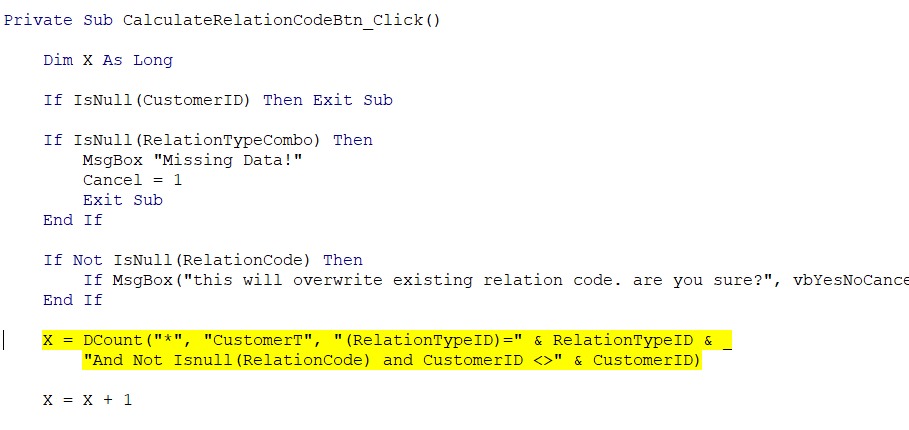
can you please let me know what am I doing wrong? I tried to fill a data in a combo box and trying to generate a relation code.

also in another code I tried saving a text field from the value box. and then trying to concatenate with a value of the customer code but wasn't successful there as well.

Kindly help
Kashif Bakkar OP  @Reply  
   
3 years ago

Kashif Bakkar OP  @Reply  
   
3 years ago
@Kevin Robertson did the space still no luck!
Kevin Robertson  @Reply  
          
3 years ago
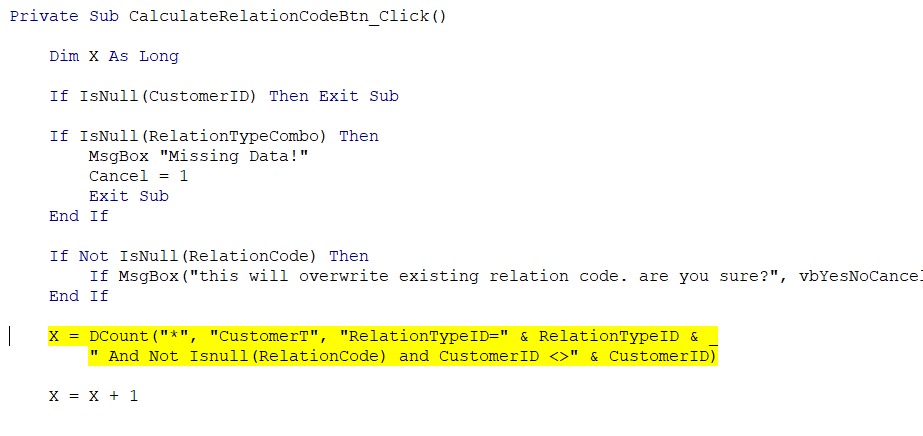
Remove the parentheses from RelationTypeID.
Kashif Bakkar OP  @Reply  
   
3 years ago

Alex Hedley  @Reply  
           
3 years ago
Current SQL for ref:
X = DCount("*", "CustomerT", "RelationTypeID=" & RelationTypeID & " And Not IsNull(RelationCode) and CustomerID <>" & CustomerID)
Alex Hedley  @Reply  
           
3 years ago
If you harcode some values does it work?

X = DCount("*", "CustomerT", "RelationTypeID=1 And Not IsNull(RelationCode) and CustomerID <> 2")

Replace 1 and 2 with values that exist in your db.
Kashif Bakkar OP  @Reply  
   
3 years ago
yes that works but I need options to compare them with multiple option
Alex Hedley  @Reply  
           
3 years ago
Can you print the variables so you know they are correct before being passed to the DCOUNT.
Kashif Bakkar OP  @Reply  
   
3 years ago
sorry I did not understand what you meant!
Alex Hedley  @Reply  
           
3 years ago
Debug.Print RelationTypeID
Debug.Print CustomerID

or

MsgBox RelationTypeID
MsgBox CustomerID

This thread is now CLOSED. If you wish to comment, start a NEW discussion in Access Forum.
 

Next Unseen

 
New Feature: Comment Live View


The following is a paid advertisement
Computer Learning Zone is not responsible for any content shown or offers made by these ads.
 

Learn
 
Access - index
Excel - index
Word - index
Windows - index
PowerPoint - index
Photoshop - index
Visual Basic - index
ASP - index
Seminars
More...
Customers
 
Login
My Account
My Courses
Lost Password
Memberships
Student Databases
Change Email
Info
 
Latest News
New Releases
User Forums
Topic Glossary
Tips & Tricks
Search The Site
Code Vault
Collapse Menus
Help
 
Customer Support
Web Site Tour
FAQs
TechHelp
Consulting Services
About
 
Background
Testimonials
Jobs
Affiliate Program
Richard Rost
Free Lessons
Mailing List
PCResale.NET
Order
 
Video Tutorials
Handbooks
Memberships
Learning Connection
Idiot's Guide to Excel
Volume Discounts
Payment Info
Shipping
Terms of Sale
Contact
 
Contact Info
Support Policy
Mailing Address
Phone Number
Fax Number
Course Survey
Email Richard
[email protected]
Blog RSS Feed    YouTube Channel

LinkedIn
Copyright 2026 by Computer Learning Zone, Amicron, and Richard Rost. All Rights Reserved. Current Time: 5/7/2026 6:23:44 AM. PLT: 0s