Free Lessons
Courses
Seminars
TechHelp
Fast Tips
Templates
Topic Index
Forum
ABCD
 
Home   Courses   TechHelp   Forums   Help   Contact   Merch   Join   Order   Logon  
 
Back to Access Developer Forum    Comments List
Upload Images   @Reply   Bookmark    Link   Email   Next Unseen 
Multi Column Crosstab Query
Sami Shamma 
             
3 years ago
Good morning friend

Is there an easy way to have 2 column CrossTab query?
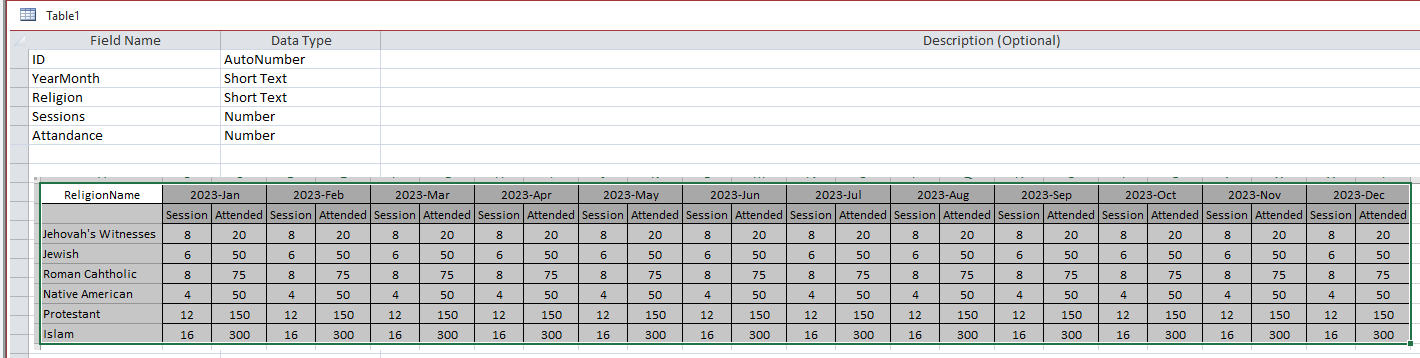
I have simple data as follows (also see image below):
- YearMonth across the top
- Religion down
I want to show 2 values under each YearMonth Sum(Sessions) & Sum(Attended)

Thanks

Sami Shamma OP  @Reply  
             
3 years ago

Sami Shamma OP  @Reply  
             
3 years ago
I do not need the second column heading, just to clarify my point.
Kevin Yip  @Reply  
     
3 years ago
To do that in Access, your crosstab query has to create separate columns such as Jan-2023 Sessions, Jan-2023 Attended, Feb-2023 Sessions, Feb-2023 Attended, and so on.  There is no way to have a column header that "merges" two columns.  In Excel, you can merge cells, but not in Access.
Sami Shamma OP  @Reply  
             
3 years ago
Good morning Kevin

Thank you for responding. I actually want to do what you suggested. I am not warried about cell merge of the collum headings. I just cannot finger out how to get two columns in the query.
Sami Shamma OP  @Reply  
             
3 years ago
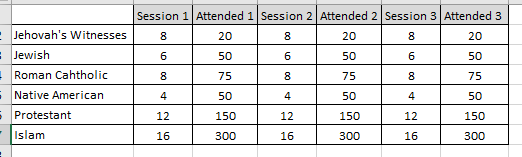
something like this (see below)
Sami Shamma OP  @Reply  
             
3 years ago

Kevin Yip  @Reply  
     
3 years ago
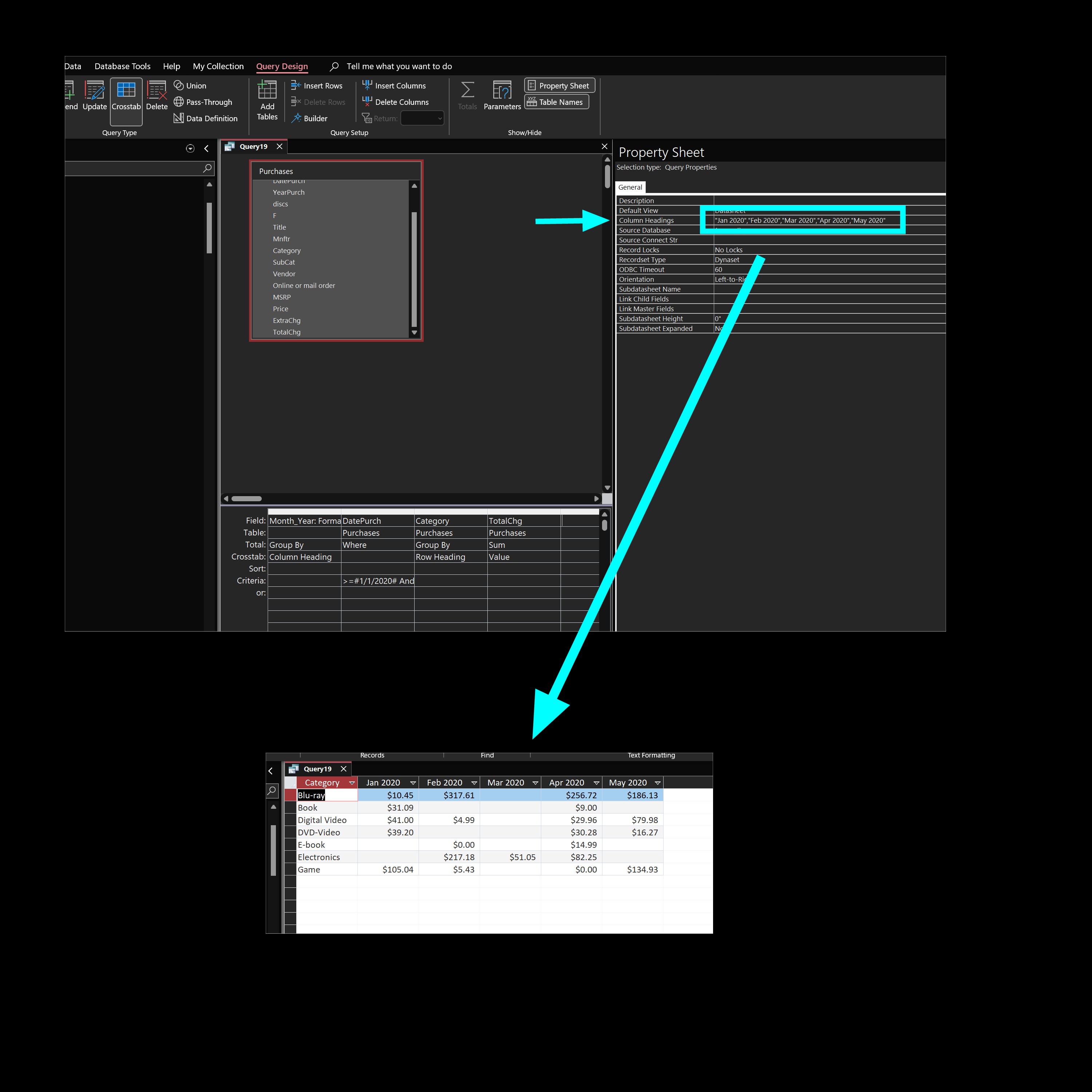
To make it appear like in your picture, the values "Session 1", "Attended 1", etc. must already exist in your query, either from table values or calculated field values.  Also, a crosstab query always sorts column headers alphabetically.  Your column headers would appear as Attended 1, Attended 2, ... Session 1, Session 2, etc.  To sort them the way you want, you need to go into that field's property window in the query design screen (see picture below) and manually enter the order of the values.  This could be a problem if your column headers were dynamically generated (i.e. values changing every time).
Kevin Yip  @Reply  
     
3 years ago

Sami Shamma OP  @Reply  
             
3 years ago
Thank you Kevin

That is very helpful
Scott Axton  @Reply  
        
3 years ago
Sami, first off let me say I haven't worked with crosstab, other than the courses, EVER.  So... I'm just trying to help you think outside the box.

What if you create a query and concatenate the session and attended together to get the column value?
So something like DisplayValue: [Sessions] & " -- " & [Attendance]

Another alternative might be to create a TempTable to generate the data and use Excel to format and display your data as it seems to have a better functionality for crosstab and pivot tables.
You might even be able to display the Excel in your db as say a subform in a form.

Again - I haven't tried any of this - I'm just trying to help you think through your issue.

This thread is now CLOSED. If you wish to comment, start a NEW discussion in Access Developer Forum.
 

Next Unseen

 
New Feature: Comment Live View


The following is a paid advertisement
Computer Learning Zone is not responsible for any content shown or offers made by these ads.
 

Learn
 
Access - index
Excel - index
Word - index
Windows - index
PowerPoint - index
Photoshop - index
Visual Basic - index
ASP - index
Seminars
More...
Customers
 
Login
My Account
My Courses
Lost Password
Memberships
Student Databases
Change Email
Info
 
Latest News
New Releases
User Forums
Topic Glossary
Tips & Tricks
Search The Site
Code Vault
Collapse Menus
Help
 
Customer Support
Web Site Tour
FAQs
TechHelp
Consulting Services
About
 
Background
Testimonials
Jobs
Affiliate Program
Richard Rost
Free Lessons
Mailing List
PCResale.NET
Order
 
Video Tutorials
Handbooks
Memberships
Learning Connection
Idiot's Guide to Excel
Volume Discounts
Payment Info
Shipping
Terms of Sale
Contact
 
Contact Info
Support Policy
Mailing Address
Phone Number
Fax Number
Course Survey
Email Richard
[email protected]
Blog RSS Feed    YouTube Channel

LinkedIn
Copyright 2026 by Computer Learning Zone, Amicron, and Richard Rost. All Rights Reserved. Current Time: 4/30/2026 2:06:02 PM. PLT: 0s