Free Lessons
Courses
Seminars
TechHelp
Fast Tips
Templates
Topic Index
Forum
ABCD
 
Home   Courses   TechHelp   Forums   Help   Contact   Merch   Join   Order   Logon  
 
Back to Access Forum    Comments List
Upload Images   @Reply   Bookmark    Link   Email   Next Unseen 
Referencing a subreport
Sami Shamma 
             
3 years ago
Greetings friends.

Can someone help me with the this:

I have MasterR report that has 4 Subreport1R, Subreport2R etc. all my subreports are based on crosstab queries.
Access will not let me set Parent/chiles controls in the subreports because of the crosstab.

I tried to set the me.RecordSource in the onload event in the subreport but it does not fire.

now I am trying to set the subreport ".RecordSource" value in the MasterR onload event.

How do I refer to it?

Richard shows how to reference a subform control, but I can't find how to do this for a subreport.

I have guessed the following which did not work:

    Report!MasterR.Report.Subreport1R.RecordSource = SQL

Help!
Sami Shamma OP  @Reply  
             
3 years ago
Actually the following syntax compiled:

    Me.Subreport1R.Report.RecordSource = SQL

But Access gives an error saying I can not change the recordSource after printing has started. this is code is in the onload event.

Kevin Robertson  @Reply  
          
3 years ago
Your syntax is incorrect.

Reports!MasterR!Subreport1R.Report.RecordSource
Kevin Robertson  @Reply  
          
3 years ago
Have you tried using the Format Event of the section containing your Subreport?
Right click the section band and click Build Event.
Sami Shamma OP  @Reply  
             
3 years ago
Let me try that
Sami Shamma OP  @Reply  
             
3 years ago
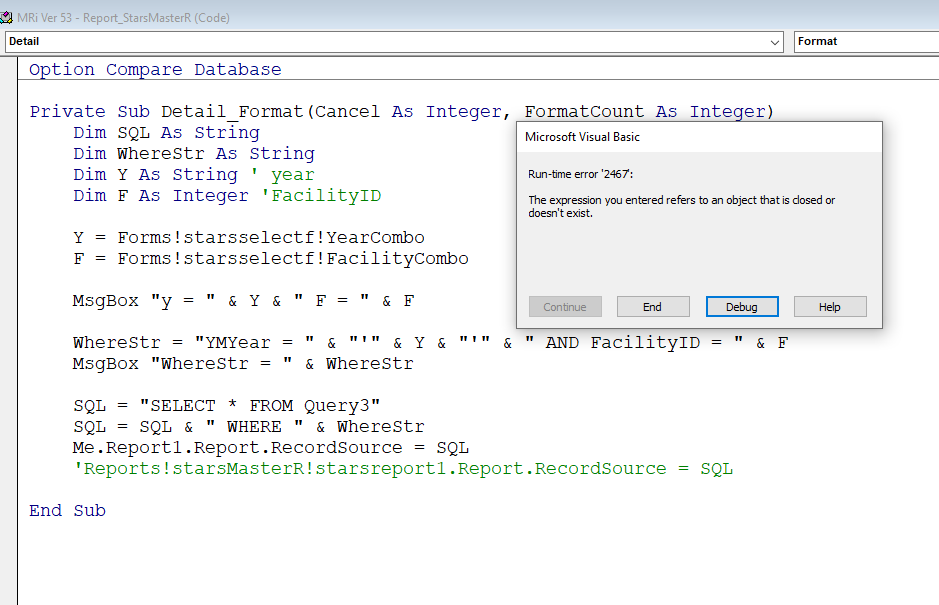
ok I have got the syntax below to compile.
I have tried it in three different events:
1)onload
2)onOpen
3) Format.

I am not getting the timing correct.
Sami Shamma OP  @Reply  
             
3 years ago

Sami Shamma OP  @Reply  
             
3 years ago
onLoad gives the same error as above 2467
Sami Shamma OP  @Reply  
             
3 years ago
onOpen gives error 2455
you entered an expression that has an invalid reference to the property Form/Report
Kevin Robertson  @Reply  
          
3 years ago
What about putting the code directly in the Subreport instead of the master?
Sami Shamma OP  @Reply  
             
3 years ago
when I put it in the subreport OnLoad, it does not execute at all. I dont get the MsgBox displayed
Sami Shamma OP  @Reply  
             
3 years ago
when I put it in OnOpen event of the subreport i get:

error 2465
can't find "StarsReort1" referenced in your expression
Kevin Robertson  @Reply  
          
3 years ago
You need to use Me.RecordSource if referring to the current report.
Sami Shamma OP  @Reply  
             
3 years ago
I need few minuets to clean up my code. I think you may have put me on the correct track.
Going back  to previous back up.
Sami Shamma OP  @Reply  
             
3 years ago
Hi Kevin

I have set my brains on fire.
double double quotes got the better of me.
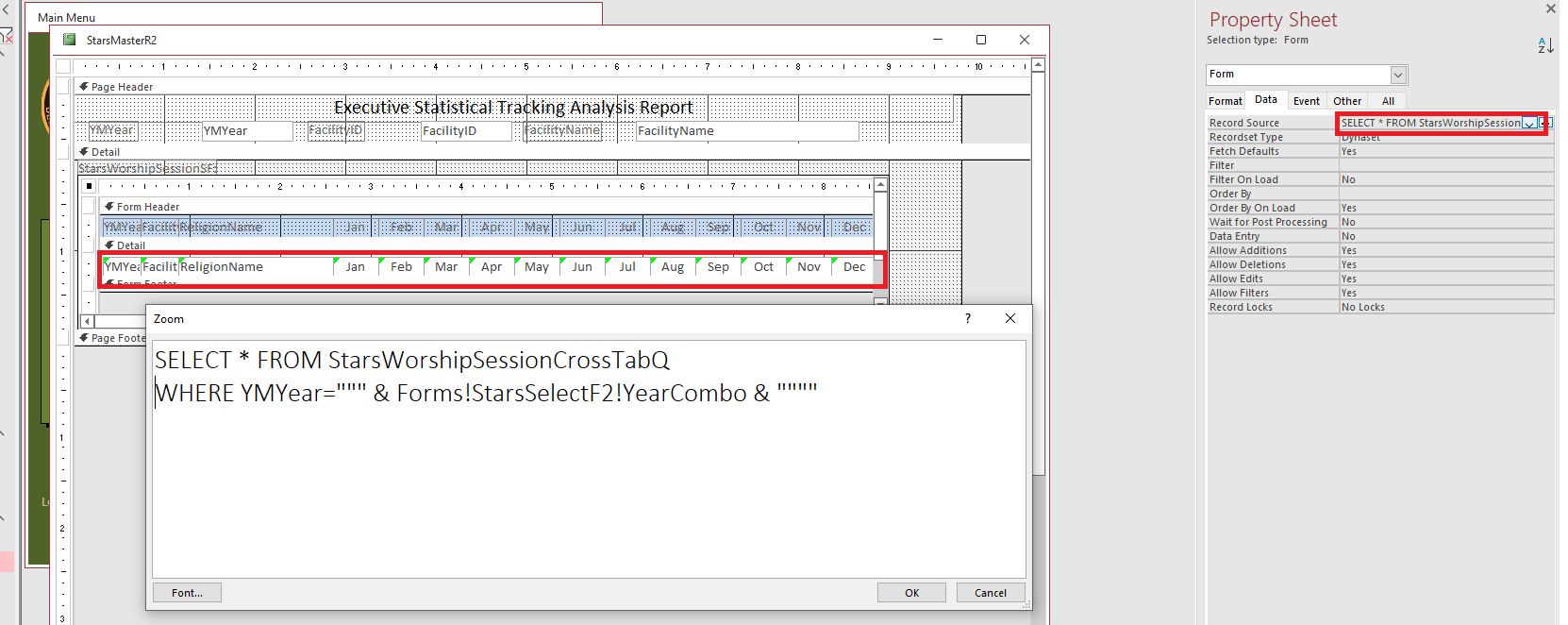
I got the thing to work with:

      SELECT * FROM StarsWorshipSessionCrossTabQ WHERE YMYear = "2023"  

In the Record Source of the sub form
now i need to replace "2023" with

Forms!StarsSelectF2!YearCombo

I just can't do it.
Kevin Robertson  @Reply  
          
3 years ago
Something like this?

SQL = "SELECT * FROM StarsWorshipSessionCrossTabQ WHERE YMYear=""" & Forms!StarsSelectF2!YearCombo & """"
Sami Shamma OP  @Reply  
             
3 years ago

Sami Shamma OP  @Reply  
             
3 years ago
This is what is happening to me when I have a reference to external control in the WHERE statement.
The fields from the Query are no longer recognized.

This is truly kicking my butt.
Sami Shamma OP  @Reply  
             
3 years ago
If this will not work, I may have to build the data without crosstab and use a RecordSet or an Array, what do you think?
Kevin Robertson  @Reply  
          
3 years ago
If it is going directly into the RecodSource in the Property Sheet remove one of the double quotes.

SELECT * FROM StarsWorshipSessionCrossTabQ WHERE YMYear="" & Forms!StarsSelectF2!YearCombo & """"
Kevin Robertson  @Reply  
          
3 years ago
You could also try this:

SELECT * FROM StarsWorshipSessionCrossTabQ WHERE YMYear=Forms!StarsSelectF2!YearCombo
Sami Shamma OP  @Reply  
             
3 years ago
I will give it a try
Sami Shamma OP  @Reply  
             
3 years ago
unfortunately neither worked.
Kevin Yip  @Reply  
     
3 years ago
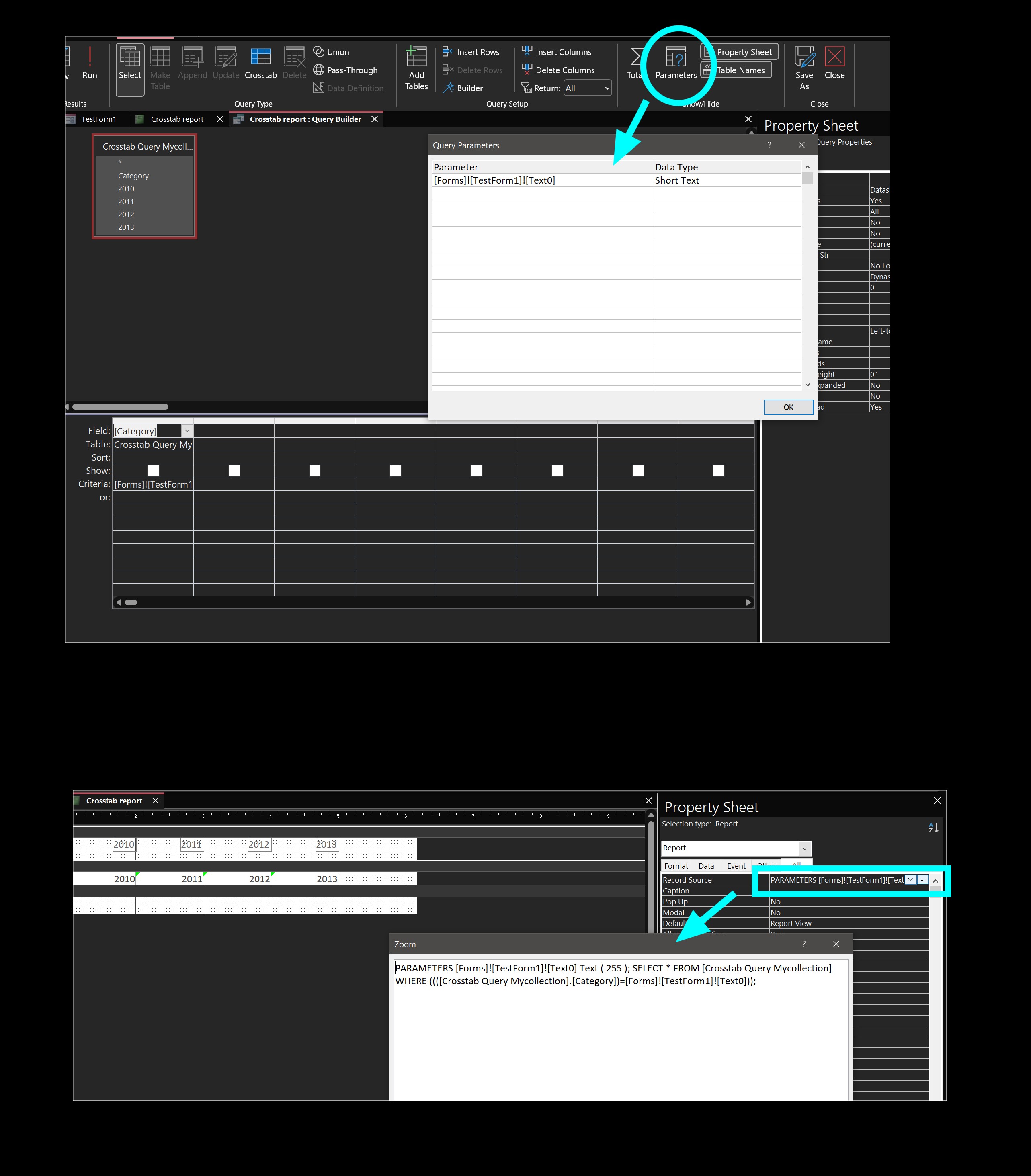
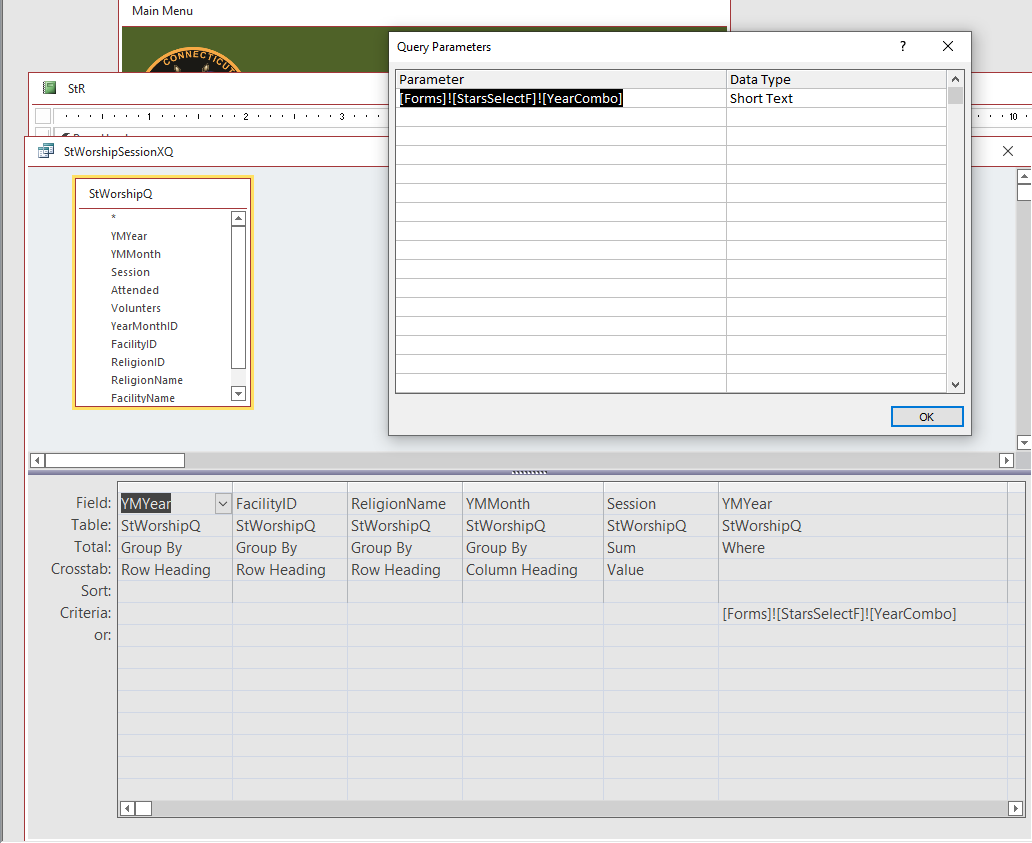
Hi Sami, to use form references like Forms!Form1!Field1 in the record source SQL, you need to explicitly declare them as parameters.  The record source editor is not like the query designer that understands parameters implicitly.  A record source is just a string, and you need to include declarations of parameters in that string.  See pictures below.  In the record source "query designer," click the "Parameters" button, and enter the form reference as shown, including its data type.  The second picture shows how the property sheet looks afterwards.  Note that the record source box now begins with a "PARAMETERS ..." keyword.  That is the SQL syntax for declaring parameters for an SQL statement.  After all this, your report should be able to understand the declared form reference and will process the SQL correctly, barring any other issues.
Kevin Yip  @Reply  
     
3 years ago

Sami Shamma OP  @Reply  
             
3 years ago
Kevin,

Thank you so much for this information. I will try it tomorrow. I was going down a rabbit hole trying to find a work around.
I may come back to you with some questions later.
again, thank you so much
Sami Shamma OP  @Reply  
             
3 years ago

Sami Shamma OP  @Reply  
             
3 years ago

Sami Shamma OP  @Reply  
             
3 years ago
Hi Kevin

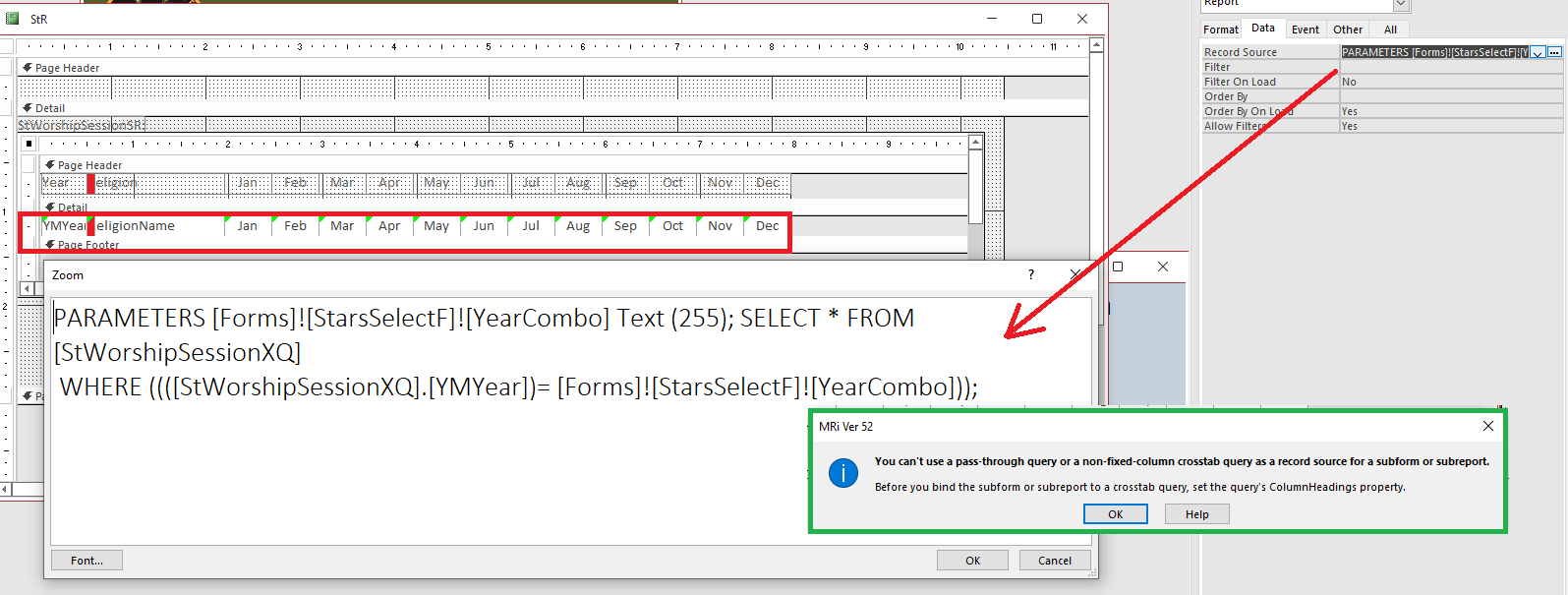
I implemented what you suggested. the bottom imageis the query and it works fine. So dose the SubReport on its own.
But when I try to imbed the Subreport in the master report I get the error in the green box in the first image.

I also included my Record source SQL.

Unfortunately, this is a report mandated by the Governor's office in the state. I have to have it in this format.

I do appreciate your help.
Kevin Yip  @Reply  
     
3 years ago
The error you are getting is unfortunately misleading, because that isn't a passthrough query (which is a whole different topic).  Your query is just a regular query, but one that Access can't handle in a subform, and there is no simple way (maybe no way) to explain it.  It's another of Access's quirks you have to find a workaround for.

I'll suggest you do what I should've suggested you do at the start: create temporary tables for your subreport's record sources.  This is a good tactic for reports in general that is preferred by many people, and it was what I did in my old job whenever the record source was a complex and tricky query (which crosstab queries often are).

To create a temporary table from a query, you just replace "SELECT" with "SELECT INTO temptablename".  Your query would become:

    PARAMETERS [Forms]! .... SELECT * INTO temptable1 ... WHERE ...

This is an action query, so you need to run it with the VBA code:

    CurrentDb.Execute "PARAMETERS [Forms]! .... SELECT * INTO temptable1 ..."

A new table named "temptable1" will be created.  Go to the subreport's design view and enter "temptable1" as the record source.  Always use this same table name for this subreport so you won't have the change it.  Do the same for the other subreports with table names like temptable2, temptable3, etc.

Sami Shamma OP  @Reply  
             
3 years ago
Hi Kevin

I think I got the idea. Put the Data created by my CrossTab into a temp table and then use that temp table as my record source for my subreports. Is this a correct understanding?

I am fussy on the detail.
Where do I insert the VBA code "CurrendDb.Exceute "Para..." ?
Sami Shamma OP  @Reply  
             
3 years ago
I am getting somewhere.
I created a make table query. got the SQL from it:

SELECT StWorshipSessionXQ.* INTO StTemp FROM StWorshipSessionXQ;

Used StTemp as my record source in my sub-report and bingo, the main report worked.

Now I placed the following code in my Calling Form on Click event:

    CurrentDb.Execute "SELECT StWorshipSessionXQ.* INTO StTemp FROM StWorshipSessionXQ;"

I get the following error

Run-Time Error '3061'
Too few parameter. Expected 0.

Kevin Yip  @Reply  
     
3 years ago
The following code should work:

     DoCmd.SetWarnings False
     DoCmd.RunSQL "SELECT StWorshipSessionXQ.* INTO StTemp FROM StWorshipSessionXQ;"
     DoCmd.SetWarnings True

This code is like running the query from the navigation pane, which will show you messages like "You are about to paste 10 row(s) into the table," "You are about to delete the table", etc.  That is why you need "DoCmd.SetWarnings" to turn off those messages.

In case anyone wonders why I have you use make-table queries instead of append queries, that is because a crosstab query may create different field names every time.  And that is why you need a new table every time.
Sami Shamma OP  @Reply  
             
3 years ago
Actually when I switch to RunSQL the code did work.

Thank you so much for all your help, I can finish this now.

I appreciate you

Dr. Sami Shamma
Kevin Yip  @Reply  
     
3 years ago
Glad it worked out alright.  The form references ([Forms]![Form1]![Field1]) were the main cause of those mishaps, so you may consider avoiding them in the future, since they work in some places but not in others.  In my old job, I never put form references inside SQL statements.  I resolved the reference first, then put in the literal value.  Literal values work everywhere.  For instance:

     Dim s As String
     s = Forms!Form1!Field1 & ""
     Reports!Report1.Recordsource = "SELECT * FROM Table1 WHERE Field1 = '" & s & "'"
Sami Shamma OP  @Reply  
             
3 years ago
Thank you Kevin
I will definitely keep this in mind while I am finishing this project. I guess I should place this code in the main report onOpen event and that way, I would not need the temp Table option.

You have been very helpful, many thanks again

This thread is now CLOSED. If you wish to comment, start a NEW discussion in Access Forum.
 

Next Unseen

 
New Feature: Comment Live View


The following is a paid advertisement
Computer Learning Zone is not responsible for any content shown or offers made by these ads.
 

Learn
 
Access - index
Excel - index
Word - index
Windows - index
PowerPoint - index
Photoshop - index
Visual Basic - index
ASP - index
Seminars
More...
Customers
 
Login
My Account
My Courses
Lost Password
Memberships
Student Databases
Change Email
Info
 
Latest News
New Releases
User Forums
Topic Glossary
Tips & Tricks
Search The Site
Code Vault
Collapse Menus
Help
 
Customer Support
Web Site Tour
FAQs
TechHelp
Consulting Services
About
 
Background
Testimonials
Jobs
Affiliate Program
Richard Rost
Free Lessons
Mailing List
PCResale.NET
Order
 
Video Tutorials
Handbooks
Memberships
Learning Connection
Idiot's Guide to Excel
Volume Discounts
Payment Info
Shipping
Terms of Sale
Contact
 
Contact Info
Support Policy
Mailing Address
Phone Number
Fax Number
Course Survey
Email Richard
[email protected]
Blog RSS Feed    YouTube Channel

LinkedIn
Copyright 2026 by Computer Learning Zone, Amicron, and Richard Rost. All Rights Reserved. Current Time: 4/30/2026 6:53:10 PM. PLT: 1s