Free Lessons
Courses
Seminars
TechHelp
Fast Tips
Templates
Topic Index
Forum
ABCD
 
Home   Courses   TechHelp   Forums   Help   Contact   Merch   Join   Order   Logon  
 
Back to Access Forum    Comments List
Upload Images   @Reply   Bookmark    Link   Email   Next Unseen 
combo box select from table
David McAfee 
    
3 years ago
I am trying to figure out the code to use a combo box (Span Type) that will select either "Beam," "Arch," "Cable," "Truss" or "Other" and pull two record columns' info to two separate boxes - an unbound text box and an image box. The image box is called "ShowMe" and the text box is called "TellMe." So when "Beam" is selected, ShowMe will show a beam image and TellMe will display the description of the beam. I can't seem to get the SpanType to select the image (unbound OLE)
Scott Axton  @Reply  
        
3 years ago
First I recommend you don't use spaces in you Combo Box name - if that is the actual name.

You can get the info two ways.  DLookup of by using the .column() property
Check out the DLookup and Customer Discount
videos for more info.

OLE images are not recommended either anymore.  There are better ways to store and reference images.
Images and Access Imaging Seminar.

Scott Axton  @Reply  
        
3 years ago
Reading a little closer I think you might need to show us a screen capture in design mode.  
Is this on a single form or are you trying to do it on a continuous form?
David McAfee OP  @Reply  
    
3 years ago

David McAfee OP  @Reply  
    
3 years ago
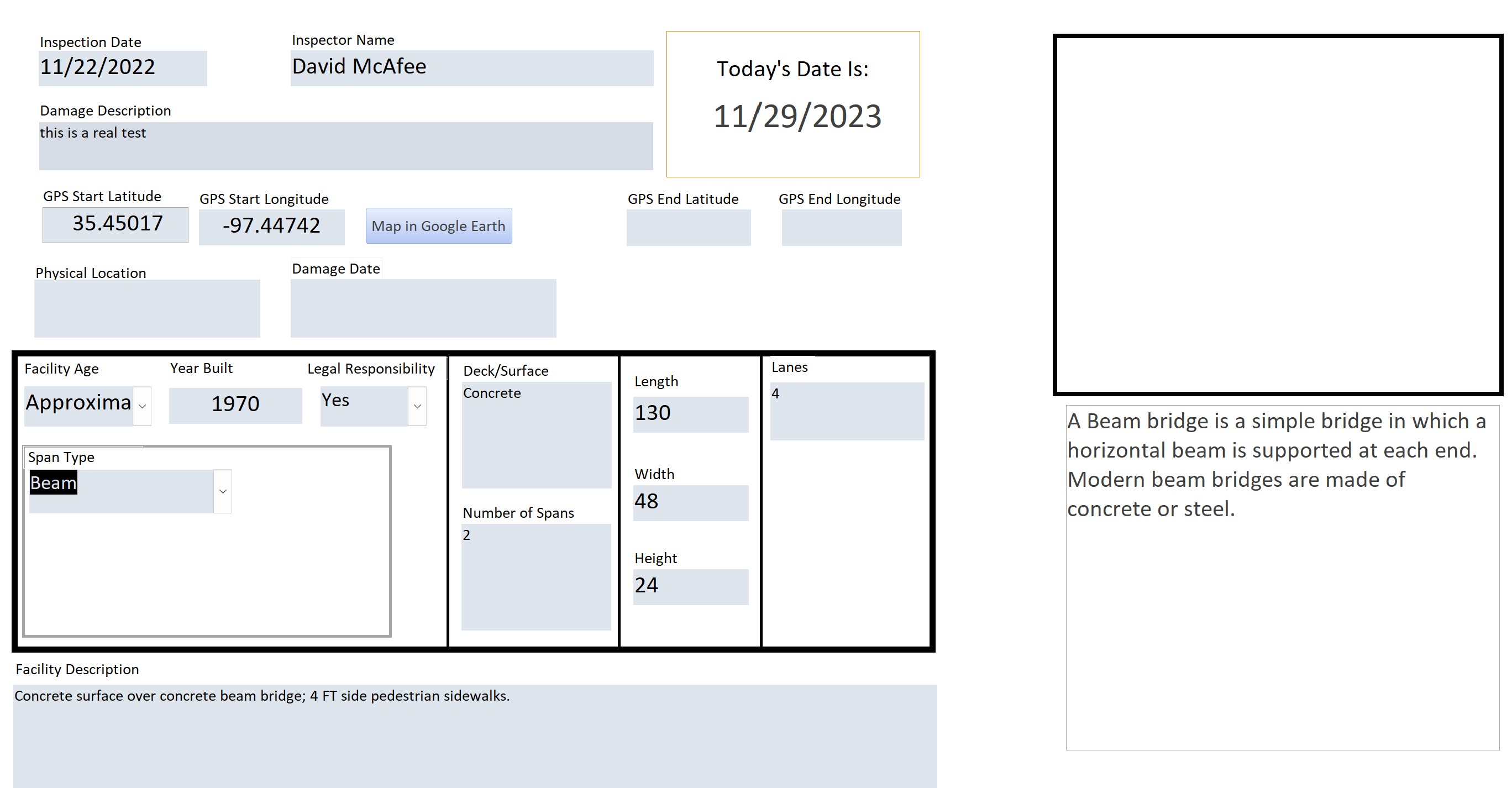
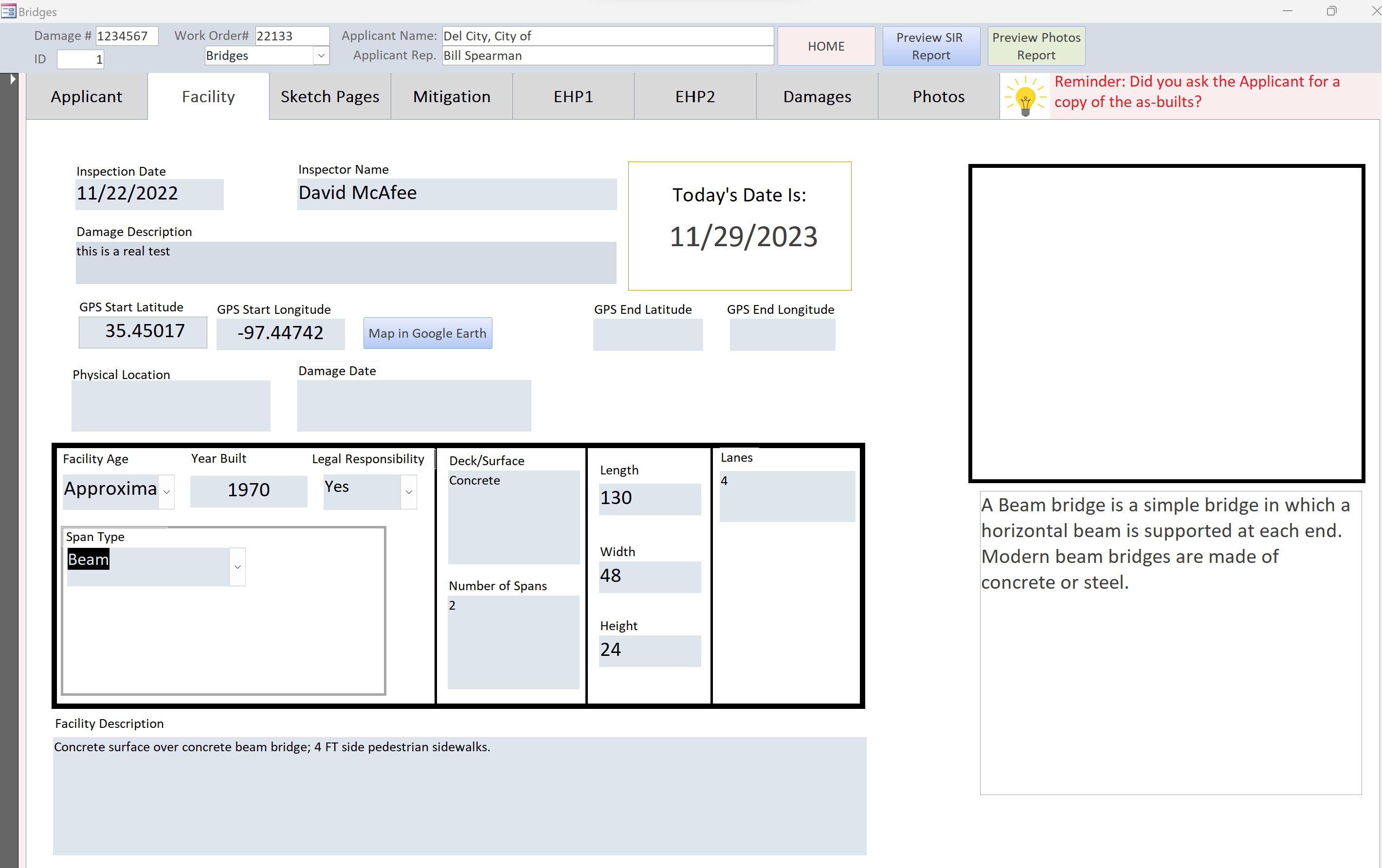
Thanks for your help Scott! Yes, I don't use spaces in the field names. The top right box is the unbound (ShowMe) and below that with the text is the unbound (TellMe). Over to the left is the SpanType combo with the choices "Arch," "Beam," Cable," "Suspension," "Truss," and "Other." I want the user to select one of those and see whatever image is tied to the selection through a table called "ShowandTell" and the text to appear below it at the same time. Right now, the text is actually in the VBA code (which I don't want), I want it to come from the same table as the image path. The image path is in a root directory (C:\SITemplates\PicLib). That's about all I know to tell you at this point. What should I use as the "ShowMe" box and what do you suggest the code should be to pull the info from the ShowandTell table?  Thanks again for your help!
David McAfee OP  @Reply  
    
3 years ago

David McAfee OP  @Reply  
    
3 years ago
I guess I should have shown the whole look of the form with the header and the tabs. Everything comes from the same table except the Damages and the Photos tabs which have their own subforms and tables.
Scott Axton  @Reply  
        
3 years ago
David,  is the show and tell just an example of the type? Or is it actual pictures of that particular bridge?
How about on the Photo tab?

I don't use the tabbed forms so I may have to familiarize my self with those again.  They are in the frowned upon category of the Evil Access Stuff just because of the PITA factor.

I don't know how fast I can get back to you.  I'm dealing with some personal stuff right now so I may be off line for a bit.
Maybe the other guys can jump in too.
Kevin Yip  @Reply  
     
3 years ago
Hi David, is your image stored externally in a Windows folder (the recommended way) or internally inside a table's OLE field?  If it's the latter, it won't work with a combo box.  An OLE field is binary data, which can't be shown or processed by a combo box.

An unbound OLE control can only store (1) linked images, stored externally in Windows folders, or (2) embedded images, stored directly inside the control itself.  And neither case applies to images stored inside an OLE field of a table.  So an unbound OLE field won't work here.

An attachment field may work.  It can store multiple images.  And it returns a string (of the file name(s)) when it is referenced by a combo box.  But you still have to physically extract that file from the attachment field and save it to an external Windows folder before you can use it on an unbound OLE control (or image control).

That is why the recommended way is, again, saving all images in Windows folders, which makes your job easier in so many aspects.  I understand there may be a need to save files inside Access tables (for security or whatever reasons).  But if you do that, a whole lot of inconveniences ensue.
David McAfee OP  @Reply  
    
3 years ago
Scott: The ShowMe is to display an example of each bridge when the SpanType is selected. The Photos tab shows photos taken from the inspection page and has nothing to do with what I'm trying to do on the Facilities tab...and it works fine. FYI...Take a picture...click on the paper clip and browse to the photo on the tablets' pictures section *Not stored in Access." I hadn't thought of trying the attachment field and that is what is used in the Photos tab page, so that will be next.

Kevin: I know not to store photos in Access only links and in this case, in the root directory on C:\SITemplates\PicLib\image

This thread is now CLOSED. If you wish to comment, start a NEW discussion in Access Forum.
 

Next Unseen

 
New Feature: Comment Live View


The following is a paid advertisement
Computer Learning Zone is not responsible for any content shown or offers made by these ads.
 

Learn
 
Access - index
Excel - index
Word - index
Windows - index
PowerPoint - index
Photoshop - index
Visual Basic - index
ASP - index
Seminars
More...
Customers
 
Login
My Account
My Courses
Lost Password
Memberships
Student Databases
Change Email
Info
 
Latest News
New Releases
User Forums
Topic Glossary
Tips & Tricks
Search The Site
Code Vault
Collapse Menus
Help
 
Customer Support
Web Site Tour
FAQs
TechHelp
Consulting Services
About
 
Background
Testimonials
Jobs
Affiliate Program
Richard Rost
Free Lessons
Mailing List
PCResale.NET
Order
 
Video Tutorials
Handbooks
Memberships
Learning Connection
Idiot's Guide to Excel
Volume Discounts
Payment Info
Shipping
Terms of Sale
Contact
 
Contact Info
Support Policy
Mailing Address
Phone Number
Fax Number
Course Survey
Email Richard
[email protected]
Blog RSS Feed    YouTube Channel

LinkedIn
Copyright 2026 by Computer Learning Zone, Amicron, and Richard Rost. All Rights Reserved. Current Time: 5/2/2026 10:06:01 AM. PLT: 1s