Free Lessons
Courses
Seminars
TechHelp
Fast Tips
Templates
Topic Index
Forum
ABCD
 
Home   Courses   TechHelp   Forums   Help   Contact   Merch   Join   Order   Logon  
 
Back to Access Developer Forum    Comments List
Upload Images   @Reply   Bookmark    Link   Email   Next Unseen 
Recordset add update combo
Sami Shamma 
             
3 years ago
Good morning friends

My main source of data comes from a 55-year-old Mainframe DB in the form of an Excel spreadsheet.
My Access DB is 12 years old. I am finally rewriting it with all my nelly acquired knowledge from Richrd, The Kevins, Alex and all the others who help.
I am replacing 12 update/delete/append queries with one VBA recordset.

Is my only option to update an Inmate record if it exists and add a record if it does not is to run through my imported data twice ignoring the errors?
or is there a magical  rs.XXXX that performs rs.AddNew and rs.Update at the same time.
or is there an elegant way in the same loop to test if a record exist update else add; something like

if InmateNumber "exist"
   rsIT.update
   rsIM!housing = rs.housing
   ....
else
   rsIT.AddNew
   rsIM!housing = rs.housing
   ....
end if


InmateNumbers are Unique; how do I test for "exist" inside a Recodrset loop.

Thank you guys for all the help

Sami Shamma OP  @Reply  
             
3 years ago
rsIM should be rsIT
Scott Axton  @Reply  
        
3 years ago
Sami -  Richard has shown in several places (I can't think where right off hand, but I will see if I can find it) using DLookup.

The fields are all the same just whether you are adding or changing them changes (correct?)

So something like:

     InmateNumber = NZ(DLookup("InmateNumber", "InmateT"),0)
    
     If InmateNumber <> 0  Then
        'Inmate exists - update the record
          rsIT.Update
     Else
         'Inmate does NOT exist create a new record
          rsIT.AddNew
    End If        
  
    'the rest goes here:
    rsIT!housing = Housing
    rsIT!Field1 = Field1
    rsIT!Field2 = Field2
    ...
      
   rsIT.Update
Sami Shamma OP  @Reply  
             
3 years ago
Hi Scott

Yes all the fields are the same.

DLookup should solve this problem, I will test how slow it will be with 10,000 records over the network.


Thanks
Kevin Yip  @Reply  
     
3 years ago
You can use the Recordcount property to help you.  E.g.:

    Dim r As Recordset
    Set r = DBEngine(0)(0).OpenRecordset("SELECT * FROM Table1 WHERE ID=" & SomeValue)
    If r.RecordCount > 0 Then
        r.MoveFirst
        r.Edit
    Else
        r.AddNew
    End If
    r!ID = SomeValue
    r!Field1 = SomeValue2
    r.Update
    r.Close


In the above, only one recordset is opened, and DLookup() is not needed; so performance-wise this is preferred.  If a record is found, the Recordcount property will be at least 1, otherwise 0.  Then you use .Edit to edit the existing record, or .Addnew to add a new one.

Recordcount doesn't always give an accurate row count.  But it is always at least 1 if records exist, or 0 if not, which suits our purpose here.

The above code assumes only one record will match the value you seek.  Otherwise, you need to use a loop with .MoveNext in addition to  .MoveFirst in order to access all matching records.
Sami Shamma OP  @Reply  
             
3 years ago
Hi Kevin

I am not sure if I understand your solution, but I am eager to learn from you.

This is my existing code that is actually working. I know it is a bit clumsy.

DetailsPrivate Sub UpdateInmate()

    Dim db As Database
    Dim INumber As String             'Inmate Number
    Dim rsR As Recordset               'AlphaRawT
    Dim rsI As Recordset                'InmateT
    Dim NewRecords As Integer      'count of new
    Dim UpdatedRecords As Integer 'count of updated records
    
    NewRecords = 0
    UpdatedRecords = 0
    Set db = CurrentDb
    Set rsR = db.OpenRecordset("AlphaRawT")
    While Not rsR.EOF
        INumber = Nz(DLookup("InmateNumber", "InmateT", "InmateNumber =""" & rsR![Inmate Number] & """"), 0)
        If INumber <> 0 Then
            'Inmate exists - update the record
            Set rsI = db.OpenRecordset("SELECT * FROM InmateT WHERE InmateNumber = """ & INumber & """")
            rsI.Edit
            rsI!FacilityCode = rsR![Facility Code]
            rsI!Housing = rsR![Housing Unit Code]
            rsI!HousingCode = rsR![Housing Code]
            rsI!InmateName = rsR![Name (Full)]
            rsI!ReligionCode = rsR![Religion Affiliation Code]
            UpdatedRecords = UpdatedRecords + 1
            rsI.Update
            'rsI.Close
         Else
        'Inmate does NOT exist create a new record
            Set rsI = db.OpenRecordset("InmateT")
            rsI.AddNew
            rsI!InmateNumber = rsR![Inmate Number]
            rsI!FacilityCode = rsR![Facility Code]
            rsI!Housing = rsR![Housing Unit Code]
            rsI!HousingCode = rsR![Housing Code]
            rsI!InmateName = rsR![Name (Full)]
            rsI!ReligionCode = rsR![Religion Affiliation Code]
            NewRecords = NewRecords + 1
            rsI.Update
            'rsI.Close
        End If
        rsR.MoveNext
        rsI.Close
    Wend
    rsR.Close
    db.Close
    Set rsI = Nothing
    Set rsR = Nothing
    Set db = Nothing
    Status "New Records = " & NewRecords
    Status "Updated Records = " & UpdatedRecords
    
End Sub


two questions please:

1) how do I get away with only one recoredset when I have 2 tables: the imported from excel AlphaRawT and my permanent Inmate table InmateT?
2) I am not familiar with this notation : DBEngine(0)(0).

Many thanks
Kevin Yip  @Reply  
     
3 years ago
Your InmateT table is opened twice, once with DLookup and another with OpenRecordset.  That would be a place where you would consider accessing it just once, as shown in my post.  It's not necessarily wrong to open it twice, but as time goes on and as your app grows bigger, you need to think about optimization.

DBEngine(0)(0) refers to the database you are using, while CurrentDb refers to a new instance of the database.  The former used to be faster because it doesn't create a new instance, but nowadays the performance gain is negligible due to faster PCs.  I started using Access in the 90s so I got into the habit of using DBEngine(0)(0).
Alex Hedley  @Reply  
           
3 years ago
aka dbEngine.Workspaces(0).Databases(0)
Sami Shamma OP  @Reply  
             
3 years ago
Thank you Alex.
appreciate the knowledge you guys give me.
Sami Shamma OP  @Reply  
             
3 years ago
I would like to learn more about Workspaces one of these days.
Sami Shamma OP  @Reply  
             
3 years ago
I am working on my code incrementally making sure it works before I add the next code.
This next error has taken me all day and I am stumped.
Some background information regarding the code
I have 16 prisons with three types of Housing (Blocks and Cells) numbering styles: "137" & "114" is one style "123" is another style and all the rest are the same.

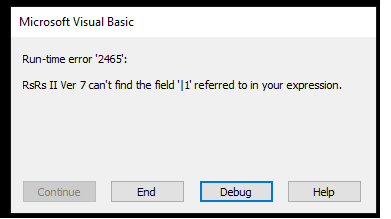
I get the following error as in the image. the debug points to the long if statement with many "Or" in the following code:

DetailsPrivate Sub UpdateSubHousing()
    Dim db As Database
    Dim rsI As Recordset
    Dim vUnit As String
    Dim vCell As String
    Set db = CurrentDb
    Set rsI = db.OpenRecordset("InmateT")
        While Not rsI.EOF
            rsI.Edit
            If rsI!FacilityCode = "137" Or rsI!FacilityCode = "114" Then
                MsgBox rsI!FacilityCode
                If rsI!Housing = "X" Then
                    MsgBox rsI!Housing
                    vCell = "00"
                Else
                    vCell = Right(rsI!HousingCode, 3)
                End If
                If [rsI!Housing] = "N" Or "O" Or "P" Or "Q" Or "R" Or "S" Or "W" Or "X" Or "Z" Then
                    vUnit = ""
                Else
                   If rsI!CellNumber > "48" Then
                       vUnit = "-2"
                   Else
                       vUnit = "-1"
                   End If
                End If
                rsI!unitnumber = vUnit
                rsI!CellNumber = vCell
            ElseIf rsI!FacilityCode = "123" Then
                    'do BCC
            Else
                    'do Others
                    rsI!SubHousing = rsI!Housing
            End If
            rsI.Update
            rsI.MoveNext
        Wend
    rsI.Close
    db.Close
    Set rsI = Nothing
    Set db = Nothing

End Sub


I tried to replace the If statement with many "Or"s with : If rsI!Housing In ("N","O", ......)
but it will not compile.

What am I doing wrong?

Sami Shamma OP  @Reply  
             
3 years ago

Sami Shamma OP  @Reply  
             
3 years ago
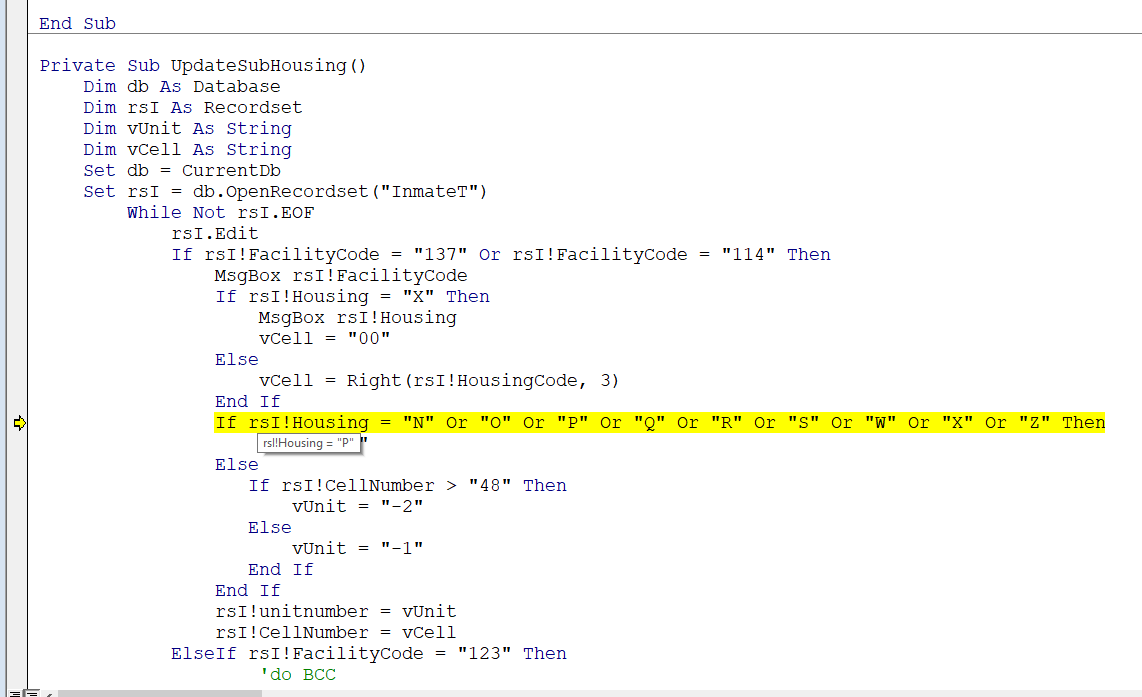
I removed the  [ ] around the rsI!Housing and now I get error '13' Type mismatch

hovering over it shows the value, see image below
Sami Shamma OP  @Reply  
             
3 years ago

Alex Hedley  @Reply  
           
3 years ago
What's the difference between your first IF with FacilityCode and the one that isn't working, Housing?
Sami Shamma OP  @Reply  
             
3 years ago
Hi Alex

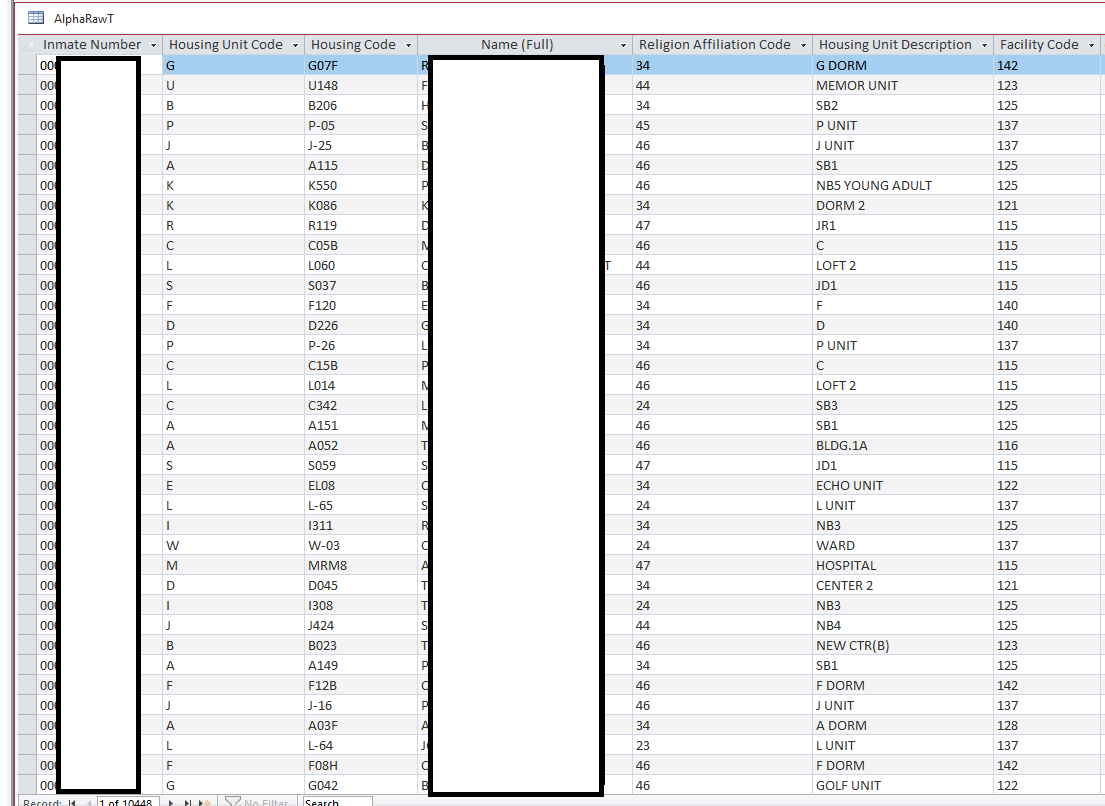
here is my raw data coming from the mainframe in a spreadsheet every day after "patch update" at midnight!
Sami Shamma OP  @Reply  
             
3 years ago
"Housing unit code" becomes "Housing" in my InmateT. it is the housing Block the inmate is in.
"Housing Code" is the actual "Cell" or Bed number
"Facility Code" is the prison.

In three prisons, the "Housing" is vague and refers to 1, 2 or 3 different "Blocks". in these prisons, I have to parse the "Housing Code" to establish which block the inmate is in hence this code.
Sami Shamma OP  @Reply  
             
3 years ago

Alex Hedley  @Reply  
           
3 years ago
I meant more if you look at your actual VBA code how does it differ?
Sami Shamma OP  @Reply  
             
3 years ago
The only difference I see is that the "If" for Facility code, I repeat the expiration; where in the Housing "If", I use the "Or" without repeating the expression.
Sami Shamma OP  @Reply  
             
3 years ago
Thanks
this code now works.

                End If
                If rsI!Housing = "N" Or rsI!Housing = "O" Or rsI!Housing = "P" Or rsI!Housing = "Q" _
                Or rsI!Housing = "R" Or rsI!Housing = "S" Or rsI!Housing = "W" Or rsI!Housing = "X" Or rsI!Housing = "Z" Then


there must be a more elegant solution than this.

I couldn't get "In" condition to work.

BTW. I lived in England for 18 years.
Kevin Robertson  @Reply  
          
3 years ago
You could use a Select Case

    Select Case rsI!Housing
        Case "N", "O", "P", "Q", "R", "S", "W", "X", "Z"
            ' code for these conditions
        Case Else
            ' code for all other conditions
    End Select
Sami Shamma OP  @Reply  
             
3 years ago
Thank you Kevin, This is more elegant than what I did.
Scott Axton  @Reply  
        
3 years ago
Sami -

I think this might be an instance where the Select Case statement might be of use to you.  Check out the Switch Function extended cut for another example.  Even more on the Microsoft Select Case Page listed in the Select Case video ( https://tinyurl.com/2dabvspk ).

With the Select Case you can specify multiple criteria on one line.  I think it would be more readable as well as easily updated if your criteria changes.
Scott Axton  @Reply  
        
3 years ago
Ha!  Great minds...   I really should refresh before posting.  My thoughts exactly Kevin
Sami Shamma OP  @Reply  
             
3 years ago
Thank you gentlemen

here is the new code:

Details        While Not rsI.EOF
            rsI.Edit
            Select Case rsI!FacilityCode
            Case "137", "114"
                If rsI!Housing = "X" Then
                    vCell = "00"
                Else
                    vCell = Right(rsI!HousingCode, 3)
                End If
                Select Case rsI!Housing
                Case "N", "O", "P", "Q", "R", "S", "W", "X", "Z"
                    vUnit = ""
                Case Else
                   If rsI!CellNumber > "48" Then
                       vUnit = "-2"
                   Else
                       vUnit = "-1"
                   End If
                End Select
                rsI!unitnumber = vUnit
                rsI!CellNumber = vCell
                rsI!SubHousing = rsI!Housing & vUnit
                
            Case "123"
                    'do BCC
            Case Else
                    'do Others
                    rsI!SubHousing = rsI!Housing
            End Select
            
            rsI.Update
            rsI.MoveNext
        Wend


I am heading to do some video watching :)
Sami Shamma OP  @Reply  
             
3 years ago
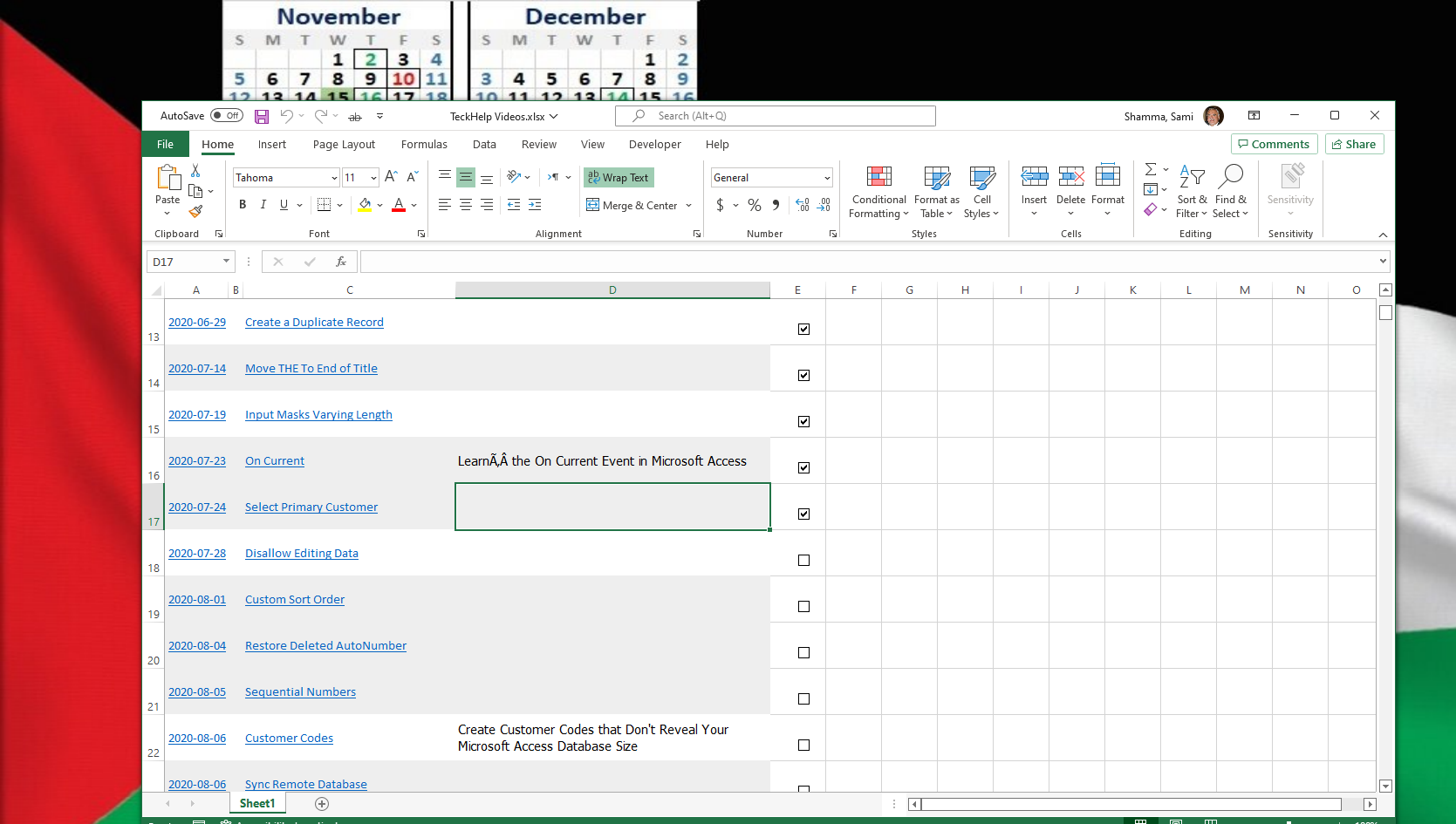
BTW, having finished all of Richard's courses, I imported the TeckHelp data to a spreadsheet and working my way through the list.
it is going to take some time to see all 650+ videos not counting extended cuts.
Sami Shamma OP  @Reply  
             
3 years ago

Kevin Yip  @Reply  
     
3 years ago
If the value is always a single alphabet, you can also write:

    Select Case rsI!Housing
        Case "N" to "S", "W", "X", "Z"
            ' code for these conditions
        Case Else
            ' code for all other conditions
    End Select

Sami Shamma OP  @Reply  
             
3 years ago
Hi Kevin

thank you, that is good to know. I actually have a use for it now.

This thread is now CLOSED. If you wish to comment, start a NEW discussion in Access Developer Forum.
 

Next Unseen

 
New Feature: Comment Live View


The following is a paid advertisement
Computer Learning Zone is not responsible for any content shown or offers made by these ads.
 

Learn
 
Access - index
Excel - index
Word - index
Windows - index
PowerPoint - index
Photoshop - index
Visual Basic - index
ASP - index
Seminars
More...
Customers
 
Login
My Account
My Courses
Lost Password
Memberships
Student Databases
Change Email
Info
 
Latest News
New Releases
User Forums
Topic Glossary
Tips & Tricks
Search The Site
Code Vault
Collapse Menus
Help
 
Customer Support
Web Site Tour
FAQs
TechHelp
Consulting Services
About
 
Background
Testimonials
Jobs
Affiliate Program
Richard Rost
Free Lessons
Mailing List
PCResale.NET
Order
 
Video Tutorials
Handbooks
Memberships
Learning Connection
Idiot's Guide to Excel
Volume Discounts
Payment Info
Shipping
Terms of Sale
Contact
 
Contact Info
Support Policy
Mailing Address
Phone Number
Fax Number
Course Survey
Email Richard
[email protected]
Blog RSS Feed    YouTube Channel

LinkedIn
Copyright 2026 by Computer Learning Zone, Amicron, and Richard Rost. All Rights Reserved. Current Time: 6/17/2026 10:44:09 AM. PLT: 0s