Free Lessons
Courses
Seminars
TechHelp
Fast Tips
Templates
Topic Index
Forum
ABCD
 
Home   Courses   TechHelp   Forums   Help   Contact   Merch   Join   Order   Logon  
 
Back to Access Developer Forum    Comments List
Upload Images   @Reply   Bookmark    Link   Email   Next Unseen 
Query SQL to VBA Tool
William Kennedy 
    
3 years ago
I use your Query SQL to VBA Tool a great deal in my new project.  But I have a some of old projects with a lot of Queries.  Many of those queries are Orphans and no longer useful.  They no longer are used.  Is there a way to add to your Tool the ability to identify queries that are Orphan?  I think That would be a great addition.
Richard Rost  @Reply  
          
2 years ago
That would be a great tool for someone to write that takes a list of your queries and figures out if they're used or not by other objects, but that would be a major undertaking, and I'm not building it. LOL
Kevin Yip  @Reply  
     
2 years ago
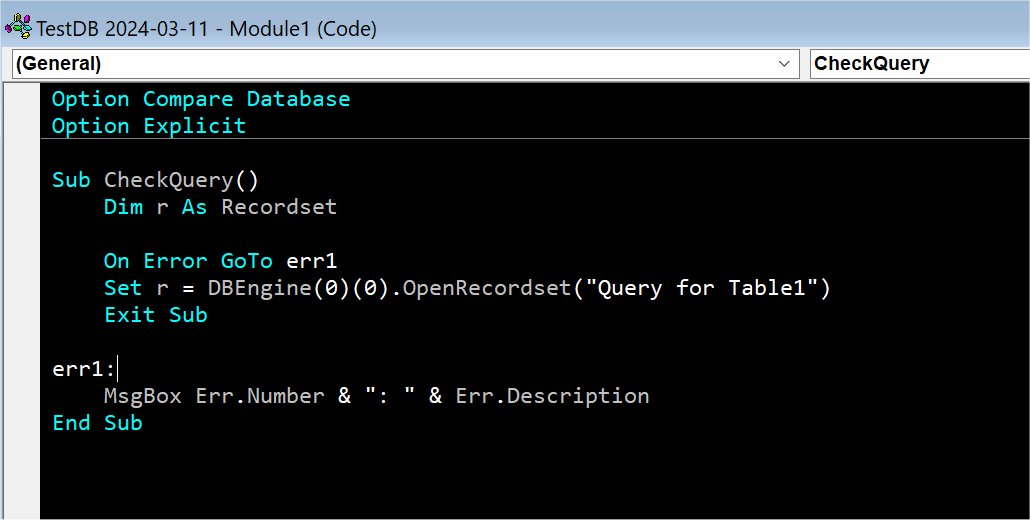
One way to do it is to check if a query returns an error, with the On Error statement.  See picture below.  A query with missing tables would return an error message like "Access cannot find table..."  Trap the error with On Error, and obtain the error number and description as shown below.  Sometimes errors may be unclear ("Incorrect syntax near ';'...").  But it's always useful to discover whatever errors there are in your queries.
Kevin Yip  @Reply  
     
2 years ago

Richard Rost  @Reply  
          
2 years ago
Good idea, Kevin. That would be great for finding queries that are MISSING dependencies... but it's going to be a lot more difficult trying to figure out which queries don't have anyone dependent on them.
Kevin Yip  @Reply  
     
2 years ago
It's definitely a much tougher task, since you have to search everywhere (VBA modules, SQL statements in record sources, row sources, saved queries, etc.) to find any queries that are no longer referenced anywhere.  Also, even if a query isn't referenced now, it doesn't mean it won't be later.  I have queries that are dynamically switched among themselves, and they aren't all used at the same time.  If the reason to remove unused queries is to clean up the navigation pane, I may suggest letting it be.  In all my years using Access, I've never cleaned it up.  It's better to make the navigation pane more readable with naming conventions and such.  I use ALL CAPS to name queries that are more important than others so they stand out in the navigation pane, for instance.
Richard Rost  @Reply  
          
2 years ago
Good idea.
Sami Shamma  @Reply  
             
2 years ago
What do I do is have one query called something like 'usedQuerirsDoNotDeleteQ'. And in this  query, I add all the queries that I use only inside of my VBA.  This way, when I am checking object, dependency for a given query, it will show up.
Sami Shamma  @Reply  
             
2 years ago
Richard do you have an actual tool?
Richard Rost  @Reply  
          
2 years ago
Nope
Richard Rost  @Reply  
          
2 years ago
I used to do something similar, though I used to take a query that I thought was no longer needed and just rename it to something like "OkayToDeleteLater20230601" or whatever. Then, I would wait a month or two. If I didn't hit any errors, then that would mean that the query could probably be safely deleted.
Alex Hedley  @Reply  
           
2 years ago
If you use a {VCS} tool you could easily search all the exported code and check references of names etc.
Start with some regex and build upon it.
William Kennedy OP  @Reply  
    
2 years ago
Hello Alex.  How about a Tech help explaining VCS tools.
Alex Hedley  @Reply  
           
2 years ago
Theres already a couple of videos
VCS / GitHub
I'm looking to update to the latest version with the new Ribbon.

This thread is now CLOSED. If you wish to comment, start a NEW discussion in Access Developer Forum.
 

Next Unseen

 
New Feature: Comment Live View


The following is a paid advertisement
Computer Learning Zone is not responsible for any content shown or offers made by these ads.
 

Learn
 
Access - index
Excel - index
Word - index
Windows - index
PowerPoint - index
Photoshop - index
Visual Basic - index
ASP - index
Seminars
More...
Customers
 
Login
My Account
My Courses
Lost Password
Memberships
Student Databases
Change Email
Info
 
Latest News
New Releases
User Forums
Topic Glossary
Tips & Tricks
Search The Site
Code Vault
Collapse Menus
Help
 
Customer Support
Web Site Tour
FAQs
TechHelp
Consulting Services
About
 
Background
Testimonials
Jobs
Affiliate Program
Richard Rost
Free Lessons
Mailing List
PCResale.NET
Order
 
Video Tutorials
Handbooks
Memberships
Learning Connection
Idiot's Guide to Excel
Volume Discounts
Payment Info
Shipping
Terms of Sale
Contact
 
Contact Info
Support Policy
Mailing Address
Phone Number
Fax Number
Course Survey
Email Richard
[email protected]
Blog RSS Feed    YouTube Channel

LinkedIn
Copyright 2026 by Computer Learning Zone, Amicron, and Richard Rost. All Rights Reserved. Current Time: 5/6/2026 4:29:37 AM. PLT: 1s