Free Lessons
Courses
Seminars
TechHelp
Fast Tips
Templates
Topic Index
Forum
ABCD
 
Home   Courses   TechHelp   Forums   Help   Contact   Merch   Join   Order   Logon  
 
Back to Access Forum    Comments List
Upload Images   @Reply   Bookmark    Link   Email   Next Unseen 
Error Updated Listbox Values
Carrie Donohue 
    
3 years ago
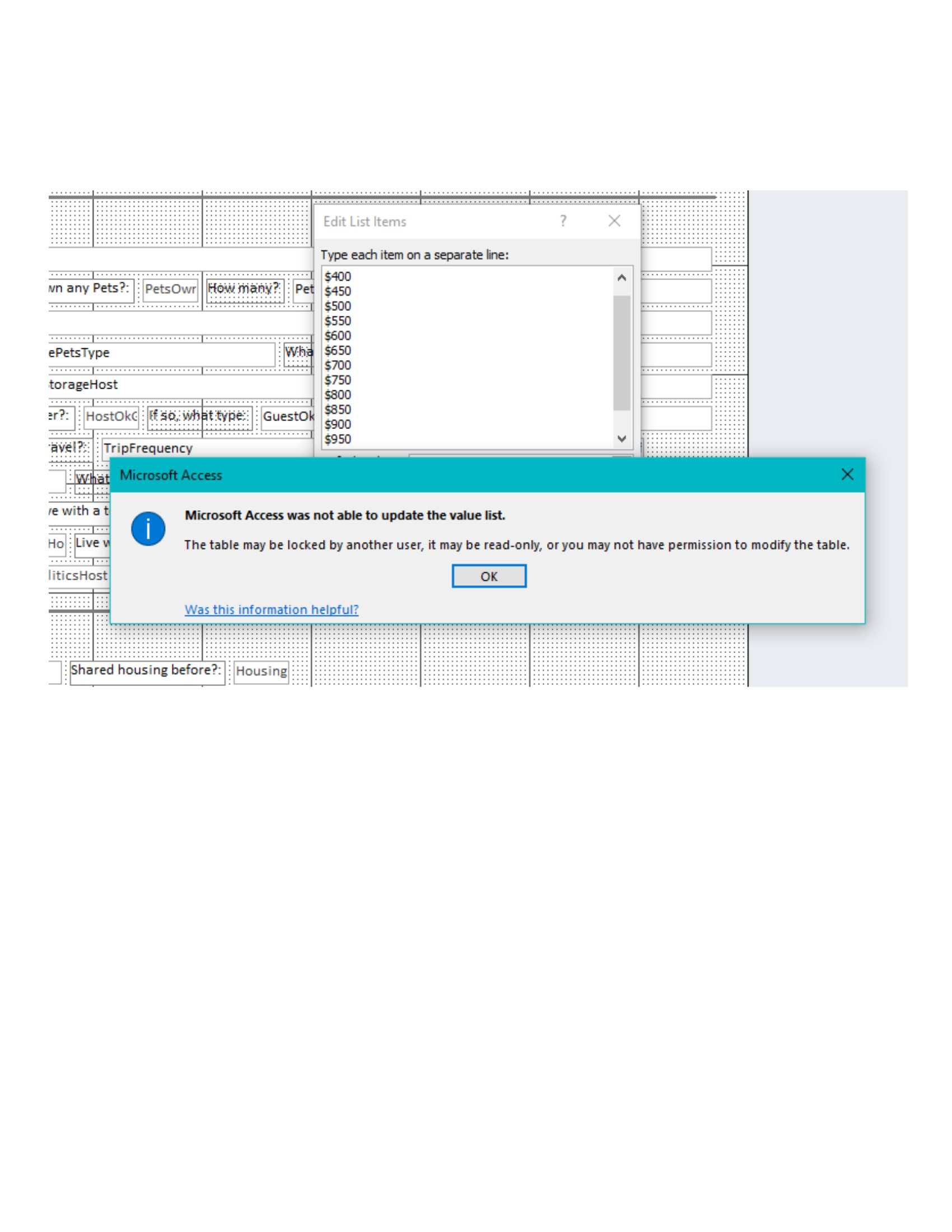
I have a very simple form in Access 2013. I am trying to add to listbox values. I can do this for a bit and then I get an error message: "MA Not Able to Update List Values". The entire error message refers to the form or field possibly being locked, read-only, or someone else is using the database. None of these are actually true. I am the only user for this database. I have backed up, Debugged, Compact/Repaired, Imported Objects into a new database. Still get this error. I am not a programmer, so I don't use any VBA commands. I am adding additional items to a value list that is already in place, via "Edit List Items" from a right-click on the field, which brings up a dropdown menu. I can also access the value items via the Property Sheet/data tab and I still get these errors. I am experiencing this on several different fields intermittently. Sometimes I can add a few values to the list successfully, then when I go back to add another I get the error message. Any help would be greatly appreciated. Thanks in advance.
Dan Jackson  @Reply  
            
3 years ago
Are you using a cloud drive such as google drive or onedrive by any chance?
Can you post a picture of the actual error message?
Carrie Donohue OP  @Reply  
    
3 years ago

Carrie Donohue OP  @Reply  
    
3 years ago
Hi, Thanks for responding. The database is on my PC; no cloud files, strictly local.
Kevin Yip  @Reply  
     
3 years ago
If the listbox is bound to a field on the form, then the listbox's entries must conform to that field's data type as set in the table.  For instance, if the field is a numeric field in the table, then the listbox can't have any text entries, or you get an error.
Carrie Donohue OP  @Reply  
    
3 years ago
Hi, Thanks Kevin for responding.  The fields conform to their specific data types. I am receiving error notifications after trying to edit fields that were already established; the new value items are of the same type and I then get an error message when trying to close the edited field.  Any other possibilities? Thanks and I hope everyone is having a lovely season.
Dan Jackson  @Reply  
            
3 years ago
You need to Troubleshoot this issue. Rule out exactly what isn't causing the problem so you can deal with what is. I can see you've done some stuff already;

Have you tried running the database on a different computer?
If it works - The problem is outside the database, such as the office install, directory etc..
If it doesn't work on another computer, its definitely a problem with the database itself.

I'd also try repairing your office installation, just to be sure - https://support.microsoft.com/en-us/office/repair-an-office-application-7821d4b6-7c1d-4205-aa0e-a6b40c5bb88b

Have you tried copying just the elements you need into a clean database file and running it again?

Is the database running from a Trusted Location?

This should help us narrow down where the problem is
Kevin Yip  @Reply  
     
3 years ago
Hi Carrie, in the "Edit List" window, copy the listbox's entries and paste it to Notepad.  Delete all the listbox's entries.  When the listbox is empty, paste the entries from Notepad back into the listbox.  Try adding to the listbox again.  Also try adding entries in Notepad, then paste to the listbox.  All this is just to eliminate certain possibilities of what is causing this.  It could be a bug in Access, or a legitimate reason for this to occur.
Carrie Donohue OP  @Reply  
    
3 years ago
Hi! I appreciate your suggestions, I tried all to no avail so I ended up recreating the database. Fortunately I was able to import the form unbounded and reconnected the fields, etc., and it works fine 'so far' : )   Next question from a user perspective as one who is entering data and then retrieving data.  When entering data, is there a way a person could select two options in a listbox and have those two choices be saved in the database? And, is there a way when forming a query to be able to search for two items within one field? For example when matching someone with available living situations. For instance in the first case, a person wishes to look for residence in two possible cities and so it would be desirable to enter two city names.  In the second case, a person wishes to search for all records containing either of the two city names. Sorry for the long post; I volunteered to create a database for an organization that matches seniors without homes with available homesharing opportunities. Being able to get help like this is awesome.  Thanks in advance!  : )
Kevin Yip  @Reply  
     
3 years ago
You can select multiple items in a listbox, but you cannot store their values.  If you turn on the "Multi Select" property on the listbox's property sheet, the listbox itself will have a Null value, because it can't store multiple values.

The only way to store multiple values in a single field is use a "multivalued field."  But you can only change its value list in table design.  You cannot edit the value list freely on a form like in a listbox.  Also, multivalued fields are cumbersome to work with, and are not recommended by many pros, including Richard himself and his moderators here.

The more common (and preferred) way to store multiple values is to store them in an additional "child" table, and create a one-to-many relationship between the parent and child tables.  Your form will need to add a "subform" to contain data from the child table.  This method lets you edit data freely and be able to save them into tables, hence the preferred method.  There are quite a few courses that cover "one-to-many relationships" and "subforms" since these are pretty big topics.

This thread is now CLOSED. If you wish to comment, start a NEW discussion in Access Forum.
 

Next Unseen

 
New Feature: Comment Live View


The following is a paid advertisement
Computer Learning Zone is not responsible for any content shown or offers made by these ads.
 

Learn
 
Access - index
Excel - index
Word - index
Windows - index
PowerPoint - index
Photoshop - index
Visual Basic - index
ASP - index
Seminars
More...
Customers
 
Login
My Account
My Courses
Lost Password
Memberships
Student Databases
Change Email
Info
 
Latest News
New Releases
User Forums
Topic Glossary
Tips & Tricks
Search The Site
Code Vault
Collapse Menus
Help
 
Customer Support
Web Site Tour
FAQs
TechHelp
Consulting Services
About
 
Background
Testimonials
Jobs
Affiliate Program
Richard Rost
Free Lessons
Mailing List
PCResale.NET
Order
 
Video Tutorials
Handbooks
Memberships
Learning Connection
Idiot's Guide to Excel
Volume Discounts
Payment Info
Shipping
Terms of Sale
Contact
 
Contact Info
Support Policy
Mailing Address
Phone Number
Fax Number
Course Survey
Email Richard
[email protected]
Blog RSS Feed    YouTube Channel

LinkedIn
Copyright 2026 by Computer Learning Zone, Amicron, and Richard Rost. All Rights Reserved. Current Time: 5/2/2026 10:02:17 AM. PLT: 0s