Free Lessons
Courses
Seminars
TechHelp
Fast Tips
Templates
Topic Index
Forum
ABCD
 
Home   Courses   TechHelp   Help   Contact   Merch   Join   Order   Logon   Forums   
 
Back to Access Forum    Comments List
Upload Images   @Reply   Bookmark    Link   Email   Next Unseen 
WHERE in a ComboBox
Sami Shamma 
             
3 years ago
Happy Holidays everyone
Can someone point me where I am going wrong in this simple comboBox "WHERE" statement?

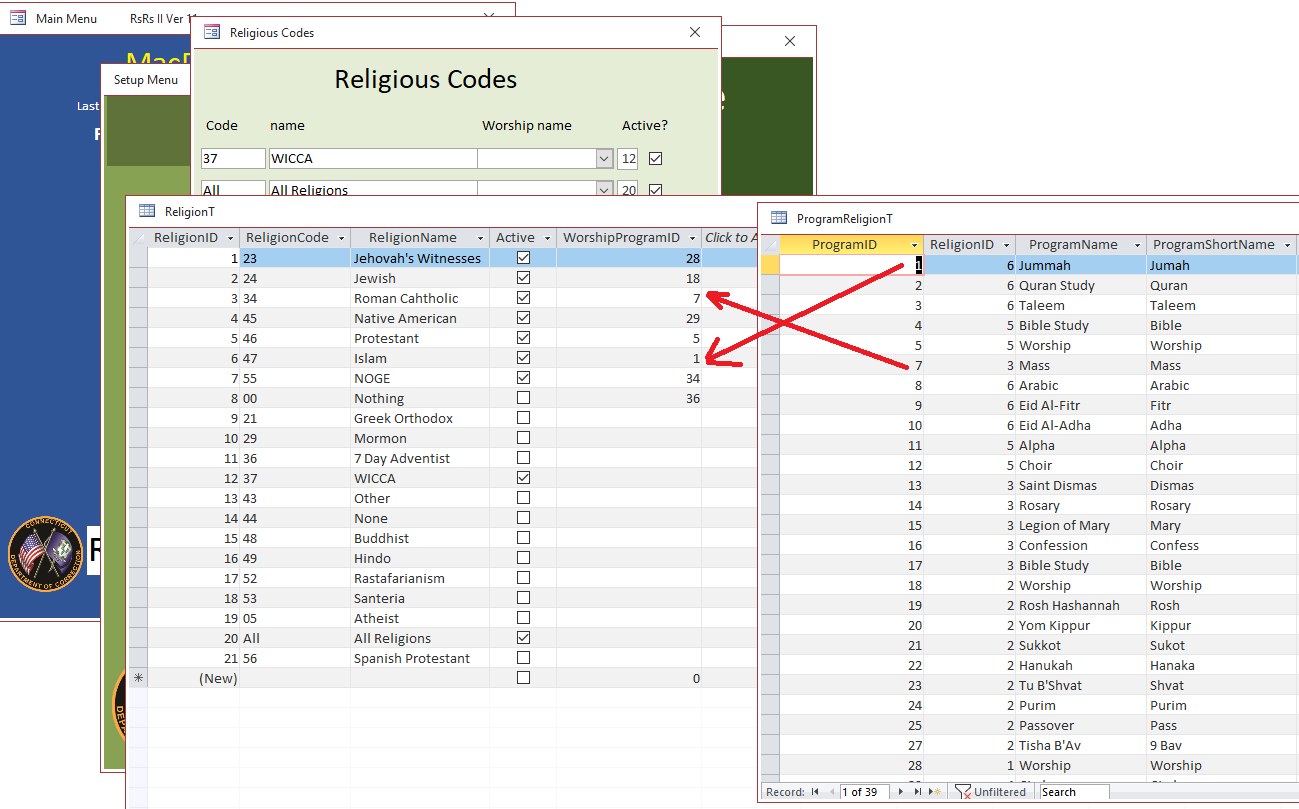
I have ReligionT with a foreign key to ReligionProgramT to bring the Name of the Worship Service. ie. Mass for Roman Catholic. I only want to show the Programs that belong to that religion. below are my 2 tables

The row Source of the ComboBox is:

SELECT ProgramID, ProgramName, ReligionID
FROM ProgramReligionT
WHERE ReligionID =  ReligionID
ORDER BY [ProgramName];  

The combo box works correctly excepts it does apply the "WHERE" statement. I get all the programs not only the ones for the ReligionID on the row I am on.

Debugging shows that I have the correct values.
Sami Shamma OP  @Reply  
             
3 years ago

Kevin Robertson  @Reply  
          
3 years ago
WHERE ReligionID =  Forms!FormName!ReligionID
Sami Shamma OP  @Reply  
             
3 years ago
Hi Kevin
Thank you for your reply.  For my knowledge, why didn't my WHERE work. When I msgbox the relegionID on the got focus of the combo box I get the correct ID.

Again many thanks

Sami Shamma OP  @Reply  
             
3 years ago

Sami Shamma OP  @Reply  
             
3 years ago
Hi Kevin

I changed the row source to:

SELECT ProgramID, ProgramName, ReligionID FROM ProgramReligionT
WHERE ReligionID =  Forms![M-ReligiousCodesF]!ReligionID
ORDER BY [ProgramName];

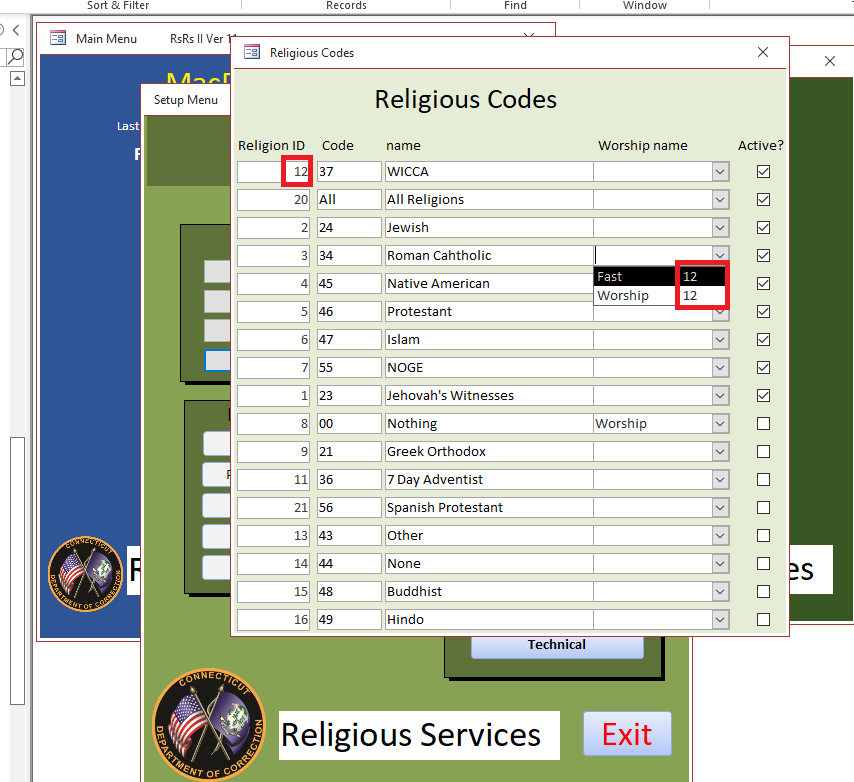
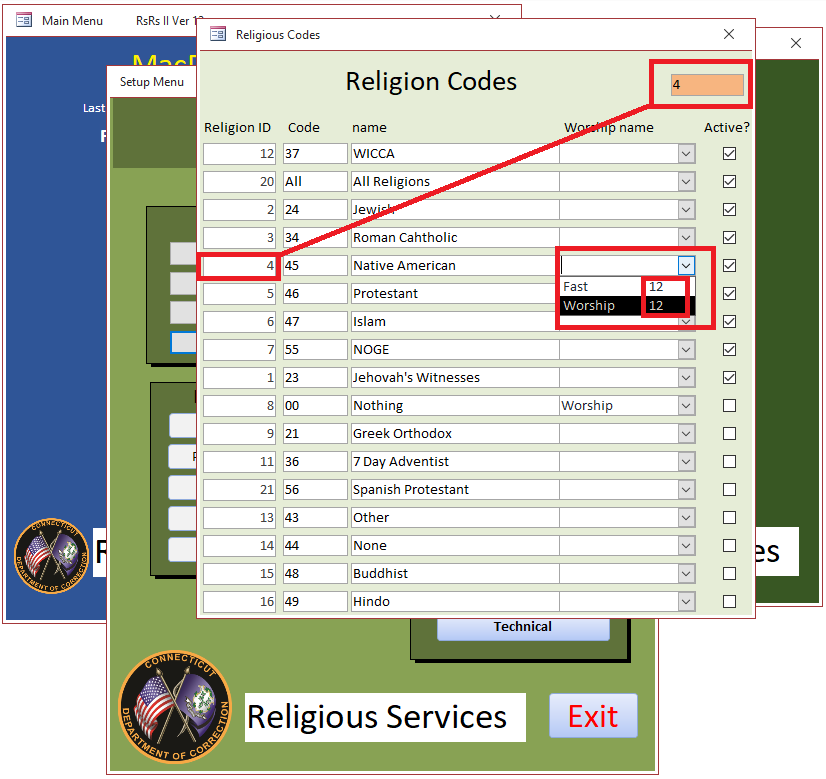
But as you can see when I open the combo box anywhere, I only get the first record "12".

That is the same as when I had the WHERE with ReligionID = ReligionID.
Scott Axton  @Reply  
      
3 years ago
Sami
Remember that a continuous form in Access that you are displaying one form multiple times so to speak.  So the reason you are seeing "incorrect" data is because it is picking up the ID off of the first record.  If you want the combo box to change depending on the record you are selecting you have to look at the record you are on to determine the ID.

Check out the Highlight Row video to see an example of what I'm talking about.  Also you could (I think - I didn't try it) take this solution and apply it to your where statement to effectively change the Combo record source depending on which record you are on.
Alex Hedley  @Reply  
           
3 years ago
Maybe the Extended Cut: Cascading Combo Boxes
Sami Shamma OP  @Reply  
             
3 years ago
Hi Scott and Alex

I used the technique in Highlight Row video and used the code below for the record source:

SELECT ProgramID, ProgramName, ReligionID
FROM ProgramReligionT
WHERE ReligionID =  SelectedID
ORDER BY ProgramName;

But I am still having the same issues
Sami Shamma OP  @Reply  
             
3 years ago

Sami Shamma OP  @Reply  
             
3 years ago
I just tried the Extended Cut: Cascading Combo Boxes trick Richard used, and it displayed the correct information but my combo box still displays only from the first Record. :(
Alex Hedley  @Reply  
           
3 years ago
How about my Legacy Tip:
Continuous Form - Dependent Combo
How to have a Continuous Form but with a Dependent Combo per Record
Sami Shamma OP  @Reply  
             
3 years ago
I will watch this now
Sami Shamma OP  @Reply  
             
3 years ago
I think this one is working. I just ran out of time to clean it up.

Thank you friends.

Enjoy your holidays.

This thread is now CLOSED. If you wish to comment, start a NEW discussion in Access Forum.
 

Next Unseen

 
New Feature: Comment Live View


The following is a paid advertisement
Computer Learning Zone is not responsible for any content shown or offers made by these ads.
 

Learn
 
Access - index
Excel - index
Word - index
Windows - index
PowerPoint - index
Photoshop - index
Visual Basic - index
ASP - index
Seminars
More...
Customers
 
Login
My Account
My Courses
Lost Password
Memberships
Student Databases
Change Email
Info
 
Latest News
New Releases
User Forums
Topic Glossary
Tips & Tricks
Search The Site
Code Vault
Collapse Menus
Help
 
Customer Support
Web Site Tour
FAQs
TechHelp
Consulting Services
About
 
Background
Testimonials
Jobs
Affiliate Program
Richard Rost
Free Lessons
Mailing List
PCResale.NET
Order
 
Video Tutorials
Handbooks
Memberships
Learning Connection
Idiot's Guide to Excel
Volume Discounts
Payment Info
Shipping
Terms of Sale
Contact
 
Contact Info
Support Policy
Mailing Address
Phone Number
Fax Number
Course Survey
Email Richard
[email protected]
Blog RSS Feed    YouTube Channel

LinkedIn
Copyright 2026 by Computer Learning Zone, Amicron, and Richard Rost. All Rights Reserved. Current Time: 8/24/2026 8:26:57 AM. PLT: 1s