Free Lessons
Courses
Seminars
TechHelp
Fast Tips
Templates
Topic Index
Forum
ABCD
 
Home   Courses   TechHelp   Forums   Help   Contact   Merch   Join   Order   Logon  
 
Back to Access Updater    Comments List
Upload Images   @Reply   Bookmark    Link   Email   Next Unseen 
Getting an Error v11
William Cummings 
     
2 years ago
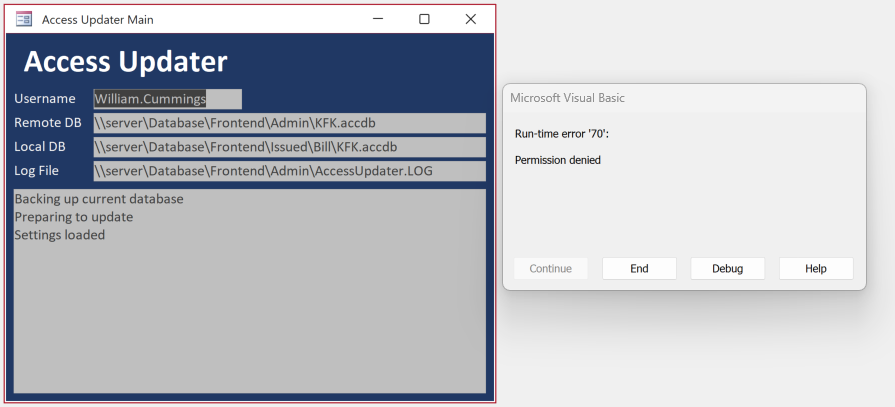
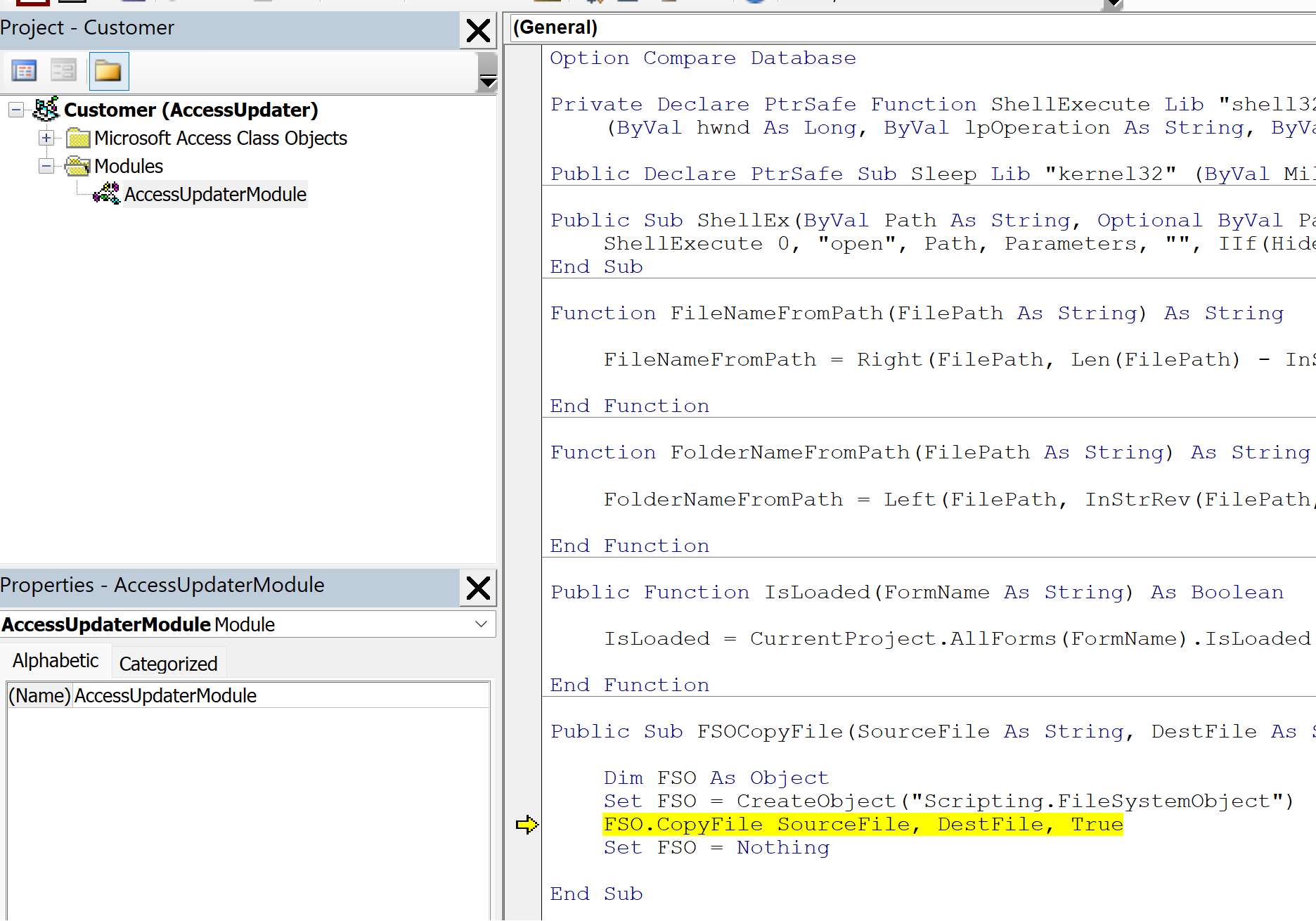
I have the updater installed, and cannot seem to get it to copy. I have an error of "Permission Denied" but any folders all users have full access, and I am an admin and I still get the same error. I will attach a screenshot of the Debug and error upon approval. I cannot find where the permission error may be at.
William Cummings OP  @Reply  
     
2 years ago

William Cummings OP  @Reply  
     
2 years ago

Sami Shamma  @Reply  
             
2 years ago
I am not familiar with the Updater; however, did you check that the destination DB is closed?
Kevin Yip  @Reply  
     
2 years ago
Copy it to a destination that you know you have full access, such as C:\My Documents on your own PC.  If it works, it's a permission issue with your other destinations, which only someone familiar with your network can fix.
William Cummings OP  @Reply  
     
2 years ago
I am the network admin will full access to all folders.  I do not believe it is security issue, unless the DB is accessing some other folder than those listed.
Kevin Yip  @Reply  
     
2 years ago
Having full network access doesn't mean you have it all the time.  Shares could go offline, files locked by users or apps, credential issues, all kinds of potential issues.  Right now you need to eliminate some possibilities.  Copy a local file that you know is fully accessible to the destination, and copy the source file to a local destination that you know is fully accessible.  Of course, check the values of SourceFile and DestFile variables by hovering your mouse over the yellow line in the editor.
William Cummings OP  @Reply  
     
2 years ago
I just tried that and it gave the same premission denied error.
Adam Schwanz  @Reply  
           
2 years ago
What kind of setup do you have that the local DB is also on the server?

Just to confirm, you tried setting local locations on the same machine for the Remote DB and Local DB in like your C Drive?
William Cummings OP  @Reply  
     
2 years ago
I did try it on my C Drive with the same concept as the server.   It appears that the permission denied is on the copy script making a backup.    It denied the first time, then i deleted the accdb.backup file from the user folder and it worked the second time (on the C drive, I have not tried on the main server env yet).  Maybe it is an overwrite issue where it cant overwrite the .backup.  

We have a server share with all the front ends in individual folders for users and they have shortcuts that point to it.  Each user has their own front end (only 18 of them).  The backend has its own folder in that share.

Kevin's tip to hover to show the path was a great tip to see what the error is on.
Kevin Yip  @Reply  
     
2 years ago
Regarding overwriting an existing file, the CopyFile command cannot overwrite a file with read-only access, or a "permission denied" error will occur.  

Copying a read-only file to a new file is fine, but that new file will also be read-only, inheriting all permissions from the original file.  If you try to overwrite that new file, the error will also occur.  

CopyFile has an option to always overwrite the destination file (which is True by default, by the way):

    fso.CopyFile OriginalFile, DestFile, True

But that will also cause an error if DestFile is read-only.
Elijah Workman  @Reply  
   
2 years ago
I am having the same issue with my updater. I am able to debug it and move past the error. So I put in a On error resume next and on error GoTo 0 and it seemed to work like normal again. But, I am having another issue where every time I push an update, my on local admin copy's Custom Navigation pane gets all scrambled. I had all my database objects in custom folders and now they are scattered. Any ideas?

This thread is now CLOSED. If you wish to comment, start a NEW discussion in Access Updater.
 

Next Unseen

 
New Feature: Comment Live View


The following is a paid advertisement
Computer Learning Zone is not responsible for any content shown or offers made by these ads.
 

Learn
 
Access - index
Excel - index
Word - index
Windows - index
PowerPoint - index
Photoshop - index
Visual Basic - index
ASP - index
Seminars
More...
Customers
 
Login
My Account
My Courses
Lost Password
Memberships
Student Databases
Change Email
Info
 
Latest News
New Releases
User Forums
Topic Glossary
Tips & Tricks
Search The Site
Code Vault
Collapse Menus
Help
 
Customer Support
Web Site Tour
FAQs
TechHelp
Consulting Services
About
 
Background
Testimonials
Jobs
Affiliate Program
Richard Rost
Free Lessons
Mailing List
PCResale.NET
Order
 
Video Tutorials
Handbooks
Memberships
Learning Connection
Idiot's Guide to Excel
Volume Discounts
Payment Info
Shipping
Terms of Sale
Contact
 
Contact Info
Support Policy
Mailing Address
Phone Number
Fax Number
Course Survey
Email Richard
[email protected]
Blog RSS Feed    YouTube Channel

LinkedIn
Copyright 2026 by Computer Learning Zone, Amicron, and Richard Rost. All Rights Reserved. Current Time: 5/7/2026 12:05:36 PM. PLT: 1s