Free Lessons
Courses
Seminars
TechHelp
Fast Tips
Templates
Topic Index
Forum
ABCD
 
Home   Courses   TechHelp   Forums   Help   Contact   Merch   Join   Order   Logon  
 
Back to Access Forum    Comments List
Upload Images   @Reply   Bookmark    Link   Email   Next Unseen 
Ref previous Sheet Excel
Sami Shamma 
             
2 years ago
Greeting friends

Does anyone know how to dynamically reference the previous sheet in Excel? I don't want to hardcode the name of the previous sheet. Is there a control that I can use to say this cell = {PreviousSheet}!A1?

Many thanks
Kevin Robertson  @Reply  
          
2 years ago
Add this function to a Module. You will need to activate the Developer tab to do this.

Function PrevSheet(RCell As Range)
    Dim xIndex As Long
    Application.Volatile
    xIndex = RCell.Worksheet.Index
    If xIndex > 1 Then _
        PrevSheet = Worksheets(xIndex - 1).Range(RCell.Address)
End Function


Then in your sheet you can call the function like this: PrevSheet(A1)
Sami Shamma OP  @Reply  
             
2 years ago
Thank you Kevin

I will try it now.
David Burns  @Reply  
    
2 years ago
There's some interesting stuff in here: https://www.mrexcel.com/board/threads/moving-to-a-previous-sheet-macro.1133731/
Sami Shamma OP  @Reply  
             
2 years ago
It works brilliantly

Thanks a lot
Kevin Robertson  @Reply  
          
2 years ago
You're welcome.
Sami Shamma OP  @Reply  
             
2 years ago
Kevin

I sent you a small thank you
Sami Shamma OP  @Reply  
             
2 years ago
Another Question

Can you Dynamically name a sheet say from a value in a Cell?

Thanks
Sami Shamma OP  @Reply  
             
2 years ago
Is there the equivalent of "On Current" event in a sheet that will fire a VBA code.

I have put this code in, but do not know how to execute it:

Sub RenameActiveSheet()
    ActiveSheet.Name = Range("P4").Value
End Sub
Kevin Robertson  @Reply  
          
2 years ago
Does this work for you?

Sub RenameSheet()
    Dim newName As String
    newName = ActiveSheet.Range("A1").Value
    
    If newName <> "" Then
        On Error Resume Next
        ActiveSheet.Name = newName
        On Error GoTo 0
    End If
End Sub


You can press ALT+F8 to run this Macro or call the sub in a Command Button.
Sami Shamma OP  @Reply  
             
2 years ago
Thanks Kevin

That worked with a button

I wish Richard will start VBA for Excel!!
Sami Shamma OP  @Reply  
             
2 years ago
Happy Friday friends

In excel, can I copy to a new sheet from current sheet using VBA and shift the cell content of a range by one cell to the right?
For example:

content of C5 will be copied to D5.

Many thanks
Kevin Robertson  @Reply  
          
2 years ago
Here is a sub that should work.

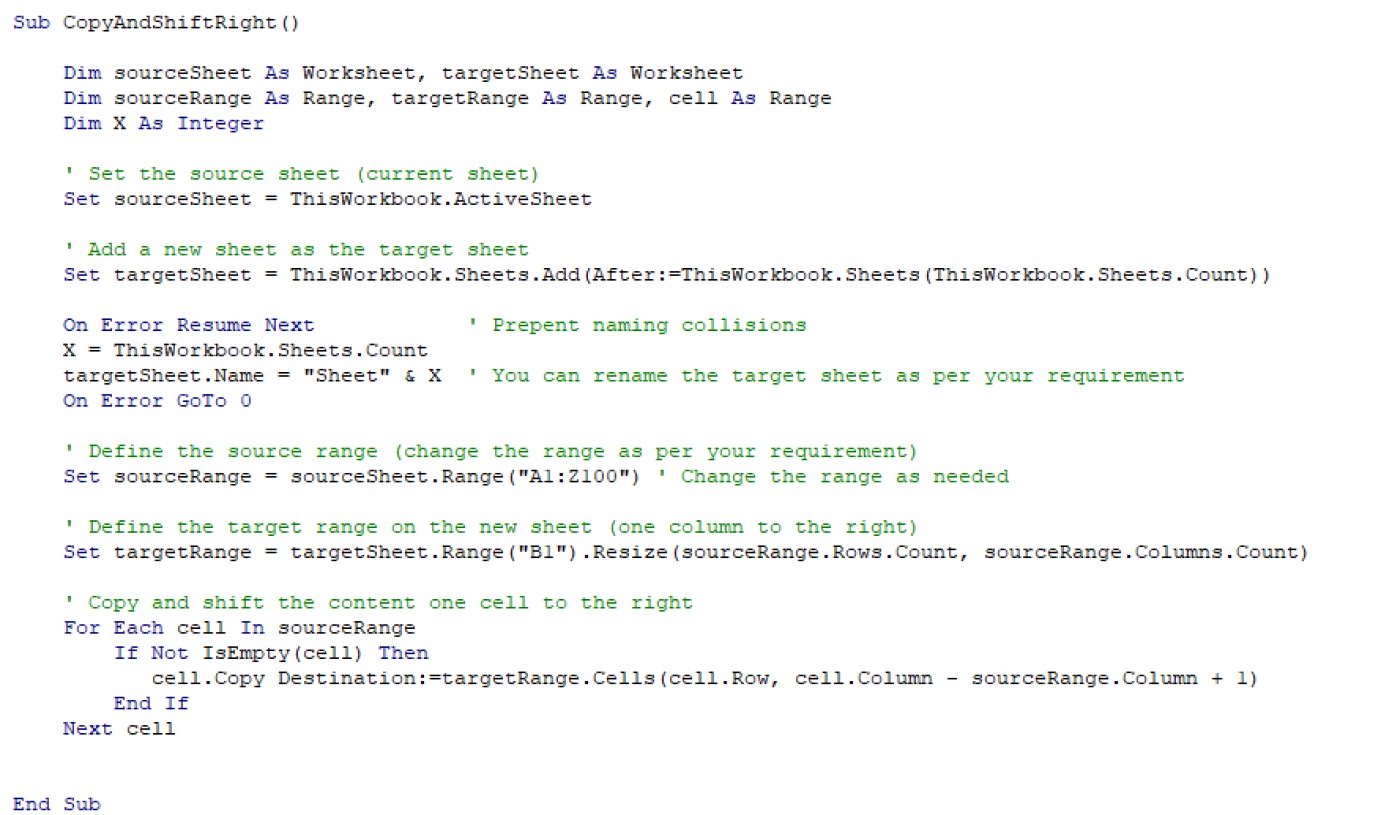
Sub CopyAndShiftRight()

    Dim sourceSheet As Worksheet, targetSheet As Worksheet
    Dim sourceRange As Range, targetRange As Range, cell As Range
    Dim X As Integer

    Set sourceSheet = ThisWorkbook.ActiveSheet
    Set targetSheet = ThisWorkbook.Sheets.Add(After:=ThisWorkbook.Sheets(ThisWorkbook.Sheets.Count))
    
    On Error Resume Next
    X = ThisWorkbook.Sheets.Count
    targetSheet.Name = "Sheet" & X
    On Error GoTo 0

    Set sourceRange = sourceSheet.Range("A1:Z100")
    Set targetRange = targetSheet.Range("B1").Resize(sourceRange.Rows.Count, sourceRange.Columns.Count)

    For Each cell In sourceRange
        If Not IsEmpty(cell) Then
           cell.Copy Destination:=targetRange.Cells(cell.Row, cell.Column - sourceRange.Column + 1)
        End If
    Next cell

End Sub


I removed the comments to shorten the code. The screenshot below is the seme code but with the comments.

Note: I have only tested this with one cell of data.
Please test fully on a non-critical test sheet before applying it to any critical work.
Kevin Robertson  @Reply  
          
2 years ago

Sami Shamma OP  @Reply  
             
2 years ago
Thank you Kevin

I will test it fully this weekend.

Many Thanks

This thread is now CLOSED. If you wish to comment, start a NEW discussion in Access Forum.
 

Next Unseen

 
New Feature: Comment Live View


The following is a paid advertisement
Computer Learning Zone is not responsible for any content shown or offers made by these ads.
 

Learn
 
Access - index
Excel - index
Word - index
Windows - index
PowerPoint - index
Photoshop - index
Visual Basic - index
ASP - index
Seminars
More...
Customers
 
Login
My Account
My Courses
Lost Password
Memberships
Student Databases
Change Email
Info
 
Latest News
New Releases
User Forums
Topic Glossary
Tips & Tricks
Search The Site
Code Vault
Collapse Menus
Help
 
Customer Support
Web Site Tour
FAQs
TechHelp
Consulting Services
About
 
Background
Testimonials
Jobs
Affiliate Program
Richard Rost
Free Lessons
Mailing List
PCResale.NET
Order
 
Video Tutorials
Handbooks
Memberships
Learning Connection
Idiot's Guide to Excel
Volume Discounts
Payment Info
Shipping
Terms of Sale
Contact
 
Contact Info
Support Policy
Mailing Address
Phone Number
Fax Number
Course Survey
Email Richard
[email protected]
Blog RSS Feed    YouTube Channel

LinkedIn
Copyright 2026 by Computer Learning Zone, Amicron, and Richard Rost. All Rights Reserved. Current Time: 5/7/2026 2:22:58 AM. PLT: 1s