Free Lessons
Courses
Seminars
TechHelp
Fast Tips
Templates
Topic Index
Forum
ABCD
 
Home   Courses   TechHelp   Help   Contact   Merch   Join   Order   Logon   Forums   
 
Back to Access Forum    Comments List
Upload Images | @Reply | Bookmark | Link | Email | Next Unseen |
Need some assistance
Carl Byerley 
        
2 years ago
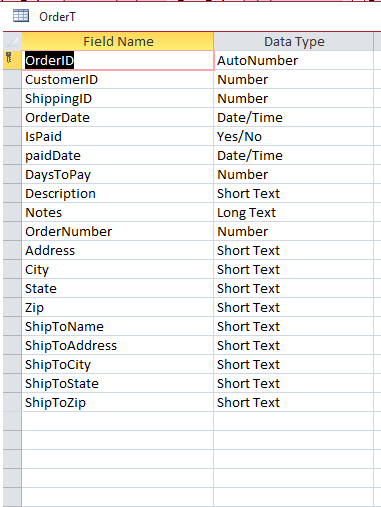
Ok, I have been watching videos for several days (till my eyes are blurring). I have made some changes to the Order form because using the Query like Richard did in the Invoicing video does not quit get it done for my purposes.
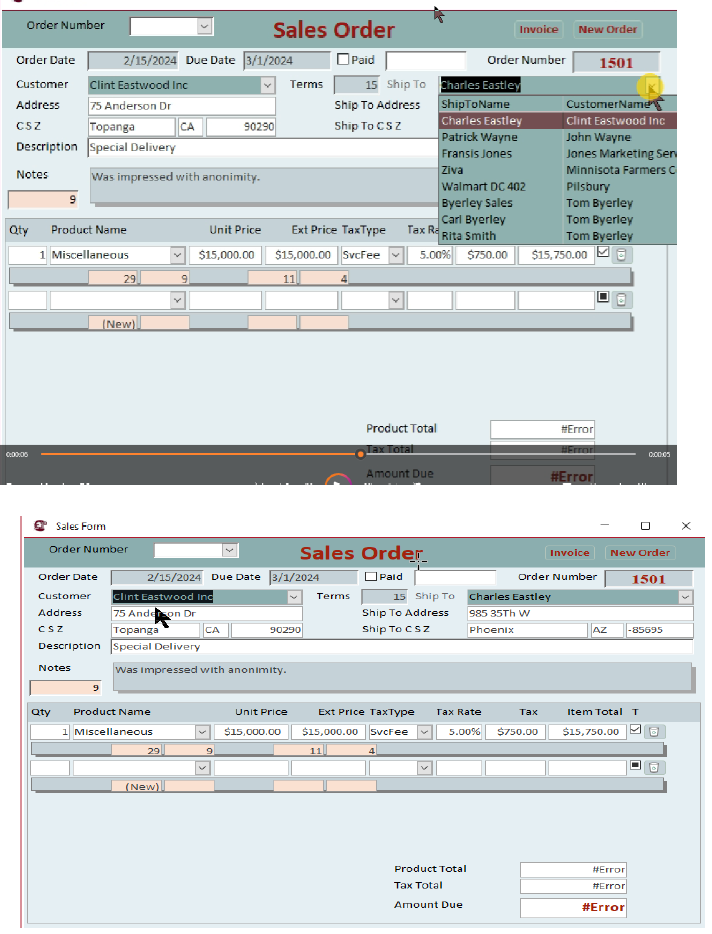
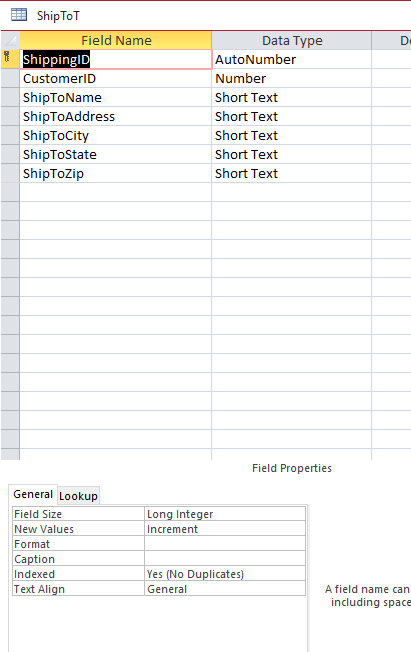
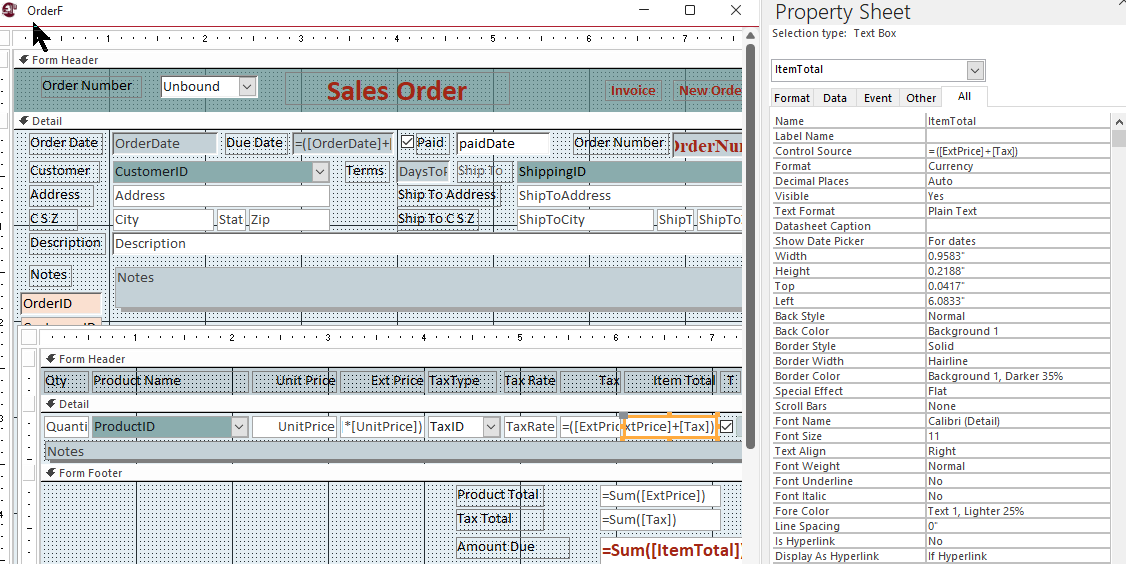
1. This form works and records data like I need it to in it's present form However, I need the Ship To Combo box to only display the shipping addresses of the current customer. Right now it lists all shipping addresses. What do I need to do here?

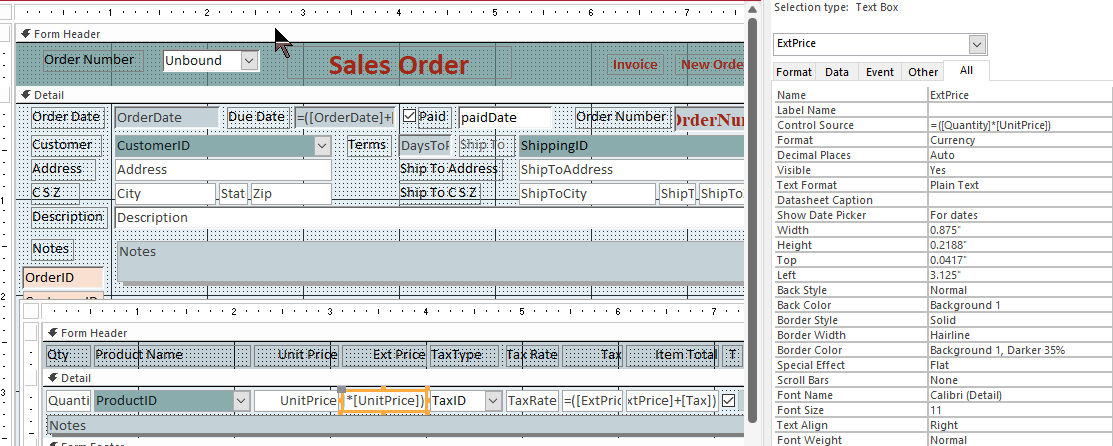
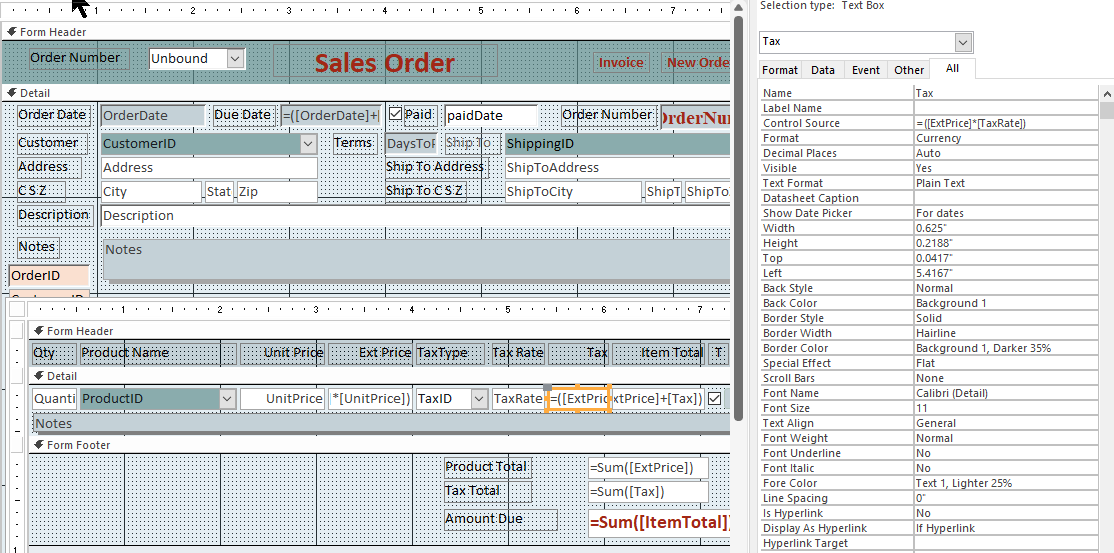
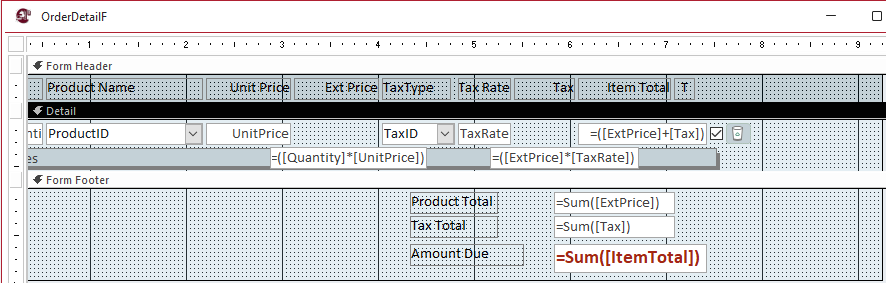
2. I need to do something different to get my totals to work, I tried the query method but them I don't get data recorded the way I need it. How can I make this work with what I have, or is it even possible?

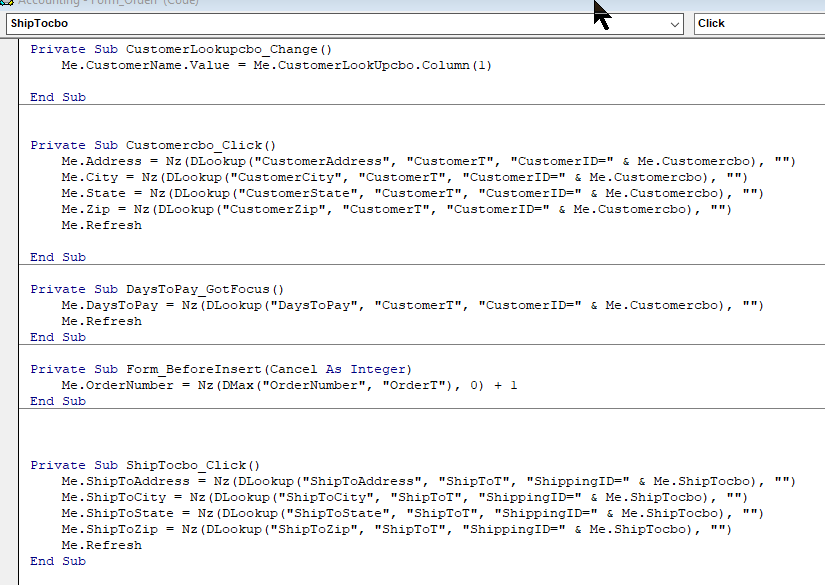
See screenshots posted below.
Carl Byerley OP  @Reply  
        
2 years ago

Carl Byerley OP  @Reply  
        
2 years ago

Carl Byerley OP  @Reply  
        
2 years ago

John Davy  @Reply  
         
2 years ago
Hi Carl
Assuming the customer's address is on the CustomerF, you are trying to have the address be on the order form. You need a way to bring that information to the fields on the order form. Here is vba that Richard use in his App.
Adapt as needed.
Private Sub Form_Current()

    LockIfShipped

    If IsLoaded("CustomerF") Then
        CustomerCombo.DefaultValue = Forms!CustomerF!CustomerID
        Address.DefaultValue = """" & Forms!CustomerF!Address & """"
        City.DefaultValue = """" & Forms!CustomerF!City & """"
        State.DefaultValue = """" & Forms!CustomerF!State & """"
        ZIP.DefaultValue = """" & Forms!CustomerF!ZIP & """"
        Country.DefaultValue = """" & Forms!CustomerF!Country & """"
    Else
        CustomerCombo.DefaultValue = 0
        Address.DefaultValue = ""
        City.DefaultValue = ""
        State.DefaultValue = ""
        ZIP.DefaultValue = ""
        Country.DefaultValue = ""
    End If
  
End Sub


Please show me the code for you issue with totals. I need to see details

John
Carl Byerley OP  @Reply  
        
2 years ago
Maybe I need to explain better, What I have so far I did to get the info I want and to have it recorded the way I need. There is probably a better way but I am at a loss to figure it out.

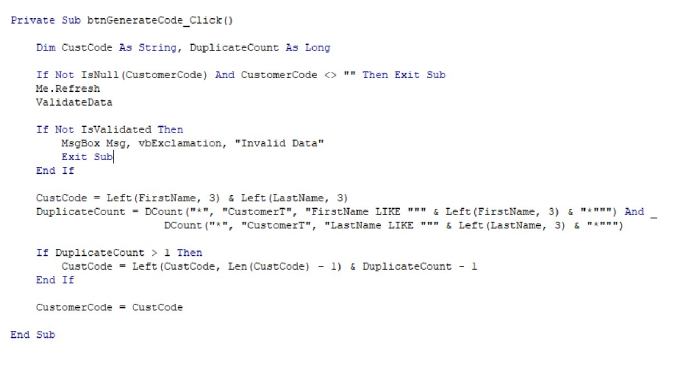
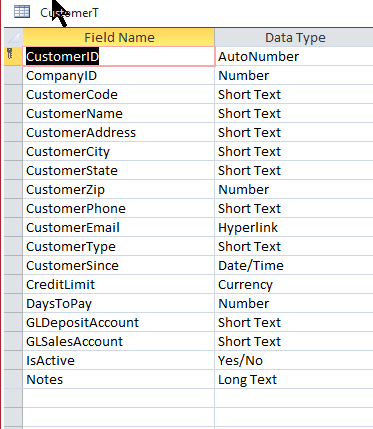
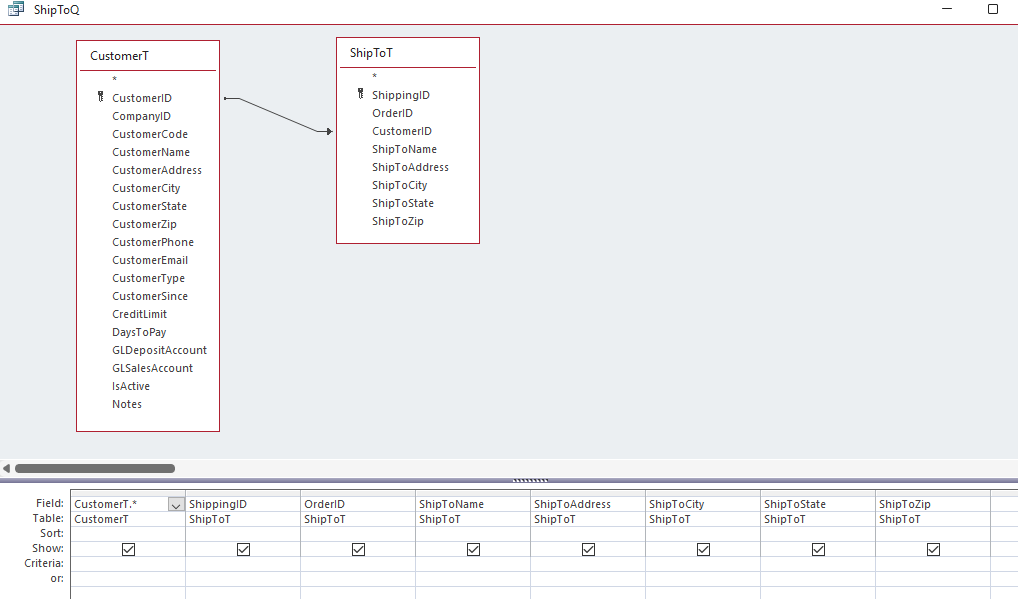
I have 2 separate tables, "CustomerT" and "ShipToT" (See "CustomerF").

The Shipping address is never the same as the Ordering Customer that is why I omitted the "Same as button".

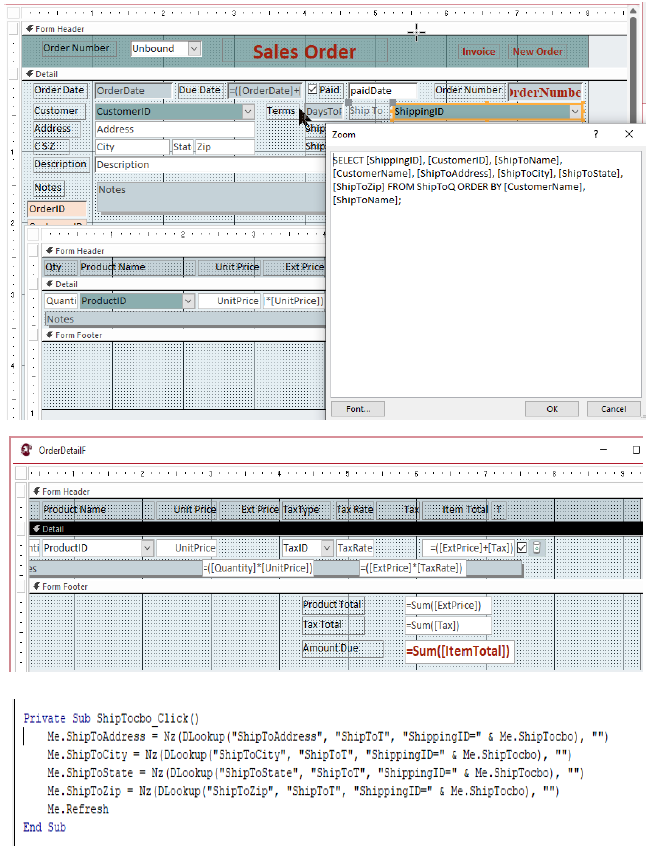
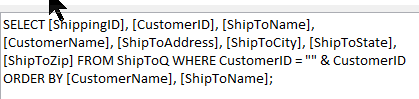
What I need is when I click the ShippingID combo for it to show only the shipping addresses for the current customer on the Form. Currently I have included the Customer name in the combo box so I can identify. I tried using a subform but for some reason it did not record the information correctly. The information currently is being filled with DLookup.
Carl Byerley OP  @Reply  
        
2 years ago

Carl Byerley OP  @Reply  
        
2 years ago

Carl Byerley OP  @Reply  
        
2 years ago

Carl Byerley OP  @Reply  
        
2 years ago

Carl Byerley OP  @Reply  
        
2 years ago

Sami Shamma  @Reply  
             
2 years ago
Carl, your first problem with the Ship to: you need a WHERE clause at the end of your control source combobox (before ORDER BY) to limit the selection to that customer:

... " WHERE CustomerID = " & CustomerID
Carl Byerley OP  @Reply  
        
2 years ago
This is all I have on the Order Totals. I have just used a Unbound text box and put the formulas in the line totals ie "ExtPrice", "TaxRate", "ItemTotal" I want to total these three columns in the footer. I tried using the query method Richard described in the video but did not record the information the way I need. I may be missing something but I tried it 3 times. What am I missing?
Carl Byerley OP  @Reply  
        
2 years ago

Carl Byerley OP  @Reply  
        
2 years ago

Carl Byerley OP  @Reply  
        
2 years ago

Carl Byerley OP  @Reply  
        
2 years ago

Carl Byerley OP  @Reply  
        
2 years ago
Sami, I think I am missing something it still lists all shipping addresses.
Carl Byerley OP  @Reply  
        
2 years ago

Carl Byerley OP  @Reply  
        
2 years ago

Sami Shamma  @Reply  
             
2 years ago
Check your double quotes in the code above. It is not correct.
Check this great video
Double Double Quotes
Carl Byerley OP  @Reply  
        
2 years ago
When I put just a single quote I do not get any data in my list.
Sami Shamma  @Reply  
             
2 years ago
Watch the video
John Davy  @Reply  
         
2 years ago
Hi Carl
Sami is correct. The WHERE will limit your list as you wanted. DoubleDouble quotes are a little confusing, so bear with it.


John
John Davy  @Reply  
         
2 years ago
Hi Carl
Take a look at Richards Expert 29 Lesson 01. I think it will help you with your totals. You might check his code on the actual form/report

John

This thread is now CLOSED. If you wish to comment, start a NEW discussion in Access Forum.
 

Next Unseen


What's This?


The following is a paid advertisement
Computer Learning Zone is not responsible for any content shown or offers made by these ads.
 

Learn
 
Access - index
Excel - index
Word - index
Windows - index
PowerPoint - index
Photoshop - index
Visual Basic - index
ASP - index
Seminars
More...
Customers
 
Login
My Account
My Courses
Lost Password
Memberships
Student Databases
Change Email
Info
 
Latest News
New Releases
User Forums
Topic Glossary
Tips & Tricks
Search The Site
Code Vault
Collapse Menus
Help
 
Customer Support
Web Site Tour
FAQs
TechHelp
Consulting Services
About
 
Background
Testimonials
Jobs
Affiliate Program
Richard Rost
Free Lessons
Mailing List
PCResale.NET
Order
 
Video Tutorials
Handbooks
Memberships
Learning Connection
Idiot's Guide to Excel
Volume Discounts
Payment Info
Shipping
Terms of Sale
Contact
 
Contact Info
Support Policy
Mailing Address
Phone Number
Fax Number
Course Survey
Email Richard
[email protected]
Blog RSS Feed    YouTube Channel

LinkedIn
Copyright 2026 by Computer Learning Zone, Amicron, and Richard Rost. All Rights Reserved. Current Time: 9/29/2026 6:12:39 PM. PLT: 2s