Free Lessons
Courses
Seminars
TechHelp
Fast Tips
Templates
Topic Index
Forum
ABCD
 
Home   Courses   TechHelp   Forums   Help   Contact   Merch   Join   Order   Logon  
 
Back to Access Forum    Comments List
Upload Images   @Reply   Bookmark    Link   Email   Next Unseen 
Compare By Month by Year
Brent Davis 
     
2 years ago
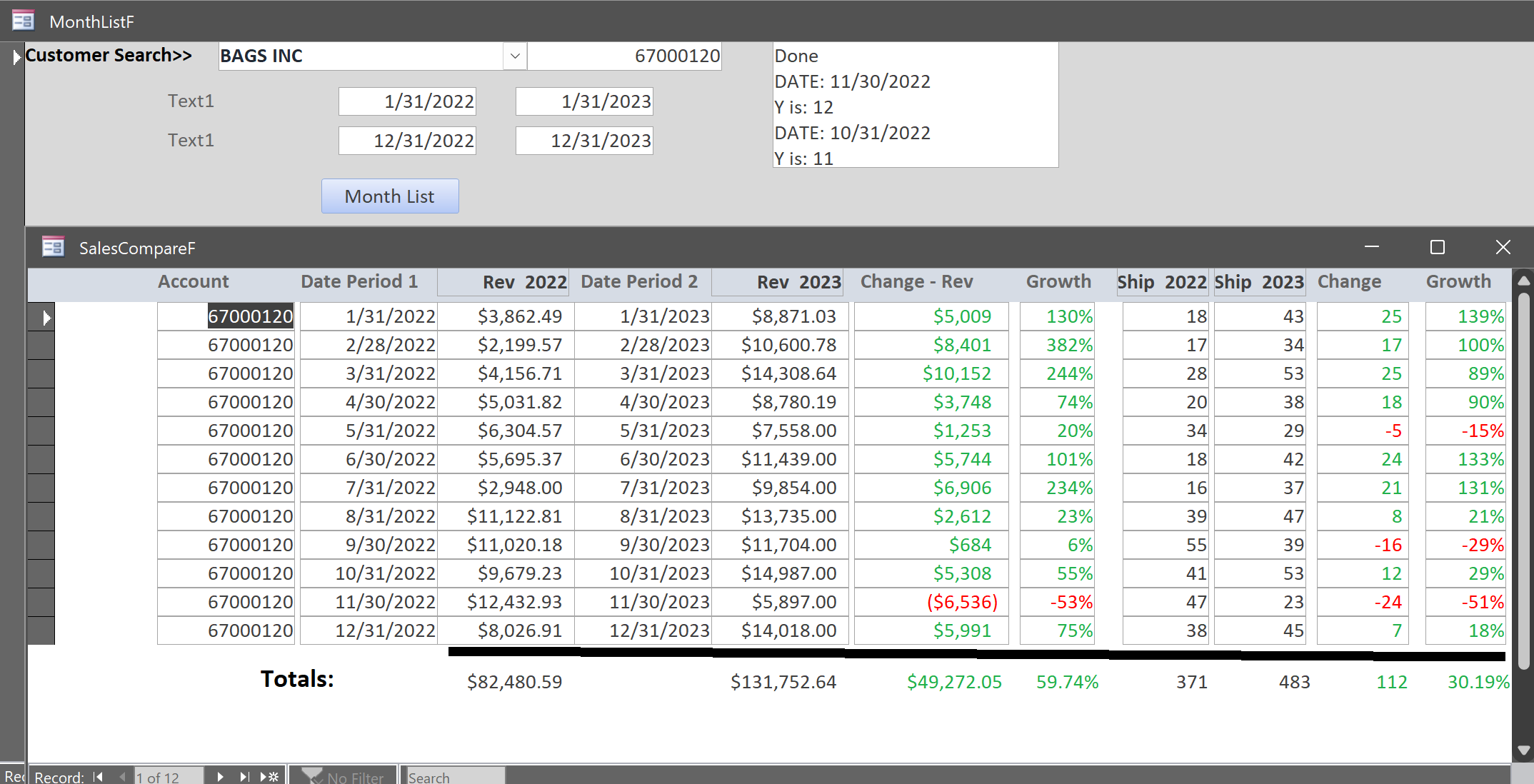
Please see the code below.  This works perfectly if I want to compare each month for year one (say 2022) to each month for year two (2023).  I have four unbound text boxes with the dates listed and I can input any dates.  If I want to compare say January 2023 and February 2023 to January 2024 and February 2024 it lists all months for 2023 and the two months with data for 2024 and then zeros for the other months in 2024. How can I get it to only show the dates listed in the text boxes?

DetailsPrivate Sub MonthListBtn_Click()

    Dim X As Date, StartDate As Date, EndDate As Date, Sales As Currency, AccountNumber As Long, Y As Long, rs As Recordset
    Dim BeginDate2 As Date, FinishDate2 As Date, Z As Date
    
    StartDate = DateSerial(Year(StartDate1), Month(StartDate1), 0)
    EndDate = DateAdd("m", 12, StartDate)
    
    BeginDate2 = DateSerial(Year(Start2Date), Month(Start2Date), 0)
    FinishDate2 = DateAdd("m", 12, BeginDate2)
    
    'AccountNumber = InputBox("Enter AccountNumber", "AccountNumber")
    AccountNumber = accountnumberTXT
    
    CurrentDb.Execute "Delete from SalesT"
    Set rs = CurrentDb.OpenRecordset("SalesT")
    
    X = StartDate
    Z = BeginDate2
    
    StatusBox = ""
    
    While X <= EndDate And Z < FinishDate2
        For Y = 1 To 12
        Status "Y is: " & Y
        Status "DATE: " & X
        X = DateSerial(Year(StartDate1), Month(StartDate1) + Y, 0)
        'While Z <= FinishDate2
        'Status "Date: " & Z
        Z = DateSerial(Year(Start2Date), Month(Start2Date) + Y, 0)
        'Wend
        rs.AddNew
        rs!AccountNumber = AccountNumber
        rs!SalesDate = X
        rs!SalesDate2 = Z
        rs!SalesAmt = Nz(DLookup("Revenue", "[Shipper Monthly Totals Table]", "Monthly=#" & [X] & "# and monthly<=#" & EndDate & "# and accountnumber=" & AccountNumber), 0)
        rs!SalesAmt2 = Nz(DLookup("Revenue", "[Shipper Monthly Totals Table]", "Monthly=#" & [Z] & "# and monthly<=#" & FinishDate2 & "# and accountnumber=" & AccountNumber), 0)
        rs!Ship1 = Nz(DLookup("Shipments", "[Shipper Monthly Totals Table]", "Monthly=#" & [X] & "# and monthly<=#" & EndDate & "# and accountnumber=" & AccountNumber), 0)
        rs!Ship2 = Nz(DLookup("Shipments", "[Shipper Monthly Totals Table]", "Monthly=#" & [Z] & "# and monthly<=#" & FinishDate2 & "# and accountnumber=" & AccountNumber), 0)
        rs.Update
        'X = DateSerial(Year(StartDate1), Month(StartDate1) + Y, 0)
        'Z = DateSerial(Year(Start2Date), Month(Start2Date) + Y, 0)
    Next
    Wend
    
    rs.Close
    Set rs = Nothing
    Status "Done"
    DoCmd.OpenForm "SalesCompareF"

End Sub


Any assistance is appreciated.
Adam Schwanz  @Reply  
           
2 years ago
Well your adding a year to both the start dates
  EndDate = DateAdd("m", 12, StartDate)

You need to change that to however many months you want to add, lots of ways you could do that, you could hard code it or make another textbox or combo box to designate the number of months to go out. Or you could change the way it's setup entirely and add an end date textbox. If part of those 4 textboxes are to have end dates, then you need to change your code to check if there is an end date before applying the add 12 months code
Brent Davis OP  @Reply  
     
2 years ago

Juan C Rivera  @Reply  
            
2 years ago
Try this and let me know if it worked.   Not 100% sure but I gave it a shot if it dont work no harm done.  

But before you put this into action please back up your data.   You never know if this will go BOOM!

DetailsPrivate Sub MonthListBtn_Click()
    Dim X As Date, StartDate As Date, EndDate As Date, Sales As Currency, AccountNumber As Long, Y As Long, rs As Recordset
    Dim BeginDate2 As Date, FinishDate2 As Date, Z As Date

    StartDate = DateSerial(Year(StartDate1), Month(StartDate1), 0)
    EndDate = DateAdd("m", 12, StartDate)

    BeginDate2 = DateSerial(Year(Start2Date), Month(Start2Date), 0)
    FinishDate2 = DateAdd("m", 12, BeginDate2)

    ' AccountNumber = InputBox("Enter AccountNumber", "AccountNumber")
    AccountNumber = accountnumberTXT

    CurrentDb.Execute "Delete from SalesT"
    Set rs = CurrentDb.OpenRecordset("SalesT")

    X = StartDate
    Z = BeginDate2

    StatusBox = ""

    ' Assuming you have four text boxes for dates: Date1, Date2, Date3, Date4
    Dim DateArray(1 To 4) As Date
    DateArray(1) = Date1
    DateArray(2) = Date2
    DateArray(3) = Date3
    DateArray(4) = Date4

    For Y = 1 To 4
        If DateArray(Y) >= StartDate And DateArray(Y) <= EndDate And Z < FinishDate2 Then
            X = DateArray(Y)
            Z = DateAdd("m", DateDiff("m", StartDate, DateArray(Y)), BeginDate2)
            
            rs.AddNew
            rs!AccountNumber = AccountNumber
            rs!SalesDate = X
            rs!SalesDate2 = Z
            rs!SalesAmt = Nz(DLookup("Revenue", "[Shipper Monthly Totals Table]", "Monthly=#" & [X] & "# and monthly<=#" & EndDate & "# and accountnumber=" & AccountNumber), 0)
            rs!SalesAmt2 = Nz(DLookup("Revenue", "[Shipper Monthly Totals Table]", "Monthly=#" & [Z] & "# and monthly<=#" & FinishDate2 & "# and accountnumber=" & AccountNumber), 0)
            rs!Ship1 = Nz(DLookup("Shipments", "[Shipper Monthly Totals Table]", "Monthly=#" & [X] & "# and monthly<=#" & EndDate & "# and accountnumber=" & AccountNumber), 0)
            rs!Ship2 = Nz(DLookup("Shipments", "[Shipper Monthly Totals Table]", "Monthly=#" & [Z] & "# and monthly<=#" & FinishDate2 & "# and accountnumber=" & AccountNumber), 0)
            rs.Update
        End If
    Next Y

    rs.Close
    Set rs = Nothing
    Status "Done"
    DoCmd.OpenForm "SalesCompareF"
End Sub
Brent Davis OP  @Reply  
     
2 years ago
Thanks for the assistance, guys! I was able to get it to work by adding a text box with the number of months to evaluate and changing the code for the Start Dates and the End Dates to reflect the dates on the form.  Juan, I am going to test your code as well, I just haven't had time yet.  I will let you know the results soon. Thanks again for sharing your knowledge!

This thread is now CLOSED. If you wish to comment, start a NEW discussion in Access Forum.
 

Next Unseen

 
New Feature: Comment Live View


The following is a paid advertisement
Computer Learning Zone is not responsible for any content shown or offers made by these ads.
 

Learn
 
Access - index
Excel - index
Word - index
Windows - index
PowerPoint - index
Photoshop - index
Visual Basic - index
ASP - index
Seminars
More...
Customers
 
Login
My Account
My Courses
Lost Password
Memberships
Student Databases
Change Email
Info
 
Latest News
New Releases
User Forums
Topic Glossary
Tips & Tricks
Search The Site
Code Vault
Collapse Menus
Help
 
Customer Support
Web Site Tour
FAQs
TechHelp
Consulting Services
About
 
Background
Testimonials
Jobs
Affiliate Program
Richard Rost
Free Lessons
Mailing List
PCResale.NET
Order
 
Video Tutorials
Handbooks
Memberships
Learning Connection
Idiot's Guide to Excel
Volume Discounts
Payment Info
Shipping
Terms of Sale
Contact
 
Contact Info
Support Policy
Mailing Address
Phone Number
Fax Number
Course Survey
Email Richard
[email protected]
Blog RSS Feed    YouTube Channel

LinkedIn
Copyright 2026 by Computer Learning Zone, Amicron, and Richard Rost. All Rights Reserved. Current Time: 5/6/2026 12:40:43 PM. PLT: 0s