Free Lessons
Courses
Seminars
TechHelp
Fast Tips
Templates
Topic Index
Forum
ABCD
 
Home   Courses   TechHelp   Help   Contact   Merch   Join   Order   Logon   Forums   
 
Back to Access Developers    Comments List
Upload Images   @Reply   Bookmark    Link   Email   Next Unseen 
Registry SaveKey Question
Brent Rinehart 
        
2 years ago
I am using the following to help with creating a trusted location how can I get this to work if I dont know the users office version to the correct location is there a way to find this out?

SaveKey "HKEY_CURRENT_USER\Software\Microsoft\Office\16.0\Access\Security\Trusted Locations\Project Pro\", ""
SaveKey "HKEY_CURRENT_USER\Software\Microsoft\Office\16.0\Access\Security\Trusted Locations\Project Pro\Path", CurrentProject.Path & "\"
Adam Schwanz  @Reply  
           
2 years ago
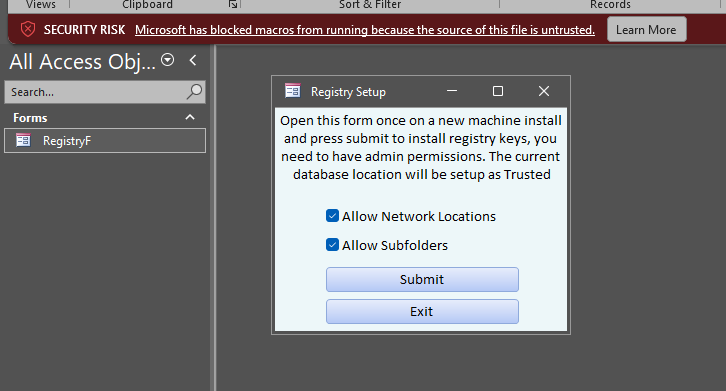
I made a template a long time ago for adding the registry fix to machines, you can use what you want from it HERE
Brent Rinehart OP  @Reply  
        
2 years ago
Thank you! I appreciate it. I gave it a try, opening it in an untrusted location, and I got the macro banner across the top. Clicking the button to submit or exit seemed to do nothing. So, I thought maybe doing that and closing the database and reopening it would show that it was taken care of and was trusted now, but it didn't seem to have anything change. Then I thought about taking the code out of the button and throwing it into the form's load event like I had the save keys, but after thinking, if everything is disabled, I guess that wouldn't work either. I'm really looking for an automated way as I would send my database through email, and the user will drop this wherever they choose, half the time, as they are not computer-savvy for most.

the two options I have been having people do for now is either place it in the same trusted location already setup which half of them remembers or tell them to right click go to properties and click the unblock bock
Brent Rinehart OP  @Reply  
        
2 years ago

Adam Schwanz  @Reply  
           
2 years ago
Hmm it worked for me last time i had to use it, but anyways. You wont find an automated option with access alone. It's built in to stop code from running without intervention. You would need to make some kind of executable (which should just prompt them to push yes, however again if the user isn't at least a local admin, you may need to sign in as an admin)You should be able to take that code in the database and modify it, make it a .bat file to setup the registry and install the database if you can grab it from a network location, that would just be one file/click. Otherwise they're always going to need to do the database and at least one thing.
Adam Schwanz  @Reply  
           
2 years ago
Another possible alternative would be to use server GPO if your on a domained network and setup the registry changes there, then they could potentially get away with just using it out the gate.
John Davy  @Reply  
         
2 years ago
Hi Brent

Take a look at https://www.ssesetup.com/. This is a setup program with lots of features.

John
Brent Rinehart OP  @Reply  
        
2 years ago
Thank you John this looks like a great way to package complete databases I was just looking for a simple alternative when I'm trying to send people sample databases to try out or test databases and they have to constantly place it in a trusted location or manipulate the file in some way to be able to open it quickly. Clearly it seemed that there is no workaround that is automated except the options that you guys have mentioned here which are great options thank you for your guys's help
Thomas Gonder  @Reply  
      
2 years ago
In my testing of just sending a demo .accde to a regular Windows workstation using the Access RunTime, I constantly have to deal with Trusted Location issue. The warning seems built into the RunTime no matter where the file is located as there doesn't seem to be a way to set the trusted location for the RunTime version. Is there a way around this?
Sami Shamma  @Reply  
             
2 years ago
Richard,

I would love to know the answer to Thomas's question above. I have that problem all the time.
Adam Schwanz  @Reply  
           
2 years ago
Access run time does not have a 'trusted locations' setting in the options. You have to do it with registry edit
Adam Schwanz  @Reply  
           
2 years ago
That could be a good thing for your list Sami its super annoying, especially if you don't know what your doing
Sami Shamma  @Reply  
             
2 years ago
How would you word it?
Sami Shamma  @Reply  
             
2 years ago
how about:
add to Access run time 'trusted locations' setting in the options
Adam Schwanz  @Reply  
           
2 years ago
Thatd be fine
Sami Shamma  @Reply  
             
2 years ago
Done, I added it.

here is the list

Richard Rost  @Reply  
          
2 years ago
Like Adam said, you have to set it with Registry keys. I cover this in the extended cut for Trusted Location.

This thread is now CLOSED. If you wish to comment, start a NEW discussion in Access Developers.
 

Next Unseen

 
New Feature: Comment Live View


The following is a paid advertisement
Computer Learning Zone is not responsible for any content shown or offers made by these ads.
 

Learn
 
Access - index
Excel - index
Word - index
Windows - index
PowerPoint - index
Photoshop - index
Visual Basic - index
ASP - index
Seminars
More...
Customers
 
Login
My Account
My Courses
Lost Password
Memberships
Student Databases
Change Email
Info
 
Latest News
New Releases
User Forums
Topic Glossary
Tips & Tricks
Search The Site
Code Vault
Collapse Menus
Help
 
Customer Support
Web Site Tour
FAQs
TechHelp
Consulting Services
About
 
Background
Testimonials
Jobs
Affiliate Program
Richard Rost
Free Lessons
Mailing List
PCResale.NET
Order
 
Video Tutorials
Handbooks
Memberships
Learning Connection
Idiot's Guide to Excel
Volume Discounts
Payment Info
Shipping
Terms of Sale
Contact
 
Contact Info
Support Policy
Mailing Address
Phone Number
Fax Number
Course Survey
Email Richard
[email protected]
Blog RSS Feed    YouTube Channel

LinkedIn
Copyright 2026 by Computer Learning Zone, Amicron, and Richard Rost. All Rights Reserved. Current Time: 8/17/2026 4:22:57 AM. PLT: 1s