Free Lessons
Courses
Seminars
TechHelp
Fast Tips
Templates
Topic Index
Forum
ABCD
 
Home   Courses   TechHelp   Forums   Help   Contact   Merch   Join   Order   Logon  
 
Back to Access Forum    Comments List
Upload Images   @Reply   Bookmark    Link   Email   Next Unseen 
Pass Where Conditions to Form
Amanda McDonald 
      
2 years ago
I have one form and one query. I have 6 buttons that open the form with different Where Conditions to filter out some of the records from the query. I also have a search field on the form.
I am stuck on how to pass the Where Conditions from the button to the search field to ensure the filtered records are also excluded from the search. Is that even possible or do I need to create 6 queries and 6 forms?

Button:
DoCmd.OpenForm "DrainReport", , , "[DrainNotThisYear] = False AND [DrainNeeds] = True AND [DrainEmailed] = True AND [DrainApproved] = False AND [DrainToldTech] = False AND [DrainCompleted] = False"

Form Search:
DetailsSub SearchPN()
Dim strCriteria, Task As String

Me.Refresh
If IsNull(Me.PropNm) Then
    MsgBox "Please enter a search criteria.", vbInformation, "Search Criteria Required."
    Me.PropNm.SetFocus
Else
    strCriteria = "([PropertyName] LIKE '*" & Me.PropNm & "*')"
        Task = "SELECT * FROM DrainList WHERE (" & strCriteria & ") ORDER BY [PropertyName]"
    DoCmd.ApplyFilter Task
End If
End Sub
Kevin Robertson  @Reply  
           
2 years ago
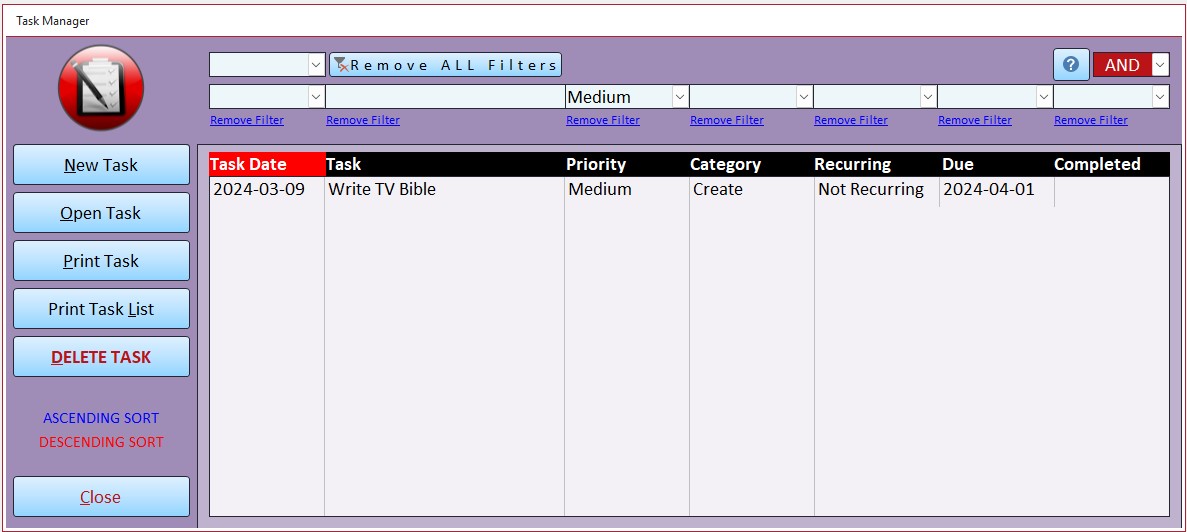
Here is a sub from one of my databases that may help in your situation.
A screenshot of my form is below.

DetailsPrivate Sub RequeryTasks()

    Dim mySQL As String, whereStr As String

    mySQL = "SELECT TaskID, TaskD, TaskName, Priority, Category, Recurring, DueD, CompletedD FROM TaskQ "
    whereStr = ""
    
    If Not IsNull(cboTaskDateMonthFilter) Then
        If whereStr <> "" Then whereStr = whereStr & cboAndOR & " "
        whereStr = whereStr & "Month(TaskD)=" & cboTaskDateMonthFilter
    End If
    
    If Not IsNull(cboTaskDateYearFilter) Then
        If whereStr <> "" Then whereStr = whereStr & cboAndOR & " "
        whereStr = whereStr & "Year(TaskD)=" & cboTaskDateYearFilter
    End If
    
    If Not IsNull(txtTaskNameFilter) Then
        If whereStr <> "" Then whereStr = whereStr & cboAndOR & " "
        whereStr = whereStr & "TaskName LIKE ""*" & txtTaskNameFilter & "*"""
    End If
        
    If Not IsNull(cboPriorityFilter) Then
        If whereStr <> "" Then whereStr = whereStr & cboAndOR & " "
        whereStr = whereStr & "Priority=""" & cboPriorityFilter.Column(1) & """"
    End If
        
    If Not IsNull(cboCategoryFilter) Then
        If whereStr <> "" Then whereStr = whereStr & cboAndOR & " "
        whereStr = whereStr & "Category=""" & cboCategoryFilter & """"
    End If
            
    If Not IsNull(cboRecurringFilter) Then
        If whereStr <> "" Then whereStr = whereStr & cboAndOR & " "
        whereStr = whereStr & "Recurring=""" & cboRecurringFilter.Column(1) & """"
    End If
            
    If Not IsNull(cboDueDateFilter) Then
        If whereStr <> "" Then whereStr = whereStr & cboAndOR & " "
        Select Case cboDueDateFilter
            Case "Today"
                whereStr = whereStr & "DueD >= #" & Date & "# And DueD < #" & Date + 1 & "#"
            Case "Tomorrow"
                whereStr = whereStr & "DueD >= #" & Date + 1 & "# And DueD < #" & Date + 2 & "#"
            Case "This Week"
                whereStr = whereStr & "DueD >= #" & Date & "# And DueD < #" & Date + 7 & "#"
            Case "This Month"
                whereStr = whereStr & "DueD >= #" & Date & "# And DueD < #" & DateAdd("m", 1, Date) & "#"
        End Select
    End If
                          
    If Not IsNull(cboCompletedDateFilter) Then
        If whereStr <> "" Then whereStr = whereStr & cboAndOR & " "
        If cboCompletedDateFilter = "Completed" Then
           whereStr = whereStr & "IsDate(CompletedD)"
        Else
           whereStr = whereStr & "Not IsDate(CompletedD)"
        End If
    End If
    
    If whereStr <> "" Then whereStr = " WHERE " & whereStr
    
    mySQL = mySQL & whereStr
    mySQL = mySQL & " ORDER BY " & OrderByStr
    lstTasks.RowSource = mySQL
    TaskSQL = mySQL
    
End Sub
Kevin Robertson  @Reply  
           
2 years ago

Sami Shamma  @Reply  
             
2 years ago
Don't apply a filter. Change the record source with the SELECT statement you created.
Watch the members only section of the next video
Search Form 2.0
Sami Shamma  @Reply  
             
2 years ago
Or better yet take Gavin's advice
Kevin Robertson  @Reply  
           
2 years ago
Sami Who's Gavin?
Sami Shamma  @Reply  
             
2 years ago
Goddamn, Siri
Sorry Kevin
Kevin Robertson  @Reply  
           
2 years ago
LOL
Kevin Yip  @Reply  
     
2 years ago
Hi Amanda, by "excluding filtered records from the search," I gather that you mean that you want to "stack" additional filters on top of an existing filter.  To do that, you can use the OR operator.  For instance:

If your existing filter is:    A <= 100

and you want to add a second filter:     A >= 200 And A<= 300   without invalidating the first filter,

then you use string concatenation technique (as demonstrated in Kevin's code) to connect them with an OR operator:

      (A <= 100) Or (A >= 200 And A <= 300)

And you will get records that satisfy either conditions.
Amanda McDonald OP  @Reply  
      
2 years ago
Thank you, everyone. It has been determined that getting email set up in Access is the top priority right now. So this has been put on hold. Kevin, when I get back to this I think your code will be the ticket! Thank you for sharing your code!

This thread is now CLOSED. If you wish to comment, start a NEW discussion in Access Forum.
 

Next Unseen

 
New Feature: Comment Live View


The following is a paid advertisement
Computer Learning Zone is not responsible for any content shown or offers made by these ads.
 

Learn
 
Access - index
Excel - index
Word - index
Windows - index
PowerPoint - index
Photoshop - index
Visual Basic - index
ASP - index
Seminars
More...
Customers
 
Login
My Account
My Courses
Lost Password
Memberships
Student Databases
Change Email
Info
 
Latest News
New Releases
User Forums
Topic Glossary
Tips & Tricks
Search The Site
Code Vault
Collapse Menus
Help
 
Customer Support
Web Site Tour
FAQs
TechHelp
Consulting Services
About
 
Background
Testimonials
Jobs
Affiliate Program
Richard Rost
Free Lessons
Mailing List
PCResale.NET
Order
 
Video Tutorials
Handbooks
Memberships
Learning Connection
Idiot's Guide to Excel
Volume Discounts
Payment Info
Shipping
Terms of Sale
Contact
 
Contact Info
Support Policy
Mailing Address
Phone Number
Fax Number
Course Survey
Email Richard
[email protected]
Blog RSS Feed    YouTube Channel

LinkedIn
Copyright 2026 by Computer Learning Zone, Amicron, and Richard Rost. All Rights Reserved. Current Time: 6/17/2026 12:13:21 PM. PLT: 1s