Free Lessons
Courses
Seminars
TechHelp
Fast Tips
Templates
Topic Index
Forum
ABCD
 
Home   Courses   TechHelp   Forums   Help   Contact   Merch   Join   Order   Logon  
 
Back to Access Forum    Comments List
Upload Images   @Reply   Bookmark    Link   Email   Next Unseen 
Convert Excel to Access
Ronald Modesett 
     
2 years ago
I've been tasked with creating a database to manage our Fiber optic infrastructure from a somewhat cumbersome and rarely updated Excel spreadsheet to a more manageable database.
I've managed to convert to Access database resulting 195 circuits. With an infrastructure of 1700 connections.
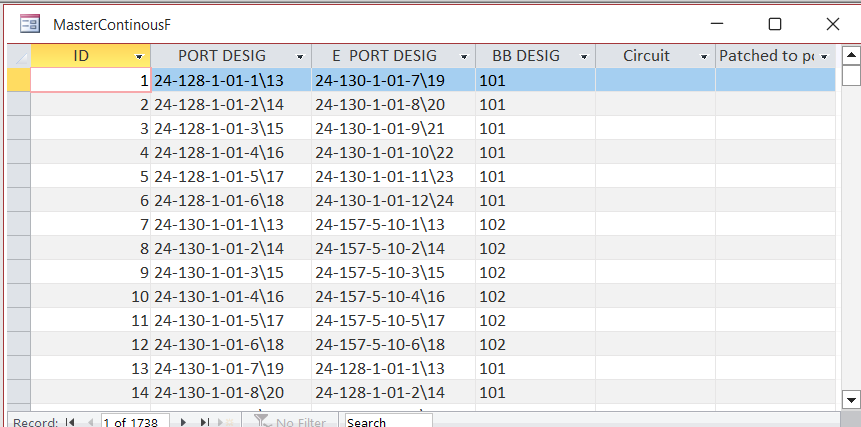
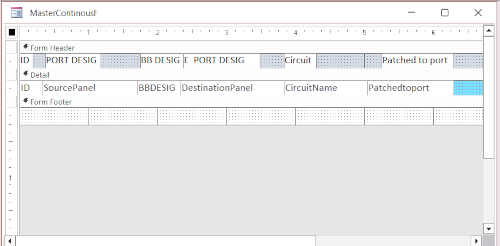
I have a single connection form, a continuous form for the database.
I have circuit name table, back bone fiber table, and a connection table.
I've finished beginner 1 and working on 2, however thus far have not been able make a comparison to what I'm trying to do. I f anyone thing they can help and would like more information or screen shots of what I've done so far please contact me.
Hope I have not broken any rules
Ron M
Sami Shamma  @Reply  
             
2 years ago
Hi Ronald
If you are looking for someone to help you work on your database, please post your request
Here
Adam Schwanz  @Reply  
           
2 years ago
The question is really broad. The data should import over pretty cleanly but your going to need to make sure the relationships are good. Theres a lot of things youre going to learn that you will use as you go through the classes. I would suggest to just keep watching a while further.  If you encounter a specific problem you can post on the forums and we can try to help, but this questions too loaded to really say anything other than keep watching. Especially as a beginner
Richard Rost  @Reply  
          
2 years ago
Ronald, it sounds like you're just getting started with Access, so I would strongly recommend finishing the beginner lessons and then maybe the first 2 levels of the expert classes before you begin tackling a major project. You're going to learn so much between now and then that you'll probably want to start over. At least, that's what I hear from a lot of people.
Ronald Modesett OP  @Reply  
     
2 years ago
First thanks to all that replied.
<B>Richard,</B> you are right and I do intend to go thru the courses, I'll most likely have to go thru more than once.
<B>Adam,</B> yes the excel did import without any problem, That is when I discovered that my co-work not here anymore entered all links twice Had to get rid of duplicate.
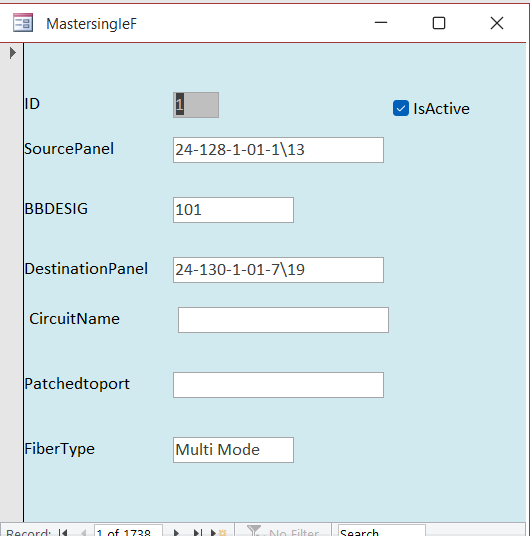
<B>Sami</B>Using my MasterSingle form when I enter a patched to I want it to save and open the master single with that source input and copy the circuit name. When that is done I'll be able to run a report on that circuit and give to one of the Tech.s to go trace out the fiber circuit to determine the problem and correct it.  I'm not sure how or where a screen shot can be posted.
Again my thanks for all replies
Ron M
Ronald Modesett OP  @Reply  
     
2 years ago

Ronald Modesett OP  @Reply  
     
2 years ago
I think I need to shrink screen shot before posting.
Is there a preferred size? I know these things can take a lot of space.
Ron M
Sami Shamma  @Reply  
             
2 years ago
Your screenshot is fine.
Without seeing your table structure, I think I understand what you're trying to do.
Very easily done in Access. However, it uses techniques you have not yet learnt.
Take Richard's advice and go further with your courses first.

Send screenshots of your tables.
Richard Rost  @Reply  
          
2 years ago
What helps me is to make mockups in Excel or PowerPoint of what I want the database forms to look like. Do some of that and post it here so we can get an idea of what you're trying to do.
Ronald Modesett OP  @Reply  
     
2 years ago

Ronald Modesett OP  @Reply  
     
2 years ago

Ronald Modesett OP  @Reply  
     
2 years ago

Ronald Modesett OP  @Reply  
     
2 years ago
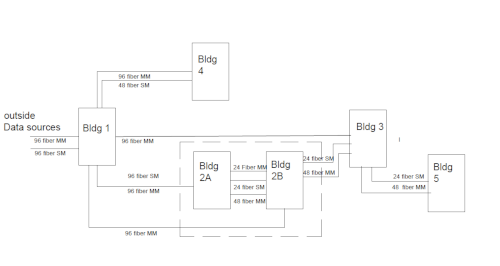
Hope these are not to small to view.
The 1st image shows the overall structure of the fiber network, with in this layout there are over 1700 possible connections.
Currently there are 195 circuits names identified. Not sure exactly what you wanted to see.
<B>Side Note: </B>I use GIMP for image editing.

This thread is now CLOSED. If you wish to comment, start a NEW discussion in Access Forum.
 

Next Unseen

 
New Feature: Comment Live View


The following is a paid advertisement
Computer Learning Zone is not responsible for any content shown or offers made by these ads.
 

Learn
 
Access - index
Excel - index
Word - index
Windows - index
PowerPoint - index
Photoshop - index
Visual Basic - index
ASP - index
Seminars
More...
Customers
 
Login
My Account
My Courses
Lost Password
Memberships
Student Databases
Change Email
Info
 
Latest News
New Releases
User Forums
Topic Glossary
Tips & Tricks
Search The Site
Code Vault
Collapse Menus
Help
 
Customer Support
Web Site Tour
FAQs
TechHelp
Consulting Services
About
 
Background
Testimonials
Jobs
Affiliate Program
Richard Rost
Free Lessons
Mailing List
PCResale.NET
Order
 
Video Tutorials
Handbooks
Memberships
Learning Connection
Idiot's Guide to Excel
Volume Discounts
Payment Info
Shipping
Terms of Sale
Contact
 
Contact Info
Support Policy
Mailing Address
Phone Number
Fax Number
Course Survey
Email Richard
[email protected]
Blog RSS Feed    YouTube Channel

LinkedIn
Copyright 2026 by Computer Learning Zone, Amicron, and Richard Rost. All Rights Reserved. Current Time: 5/6/2026 6:27:54 PM. PLT: 1s