Free Lessons
Courses
Seminars
TechHelp
Fast Tips
Templates
Topic Index
Forum
ABCD
 
Home   Courses   TechHelp   Forums   Help   Contact   Merch   Join   Order   Logon  
 
Back to Access Forum    Comments List
Upload Images   @Reply   Bookmark    Link   Email   Next Unseen 
Doesnt contain the Automation
Monica Jones 
       
2 years ago
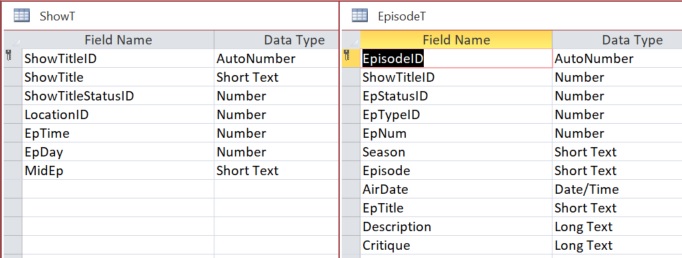
I'm rebuilding a database and taking advantage of new skills. My form and subforms are sourced from SQL, not a query (as in previous version). They appear to work until I try and add a new record then I get this "The object doesn't contain the Automation object 'EpisodeT.'" error. My link field "ShowTitleID" is on both parent and child forms. For some reason it is listed with the table name for the child field but not the parent. Any help would be greatly appreciated and please let me know if you need more information.

This is the SQL Record Source:
SELECT EpisodeT.*, ShowT.ShowTitleStatusID, ShowT.ShowTitleID
FROM ShowT INNER JOIN EpisodeT ON ShowT.[ShowTitleID] = EpisodeT.[ShowTitleID]
WHERE (((ShowT.ShowTitleStatusID)=126) AND ((EpisodeT.EpStatusID)=4)) OR (((ShowT.ShowTitleStatusID)=142) AND ((EpisodeT.EpStatusID)=4))
ORDER BY EpisodeT.EpNum;
Alex Hedley  @Reply  
           
2 years ago
Can you run the query manually in a sql window?
Monica Jones OP  @Reply  
       
2 years ago
Yes, I can put it into a new query and add a record without error. I want to say it has something to do with the link not being right or somehow incomplete but I have no proof.
Alex Hedley  @Reply  
           
2 years ago
Do each of the forms work individually?
(Maybe not if they need default values from linking etc)
Richard Rost  @Reply  
          
2 years ago
Monica, I can tell you just from looking at that, that it's probably going to be too complex for you to be able to add records to that recordset. Not Updateable
Monica Jones OP  @Reply  
       
2 years ago
I've watched the Not Updateable video, and it didn't help. The subform is editable, it's additions that cause errors. The old version worked from a query, and I've gone back to that, but it hasn't helped. The fact that it worked before has me at my wits end with them side by side on my monitors. The only two differences between the old query and the new one are that now the link fields have the same name and the order by field is new. The standing query is:

SELECT ShowT.ShowTitleStatusID, EpisodeT.AirDate, EpisodeT.EpisodeID, EpisodeT.ShowTitleID, EpisodeT.EpNum, EpisodeT.Season, EpisodeT.Episode, EpisodeT.EpTitle, EpisodeT.EpStatusID, EpisodeT.Description, ShowT.ShowTitleID, EpisodeT.EpTypeID
FROM ShowT LEFT JOIN EpisodeT ON ShowT.[ShowTitleID] = EpisodeT.[ShowTitleID]
WHERE (((ShowT.ShowTitleStatusID)=126) AND ((EpisodeT.EpStatusID)=4)) OR (((ShowT.ShowTitleStatusID)=142) AND ((EpisodeT.EpStatusID)=4))
ORDER BY EpisodeT.EpNum;
Monica Jones OP  @Reply  
       
2 years ago

Sami Shamma  @Reply  
             
2 years ago
is "Allow additions" Enabled on your form?
Monica Jones OP  @Reply  
       
2 years ago
Yes, I even added "Allow deletions.".
Kevin Yip  @Reply  
     
2 years ago
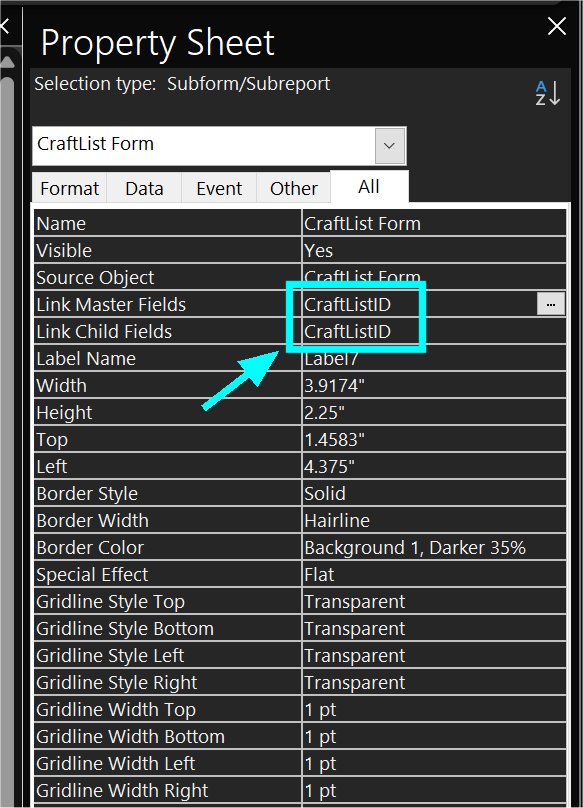
Hi Monica, you said the link fields are "listed with the table name for the child field but not the parent."  Make sure the link fields contain just the control names from the forms (not field names from tables) as shown in the picture below.
Kevin Yip  @Reply  
     
2 years ago

Monica Jones OP  @Reply  
       
2 years ago

Monica Jones OP  @Reply  
       
2 years ago
This is what I have. If I change it like you suggest it complains that it could be more than one field. I know this is because I have the fields from both tables in my query. However, when I remove EpisodeT.ShowTitleID and then try and open the form, it yells that EpisodeT.ShowTitleID isn't there. I've been thru the list of objects for both forms and named everything, even Text fields, and nothing is related to EpisodeT.ShowTitleID. Could it exist and not be in the object list?
Sami Shamma  @Reply  
             
2 years ago
You do not need the table names.
Sami Shamma  @Reply  
             
2 years ago
Why do you have the field twice in your Query?
it gives you no advantage and complicate things. try removing one from the query.
Monica Jones OP  @Reply  
       
2 years ago
I did, please reference previous comment. As for why I did it in the first place, originally the field names didn't match. In the new version I changed that for simplicity and then changed the field name whenever I came across it. I did some copy/paste of forms as a short cut that now I think isn't so short.
Sami Shamma  @Reply  
             
2 years ago
Hi Monica,

This brings to focus what Richard, teaches in his courses from the beginning, and repeats often in the tech help videos. Good databases that are easy to maintain and code Starts with a good design of the tables not only in regards to the relationships, but also naming conventions.

I can talk about that because I did not start doing things right and for a long time, I banged my head against the wall trying to get Access to do what I want. Believe it or not, it is more efficient both in time and effort to go back and revisit your table designs. One error I have committed and still committing is the following: I change the name of a field. Access will carry forward that change in most places, but not all. The most common place that causes a lot of problems is when you change the name of a field on a form or report. The control source will change; however, the actual name of that control on the form or report will remain the same. Any reference forms and reports will be to the name of the control, not the control source. So, check that the control source and the field names are consistent.
Monica Jones OP  @Reply  
       
2 years ago
At this point I think I just need to start from scratch with the forms.
Kevin Yip  @Reply  
     
2 years ago
Hi Monica, if you must have the same field twice, you must give them different and unique names by using "aliases" in your record source, e.g. SELECT Table1.ShowTitleID, Table2.ShowTitleID As ShowTitleID2 ... .  Then you can put the unique field names in the link master and child fields.  You can only put a single field name in the link master and child fields.  They don't accept table names.
Monica Jones OP  @Reply  
       
2 years ago
I GOT IT!!! Apparently, I no longer need the linked field in the query OR EVEN ON THE FORM! Access just finds it in the background!!!!!! Thank you for all your help!

This thread is now CLOSED. If you wish to comment, start a NEW discussion in Access Forum.
 

Next Unseen

 
New Feature: Comment Live View


The following is a paid advertisement
Computer Learning Zone is not responsible for any content shown or offers made by these ads.
 

Learn
 
Access - index
Excel - index
Word - index
Windows - index
PowerPoint - index
Photoshop - index
Visual Basic - index
ASP - index
Seminars
More...
Customers
 
Login
My Account
My Courses
Lost Password
Memberships
Student Databases
Change Email
Info
 
Latest News
New Releases
User Forums
Topic Glossary
Tips & Tricks
Search The Site
Code Vault
Collapse Menus
Help
 
Customer Support
Web Site Tour
FAQs
TechHelp
Consulting Services
About
 
Background
Testimonials
Jobs
Affiliate Program
Richard Rost
Free Lessons
Mailing List
PCResale.NET
Order
 
Video Tutorials
Handbooks
Memberships
Learning Connection
Idiot's Guide to Excel
Volume Discounts
Payment Info
Shipping
Terms of Sale
Contact
 
Contact Info
Support Policy
Mailing Address
Phone Number
Fax Number
Course Survey
Email Richard
[email protected]
Blog RSS Feed    YouTube Channel

LinkedIn
Copyright 2026 by Computer Learning Zone, Amicron, and Richard Rost. All Rights Reserved. Current Time: 5/2/2026 7:11:16 AM. PLT: 1s