Free Lessons
Courses
Seminars
TechHelp
Fast Tips
Templates
Topic Index
Forum
ABCD
 
Home   Courses   Templates   Seminars   TechHelp   Forums   Help   Contact   Join   Order   Logon  
 
Home > Forums > Developers
Back to Access Developer Forum    Comments List
Upload Images   @Reply   Bookmark    Link   Email   Next Unseen 
Maps and Access
Bartek Hutman 
    
20 months ago
Hi there, I was wondering if there is a way to use google maps or bing maps, or any other map to display locations based on access table or query? Let's say I have a list of 100 orders, all have a delivery address. I'd like to map all that data so I can see and plan multiple delivery routes. Ideally I'd like to be able to interact with the map, but if I could display all the points on a map, that would be enough to start. Any suggestions much appreciated. Thank you
Thomas Corbett  @Reply  
     
20 months ago
I have the code but have a slight problem with it. Rather than opening google maps once and placing markers for each address in the query it is opening google for each record in the query. I place the need for hope so if you watch the comments we should have an answer.
Richard Rost  @Reply  
          
20 months ago
Yes, it's possible, but you really need to use the Google Maps API in order to do it, and it's beyond what I'll be covering in my videos because it's fairly complicated. I'm sure with a little Googling, you'll be able to find some guides online. Perhaps even ask ChatGPT for some instructions.
Thomas Corbett  @Reply  
     
20 months ago
Ty
Kevin Yip  @Reply  
     
20 months ago
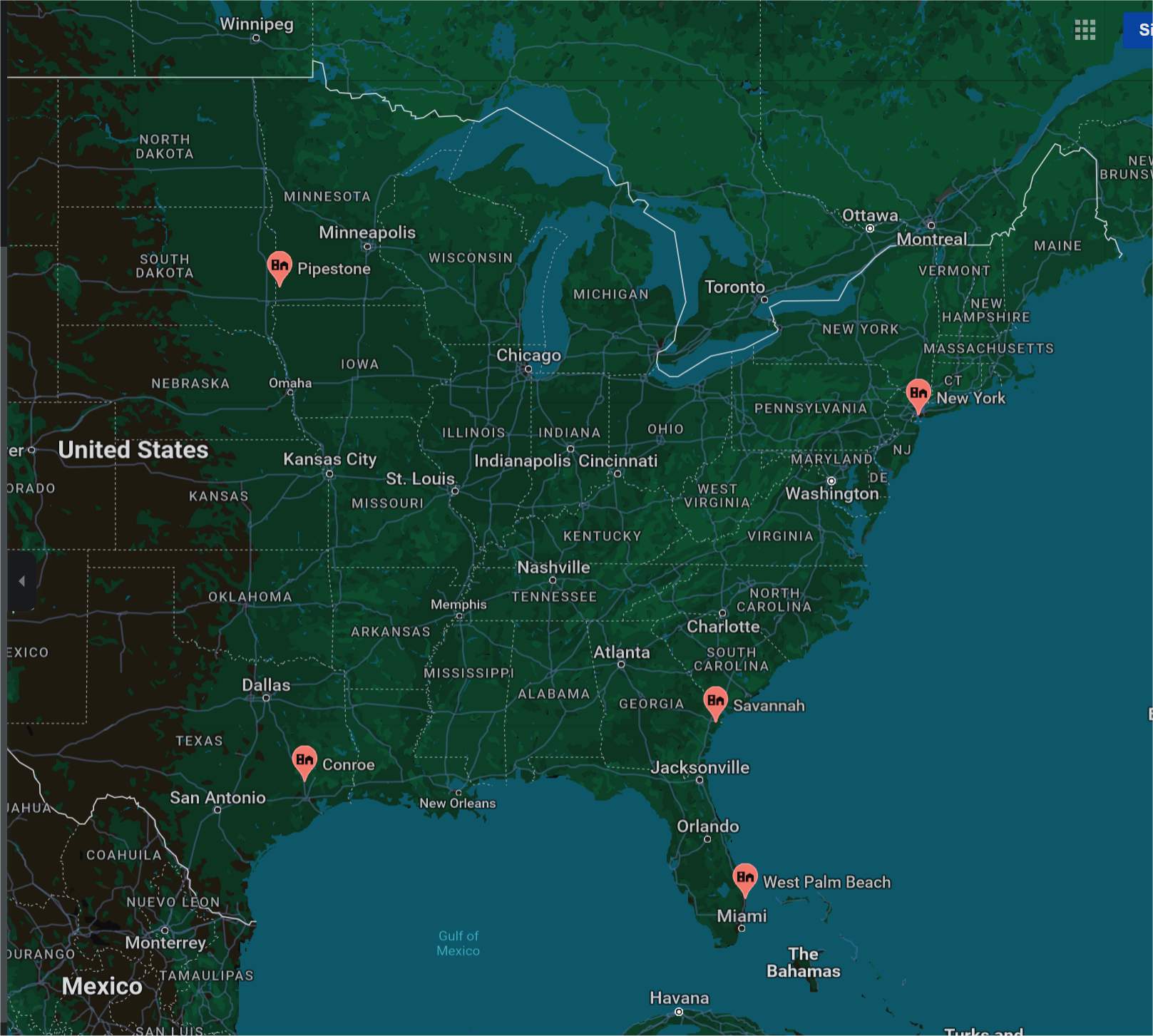
A simple (relatively speaking) way to plot multiple locations on a Google map is to compose an Internet URL with your addresses.  The URL should be:

     https://www.google.com/maps/search/

followed by your addresses delimited by the pipe symbol ("|").

For instance, to pinpoint these addresses on the map:

5700 Okeechobee Blvd., West Palm Beach, FL 33417
150 East 50th Street, New York, NY 10022
1 Resort Drive, Savannah, GA 31421
110 East Main, Pipestone, MN 56164
320 Longmire Rd, Conroe, TX 77304

Your URL should be:

     https://www.google.com/maps/search/5700 Okeechobee Blvd., West Palm Beach, FL 33417 | 150 East 50th Street, New York, NY 10022 | 1 Resort Drive, Savannah, GA 31421 | 110 East Main, Pipestone, MN 56164 | 320 Longmire Rd, Conroe, TX 77304

Using string concatenation, the URL above should be straightforward to compose.  You can then use the VBA command FollowHyperlink to open the URL in your default web browser and see the result (picture below).
Kevin Yip  @Reply  
     
20 months ago

Kevin Yip  @Reply  
     
20 months ago
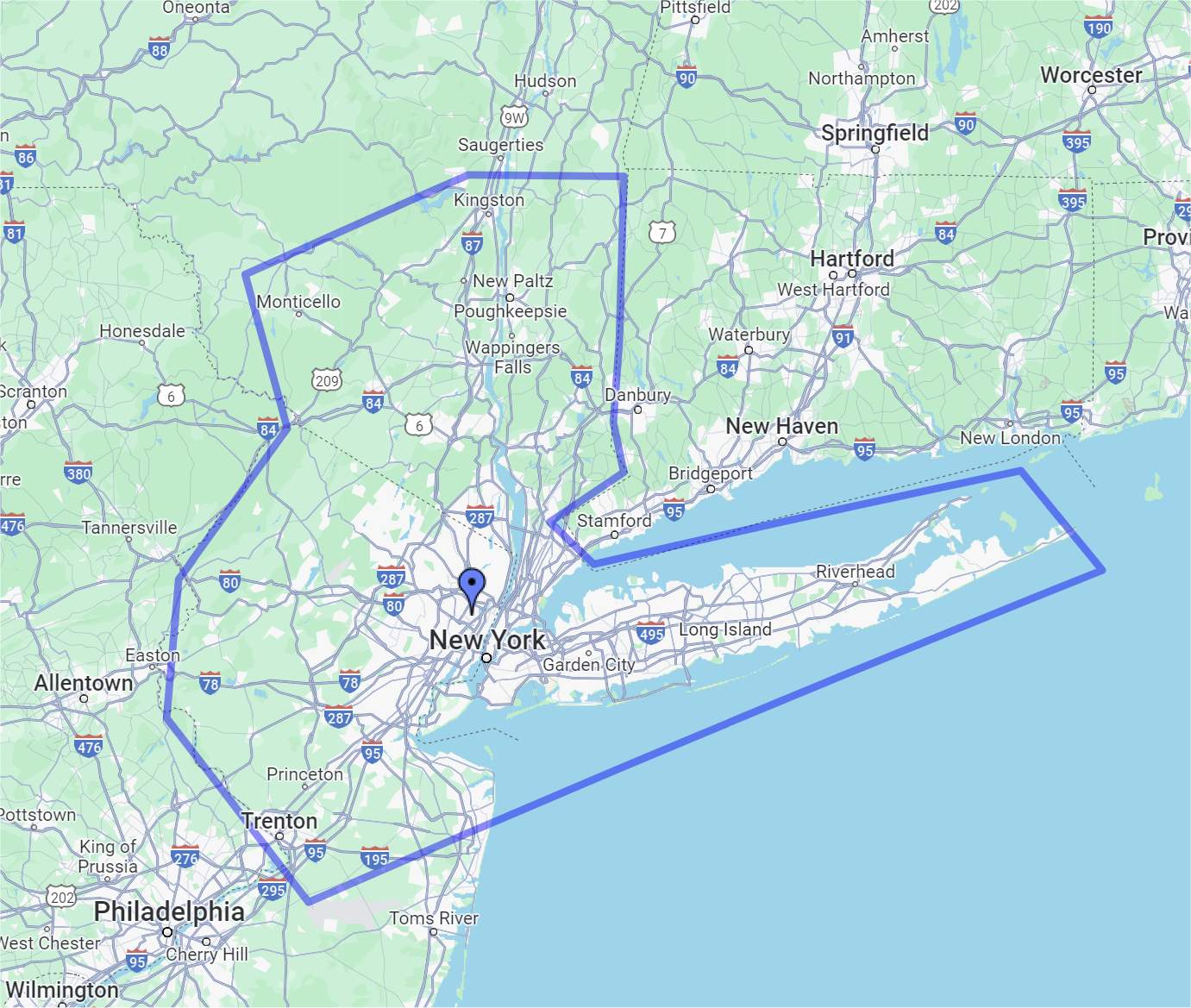
If you want to create custom maps with your own annotations (picture below) to be saved into your Google account and to share with others, that may require API because it will likely involve your account credentials and other things.  I haven't tried that.
Kevin Yip  @Reply  
     
20 months ago

Richard Rost  @Reply  
          
20 months ago
That is an awesome trick, Kevin! I never knew you could just separate multiple addresses with a pipe symbol and then feed that into the URL - that's brilliant. The only way I knew how to do it before was the Google Maps API, which took me an hour to set up. If you don't mind, I'm going to share this with everyone in a video.
Richard Rost  @Reply  
          
20 months ago
Kevin Yip  @Reply  
     
20 months ago
You're welcome, glad to be of some use today (I haven't been posting much lately).  This is Google's documentation on how to use URL to obtain driving directions, street views, and other features:

    https://developers.google.com/maps/documentation/urls/get-started

URLs are cross-platform, so they can be used on any device that has a web browser.  Storing these in your database would future-proof it in case you need to migrate your database to other platforms.
Kevin Yip  @Reply  
     
20 months ago
To create "private maps" in your Google account in any automated fashion, you would definitely need API (I'm just guessing), because the resulting URLs would just be random characters.  I've never used the Google Maps API.  In my old job, I created private maps for my company's data, but they were all done manually on the Google Maps website.
Bartek Hutman OP  @Reply  
    
20 months ago
Thank you for your replies!
Using "|" only works to an extent. Even in your example Kevin, the addresses shown are only partial matches. I was playing with different strings and for UK postcodes if I replace "|" with " to " this will give somewhat better results.

With regards to driving directions, I know you can string them together and paste into Google maps. I've used it before and it worked OK, but then google limited the amount of destinations to 10 only.
It's still handy to go to google maps for quick directions with a press of a button though.

I also looked at MapPoint from Microsoft, but that's no longer available. Maptitude seems to be another option worth exploring.

Think I might have to look into Google Maps API.

Idea for seminar maybe ;)
Kevin Yip  @Reply  
     
20 months ago
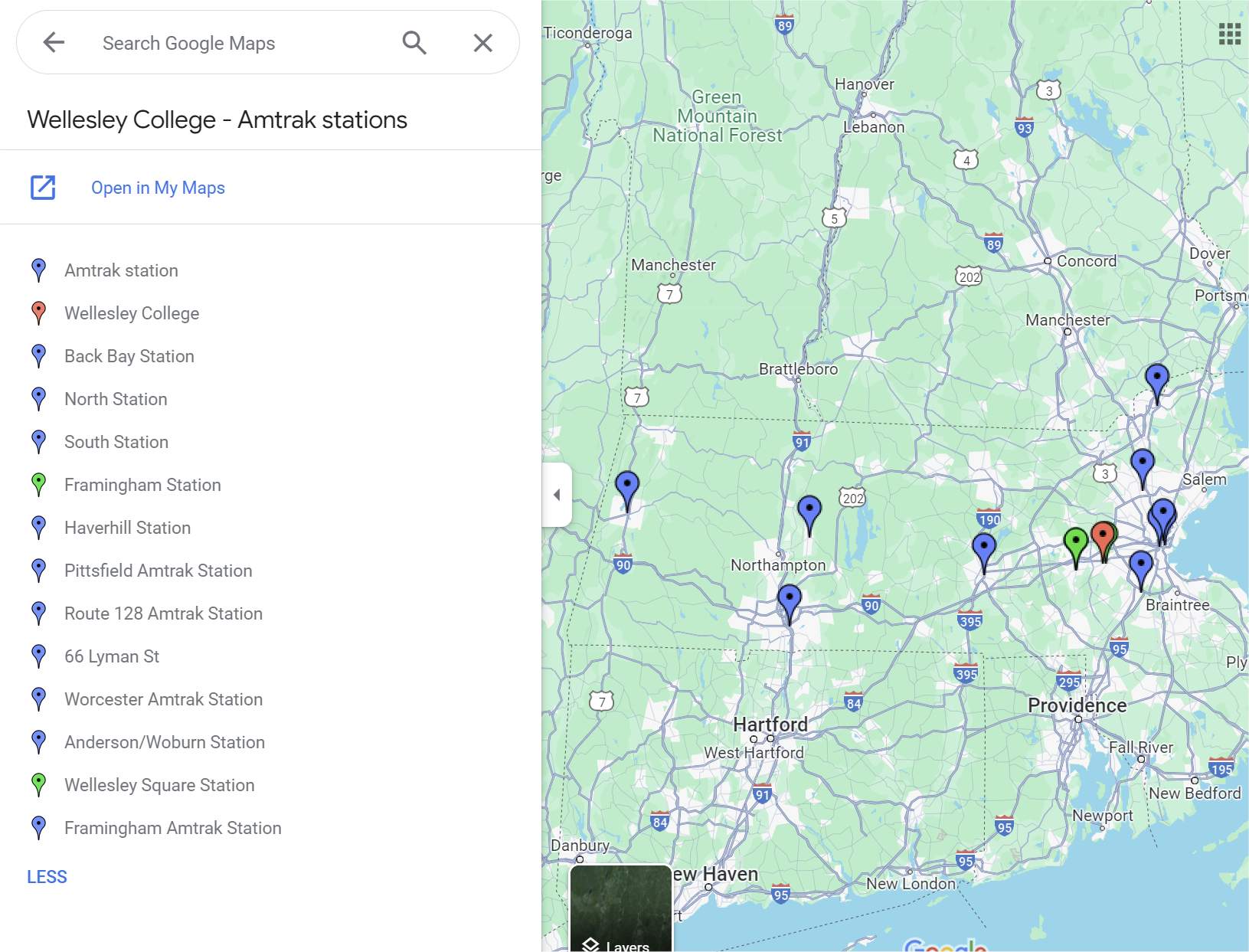
Hi Bartek, custom maps do allow (way) more than 10 locations (pictured below).  But I've only manually created custom maps.  To automate it, it would likely require the API, which I've never used.  I avoid using APIs in general, because they are essentially "backdoors," and backdoors can be shut with no warning -- whereas URLs are public-facing "front doors" that are unlikely to be removed.  To your other points, using URLs to create driving directions as Richard demonstrated does show the exact locations on the map.  But this method only allows a max of 10 locations, as you pointed out.  To be exact, it allows a maximum of 9 waypoints plus the origin and destination of the trip, so it's a total of 11 locations.  Google's documentation ( https://developers.google.com/maps/documentation/urls/get-started ) also mentions that on mobile browsers, the max is only 3 waypoints.  So I suppose custom maps are the only way to break all these limitations.  The custom maps I created do show 10+ locations whether they are viewed on mobile or desktop browsers (pictured below).  Lastly, in case it would benefit others (because the feature is semi-hidden), the way to create custom maps is log in to your Google account, go to Google Maps website or app -> Menu (symbol with three horizontal lines) -> Saved -> Maps -> Create Map.
Kevin Yip  @Reply  
     
20 months ago

Kevin Yip  @Reply  
     
20 months ago
To create driving directions with more than 11 locations, you can create multiple maps with multiple URLs, with the destination of one map being the origin of the next map.  It would be less convenient for the user to look at multiple maps, but it would be much less work for you if you stuck to using only URLs.
Matt Hall  @Reply  
          
19 months ago
If you use GPS coordinates on google, you can string up to 25 locations together like this:  https://www.google.com/maps/dir/'37.947586,-87.47364' /'37.949430,-87.47127' /'37.951275,-87.46890' /'37.953119,-87.46653' /'37.954964,-87.46416'/

Trying to mathematically optimize the route will lead you down the rabbit hole of the "Travelling Salesman Problem".

Another option is https://www.mapquest.com/routeplanner/.  It allows 26 locations and has and a nifty option to optimize the route for you.
Richard Rost  @Reply  
          
19 months ago
Here's a video I just did: Driving Directions
Thomas Corbett  @Reply  
     
19 months ago
Kevin and Richard, awesome and works great but what if I wanted to drop a pin (marker) for 5 individuals for 3 address each rather than to give driving instructions?

Thanks

Tom -
Adam Schwanz  @Reply  
            
19 months ago
I think Richard said to add //@ to the end of the string to not get driving directions.

This post

Or it appears that Kevins method in this post with | may do it as well.

As for what to link, you just have to set that up yourself, either changing the recordset or using a loop to create what addresses to send it.
Thomas Corbett  @Reply  
     
19 months ago
I think its a little deeper than that Adam. I can change the HTTPS to maps rather than driving but to place the markers is a different thing.

It does show that Kevin has the solution though.

Tom -
Matt Hall  @Reply  
          
19 months ago
CORRECTION.

Somewhere in the copy-paste, I got spaces inserted into the URL above, in front of the slashes. it should be:

Detailshttps://www.google.com/maps/dir/'37.947586,-87.47364'/'37.949430,-87.47127'/'37.951275,-87.46890'/'37.953119,-87.46653'/'37.954964,-87.46416'/
Richard Rost  @Reply  
          
19 months ago
Matt, the site might insert spaces automatically on really long lines.
Matt Hall  @Reply  
          
19 months ago
Thanks.  I will post them to the details section from now on.

This thread is now CLOSED. If you wish to comment, start a NEW discussion in Access Developer Forum.
 

Next Unseen


The following is a paid advertisement
Computer Learning Zone is not responsible for any content shown or offers made by these ads.
 

Learn
 
Access - index
Excel - index
Word - index
Windows - index
PowerPoint - index
Photoshop - index
Visual Basic - index
ASP - index
Seminars
More...
Customers
 
Login
My Account
My Courses
Lost Password
Memberships
Student Databases
Change Email
Info
 
Latest News
New Releases
User Forums
Topic Glossary
Tips & Tricks
Search The Site
Code Vault
Collapse Menus
Help
 
Customer Support
Web Site Tour
FAQs
TechHelp
Consulting Services
About
 
Background
Testimonials
Jobs
Affiliate Program
Richard Rost
Free Lessons
Mailing List
PCResale.NET
Order
 
Video Tutorials
Handbooks
Memberships
Learning Connection
Idiot's Guide to Excel
Volume Discounts
Payment Info
Shipping
Terms of Sale
Contact
 
Contact Info
Support Policy
Mailing Address
Phone Number
Fax Number
Course Survey
Email Richard
[email protected]
Blog RSS Feed    YouTube Channel

LinkedIn
Copyright 2025 by Computer Learning Zone, Amicron, and Richard Rost. All Rights Reserved. Current Time: 11/17/2025 10:30:39 AM. PLT: 1s