Free Lessons
Courses
Seminars
TechHelp
Fast Tips
Templates
Topic Index
Forum
ABCD
 
Home   Courses   TechHelp   Help   Contact   Merch   Join   Order   Logon   Forums   
 
Home > Forums > Access Forum > Aggregate Queries by David Cummins
Back to Access Forum    Comments List
Upload Images | @Reply | Bookmark | Link | Email | Next Unseen |
Aggregate Queries
David Cummins 
      
2 years ago
I am having a hard time with aggregate queries. I am trying to group together a family household by the total fees due to them. For example, The Smith household has three items at $100 per item for a total of $300 due to them. I created Household query to group the households together, so I only see the Smith household in one row instead of 3 rows. I created FeeTotal query to sum the item fees. Using the Total's parameter only works on one Household query but it falls apart when I attempt aggregate both queries. I have tried every combination that I can think of so, I am wondering if Access can achieve this, or do I need to build a VBA application module? OR should I just export to Excel and model from there?
Sami Shamma  @Reply  
             
2 years ago
It sounds to me like you're trying to do too much. Show the tables that you are using, and we will definitely help you. I believe you only need one aggregate query, most likely directly from the table, where you group by the FamilyHousehold and total the Fee field. Access is more than powerful enough to do what you want to do.
David Cummins OP  @Reply  
      
2 years ago
Hi Sami, there are 8 tables I am using to support the database and queries. I think this is the cause of my problems. I have start and end dates to determine the total fees due. And then two different types of fees. For example, The Smith Houshold has two foster children staying with them but each one for different lengths of time * the length of days * two different applied fees. It's complicated - too complicated so far for me to build in Access.

I am modeling from an Excel spreadsheet, which is the current "database" being used. I will upload the generic Excel file tomorrow (using fake names for HIPPA compliance) to determine if Access is the right tool or should I just stick to the Excel file, which I am leaning towards at the moment.

Thanks.
Sami Shamma  @Reply  
             
2 years ago
Hi David,

We are happy to assist you. In 99% of cases, Access will be the better solution. It is often the case that our knowledge and comfort with Excel clouds our ability to design a proper Access database. I am speaking from experience. I struggled in migrating my main system from Excel to Access. The other moderators at the time helped me reconceive my database.

Is this for a non profit?
Richard Rost  @Reply  
          
2 years ago
Yeah let's see some sample data. I'm sure we can figure this out for you.

And remember... you'll usually do your filtering (criteria) FIRST and then take those results and aggregate them. That's the case 90% of the time.
David Cummins OP  @Reply  
      
2 years ago

David Cummins OP  @Reply  
      
2 years ago

David Cummins OP  @Reply  
      
2 years ago
Hi Sami, Richard.

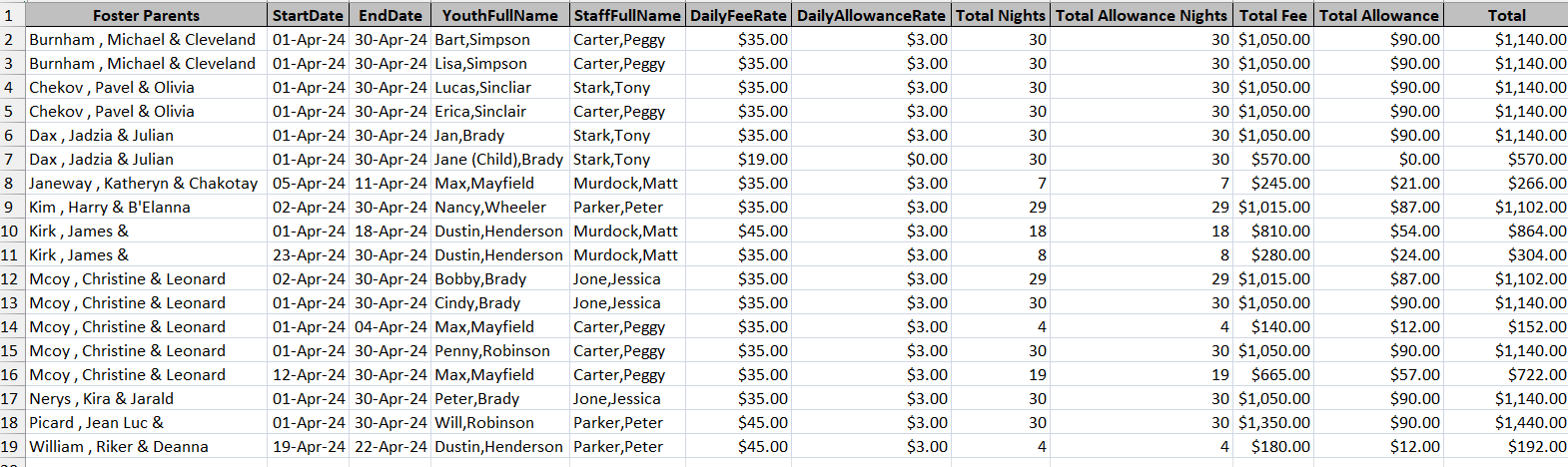
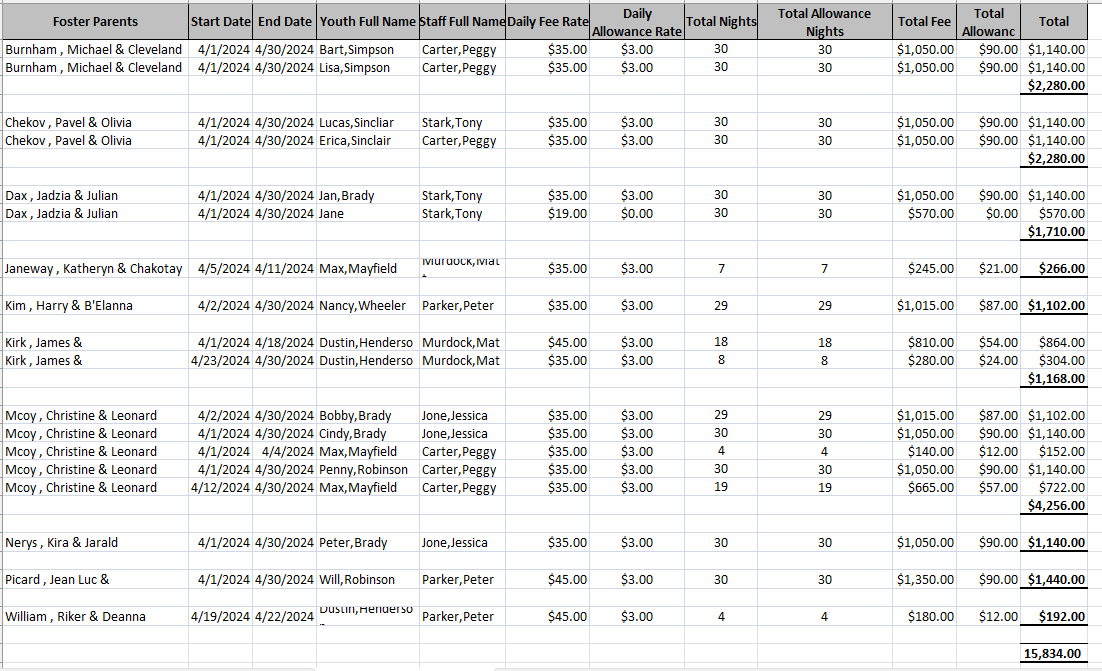
The first image is the exported Excel file from my Query. The second image is the sum for each Foster Parent requested by my accounting department. I copied the exported file and then manually summed each Foster Parent for accounting to run the budget and send checks with the proper amount.

I have five tables. 1) Fee Tracker T. 2) Foster Family (Parent) T. 3) Foster Fee Rates T. 4) Staff T. 5) Youth Allowance T. 6) Youth T.

I told accounting that I can't create a query to sum each Foster Parent payables. Not sure if Access can do this, hence my relying on Excel to generate the final report.

Let me know what you think.

Thanks
David Cummins OP  @Reply  
      
2 years ago
Correction, 6 tables....
Sami Shamma  @Reply  
             
2 years ago
David, is this information confidential?

If so, we need to remove the images.

Please advise!
Richard Rost  @Reply  
          
2 years ago
Look at the names, Sami. And you call yourself a Trekkie? :)
Sami Shamma  @Reply  
             
2 years ago
The joke on me. Did not even read the names.
Just saw the word 'Foster parents' and I panicked.
David Cummins OP  @Reply  
      
2 years ago
Hi Sami,

No confidential information here. I used TV character names including those from Star Trek. Yes, Richard. I am a huge Trekkie!
Sami Shamma  @Reply  
             
2 years ago
I am now worried that Richard might take my Trekkie Badge.
Richard Rost  @Reply  
          
2 years ago
Haha, Sami. I might. :)

David: why have you not taken the Trekkie Quiz yet to get your badge?

As far as actually answering your question goes... it's late and I'm beat. I'll try to look at it tomorrow for you.
David Cummins OP  @Reply  
      
2 years ago
I found the chink in the armor, so to speak concerning my issue here. I turns out that I cannot use the Primary and Foreign keys when using the Totals button. I cannot apply the Totals (Group by, Count and other functions) to the ID fields and therefore, I cannot relate multiple queries to aggregate data without the ID fields. I think VBA is needed to produce the results I am attempting. Can anyone direct me to a resource for VBA code?

Thanks.
Richard Rost  @Reply  
          
2 years ago
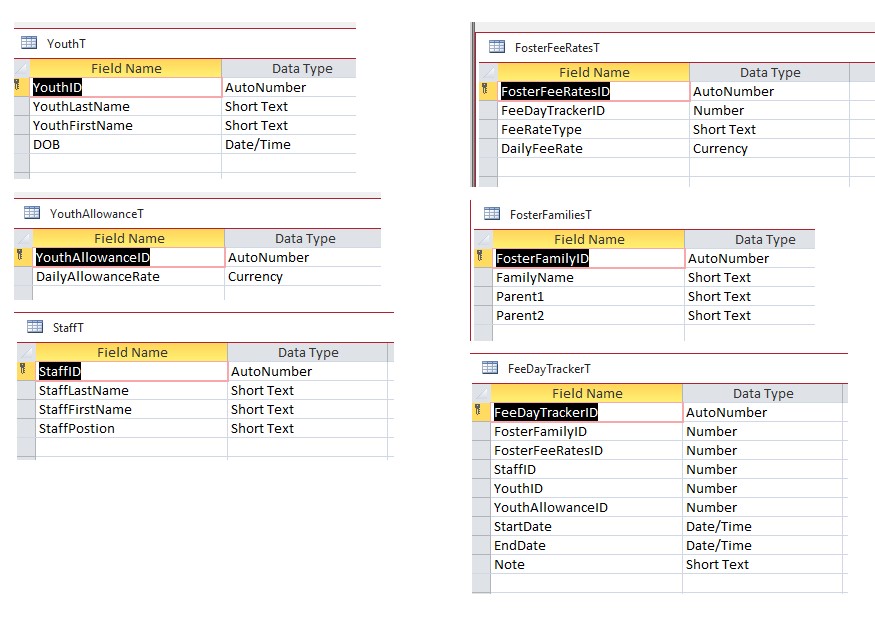
What do your tables look like?
David Cummins OP  @Reply  
      
2 years ago

David Cummins OP  @Reply  
      
2 years ago
Richard, I'm thinking I have too many tables here.
Richard Rost  @Reply  
          
2 years ago
Yeah, help me to understand what these different tables mean. Why is there, for example, a separate table for Youth Allowance?
David Cummins OP  @Reply  
      
2 years ago
Hi, Youth Allowance is a separate accounting line item that may or may not be applicable. So, I created a separate table to pull from in the Form. Does that make sense?
Richard Rost  @Reply  
          
2 years ago
I'm still very confused. Let's break this down into simple steps. What is the first thing that you want to be able to accomplish? Let's not try to kill all of the birds with one stone.
David Cummins OP  @Reply  
      
2 years ago
Hi Richard, I want to total the Total Fee plus the Total Allowance for each Foster Parent showing the Total sum for each Foster Parent.

EG. Riker Parents. [Total Fee: $1,085] + [Total Allowance: $93} = Total: $1,178.00
      Dax Parents.   [Total Fee: $1,085] + [Total Allowance: $0} = Total: $1,085

Basically, a line for each Foster Parent with Totals

I hope this makes sense.
Sami Shamma  @Reply  
             
2 years ago
The "Total Fee" and the "Total Allowance" are both on the FeeDayTrackerT. Total Fee comes from FosterFeeRateID and "Total Allowance" comes from YouthAllowanceID. Is this correct?
David Cummins OP  @Reply  
      
2 years ago
Hi Sami, Yes. "Total Fee" is pulled from the YouthAllowanceT and the FosterFeeRatesT into the FeeDayTrackerT using the Foster FosterFeeRateID and the YouthAllowanceID to relate.
Sami Shamma  @Reply  
             
2 years ago
So step one.
Build a query with FeeDayTrackerT, YouthAllowanceT, and the FosterFeeRatesT ' they should link correctly automatically using the IDs.
Select * from FeeDayTrackerT and only the amounts from the other 2 tables.

Step 2 feed this new query into a new aggregate query where you total on Parents.
David Cummins OP  @Reply  
      
2 years ago
Thanks, Sami,

This did the trick! I was close to figuring this out but didn't consider using the Select * from FeeDayTrackerT.

I really appreciate your help!
Sami Shamma  @Reply  
             
2 years ago
David, you are very welcome.

This thread is now CLOSED. If you wish to comment, start a NEW discussion in Access Forum.
 

Next Unseen


What's This?


The following is a paid advertisement
Computer Learning Zone is not responsible for any content shown or offers made by these ads.
 

Learn
 
Access - index
Excel - index
Word - index
Windows - index
PowerPoint - index
Photoshop - index
Visual Basic - index
ASP - index
Seminars
More...
Customers
 
Login
My Account
My Courses
Lost Password
Memberships
Student Databases
Change Email
Info
 
Latest News
New Releases
User Forums
Topic Glossary
Tips & Tricks
Search The Site
Code Vault
Collapse Menus
Help
 
Customer Support
Web Site Tour
FAQs
TechHelp
Consulting Services
About
 
Background
Testimonials
Jobs
Affiliate Program
Richard Rost
Free Lessons
Mailing List
PCResale.NET
Order
 
Video Tutorials
Handbooks
Memberships
Learning Connection
Idiot's Guide to Excel
Volume Discounts
Payment Info
Shipping
Terms of Sale
Contact
 
Contact Info
Support Policy
Mailing Address
Phone Number
Fax Number
Course Survey
Email Richard
[email protected]
Blog RSS Feed    YouTube Channel

LinkedIn
Copyright 2026 by Computer Learning Zone, Amicron, and Richard Rost. All Rights Reserved. Current Time: 9/29/2026 9:17:24 PM. PLT: 0s