Free Lessons
Courses
Seminars
TechHelp
Fast Tips
Templates
Topic Index
Forum
ABCD
 
Home   Courses   TechHelp   Help   Contact   Merch   Join   Order   Logon   Forums   
 
Back to Access Forum    Comments List
Upload Images   @Reply   Bookmark    Link   Email   Next Unseen 
Same Query Different Forms
Ronald de Boer 
      
2 years ago
Hi, I have 2 queries that provide the same information via a DLookup in 2 different forms.  Yes I could create 2 different queries referencing the different forms in each query however I wonder, is there a way where in the query I reference to a value in a text box that is used in the [Forms]![TextBoxValue]![Field] instead of [Forms]![FormName]![Field] where the TextBoxValue equals the Form Name. If possible I only have to maintain one query instead of two if I need to alter the query.
Richard Rost  @Reply  
          
2 years ago
So you want to use the same query with two different forms and get the value from whichever one is open?
Ronald de Boer OP  @Reply  
      
2 years ago
Hi Richard, Yes, I have 2 different forms, 1. enters new student class data. The 2nd form uses a different table from the 1st form but updates which class the student needs to be moved to when the student missed a class because he was absent.  Absentee students are placed in a waitlist table, different from the student schedule table which holds when each student is scheduled to attend his next class.  Each student is an apprentice who is already working with an employer and attends class 5 times a year over a 3 year period for 1, 2 or 3 days.  The query finds and holds whether the employer has another student in a class that either form is being used to enter another employeed student into the same class. If there is then the forms display a message to the user.  Hope this makes sense. The same query is used with 2 different forms
Kevin Yip  @Reply  
     
2 years ago
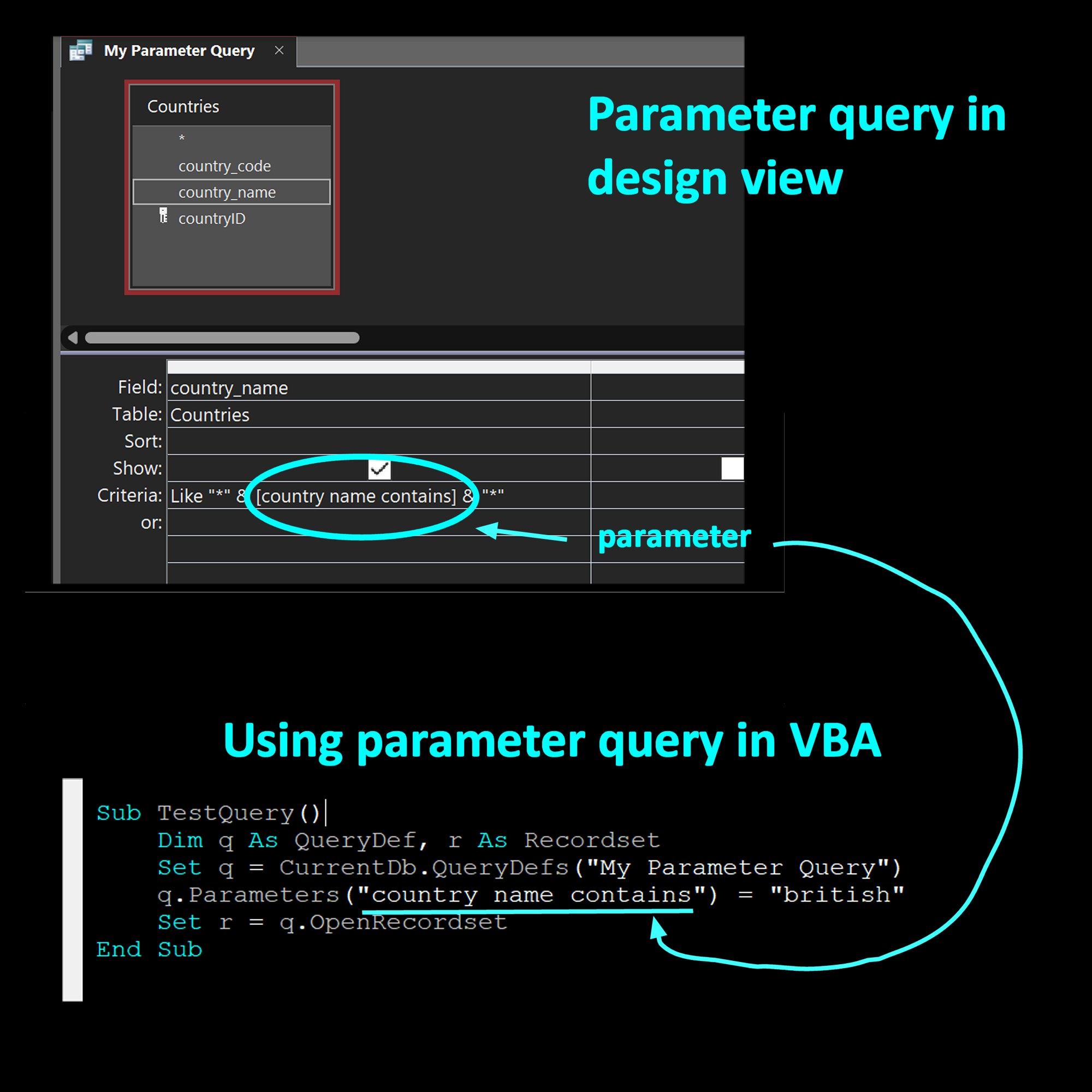
Anything that looks like [Forms]![FormName]![Field] are treated as "parameters" in queries.  This type of queries are called "parameter queries," which Richard has covered in his videos.  A parameter's name is unchangeable, so you cannot dynamically changed them in the manner you described.  You can assign a different value to a parameter, but you cannot change the parameter's name.  

Since you only have 2 forms you need this done to, I suggest you just make 2 different queries.  But if you really want to do it dynamically, there is a way to do it with VBA:

1. Instead of [Forms]![FormName]![Field], use a generic parameter name, e.g. [My Form Value]
2. In the form's Open event, open the "query def" of the query and assign the necessary value (i.e. the value contained in [Forms]![FormName]![Field]) to the parameter.
3. Also in the Open event, assign the query above to the form's record source.

Kevin Yip  @Reply  
     
2 years ago
I don't know if Richard has a video on setting up parameter queries with VBA.  The picture below shows what it entails.  You take the name of the parameter and use VBA to assign a value to it in the manner shown.
Kevin Yip  @Reply  
     
2 years ago

Richard Rost  @Reply  
          
2 years ago
It sounds to me like there's a more fundamental issue with your database, and that you shouldn't be using multiple tables to store the same type of thing. You're dealing with all students here, so instead of moving students around between different tables, why not just assign them a status or a category? That would be a whole lot easier and better from a database standpoint.
Ronald de Boer OP  @Reply  
      
2 years ago
Hi Richard, No fundamentals are OK. I am reading a 3rd party Db that I am only allowed to read and the reason why there are 2 different tables. I actually had programs in place in my Db to do this which worked however the business decided absentees needed to be stored in the 3rd party db not mine.  As you are aware business processes rule, not IT! So yes, unusual but as a tech help or developer lesson I think it would be good lesson.  Thanks for the interest.
Richard Rost  @Reply  
          
2 years ago
No, I understand completely. I've worked with companies in the past, and they were working with legacy systems or getting data from vendors, and we had to deal with how it was provided. When I had absolutely zero say on what the higher-ups could do with the data. With that being said, is this a situation where only one of the two forms could be open, and the query needs to get the data from that form? Or is there a possibility that both forms could be open because we might be able to use some function trickery to figure out which one's open, or if both are open, choose one over the other? Either way, it's going to require a custom function. You can do something like:

X: GetFormParameter()

And then your function could use IsLoaded() to check and see which of those forms is open and get the value from it. And if both are open they can prioritize whichever one you specify. This should get you started at least.

This thread is now CLOSED. If you wish to comment, start a NEW discussion in Access Forum.
 

Next Unseen

 
New Feature: Comment Live View


The following is a paid advertisement
Computer Learning Zone is not responsible for any content shown or offers made by these ads.
 

Learn
 
Access - index
Excel - index
Word - index
Windows - index
PowerPoint - index
Photoshop - index
Visual Basic - index
ASP - index
Seminars
More...
Customers
 
Login
My Account
My Courses
Lost Password
Memberships
Student Databases
Change Email
Info
 
Latest News
New Releases
User Forums
Topic Glossary
Tips & Tricks
Search The Site
Code Vault
Collapse Menus
Help
 
Customer Support
Web Site Tour
FAQs
TechHelp
Consulting Services
About
 
Background
Testimonials
Jobs
Affiliate Program
Richard Rost
Free Lessons
Mailing List
PCResale.NET
Order
 
Video Tutorials
Handbooks
Memberships
Learning Connection
Idiot's Guide to Excel
Volume Discounts
Payment Info
Shipping
Terms of Sale
Contact
 
Contact Info
Support Policy
Mailing Address
Phone Number
Fax Number
Course Survey
Email Richard
[email protected]
Blog RSS Feed    YouTube Channel

LinkedIn
Copyright 2026 by Computer Learning Zone, Amicron, and Richard Rost. All Rights Reserved. Current Time: 8/8/2026 3:02:28 AM. PLT: 1s