Free Lessons
Courses
Seminars
TechHelp
Fast Tips
Templates
Topic Index
Forum
ABCD
 
Home   Courses   TechHelp   Forums   Help   Contact   Merch   Join   Order   Logon  
 
Back to Access Forum    Comments List
Upload Images   @Reply   Bookmark    Link   Email   Next Unseen 
Aggregate Query and Report
Timothy Havlusch 
      
2 years ago
I am really just looking for what direction or task is the best way to get the results I am looking for.

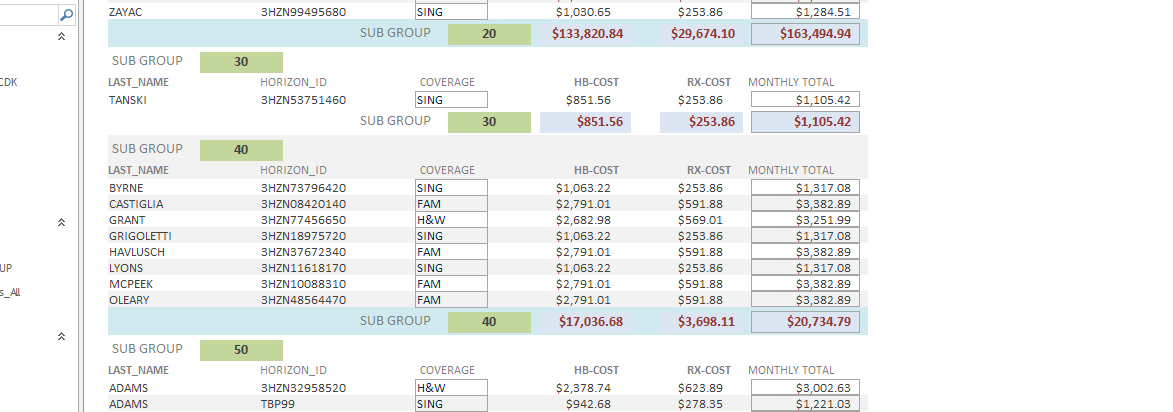
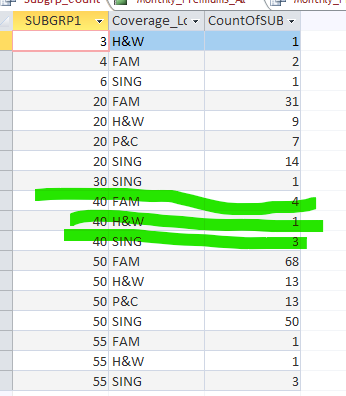
I have an aggregate query that gives me the types of coverage in each subgroup and I want those totals to appear on an already created report that totals the cost of coverage for a subgroup.


Timothy Havlusch OP  @Reply  
      
2 years ago

Timothy Havlusch OP  @Reply  
      
2 years ago

Timothy Havlusch OP  @Reply  
      
2 years ago
Thanks in advance.
John Campbell  @Reply  
     
2 years ago
Hi Timothy, Have you ever used domain functions?  You could use Dcount to get those totals on the report.  

=Dcount("coverage","QueryName", SubGrp1 = SubGrp1 in the report).  So you would get 8 for the green you have above.  

So this would work, but can slow down a report if there is a ton of data.
Timothy Havlusch OP  @Reply  
      
2 years ago
There is not a ton of data only approximately 240 employees.  Every Subgroup (Health Plan) has the same 4 categories  of coverage. What I am trying to get to appear on the subgroup footer and using SubGroup 40 as an example is this:
SING=3 P&C=0 H&W=1 FAM=4   Those are my four levels of coverage, (Single, Parent & Child, Husband & Wife and Family)

And in this case there are 8 people in subgroup 40

As you can see with Subgroup 50 (our most popular plan) we have 50 Singles, 13 Parent & Children, 13 Husband & Wife, and 68 Families for a total of 144 subscribers.  My gola was if I could figure it out for one subgroup the others would be easy.

I will read up more on Dcount and make sure I got the syntax all correct.


Timothy Havlusch OP  @Reply  
      
2 years ago
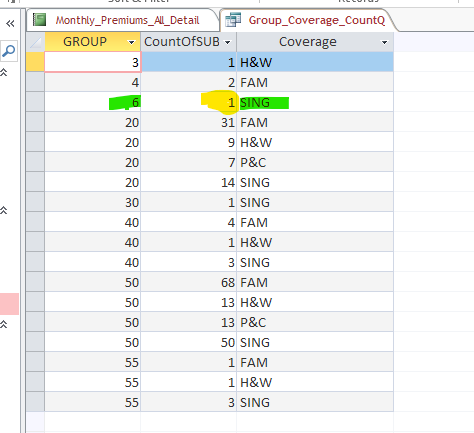
I am failing at every turn.  I am now trying to have it return the value for each sub group of how many records = "SING" ...so at least for Subgroup 06 I only have one subscriber and they are single and I am running into issues there as well.  If I can get that at least I can replicate the other coverages....time to go home but still trying.,
Richard Rost  @Reply  
          
2 years ago
If what you're trying to do is get a simple count of each of those items in the group footer total, you could use my DLookupPlus function. Aside from that, since you're dealing with multiple records, you would probably need to use a subreport inside the group footer to show the same information. Definitely not an easy report to put together.
Timothy Havlusch OP  @Reply  
      
2 years ago
I already have a very simple query that returns the exact values I am looking for.  What I am trying to generate at the Subgroup level on the report is the expression that says...ok for this subgroup (and I'll use 6 as an example), I want the total number of people in the subgroup that have the coverage that is Equal to SING.  In this case it should return a value of 1.  If I can get it to work in one instance I can then add the others to the sub group footer.
Timothy Havlusch OP  @Reply  
      
2 years ago

Timothy Havlusch OP  @Reply  
      
2 years ago
Sorry for being a pill about this but I think I am close....DLookup is what I want, so from the query (Group_Coverage_CountQ)
So on the report for each Group I want to return the value of SING for each Group.  This is where I am at:

   Return          the Count               From Query                  that matches group on report   and Coverage =SING  
                  
=DLookUp("[CountOfSUBGRP1]","[Group_Coverage_CountQ]",[Group]=""&[Group]&""And"Coverage=""SING""")
Adam Schwanz  @Reply  
           
2 years ago
If you copy/pasted that, your quotation are wrong. If Group is a number you only need 1, and if it's a string you need 3, it looks like you only have 2? Also missing one in front of Group

=DLOOKUP("[CountOfSUBGRP1]","[Group_Coverage_CountQ]","Group=" & Group & " and Coverage=""Sing""")
Timothy Havlusch OP  @Reply  
      
2 years ago
The Zoom screen doesn't let you cut n paste so I retyped it in my response.  I then went and deleted it and retyped your solution but still getting a #Error
Adam Schwanz  @Reply  
           
2 years ago
Just to confirm, you copy/pasted my solution in? That should be what you need unless, is Group a Number Field? If it's string you'll need to

=DLOOKUP("[CountOfSUBGRP1]","[Group_Coverage_CountQ]","Group=""" & Group & """ and Coverage=""Sing""")

Is the Group field on the form that you're trying to use this DLOOKUP on?
Adam Schwanz  @Reply  
           
2 years ago
You may also be dealing with null values, can you make sure that the criteria on the page matches one that has a result?
Timothy Havlusch OP  @Reply  
      
2 years ago
Everything has been retyped.  "Group" in my master table is a "Number" data type.  There are not any "null" values in my data as every employee has a Group (which is their Health Benefit Plan) and every employee has a level of coverage (SING,FAM, H&W, P&C)
Timothy Havlusch OP  @Reply  
      
2 years ago
It helps tremendously if you spell coverage correctly....good arrow bad indian.

This thread is now CLOSED. If you wish to comment, start a NEW discussion in Access Forum.
 

Next Unseen

 
New Feature: Comment Live View


The following is a paid advertisement
Computer Learning Zone is not responsible for any content shown or offers made by these ads.
 

Learn
 
Access - index
Excel - index
Word - index
Windows - index
PowerPoint - index
Photoshop - index
Visual Basic - index
ASP - index
Seminars
More...
Customers
 
Login
My Account
My Courses
Lost Password
Memberships
Student Databases
Change Email
Info
 
Latest News
New Releases
User Forums
Topic Glossary
Tips & Tricks
Search The Site
Code Vault
Collapse Menus
Help
 
Customer Support
Web Site Tour
FAQs
TechHelp
Consulting Services
About
 
Background
Testimonials
Jobs
Affiliate Program
Richard Rost
Free Lessons
Mailing List
PCResale.NET
Order
 
Video Tutorials
Handbooks
Memberships
Learning Connection
Idiot's Guide to Excel
Volume Discounts
Payment Info
Shipping
Terms of Sale
Contact
 
Contact Info
Support Policy
Mailing Address
Phone Number
Fax Number
Course Survey
Email Richard
[email protected]
Blog RSS Feed    YouTube Channel

LinkedIn
Copyright 2026 by Computer Learning Zone, Amicron, and Richard Rost. All Rights Reserved. Current Time: 6/27/2026 1:29:49 AM. PLT: 1s