Free Lessons
Courses
Seminars
TechHelp
Fast Tips
Templates
Topic Index
Forum
ABCD
 
Home   Courses   TechHelp   Forums   Help   Contact   Merch   Join   Order   Logon  
 
Back to Access Forum    Comments List
Upload Images   @Reply   Bookmark    Link   Email   Next Unseen 
Password failure
Nicole Sovis 
   
2 years ago
(Actually, this is David Sovis (Nicole was on the credit card when I purchased lessons last)

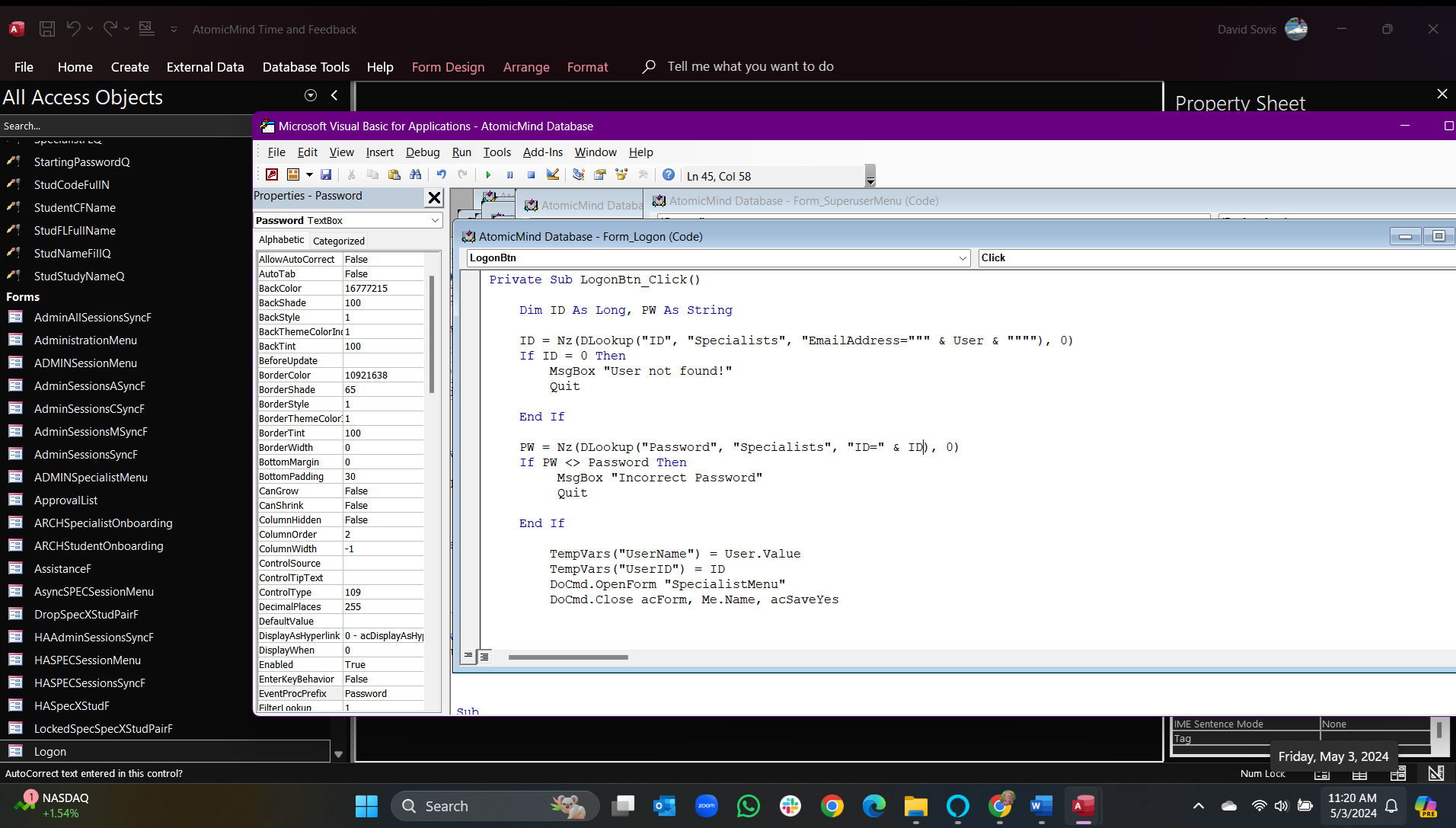
I believe I have setup my LOGON button VBA to match your tutorial. (I have an image to share)

When I wrote this a couple of months ago it worked great. But now recently it only catches/rejects the logon name (I use the user's email address to get user's ID from table) BUT it will totally bypass the Password test and Logon.

I did have the force change password features coded in, but, I have stripped them due to this issue.

Beating my head against the wall...Ideas?
Nicole Sovis OP  @Reply  
   
2 years ago

Sami Shamma  @Reply  
             
2 years ago
Where is "PW" defined?
Adam Schwanz  @Reply  
           
2 years ago
I'm assuming the quit doesn't work, and you don't have an exit sub, so it just goes on and fires the open form code too. Try replacing Quit with exit sub. If that doesn't work,This is what I use, you could try this.

If IsNull(txtUserName) Then
    MsgBox "Invalid Username"
    Exit Sub
End If
If IsNull(txtPassword) Then
    MsgBox "Invalid Password"
    Exit Sub
End If

Dim X As Long
X = Nz(DLookup("UserID", "UserT", "Username=""" & txtUserName & """ AND Password=""" & txtPassword & """"),0)

If X>0 Then
'Valid User Code
'Set Tempvar/openClose forms here
Else
Msgbox "Invalid Login"
End If
Adam Schwanz  @Reply  
           
2 years ago
Actually if you're not getting the messageboxes of incorrect information, the quit isn't even firing. Before your tempvars stuff add in a
msgbox ID
msgbox PW

and see what your values are
Nicole Sovis OP  @Reply  
   
2 years ago
If I enter a wrong Password, I get MsgBox and it rejects properly.

If I enter the correct Password, it accepts and moves on.

If I leave the Password field blank, it responds like it has the correct Password, validates and moves on....is it a Null issue? How do I fix?
Adam Schwanz  @Reply  
           
2 years ago
Oh, yea that makes sense. Your setting it to 0 but it's a string, so its staying null. and the PW<>Password part, null does = null, so it lets it in.

You could try setting it to "" instead of 0, but that might still match. You might have to set the NZ to like "Wrong" or something instead.

Or you could just put in the checks that there is information in the fields like I have, if the field is blank exit sub.
Nicole Sovis OP  @Reply  
   
2 years ago
I tried Exit Sub, acted the same way...
Nicole Sovis OP  @Reply  
   
2 years ago
I installed Msg Boxes for the resultant ID and PW. When I input just the User Logon (Email Address) and no Password (Null or Blank), the ID kicks back the correct ID that correlates with the user email, BUT, it also inserts the password associated with that user as PW comes back with the correct Password, but, I haven't input a Password....????
Adam Schwanz  @Reply  
           
2 years ago
PW should come back with the password if the user name is correct.

But it shouldn't match the Password Field if the password field is blank.
Nicole Sovis OP  @Reply  
   
2 years ago
Ok, Resolved! I added your suggested IsNull statements prior to the validation statements for both ID and PW (I kept my current validation statements). It all works now.

This thread is now CLOSED. If you wish to comment, start a NEW discussion in Access Forum.
 

Next Unseen

 
New Feature: Comment Live View


The following is a paid advertisement
Computer Learning Zone is not responsible for any content shown or offers made by these ads.
 

Learn
 
Access - index
Excel - index
Word - index
Windows - index
PowerPoint - index
Photoshop - index
Visual Basic - index
ASP - index
Seminars
More...
Customers
 
Login
My Account
My Courses
Lost Password
Memberships
Student Databases
Change Email
Info
 
Latest News
New Releases
User Forums
Topic Glossary
Tips & Tricks
Search The Site
Code Vault
Collapse Menus
Help
 
Customer Support
Web Site Tour
FAQs
TechHelp
Consulting Services
About
 
Background
Testimonials
Jobs
Affiliate Program
Richard Rost
Free Lessons
Mailing List
PCResale.NET
Order
 
Video Tutorials
Handbooks
Memberships
Learning Connection
Idiot's Guide to Excel
Volume Discounts
Payment Info
Shipping
Terms of Sale
Contact
 
Contact Info
Support Policy
Mailing Address
Phone Number
Fax Number
Course Survey
Email Richard
[email protected]
Blog RSS Feed    YouTube Channel

LinkedIn
Copyright 2026 by Computer Learning Zone, Amicron, and Richard Rost. All Rights Reserved. Current Time: 5/2/2026 8:54:03 AM. PLT: 0s