Free Lessons
Courses
Seminars
TechHelp
Fast Tips
Templates
Topic Index
Forum
ABCD
 
Home   Courses   TechHelp   Help   Contact   Merch   Join   Order   Logon   Forums   
 
Back to Access Forum    Comments List
Pending Approval    Upload Images   @Reply   Bookmark    Link   Email   Next Unseen 

Anonymous 
 
Richard Rost  @Reply  
          
2 years ago
Is it possible? MAYBE if your website directory was also set up as a drive letter (Z:) or network share (//WEBSERVER). There are tools that can do this.

BUT YES, THIS IS DISCOURAGED.
Richard Rost  @Reply  
          
2 years ago
If you want to put your data online, my recommendation is SQL Server. It's inexpensive and not terribly difficult.
Kevin Yip  @Reply  
     
2 years ago
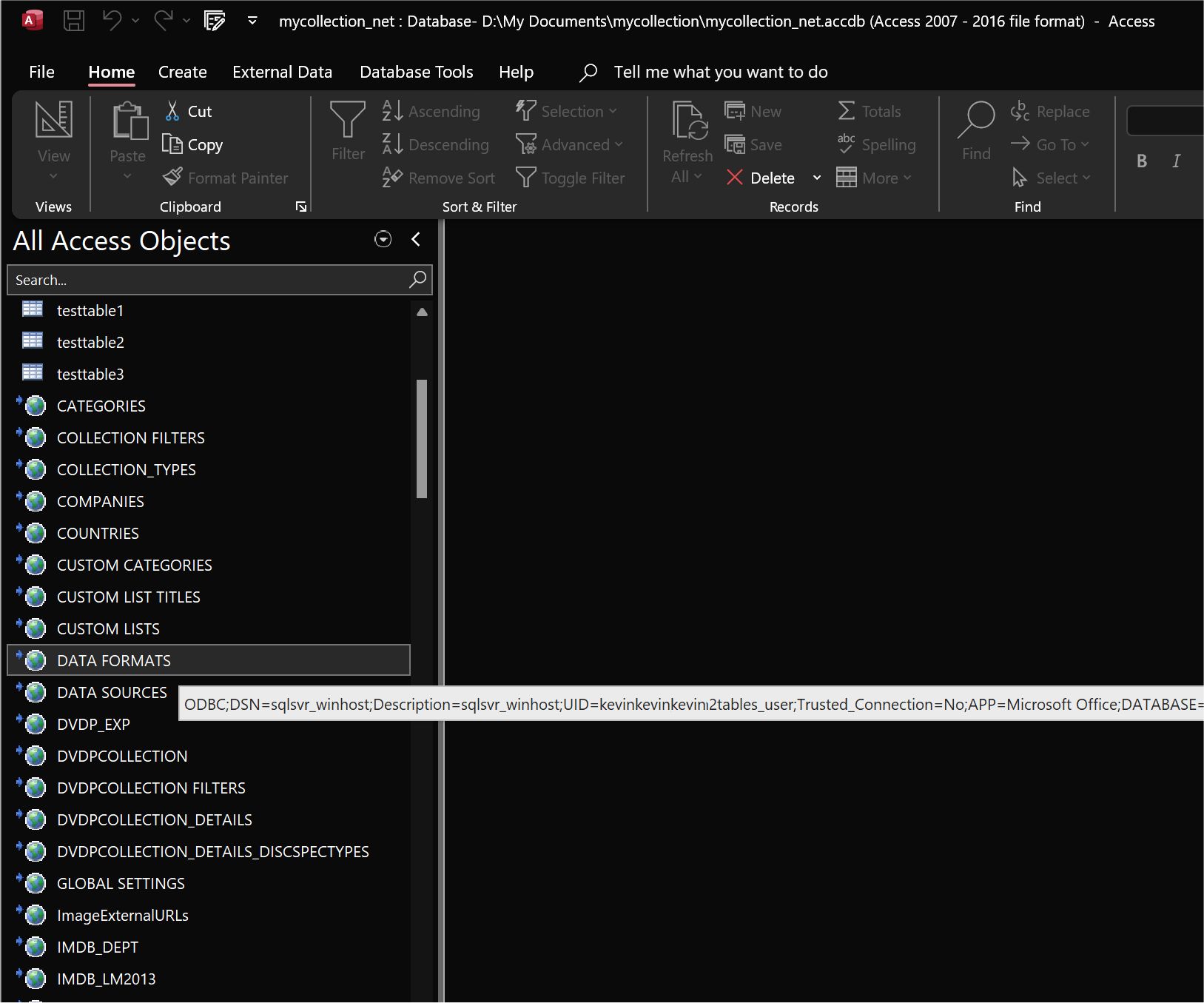
This can be done if your online database is SQL Server.  See picture below.  All my linked tables are from a Winhost online SQL Server database.  My Access front end can access them like any other tables.

If you mean to do this with an Access database, you can upload it, but you can only have access to it server-side.  That means all database operations have to be done with server-side coding such as ASP and VBScript (which Richard has lessons on).  And you can't link tables in your front end, because that is a client-side action.  In addition, Access databases are less secure online.  So most people don't go this route.
Kevin Yip  @Reply  
     
2 years ago

Kevin Yip  @Reply  
     
2 years ago
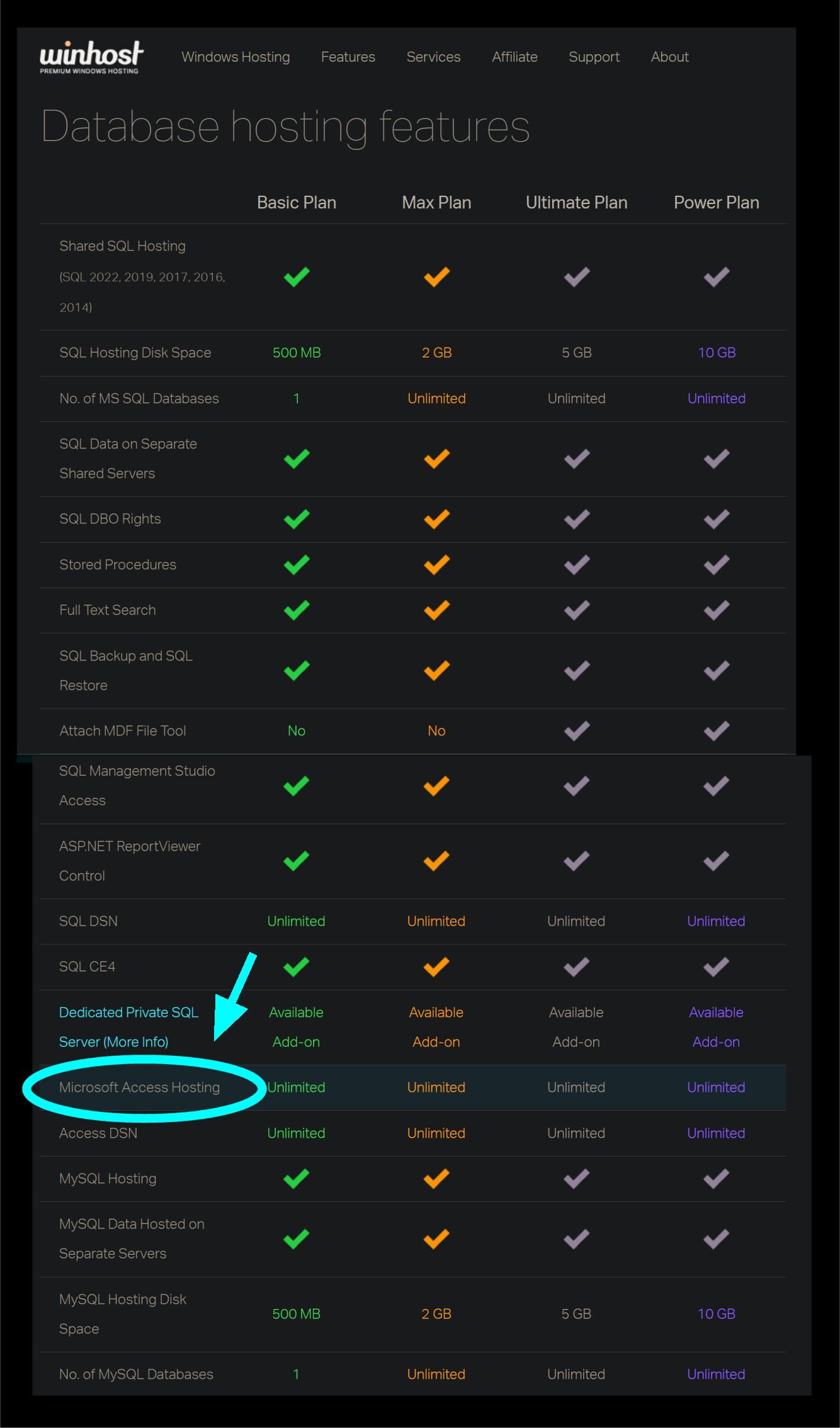
Winhost specifically says you are allowed to upload Access databases (see picture below).  But again, this only means you have access on the server-side, not on your local front end.  Winhost does not state this clearly, and assumes the user knows this already.
Kevin Yip  @Reply  
     
2 years ago

Richard Rost  @Reply  
          
2 years ago
Yeah 20 or so years ago when I first started dabbling with getting my Access databases online, I did try to upload a back end to the website and I was able to code it fine using ASP. But only for the website (server-side, as Kevin says). I would still have to use tricks to transfer data back and forth because your local front end Access database can't connect to a back-end Access database. I played around with using a VPN and mapping a drive letter that way, but it's not a good idea.

This thread is now CLOSED. If you wish to comment, start a NEW discussion in Access Forum.
 

Next Unseen

 
New Feature: Comment Live View


The following is a paid advertisement
Computer Learning Zone is not responsible for any content shown or offers made by these ads.
 

Learn
 
Access - index
Excel - index
Word - index
Windows - index
PowerPoint - index
Photoshop - index
Visual Basic - index
ASP - index
Seminars
More...
Customers
 
Login
My Account
My Courses
Lost Password
Memberships
Student Databases
Change Email
Info
 
Latest News
New Releases
User Forums
Topic Glossary
Tips & Tricks
Search The Site
Code Vault
Collapse Menus
Help
 
Customer Support
Web Site Tour
FAQs
TechHelp
Consulting Services
About
 
Background
Testimonials
Jobs
Affiliate Program
Richard Rost
Free Lessons
Mailing List
PCResale.NET
Order
 
Video Tutorials
Handbooks
Memberships
Learning Connection
Idiot's Guide to Excel
Volume Discounts
Payment Info
Shipping
Terms of Sale
Contact
 
Contact Info
Support Policy
Mailing Address
Phone Number
Fax Number
Course Survey
Email Richard
[email protected]
Blog RSS Feed    YouTube Channel

LinkedIn
Copyright 2026 by Computer Learning Zone, Amicron, and Richard Rost. All Rights Reserved. Current Time: 7/15/2026 11:55:23 AM. PLT: 1s