Free Lessons
Courses
Seminars
TechHelp
Fast Tips
Templates
Topic Index
Forum
ABCD
 
Home   Courses   TechHelp   Help   Contact   Merch   Join   Order   Logon   Forums   
 
Home > Forums > Access Forum > Multiple TempVars by Samantha Waterman
Back to Access Forum    Comments List
Upload Images   @Reply   Bookmark    Link   Email   Next Unseen 
Multiple TempVars
Samantha Waterman 
     
2 years ago
Hello!

I just had a question about Tempvars. So, from the User Level Security videos I have been able to create user logons for my Sales Reps and will be able to let them see only the Orders that they've created.
My question is though, each Sales Rep I have is assigned to oversee 2 locations. I have a totally separate Location Table that I already use, both for Customers and Orders.
So, if want my rep Sue to be assigned to 'Buffalo' and 'Rochester' and Bill to be assigned to 'Tampa' and 'Orlando', would I have to expand my 'UserT' to include 2 locations with a foreign key to relate that back to the "LocationT"? And if so, would I have to add multiple Tempvars to my logon VBA code? Like so?:

Video:
TempVars ('Username')
TempVars ('UserID')

My question: (would I have to do it like this?)
TempVars ('Username')
TempVars ('UserID')
TempVars ('LocationOne')
Adam Schwanz  @Reply  
           
2 years ago
You could, or you could use a junction table in a Many-to-Many

Then you could make it a tempvar or DLookup the location with the userID tempvar when you need it.
Samantha Waterman OP  @Reply  
     
2 years ago
Thank you, Adam!

I appreciate the help and I think I'm almost there - - watched both recommended videos; made a junction table which actually makes sense when I look at it.

But from your response and my limited knowledge, does that mean I can utilize the UserID from the Junction Table, even though the UserID in the TempVars is from the User Table, in my DLookup? Like if I make my DLookup like this:

= Nz(DLookup ("UserID", "UserXLocationT", "UserID=" & TempVars ("UserID")), 0)

Will it still work even though I'm using "UserID" from a different table than the ID I used to create the TempVars? Sorry, does that make sense?
Adam Schwanz  @Reply  
           
2 years ago
Can multiple users be assigned the same locations? Or is it always only one user on the location? If it's only ever one, it may be simpler to just put a userID field in the location table. So lets clarify that before we go any deeper.

If you need to use the junction table, you'll have to use some code to come up with both location results. If you dlookup by UserID it could grab either one of the locationIDs in the junction table.

Depending on what you need this to do, the security seminar shows how to make permission "groups". You could potentially use the locations as the "permission group" and assign them to your users as well.Access Security Seminar

What are you planning to use the login for? To change the way forms behave for certain users? Or is it only as a means to make people have a username/password to access it?
Samantha Waterman OP  @Reply  
     
2 years ago
Ok, hopefully I don't over-explain this as usual! LOL ' but yes, to clarify, multiple users can be assigned to the same locations.

Code I can work with once I understand it, so that isn't a problem if that's the only route to go!

And I do hope to watch the Access Security Seminar in the future when I have the time and money to, but unfortunately that is not an option at the moment (TMI but the struggle is real right now, LOL)

And just for the sake of helping you to understand and me to not overexplain: I'm using the login for my Sales Reps and yes, to change the way some of the forms behave for them. I have 5 sales reps and 1 manager; each rep handles 2 locations each and the manager oversees them all - - on a separate note; our Customers are not assigned to Sales Reps, just Orders - - So, an example to show the purpose for my original question: I want to limit my Customer List Form so each rep only has to see the customers in their locations. Like Sue would only have to see the customers from "Buffalo" and "Rochester" instead of having to scroll through the hundreds of customers already in the database that she doesn't have to bother with.

The User Level Security videos tie into what I need, I'm just unsure of how to incorporate multiple locations for my users.
Hopefully that all makes sense and I've answered your questions without confusing you too??
Adam Schwanz  @Reply  
           
2 years ago

Adam Schwanz  @Reply  
           
2 years ago
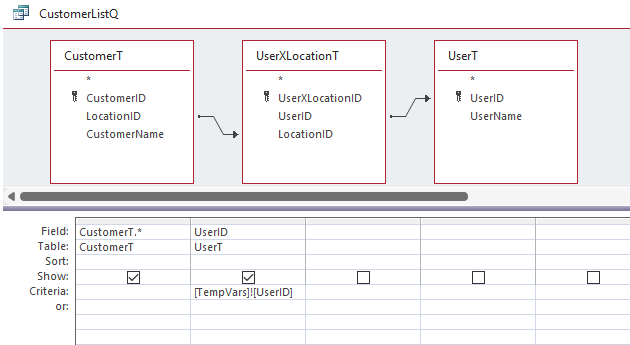
Here's an example using only minimal fields, this would only return customers who have the userID of the userID being stored in the tempvars (and you could leave out UserT and just use the userID from the junction table with the criteria, but I included it incase you want any fields from that)
Richard Rost  @Reply  
           
2 years ago
I knew if the subject said "TempVars" that Adam would be all over it. :)
Samantha Waterman OP  @Reply  
     
2 years ago
Yay! Thank you so much, Adam! I truly appreciate the help - - the query worked just like I needed it to! Changed the record source on my list form to the query and then logged in as my different users to test it and it only brings up their locations! Again, thank you so much! You're awesome and all of you make all of this look so easy to do!! I'm very grateful!

This thread is now CLOSED. If you wish to comment, start a NEW discussion in Access Forum.
 

Next Unseen


What's This?


The following is a paid advertisement
Computer Learning Zone is not responsible for any content shown or offers made by these ads.
 

Learn
 
Access - index
Excel - index
Word - index
Windows - index
PowerPoint - index
Photoshop - index
Visual Basic - index
ASP - index
Seminars
More...
Customers
 
Login
My Account
My Courses
Lost Password
Memberships
Student Databases
Change Email
Info
 
Latest News
New Releases
User Forums
Topic Glossary
Tips & Tricks
Search The Site
Code Vault
Collapse Menus
Help
 
Customer Support
Web Site Tour
FAQs
TechHelp
Consulting Services
About
 
Background
Testimonials
Jobs
Affiliate Program
Richard Rost
Free Lessons
Mailing List
PCResale.NET
Order
 
Video Tutorials
Handbooks
Memberships
Learning Connection
Idiot's Guide to Excel
Volume Discounts
Payment Info
Shipping
Terms of Sale
Contact
 
Contact Info
Support Policy
Mailing Address
Phone Number
Fax Number
Course Survey
Email Richard
[email protected]
Blog RSS Feed    YouTube Channel

LinkedIn
Copyright 2026 by Computer Learning Zone, Amicron, and Richard Rost. All Rights Reserved. Current Time: 9/25/2026 1:43:02 PM. PLT: 1s