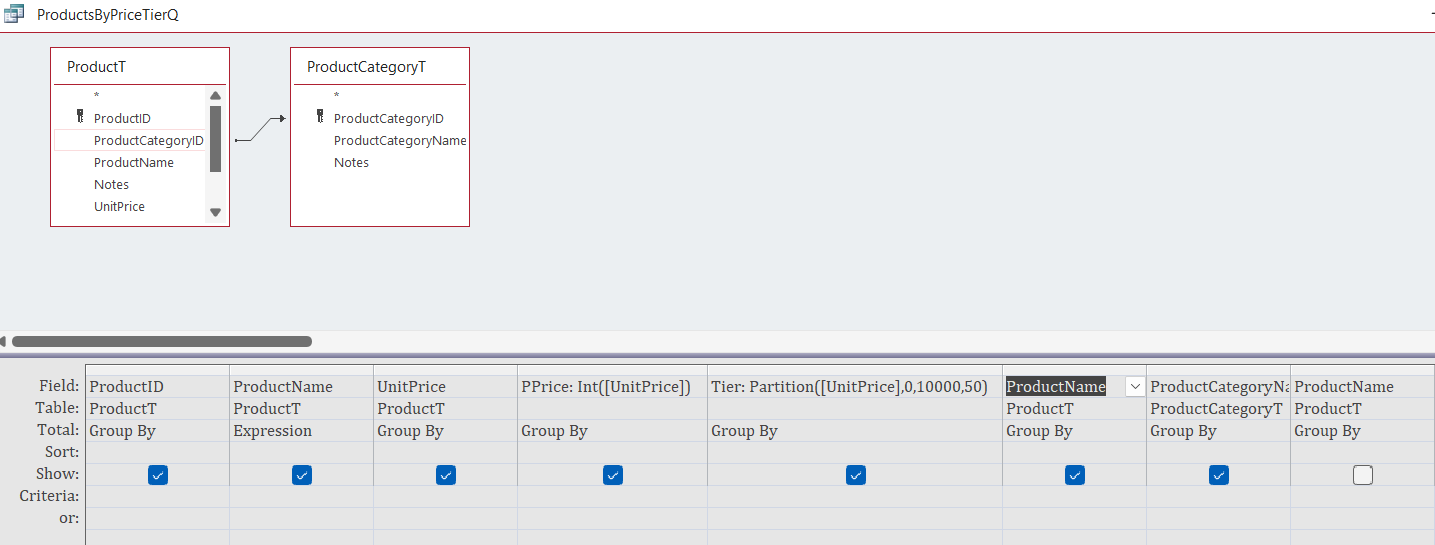
Well, I came across a stumper here. I changed the expression to read: PPart: Partition([PPrice],0,10000,50) instead of UnitPrice and now it is asking for a parameter value on PPrice. I double-checked the spelling and the way it was written and it looks fine. If I put it back in UnitPrice instead of PPrice it works. Not sure what is wrong and lately I haven't come across anything that I couldn't fix till now. Thanks, Ken
David Burns
@Reply 2 years ago
PPart: Partition([PPrice],0,10000,50) <= is this in a query? The error is suggesting that the field PPrice doesn't exist or Access thinks the field is in a different location/table. Have a look at where the query, if it is a query, is looking for UnitPrice then check where you have the PPrice field.
Kenneth WykoffOP
@Reply 2 years ago
Hi David and yes. It is in the video for Partitions in Lesson 18. It all appears the same as I was instructed, but it fails until I turn the PPrice back into the UnitPrice. Once I do that it all works just as it should. It's strange but this is the second situation I have come across a weird thing. Ken
Kenneth WykoffOP
@Reply 2 years ago
Kenneth WykoffOP
@Reply 2 years ago
Kenneth WykoffOP
@Reply 2 years ago
Top is without the change and the next is with the change and the parameter request
Okay, so this isn't something that I did in the video, right? The problem is, if you're calculating a value in the query like PPrice, you cannot always use that in another calculation in the same query because, at the time the query is running, it doesn't know what that value is until it's finished. This usually only happens with domain lookup functions or sums, averages, those kinds of things, but it can happen with any kind of function.
The only solution to that is to put it in a second query so that your PPrice value is completely calculated, and then you can partition it in the next query. I didn't catch the fact that you changed the query. In the future, let me know if this is something that I actually do in the video that isn't working for you or if it's a modification you made because that changes the story. LOL
Kevin Robertson
@Reply 2 years ago
You probably need to use multiple Queries.
In the first Query add any functions or criteria you need.
The second will be your aggregate Query which will be based on the first.
Kenneth WykoffOP
@Reply 2 years ago
Thanks Richard and Kevin. Just was concerned I missed something.
Ken
Yeah, at this point, these videos have been online for 10 to 15 years now. So, chances are the stuff I show in the videos works. If you made a deviation from what I do in the video, then that's where the problem is. We're perfectly happy to help you with any different things that you might come up with that you want to try. I just want to make sure that it's not a problem with the video. If there is a problem with the video or if something's wrong, even if someone does mention it in the comments, I generally try to put a notice up by the videos with an Errata section or something.
Kenneth WykoffOP
@Reply 2 years ago
Thanks, Richard and as always I do appreciate that. I'm just thrilled that so far since that last one it's all going smoother,
Sorry, only students may add comments.
Click here for more
information on how you can set up an account.
If you are a Visitor, go ahead and post your reply as a
new comment, and we'll move it here for you
once it's approved. Be sure to use the same name and email address.
This thread is now CLOSED. If you wish to comment, start a NEW discussion in
Access Expert 18.