Free Lessons
Courses
Seminars
TechHelp
Fast Tips
Templates
Topic Index
Forum
ABCD
 
Home   Courses   TechHelp   Help   Contact   Merch   Join   Order   Logon   Forums   
 
Back to Access Forum    Comments List
Upload Images   @Reply   Bookmark    Link   Email   Next Unseen 
Make an excel like entryForm
Sandi Cushion 
      
2 years ago
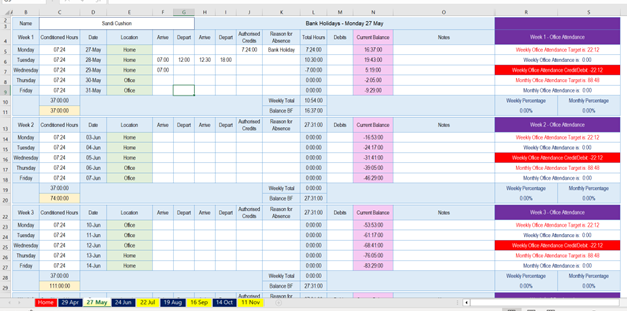
I have built a simple database for my 1600+ staff. We work on a flexi basis.  i.e. hours worked over the contracted hours per week can be saved and taken as flexi leave.  I currently use an excel entry form to collect and calculate hours worked over a four week (mon-fri) period.  It also calculates the require office/home work attendance (60% office work).  The excel method is cumbersome and unwieldy.  Is there any way I can reproduce this to be used in my database.
Sandi Cushion OP  @Reply  
      
2 years ago

Adam Schwanz  @Reply  
           
2 years ago
You're going to need to get creative and use multiple subforms if you want to list the data like that out ever week with totals below each week.

But in it's most simple form, this could be done with just a simple giant continuous form based on a table with the fields Date, Hours, Location, Arrive1,Depart1,Arrive2,Depart2,Authorized Credits, Reason for absence, Debits, Notes, and attendance. Total Hours should be a calculation, and depending on your use, current balance will probably be a calculation.

Then you are just doing formatting to address the appearance. Other than getting the weekly totals to appear and needing to use subforms/filtering it would be pretty basic. If you can live without those totals and just put them all togethor, you can just put the weekly totals all together in the footer or something with DLookup or count/sum.

I'm not sure if Richard has a specific video covering using subforms to achieve something like this, I think it's more across many videos learning how to interact with it like this, but Continuous Forms is the basic form.
Richard Rost  @Reply  
          
2 years ago
Yeah, I wouldn't bother with multiple subforms. I'd go with a single continuous form, and if you want to see a breakdown by week, just put filter buttons on it so you can say, "Show me week one," or "Show me week four," or "Show me weeks 10 through 15," whatever. But if I could see the data more clearly, then I could give you more input. I can barely read what you have there, even if I zoom in.
Ludwig Willems  @Reply  
      
2 years ago
volgen :)
Kevin Yip  @Reply  
     
2 years ago
Hi Sandi, your Excel form is cumbersome because it lacks structure, and that is what a database can offer.  But to have structure in Access, you need to design the structure yourself -- by creating "normalized" table structure.  You need to have your tables set up properly before you can begin to design how your data entry forms should look and work.  For instance, a normalized table may look something like:

PersonID   LineNum    DateTime             Location     Notes
1          1          27-May-2024          None         Absent - bank holiday
1          2          28-May-2024 07:00    None         Arrive
1          3          28-May-2024 12:00    None         Depart
1          4          28-May-2024 12:30    None         Arrive
1          5          28-May-2024 18:00    None         Depart

Your Excel sheet only has two columns for arrivals and departures.  What if a person arrives and departs more times than that?  You'll have to add more columns in the middle, making it even more cumbersome.  But a properly designed table like the above can accommodate any number of arrivals and departures.

In Access, data entry forms are for entering "records," which are rows.  And that means data have to placed in a structured manner.  You cannot enter data wherever you want like in Excel.

You have an "expert" badge so I assume you know at least some of these topics.  In short, there is a paradigm shift from designing for Excel to doing it in Access.
Sami Shamma  @Reply  
             
2 years ago
Kevin (like usual) is correct. But it is well worth making this paradigm shift to Access for your application.
Sandi Cushion OP  @Reply  
      
2 years ago
Thank you everyone.  I understand what you are saying, this is a sheet that I inherited and the boss wants to put a very similar looking interface in front of the staff.
Richard Rost  @Reply  
          
2 years ago
You CAN do it... you'd need to use multiple subforms if you want it to look exactly like that. There's always ways to make Access look and behave like other software... but it's almost always BETTER in the long run if you change your processes to conform to how a real database application SHOULD work.
Kevin Yip  @Reply  
     
2 years ago
Hi Sandi, you said so yourself: it's cumbersome.  You need to tell your boss that, and ask him to let you change it.  It's cumbersome precisely because of the unstructured Excel layout, from what I can see.  A unwieldy user interface will hurt productivity, which I'm sure your boss cares about.
Richard Rost  @Reply  
          
2 years ago
Yeah, back in my consulting days, I used to actually make workers MAD at me because I'd come in, streamline their operations (from their old Excel sheets or DOS app days) and then what used to take them 2 days now took 20 minutes. They feared for their jobs.
Kevin Yip  @Reply  
     
2 years ago
I went through the same thing in the 1990s when some of my co-workers were resistant to technological changes.  At the end, our industry and trading partners made those tech changes mandatory, and that made my job easier.

In this forum, you are a teacher, not a consultant, so you should have more freedom in how you give advice.  As a consultant, you are under your client's employ, so you may not be as "free" in your advice-giving, because you are under your client's employ.  And they may only hear or accept what they want to hear or accept.  This is from my first-hand experience too.  If the client wants to walk on hot coal bare-foot, you have to comply.
Richard Rost  @Reply  
          
2 years ago
Yeah... And fortunately I have tenure here so I can day what I want. Lol.

This thread is now CLOSED. If you wish to comment, start a NEW discussion in Access Forum.
 

Next Unseen

 
New Feature: Comment Live View


The following is a paid advertisement
Computer Learning Zone is not responsible for any content shown or offers made by these ads.
 

Learn
 
Access - index
Excel - index
Word - index
Windows - index
PowerPoint - index
Photoshop - index
Visual Basic - index
ASP - index
Seminars
More...
Customers
 
Login
My Account
My Courses
Lost Password
Memberships
Student Databases
Change Email
Info
 
Latest News
New Releases
User Forums
Topic Glossary
Tips & Tricks
Search The Site
Code Vault
Collapse Menus
Help
 
Customer Support
Web Site Tour
FAQs
TechHelp
Consulting Services
About
 
Background
Testimonials
Jobs
Affiliate Program
Richard Rost
Free Lessons
Mailing List
PCResale.NET
Order
 
Video Tutorials
Handbooks
Memberships
Learning Connection
Idiot's Guide to Excel
Volume Discounts
Payment Info
Shipping
Terms of Sale
Contact
 
Contact Info
Support Policy
Mailing Address
Phone Number
Fax Number
Course Survey
Email Richard
[email protected]
Blog RSS Feed    YouTube Channel

LinkedIn
Copyright 2026 by Computer Learning Zone, Amicron, and Richard Rost. All Rights Reserved. Current Time: 8/7/2026 3:40:51 PM. PLT: 0s