Free Lessons
Courses
Seminars
TechHelp
Fast Tips
Templates
Topic Index
Forum
ABCD
 
Home   Courses   TechHelp   Forums   Help   Contact   Merch   Join   Order   Logon  
 
Back to Access Developer Forum    Comments List
Upload Images   @Reply   Bookmark    Link   Email   Next Unseen 
Padding with zeros
Sami Shamma 
             
2 years ago
Greeting friends,

I have a combo box that is bound to a query. It takes a string that is numeric. All my numbers are 8 digits long, and if less, must be padded by zeros. For example:
if the user enters "123456" I want to save it as "00123456."

Is there a way of doing this without VBA, just with formatting?

Thanks
Sami Shamma OP  @Reply  
             
2 years ago

Thomas Gonder  @Reply  
      
2 years ago
Like this?
Thomas Gonder  @Reply  
      
2 years ago

Sami Shamma OP  @Reply  
             
2 years ago
Thomas, yes.
Sami Shamma OP  @Reply  
             
2 years ago
I tried that
Somehow it didn't work when it is a combo box
Thomas Gonder  @Reply  
      
2 years ago

Thomas Gonder  @Reply  
      
2 years ago
What are you "displaying" in the combo box? An ID or a data field from somewhere?
Sami Shamma OP  @Reply  
             
2 years ago
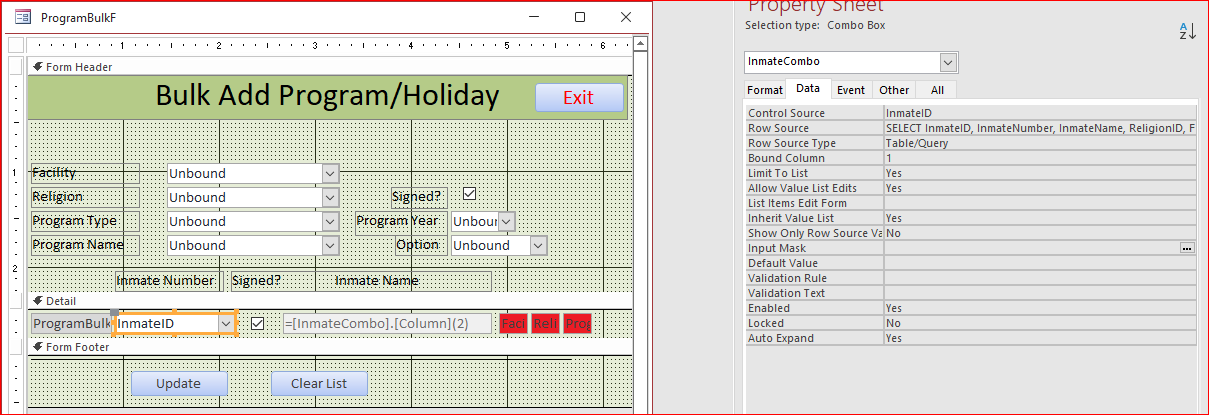
my rowsource is:
SELECT InmateID, InmateNumber, InmateName, ReligionID, FacilityID FROM InmateBulkQ ORDER BY InmateNumber;

The user enters InmateNumber
Sami Shamma OP  @Reply  
             
2 years ago

Sami Shamma OP  @Reply  
             
2 years ago
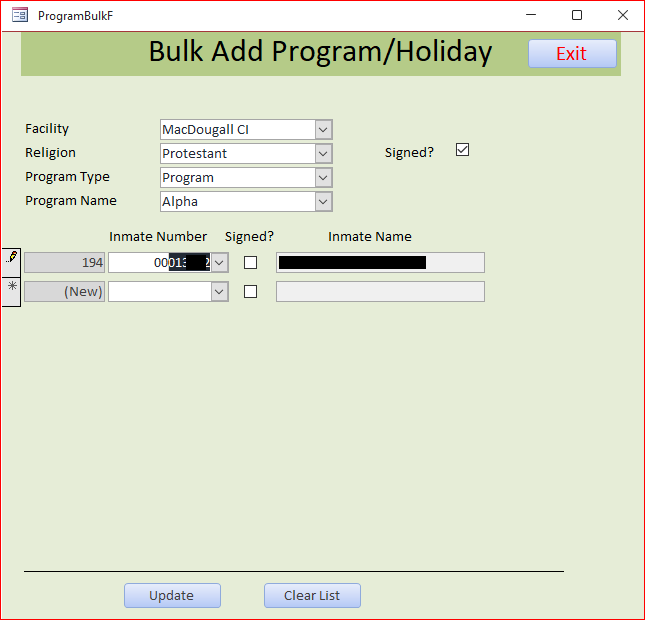
I had to didact the real Inmate number and name
Sami Shamma OP  @Reply  
             
2 years ago
In the image above I had to enter the leading zeros.
Thomas Gonder  @Reply  
      
2 years ago
I'm guessing your Inmate number is a number? I wonder if the query converts it to a string, so that the format won't work? I've had creepy things like that happen with queries. The query properties also don't work as expected.
Sami Shamma OP  @Reply  
             
2 years ago
My "Inmate number" is a text not a number. It is like SSN, according to @Richrd advice, if you do not need to do math on it, make it a string.
Kevin Robertson  @Reply  
          
2 years ago
Just use the Format function in your Query.
Kevin Robertson  @Reply  
          
2 years ago

Adam Schwanz  @Reply  
           
2 years ago
Yea, or if you need to store the actual value for some reason, use 8-len(field) and add that number of zeros manually in the afterupdate of the field.
Thomas Gonder  @Reply  
      
2 years ago
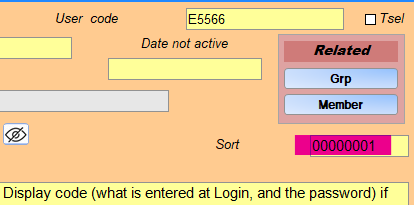
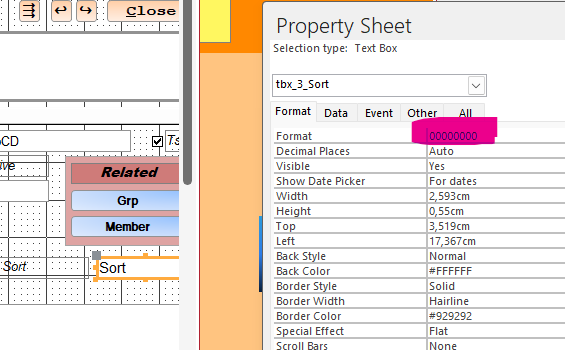
@ Sami I created a test combo box in the same form. I made it an unbound control and got a real number from another table via Select. I told the control to display the sort number from the other table with 00000000 formatting, without showing the ID. Yep, Access ignores the formatting with zeros when it's a combo box. So yeah, looks like going with Kevin's solution is best for a query. We're probably out of luck if going directly against a table with a Select without doing something tricky in the Record source as in the query. This worked for me if wanting to just display the padded number (image below).

As a side note, if a number is a number, and can never be a string, I do use number types. After a few digits, it saves disc space. In the case of my Sort field, yes, we never "do math" on them, but I do want them to sort right to left.
Thomas Gonder  @Reply  
      
2 years ago

Kevin Robertson  @Reply  
          
2 years ago
That highlighting makes that very difficult to read. Consider using a lighter shade.
Thomas Gonder  @Reply  
      
2 years ago
@ Kevin R. Thanks, I'll do that in the future if there isn't a color conflict, which there often is.
If I click on the image and see it in its own browser tab, it reads quite well on both my monitors.
Is that not the case with your monitor?
Sami Shamma OP  @Reply  
             
2 years ago
Thank you, guys.

My Data already has the leading zeros example:
InmateNumber    InmateName
00222333            John Dow
00012345            Sami Shamma

So, I think I need to try Adam idea as I am looking for inmate numbers from the drop box.

I will report my findings.
Sami Shamma OP  @Reply  
             
2 years ago
I may have a solution; I can trap the entry (With No leading zeros) in the "Not In List" Event.

How can I get the value of what has been typed into that box? it is not yet in the Combo box!

If I get the value, I can do what Adam suggested and add the leading zero in code.
Thomas Gonder  @Reply  
      
2 years ago
Ahhh, now maybe I understand. The InmateNumber already has the padded 0s. You want to be able to type in the number without 0s, and not use the selection pulldown in the combobox? But what do you want to show as the text in the combo box after tab/return/move? Why have combo box if you're not going to use it for selection?

If I recall correctly, one can't change an entry in the before update procedure, for some crazy reason it has to be changed in the after update.
Sami Shamma OP  @Reply  
             
2 years ago
Thomas,

You described my situation accurately.

I use this form, as the heading indicates, to enter inmates into programs in bulk. This form works perfectly when I use a barcode scanner to scan the inmate numbers from printed forms.

However, every now and then I need to enter inmate numbers by hand.

You ask a good question on why use a combo box. Perhaps tomorrow morning I will try to come up with another alternative.
Thomas Gonder  @Reply  
      
2 years ago
I know you probably can't change the data as it's stored for inmates, in that the InmateNumber probably comes from another system besides Access. My guess is that it's from an older db system that had fixed length fields for numbers. Many of those older systems, by default, displayed the numbers padded with zeros instead of removing them when converted from a stored binary representation. As such, people got used to having the zeros in front. I got a lot of data transfers from systems like that.

Some systems I used to work with stored numbers as strings, even on the disc. I always ripped off the zeros for storage, and padded on output (reports) if needed. Most people were pleased to ignore the zeros, unless they were used to seeing them in punch cards for alignment purposes (Matrix scrolling data looks so sophisticated, no?).

I haven't yet started to work with barcodes for reading. I've got the equipment, but yet to have them work in Access (hint for a tech tip?). Does the barcode reader return a fixed length number with padded zeros? I'm guessing would because as far as I know, most numeric bar codes are fixed length too. Although, I'm guessing that there are options in the reader's drivers and software to modify this.

Let us know what finally works please.
Thomas Gonder  @Reply  
      
2 years ago
Thanks Alex!
Sami Shamma OP  @Reply  
             
2 years ago
Hi Thomas
You are correct again, my friend. I received the data from a 52 year old mainframe system.
As I said, this form performs perfectly when used with a barcode scanner. I am considering a separate form for manual entry.
Thomas Gonder  @Reply  
      
2 years ago
@ Sami, could you try a test DB and see if everything still works okay after converting the InmateNumber from a string to maybe a long integer in the table? Then making the entry control a text box. I'm guessing that Access would deal with the leading zeros from the barcode reader in a textbox just fine.

This thread is now CLOSED. If you wish to comment, start a NEW discussion in Access Developer Forum.
 

Next Unseen

 
New Feature: Comment Live View


The following is a paid advertisement
Computer Learning Zone is not responsible for any content shown or offers made by these ads.
 

Learn
 
Access - index
Excel - index
Word - index
Windows - index
PowerPoint - index
Photoshop - index
Visual Basic - index
ASP - index
Seminars
More...
Customers
 
Login
My Account
My Courses
Lost Password
Memberships
Student Databases
Change Email
Info
 
Latest News
New Releases
User Forums
Topic Glossary
Tips & Tricks
Search The Site
Code Vault
Collapse Menus
Help
 
Customer Support
Web Site Tour
FAQs
TechHelp
Consulting Services
About
 
Background
Testimonials
Jobs
Affiliate Program
Richard Rost
Free Lessons
Mailing List
PCResale.NET
Order
 
Video Tutorials
Handbooks
Memberships
Learning Connection
Idiot's Guide to Excel
Volume Discounts
Payment Info
Shipping
Terms of Sale
Contact
 
Contact Info
Support Policy
Mailing Address
Phone Number
Fax Number
Course Survey
Email Richard
[email protected]
Blog RSS Feed    YouTube Channel

LinkedIn
Copyright 2026 by Computer Learning Zone, Amicron, and Richard Rost. All Rights Reserved. Current Time: 5/2/2026 8:30:51 AM. PLT: 1s