Free Lessons
Courses
Seminars
TechHelp
Fast Tips
Templates
Topic Index
Forum
ABCD
 
Home   Courses   TechHelp   Forums   Help   Contact   Merch   Join   Order   Logon  
 
Back to Access Developer Forum    Comments List
Upload Images   @Reply   Bookmark    Link   Email   Next Unseen 
Trouble with String DLookup
Ronald de Boer 
      
2 years ago
Hi,

I have a DLookup that needs to lookup a table with the Criteria being a number stored as a string but the variable being used is stored a Long number.

DLookUp("GIVEN_NAME1","EpsilonT","[REG_NO] = "" & CStr([EContractCode]) & """)

REG_NO is a String
EContractCode is a Number

REG_NO = 60205115
EContractCode = 60205115

There is definitely a name in the record in GIVEN_NAME1

In a form I do the Dlookup above and the result in the field on the form is blank.  I don't get #Name? or #Error? just a empty field is returned. Any idea why?

Regards and Thx
RdB
Alex Hedley  @Reply  
           
2 years ago
If you filter the list of data manually for that value does it show?

If you run a Query SELECT *, GIVEN_NAME1 FROM EpsilonT WHERE REG_NO = '60205115' what do you get?
Ronald de Boer OP  @Reply  
      
2 years ago
Hi Alex

Thanks for your response. Created the query SQL below and received one record as expected.

SELECT *, EpsilonT.REG_NO
FROM EpsilonT
WHERE (((REG_NO)='60205115'));


Regards
Ron dB
Ronald de Boer OP  @Reply  
      
2 years ago
Hi Alex,  Added GIVEN_NAME1 below and still received one record

SELECT EpsilonT.REG_NO, EpsilonT.GIVEN_NAME1, *
FROM EpsilonT
WHERE (((EpsilonT.[REG_NO])='60205115'));

Alex Hedley  @Reply  
           
2 years ago
Double Double Quotes

DLookup

DLookup("StateName", "StateT", "StateAbbreviation=""" & State & """")
Alex Hedley  @Reply  
           
2 years ago
I tend to break it down into steps, replacing something each time.

Firstly does it work if you hardcode it?

DLookUp("GIVEN_NAME1","EpsilonT","[REG_NO]='60205115'")
Ronald de Boer OP  @Reply  
      
2 years ago
Hi Alex,

The old double double quote got me.  This is the 2nd time IN 3 odd years as a developer I have had to use a dlookup using a string.  I have 5 MS Access Db's and would have no idea where that dlookup is and thought I knew how many double quotes I needed.  Think I will use a "1,3,4 rule" from now on.

Thankyou very much.

Regards

Ron dB
Thomas Gonder  @Reply  
       
2 years ago
@ Ronald So what was wrong with your original Dlookup() {in post #1}? How did you write it now?
Adam Schwanz  @Reply  
           
2 years ago
The quotations Thomas.
"" & CStr([EContractCode]) & """)
should be
""" & CStr([EContractCode]) & """")
Thomas Gonder  @Reply  
       
2 years ago
Yes Ronald, I saw that, but I wonder how did it compile?
I just tried testing exactly what you posted originally, and it compiled???
Very odd, I would have expected trouble with the incomplete double-quotes.
Thomas Gonder  @Reply  
       
2 years ago

Adam Schwanz  @Reply  
           
2 years ago
I believe it just views it as a single quote making it just like a string so it was just seeing
"[REG_NO] = 'this is just random text including the & signs and variables in it inside single quotes as actual text'"
Similar to
"State='FL'"
or
"State=""FL"""
Kevin Yip  @Reply  
     
2 years ago
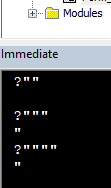
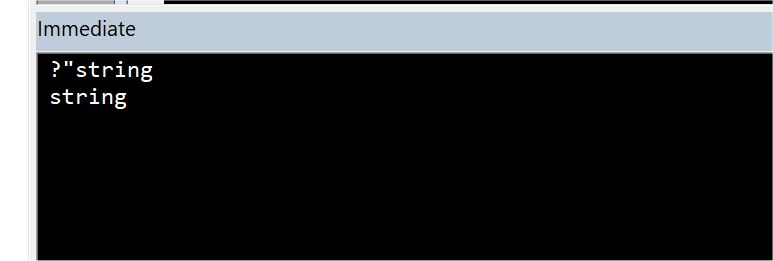
The immediate window autocorrects missing quotes (see picture below).  But in VBA coding, you have to be 100% syntactically correct.
Kevin Yip  @Reply  
     
2 years ago

Thomas Gonder  @Reply  
       
2 years ago
@ Kevin My test showed that Ronald's line allowed entry (moving off the line) and also compiled as he wrote it in the original post. So it appears that VBA will not throw a syntax error, but based on his experience, won't return a record either. A small, maybe 30-year-old problem that Microsoft could pay some attention to?
Ronald de Boer OP  @Reply  
      
2 years ago
Hi Thomas,

Sorry for not replying, I used and it compiles and works as Adam explained above "REG_NO=""" & CStr([EContractCode]) & """"
Regards

Ron
Christopher Hankwembo  @Reply  
  
2 years ago
Criteria being a number stored as a string but the variable being used is stored a Long number.

This incorrect , kindly use the primary key otherwise it will not work
Adam Schwanz  @Reply  
           
2 years ago
What do you mean Christoper? It works fine with strings, longs, numbers, dates, anything at all, as long as your syntax is correct.

Even if you mean the chance of having duplicates, strings can be made indexed and unique as well.

This thread is now CLOSED. If you wish to comment, start a NEW discussion in Access Developer Forum.
 

Next Unseen

 
New Feature: Comment Live View


The following is a paid advertisement
Computer Learning Zone is not responsible for any content shown or offers made by these ads.
 

Learn
 
Access - index
Excel - index
Word - index
Windows - index
PowerPoint - index
Photoshop - index
Visual Basic - index
ASP - index
Seminars
More...
Customers
 
Login
My Account
My Courses
Lost Password
Memberships
Student Databases
Change Email
Info
 
Latest News
New Releases
User Forums
Topic Glossary
Tips & Tricks
Search The Site
Code Vault
Collapse Menus
Help
 
Customer Support
Web Site Tour
FAQs
TechHelp
Consulting Services
About
 
Background
Testimonials
Jobs
Affiliate Program
Richard Rost
Free Lessons
Mailing List
PCResale.NET
Order
 
Video Tutorials
Handbooks
Memberships
Learning Connection
Idiot's Guide to Excel
Volume Discounts
Payment Info
Shipping
Terms of Sale
Contact
 
Contact Info
Support Policy
Mailing Address
Phone Number
Fax Number
Course Survey
Email Richard
[email protected]
Blog RSS Feed    YouTube Channel

LinkedIn
Copyright 2026 by Computer Learning Zone, Amicron, and Richard Rost. All Rights Reserved. Current Time: 6/16/2026 1:41:29 PM. PLT: 1s