Free Lessons
Courses
Seminars
TechHelp
Fast Tips
Templates
Topic Index
Forum
ABCD
 
Home   Courses   TechHelp   Forums   Help   Contact   Merch   Join   Order   Logon  
 
Back to Access Forum    Comments List
Upload Images   @Reply   Bookmark    Link   Email   Next Unseen 
ACCDE error not on ACCDB
Jennifer Neighbors 
     
2 years ago
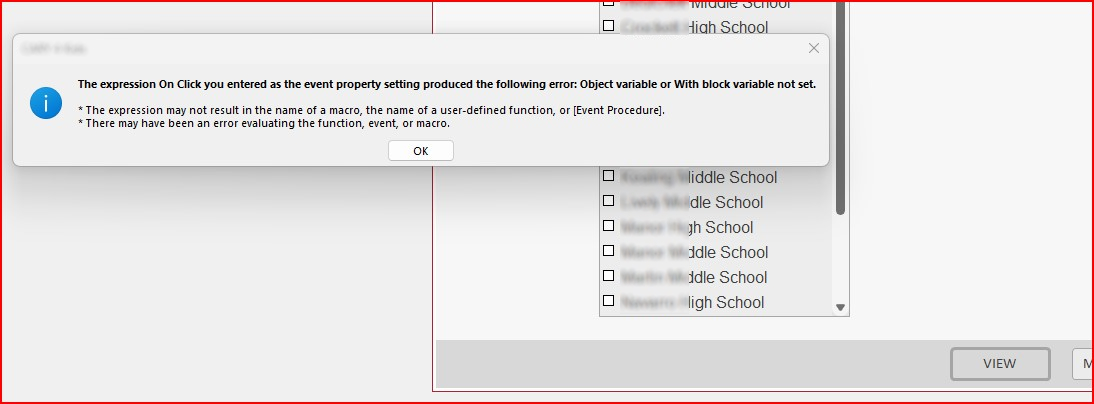
I recently updated a db back end to SQL Server. My development db (ACCDB) runs reports fine. However, when I make a ACCDE out of it and try to run reports from the ACCDE, I get a weird error upon clicking the button to run the selected report. I cannot look into code to see where the error is because it's an ACCDE. I will post the error message. Does anyone have any insight into what could be causing this?
Jennifer Neighbors OP  @Reply  
     
2 years ago

Adam Schwanz  @Reply  
           
2 years ago
Try Troubleshooter.

After compile/compact, remake the ACCDE and try again on that ACCDE. If it still gives the error, what is the code behind the button to open the report? (Look on your ACCDB and post the code)
Jennifer Neighbors OP  @Reply  
     
2 years ago
Code
Private Sub OpenOutput_Click()
'
' Open the report, query or form.  if opening a report, open it in preview mode.
'

On Error GoTo ErrHandler

Dim stDocName, stCriteria As String
Dim datStartDate As Variant
Dim datEndDate As Variant
Dim intUserID As Integer
Dim intCountSchools As Integer

    If IsNull(Me!SelectOutput) Then
        MsgBox "From the drop-down menu, please select a report to open.", vbOKOnly, "Information Required"
    Else
        stDocName = Forms!frmreports_SUsers!SelectOutput.Column(1)
        datStartDate = Me.BegDate
        datEndDate = Me.EndDate
        If Me!SelectOutput.Column(4) = True And (IsNull(Me!BegDate) Or IsNull(Me!EndDate)) Then
            MsgBox "A beginning and end date are required.", vbOKOnly, "Information Required"
            Me.BegDate.SetFocus
            Exit Sub
        Else
            If Me.BegDate > Me.EndDate Then
                MsgBox "The beginning date must be before the ending date.", vbOKOnly, "Error"
                Me.BegDate.SetFocus
                Exit Sub
            End If
        End If
    End If

    If Me!SelectOutput.Column(5) = True And (IsNull(Me!PrevBegDate) Or IsNull(Me!PrevEndDate)) Then
        MsgBox "A beginning and end date are required.", vbOKOnly, "Information Required"
            Me.PrevBegDate.SetFocus
            Exit Sub
    Else
        If Me.PrevBegDate > Me.PrevEndDate Then
            MsgBox "The beginning date must be before the ending date.", vbOKOnly, "Error"
            Me.PrevBegDate.SetFocus
            Exit Sub
        End If
    End If
    
    intCountSchools = CountSelectedSchools
    If intCountSchools < 1 Then
        MsgBox "You have not selected any schools for this report.", vbOKOnly, "Information Required"
        Exit Sub
    End If
    
    Select Case Me!SelectOutput.Column(1)
        Case "frmCaseloadDemographics", "frmCaseloadPerformance"
            If Me.lstCohortSemesters.ItemsSelected.Count = 0 Then
                MsgBox "Please select one or more cohort semesters to include in this report.", vbOKOnly, "Information Required"
                Exit Sub
            End If
    End Select

    If IsNull(Me!SelectOutput.Column(7)) = False Then
        stCriteria = Me!SelectOutput.Column(7)
    End If
            
    If Me!SelectOutput.Column(3) = "report" Then
        DoCmd.Minimize
        intUserID = ValidateUserID
        If DLookup("SuppressReportTipPopUp", "tblUsers", "UserID = " & intUserID) = False Then
            DoCmd.OpenForm "frmReportTip"
        End If
        DoCmd.OpenReport stDocName, acViewPreview, , , acWindowNormal, datStartDate & " to " & datEndDate
    ElseIf Me!SelectOutput.Column(3) = "query" Then
        DoCmd.OpenQuery stDocName
    ElseIf Me!SelectOutput.Column(3) = "form" Then
        DoCmd.Minimize
        DoCmd.OpenForm stDocName, , , , , , datStartDate & " to " & datEndDate
    End If

ExitHere: Exit Sub

ErrHandler:
    If Err.Number = 2501 Then
        ' Report was cancelled and that's okay.  Skip over and reopen the reports form so the user can enter wider parameters.
        DoCmd.OpenForm "frmReports_SUsers"
    Else
        MsgBox "Oops! It looks like there has been an error. The error is number " & Err.Number & ": " & Err.Description & " in " & _
        VBE.ActiveCodePane.CodeModule & " in OpenOutput_Click. The program will now attempt to resume normally.", vbOKOnly, "Error"
        Resume ExitHere
    End If
    
End Sub
Kevin Yip  @Reply  
     
2 years ago
The VBE object has no value if if the VBA Editor has never been opened.  Since an .accde file cannot open the VB editor, VBE.ActiveCodePane.CodeModule has no value, and will never do.  You need to use the literal name in your code:

     Err.Description & " in MyLiteralModuleNameHere in OpenOutput_Click. ... "
Jennifer Neighbors OP  @Reply  
     
2 years ago
Nice observation, Kevin... thank you! Is this why my procedure throws the error when the user clicks the command button in the accde?
Jennifer Neighbors OP  @Reply  
     
2 years ago
Kevin, after correcting the module reference in my error trapping code, the error trapping now works well. I'm still getting a run time error #91 Object variable or with block variable not set when I try to run a report. I also corrected one variable that I don't think I DIM'd. That did not fix the issue, either. I wonder if my db is corrupted; although the accdb does work as expected, it fails when I convert it to an accde. The only thing that fails is this command button.
Kevin Yip  @Reply  
     
2 years ago
That is NOT why the error occurs.  The actual error is stored in Err.Number and Err.Description.  But you can't see them because of another error (caused by the use of VBE).

More importantly, you cannot afford to have errors occurring inside the error handler itself, which defeats the purpose of having error handlers in the first place.  In my old job, all my error handlers contained only procedures.  E.g.:

     ErrHandler:
          HandleAppError()
          RecordAppError()
          ...

And those procedures also have their own error handlers, so that no error would ever be left unhandled.

You also need a way to record errors too, such as storing error numbers and messages in a table so you can review them later.
Jennifer Neighbors OP  @Reply  
     
2 years ago
You may be quite right that I need to develop better error-handling habits. However, I changed the VBE reference for all the procedures in this module. The error number and description are now given. It is not helping me... perhaps I am just not "getting" it, but I don't see my error in the code. And it runs fine in the accdb. Would you mind helping me with that part of the problem? I'd love your feedback on what is causing run time error #91. Thanks so much!
Kevin Yip  @Reply  
     
2 years ago
If error 91 is unhandled, it can only occur inside the error handler -- the only part in your procedure that isn't handled by On Error.  As I suggested earlier, put your entire error-handling code inside another procedure, and use On Error there too, so you can trap the error.
Ronald de Boer  @Reply  
      
2 years ago
Hi Jennifer
I have found in the paste that this error can be caused by an event in your VBA code that has no executable code.  I suggest looking at your code from recent modification either in a Form or Report where you created some VBA code and check where you went to create some code and changed your mind without deleting the event.

If you have done a lot of new Forms and or Reports then create a new Db and move in your tables and queries all together then your Form 2 or 3 at a time.  Create your ACCDE file and see if the error re-occurs.  If so check these form events for events if no executables code within them and delete.  Recompile and keep doing so.

This thread is now CLOSED. If you wish to comment, start a NEW discussion in Access Forum.
 

Next Unseen

 
New Feature: Comment Live View


The following is a paid advertisement
Computer Learning Zone is not responsible for any content shown or offers made by these ads.
 

Learn
 
Access - index
Excel - index
Word - index
Windows - index
PowerPoint - index
Photoshop - index
Visual Basic - index
ASP - index
Seminars
More...
Customers
 
Login
My Account
My Courses
Lost Password
Memberships
Student Databases
Change Email
Info
 
Latest News
New Releases
User Forums
Topic Glossary
Tips & Tricks
Search The Site
Code Vault
Collapse Menus
Help
 
Customer Support
Web Site Tour
FAQs
TechHelp
Consulting Services
About
 
Background
Testimonials
Jobs
Affiliate Program
Richard Rost
Free Lessons
Mailing List
PCResale.NET
Order
 
Video Tutorials
Handbooks
Memberships
Learning Connection
Idiot's Guide to Excel
Volume Discounts
Payment Info
Shipping
Terms of Sale
Contact
 
Contact Info
Support Policy
Mailing Address
Phone Number
Fax Number
Course Survey
Email Richard
[email protected]
Blog RSS Feed    YouTube Channel

LinkedIn
Copyright 2026 by Computer Learning Zone, Amicron, and Richard Rost. All Rights Reserved. Current Time: 5/6/2026 4:32:34 AM. PLT: 0s