Free Lessons
Courses
Seminars
TechHelp
Fast Tips
Templates
Topic Index
Forum
ABCD
 
Home   Courses   TechHelp   Forums   Help   Contact   Merch   Join   Order   Logon  
 
Back to Access Developer Forum    Comments List
Upload Images   @Reply   Bookmark    Link   Email   Next Unseen 
Making ZipCode lookup Public
Bruce McCormick 
   
2 years ago
Thank you for considering my confusion!!!

Would the best way to make the zip code lookup subs (i think actually only one needs the following) public would be whenever a zip lookup "edit" command button is clicked, set the calling form's name to a global variable?

Thank you folks!
-Bruce
Thomas Gonder  @Reply  
       
2 years ago
I'm not sure exactly what you are asking. But for doing zip codes, I prefer two ways to allow entry in a form.

The first way is with a lookup combo box, so the user can enter the first couple of digits (if not everything), and then the combo shows the rest of the data in columns. Do not load the source until two or three characters are entered. Search for:
"How to Filter the Data in a Combo Box or List Box as you Type in Microsoft Access"
This comes in handy when zip codes change for an address, as happened to one of my houses, and maybe the first three digits will narrow it down when the database or customer isn't current.

The second approach is with an opened search form. And yes, in that case a global variable will be needed to pass back the correct ID to the calling form. Search for:
"Microsoft Access Multi-Field Search Form 2.0 New and Improved Features!"

I think a good form allows for both types of searching and is consistent across all combo boxes that have large source tables.
Thomas Gonder  @Reply  
       
2 years ago

Thomas Gonder  @Reply  
       
2 years ago
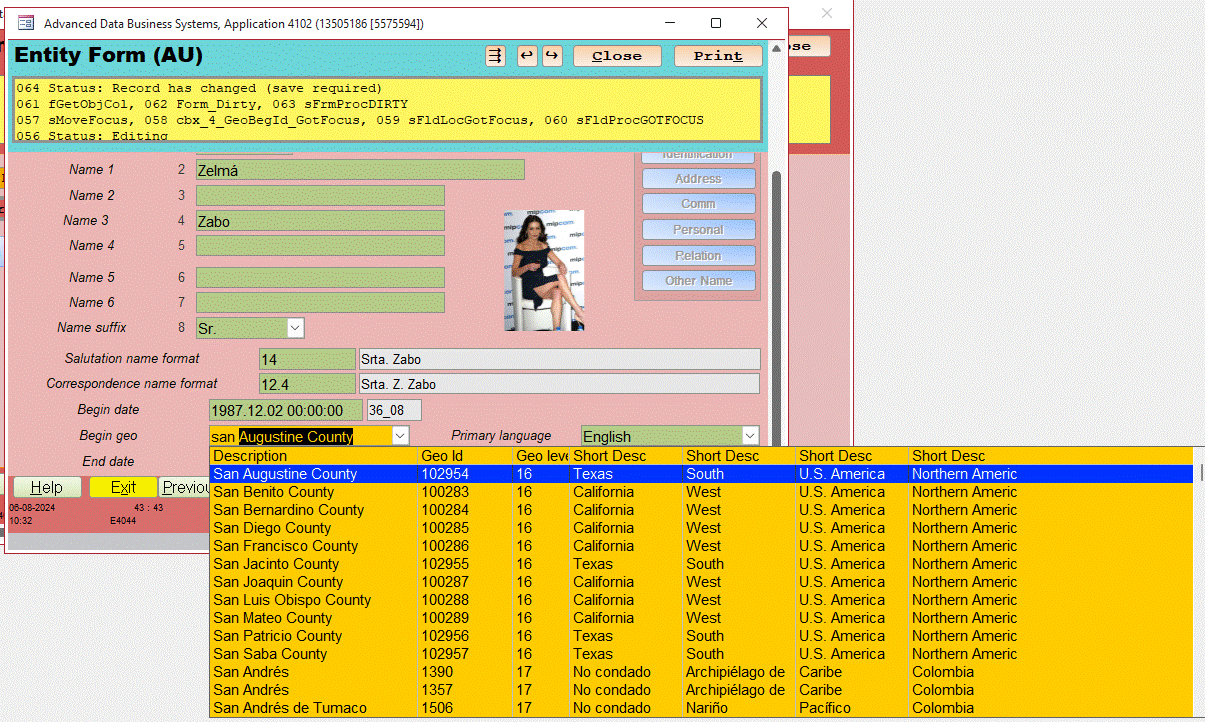
The above image is how the combo box works after entering four characters. It's for geography, since I haven't yet finished by addressing portion of the Evaluation db.

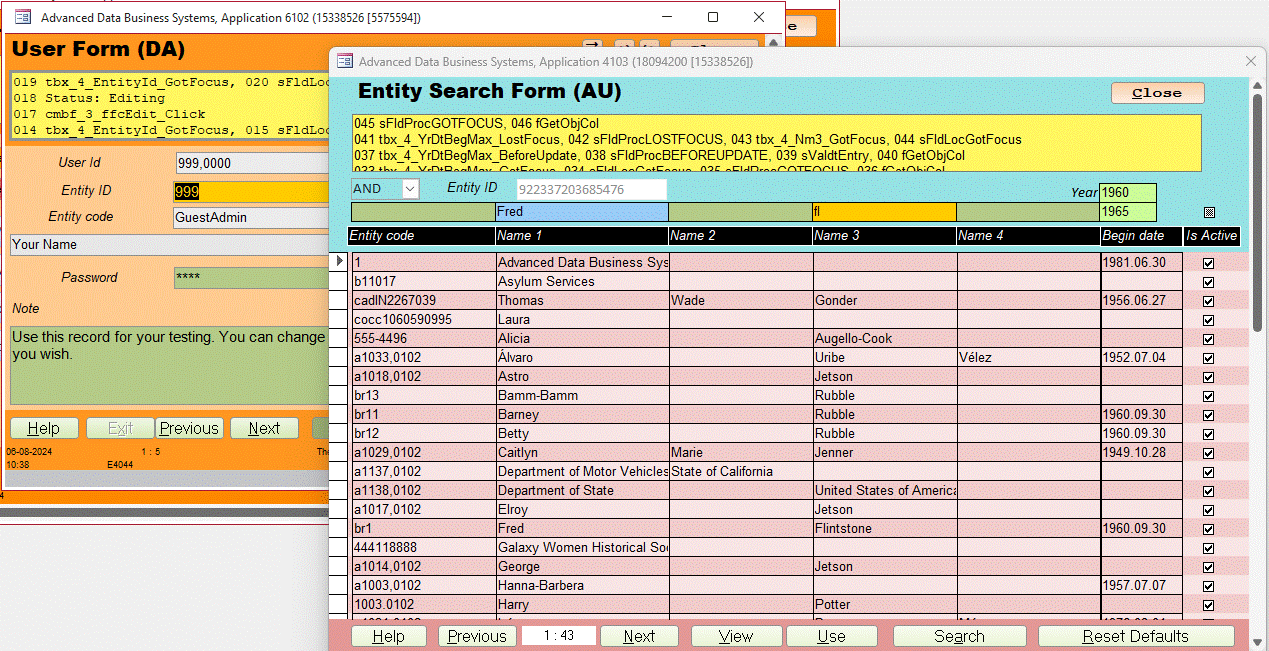
The next image shows a search for an Entity from the User Form, using the Search Form for the Entity. Two different tables and forms. This is the second method I described. You would make your own for Zip Codes using these ideas.
Thomas Gonder  @Reply  
       
2 years ago

Bruce McCormick OP  @Reply  
   
2 years ago
Thank you, Thomas!

What i am working for is to make as much of the code available to a call from any form, and i see now that obviously i also have to handle the after update event, which, without much consideration as of yet, will just involve passing the variable "ZIP" from that to a public sub along with the command button's code doing the same.

btw, NICE use of color! (and Zelma ain't half bad looking either... oh, for my younger days-)
Bruce McCormick OP  @Reply  
   
2 years ago
All is good. Well, maybe not all, but this code conversion is. I set global public oForm as Form, then at the after-update event set it to the then active form's name (me.name), then simply wrapped all subsequent field assignments in a With oFrom/End With and it works from any form in the project-
Kevin Robertson  @Reply  
          
2 years ago
Which is it? Global or Public?
Bruce McCormick OP  @Reply  
   
2 years ago
-Oh - I also replicated (fancy word for copy) most of AfterUpdate into a Public sub in a module, and i also copied over OpenZipForm as a Public sub in the new module, then stripped the original AfterUpdate down to minimums:

DetailsPrivate Sub cmdEditZip_Click(Zip)
'Credit: Richard Rost 599cd.com
    Call OpenZipForm(Zip)
End Sub

Private Sub Zip_AfterUpdate()
'Credit: Richard Rost 599cd.com
    Dim sForm As String
    
    sForm = Me.Name
    
    Set oForm = Forms(sForm)
    Call Zip_AfterUpdateRemote([Zip])

End Sub

and as you noticed, renamed the AfterUpdate to AfterUpdateRemote:
        
Public Sub Zip_AfterUpdateRemote(Zip)
'Credit: Richard Rost 599cd.com
Dim ID As Long          '
Dim ZC As Long          '
Dim sCity As String     '
Dim sState As String    '

With oForm
    .Zip = Replace(Zip, " ", "")
    .Zip = UCase(Zip)
End With


'Count ZipCodes in table that match
ZC = DCount("*", "tblZip", "ZipCode = """ & Zip & """")
If ZC = 1 Then
    'ZipCode exists and there is only one record
    With oForm
        ID = Nz(DLookup("ID", "tblZip", "ZipCode = """ & Zip & """"), 0)
        .City = DLookup("City", "tblZip", "ID = " & ID)
        .State = DLookup("State", "tblZip", "ID = " & ID)
    End With
Else
    'Zipcode does not exist or there are more than one
    Call OpenZipForm(Zip)
End If

End Sub
Thomas Gonder  @Reply  
       
2 years ago
@Bruce Again, I'm not sure where you are putting all your procedures, based just on the code. But if it works, it works.
In my "1001 - Fred Flintstone Demo of the ADS Entity Form" (14:20) I show how to use a right click on an input control to allow opening another form, either the form for the primary table or a search form. This way you don't need a bunch of command buttons on the form for every field that is a foreign key.

P.S. Zelma is my fictitious test record. She takes a lot of abuse during development and QC.
Thomas Gonder  @Reply  
       
2 years ago
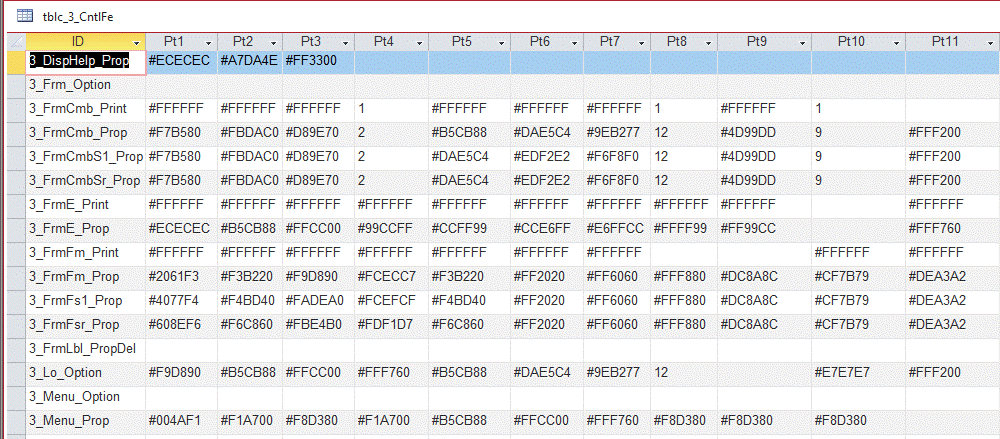
@Bruce As to colors, that was a lot of work. I had to come up with a scheme that works within an Application Module (like payroll or sales). Then I modify the scheme for each new Application Module. The colors have significance in the different types of forms and controls in a module.

I would have been (and was) hopelessly lost without this from Richard:
"How to Get the Exact Color You Want in Microsoft Access VBA"
Thomas Gonder  @Reply  
       
2 years ago

Bruce McCormick OP  @Reply  
   
2 years ago
@ Kevin: As far as i have read it really doesn't much matter. There is supposed to be no such thing as declaring a variable "Global", it is generally reserved for "Load, Upload and User Forms" (https://www.mrexcel.com/board/threads/global-vs-public-variable.425695/), but if i recall the term "Global" has been used a number of times in these forums and seems to still act the same-
Bruce McCormick OP  @Reply  
   
2 years ago
@ Thomas: I keep going to the Colors|More Colors|Custom and choosing something, half the time forgetting that once i've chosen something i like i can just go back to that form and copy the color code (derrrrrrrr).

P.S. I guess i'll just have to group Zelma with "Stevie Nicks when she was in her late 20's/early 30's", being two people i'll never meet- Life is cruel.
Thomas Gonder  @Reply  
       
2 years ago
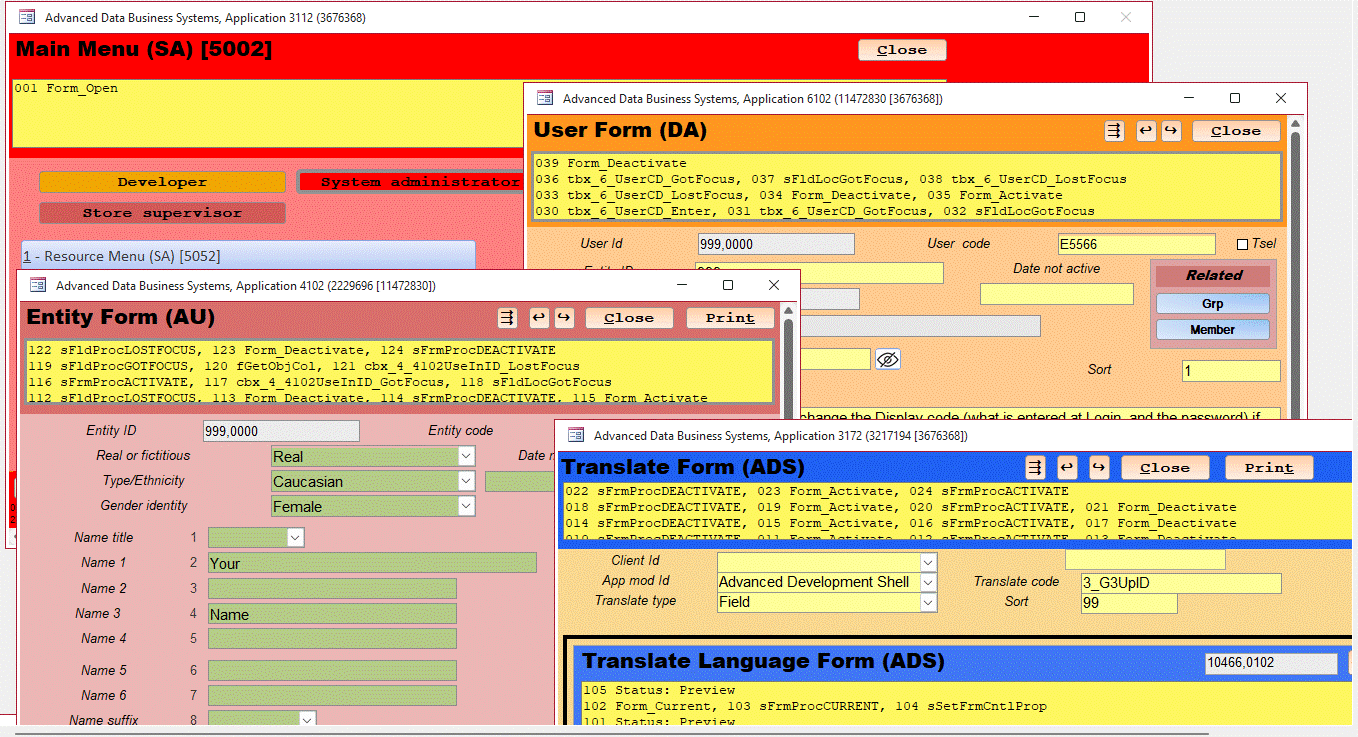
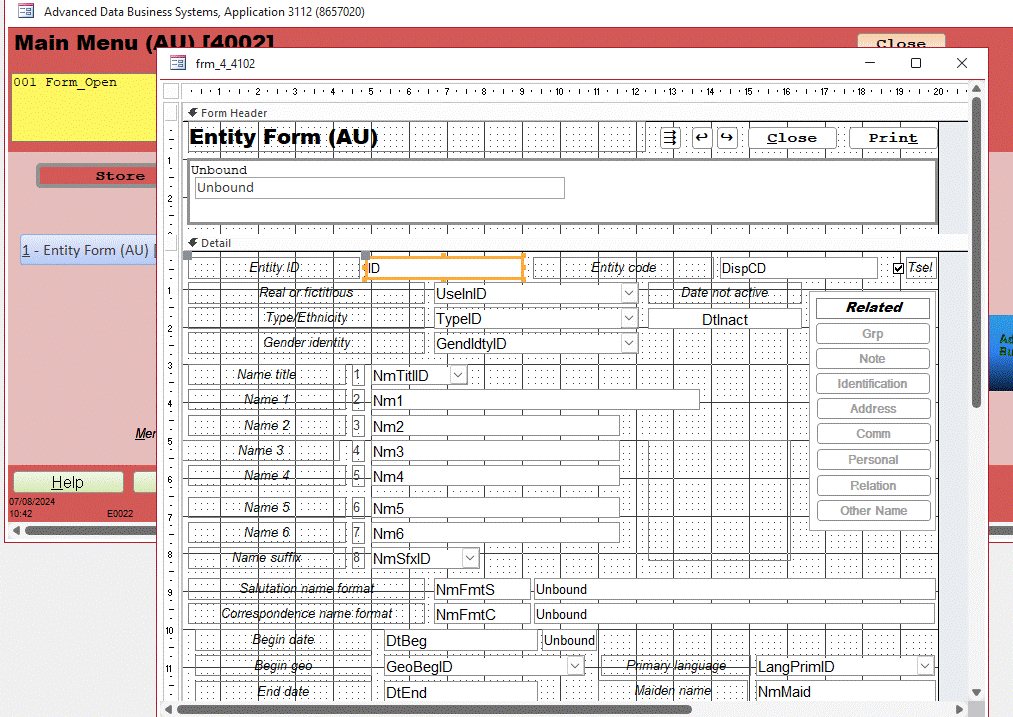
@Bruce It was a bit of a painful process, but I created records for each type of form and area of the form that needed colors. Now,  a couple of routines set all those colors based on the Application Module.  I design forms in B&W and it's all taken care of in the "helper" module for forms. Makes a nice consistent interface for users. The colors can change based upon what the user is doing, or what errors might have been encountered. Look at the Entity Form above, see the green color for the entry controls? Means they can edit, while the other forms have a yellow color for the controls, that means just previewing (can't edit).
Thomas Gonder  @Reply  
       
2 years ago

Thomas Gonder  @Reply  
       
2 years ago

Bruce McCormick OP  @Reply  
   
2 years ago
@Thomas - I am here revisiting posts and picking up on information i might have missed. The color designation grid you created is amazing. The work that went into that alone humbles me, but i also noticed something that i missed before - it's not just the technical aspect of creation, you also have an amazing artistic gift. I i tried something similar it would look more like the scene of a large traffic accident. Well done!
Thomas Gonder  @Reply  
       
2 years ago
Actually Bruce, with my color abilities and lack of graphic artist skills, I might as well be color blind.
Again, it was Richard's video on colors that got me started in the right direction.
I've seen enough bad design, meaning lousy for the user to navigate, that I've learned what to avoid.
If you like the colors, you should check out the different language ability of the ADS. That was a lot more complicated.
Anyways, thanks for the compliment.

This thread is now CLOSED. If you wish to comment, start a NEW discussion in Access Developer Forum.
 

Next Unseen

 
New Feature: Comment Live View


The following is a paid advertisement
Computer Learning Zone is not responsible for any content shown or offers made by these ads.
 

Learn
 
Access - index
Excel - index
Word - index
Windows - index
PowerPoint - index
Photoshop - index
Visual Basic - index
ASP - index
Seminars
More...
Customers
 
Login
My Account
My Courses
Lost Password
Memberships
Student Databases
Change Email
Info
 
Latest News
New Releases
User Forums
Topic Glossary
Tips & Tricks
Search The Site
Code Vault
Collapse Menus
Help
 
Customer Support
Web Site Tour
FAQs
TechHelp
Consulting Services
About
 
Background
Testimonials
Jobs
Affiliate Program
Richard Rost
Free Lessons
Mailing List
PCResale.NET
Order
 
Video Tutorials
Handbooks
Memberships
Learning Connection
Idiot's Guide to Excel
Volume Discounts
Payment Info
Shipping
Terms of Sale
Contact
 
Contact Info
Support Policy
Mailing Address
Phone Number
Fax Number
Course Survey
Email Richard
[email protected]
Blog RSS Feed    YouTube Channel

LinkedIn
Copyright 2026 by Computer Learning Zone, Amicron, and Richard Rost. All Rights Reserved. Current Time: 4/30/2026 5:13:34 PM. PLT: 0s