Free Lessons
Courses
Seminars
TechHelp
Fast Tips
Templates
Topic Index
Forum
ABCD
 
Home   Courses   TechHelp   Forums   Help   Contact   Merch   Join   Order   Logon  
 
Back to Access Forum    Comments List
Upload Images   @Reply   Bookmark    Link   Email   Next Unseen 
ACCDB file to ACCDE file
Jerry Fowler 
       
2 years ago
I wanted to share my TechHelp Video Database for others to see. So I thought I would save it to a ACCDE file. I opened the ACCDB file and first made sure the folder I had the ACCDB FrontEnd and BackEnd files was a trusted folder with all sub folders trusted as there is a Photos subfolder that has all the images. Then have been going through and testing all the forms and VBA code, no errors sofar. I then went into the VBA Editor and ran a debug and again no errors came up. So I went out of the database made a backup. re-entered the ACCDB file and saved as an ACCDE file. then closed everything and ran the ACCDE file and the main menu came up but from there none of the forms would open up. Did I miss a step? It seems to me that the VBA code is blocked for some reason.
Ludwig Willems  @Reply  
      
2 years ago
volgen :)
Sami Shamma  @Reply  
             
2 years ago
run
Compact & Repair
before you save accde file
Jerry Fowler OP  @Reply  
       
2 years ago
Sami thanks for your reply, I have added that to my list. Unfortunately, it did not help in my case.
Adam Schwanz  @Reply  
           
2 years ago
Your running it from the same computer? Is it in the exact same file location? It sounds like a Trusted Location problem. I'd check that first, I don't know your settings, but it could be something simple like a file name or the "include subfolders" check.

Do you have any other code running in like the on open/current of the main menu that could be getting it stuck? (Along those lines, you could try adding a Msgbox "Hi" to your main menus on open event, that would tell you if VBA is working)
Kevin Yip  @Reply  
     
2 years ago
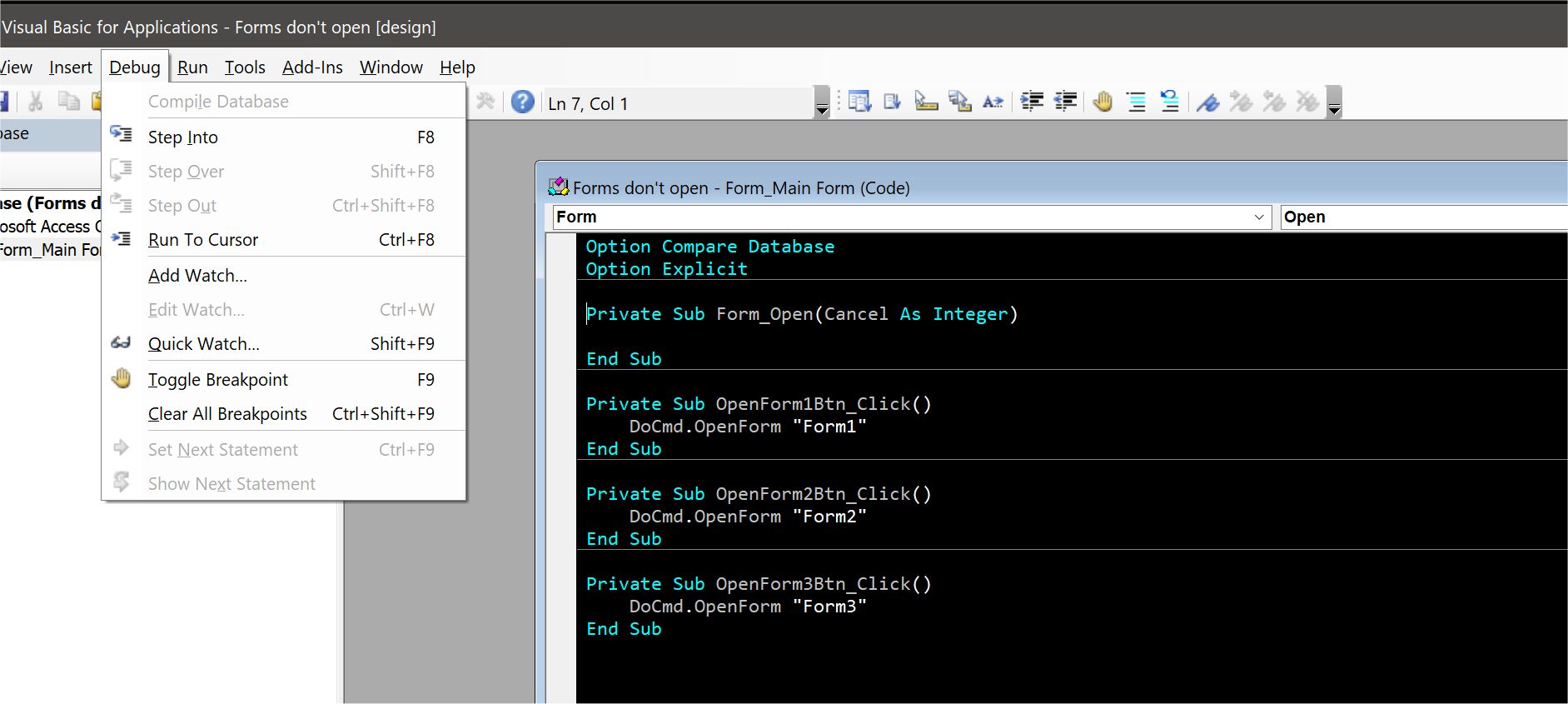
Check if you have any empty procedures in your form modules (see picture below).  That could cause the resulting .accde file to have non-functioning buttons.  Compiling the module should automatically remove empty procedures, but sometimes it doesn't, as the picture below shows.  In that case, you need to decompile and re-compile the database.

Anyone can recreate this "bug":  Create a new .accdb, create a new form, add a button with an On Click event procedure that does something (open MsgBox, open another form, whatever).  Then add another event procedure (Form_Open, Detail_Click, anything will do, but has to be an actual form event), and leave it empty.  DON'T compile the code.  Save and close the form, then create an .accde file from the database.  Open the .accde file, open the form, and you'll see that clicking the button does nothing -- all because of the empty procedure, apparently.  As I said above, compiling the database should remove all empty procedures.  But I've seen that once in a blue moon it doesn't.
Kevin Yip  @Reply  
     
2 years ago

Jerry Fowler OP  @Reply  
       
2 years ago
I will check that as I might have one, or could it be that I have a subroutine to two that I don't use?
Jerry Fowler OP  @Reply  
       
2 years ago
Would there be a way to search for those empty routines? I have found 2 so far, but going through all the modules is tedious.
Kevin Yip  @Reply  
     
2 years ago
Compile the database and make another .accde, and see that fixes it.  Also, you only need to find empty procedures in the form module(s) of the form(s) that have problems in the accde.

This thread is now CLOSED. If you wish to comment, start a NEW discussion in Access Forum.
 

Next Unseen

 
New Feature: Comment Live View


The following is a paid advertisement
Computer Learning Zone is not responsible for any content shown or offers made by these ads.
 

Learn
 
Access - index
Excel - index
Word - index
Windows - index
PowerPoint - index
Photoshop - index
Visual Basic - index
ASP - index
Seminars
More...
Customers
 
Login
My Account
My Courses
Lost Password
Memberships
Student Databases
Change Email
Info
 
Latest News
New Releases
User Forums
Topic Glossary
Tips & Tricks
Search The Site
Code Vault
Collapse Menus
Help
 
Customer Support
Web Site Tour
FAQs
TechHelp
Consulting Services
About
 
Background
Testimonials
Jobs
Affiliate Program
Richard Rost
Free Lessons
Mailing List
PCResale.NET
Order
 
Video Tutorials
Handbooks
Memberships
Learning Connection
Idiot's Guide to Excel
Volume Discounts
Payment Info
Shipping
Terms of Sale
Contact
 
Contact Info
Support Policy
Mailing Address
Phone Number
Fax Number
Course Survey
Email Richard
[email protected]
Blog RSS Feed    YouTube Channel

LinkedIn
Copyright 2026 by Computer Learning Zone, Amicron, and Richard Rost. All Rights Reserved. Current Time: 5/6/2026 10:20:38 PM. PLT: 1s