Free Lessons
Courses
Seminars
TechHelp
Fast Tips
Templates
Topic Index
Forum
ABCD
 
Home   Courses   TechHelp   Forums   Help   Contact   Merch   Join   Order   Logon  
 
Back to Access Forum    Comments List
Upload Images   @Reply   Bookmark    Link   Email   Next Unseen 
If statement with time
Mark Desens 
      
2 years ago
Hi Richard and guys, I have a challenging one. I just started this project research. On one of my forms we have to record the time. start and end time. three drop down menu's, one for the hour, one for the minute and one for the am/pm. I'd like to use the if then else statement to compare the time the person put in start and end with the time on the computer, an auto insert the am/pm depending on if it's after 12pm or before. Any suggestions?
Sami Shamma  @Reply  
             
2 years ago
Please be more specific. See Rule #2.
show the Form
Give an example of what you want to accomplish
Adam Schwanz  @Reply  
           
2 years ago
I'm not envisioning what you're trying to do, but you just need to compare your timefield with now(), might need to use timevalue() too
Mark Desens OP  @Reply  
      
2 years ago
Hey guys thanks for responding, but I am going to let this one go. Nobody is suggesting or complaining. Thanks anyway.
John Davy  @Reply  
         
2 years ago
Hi Mark
I agree, more info is needed, but why are you using 3 dropdowns instead of 1?

John
Alex Hedley  @Reply  
           
2 years ago
I'd have a Default Value set to Now() so when the record is created and someone picks from the dropdowns then you can compare the two.

Or if you need to update after changes have an After Update that sets the field.
You could either make the field ReadOnly and show on the Form, or just hide it if they user doesn't need to see it.
Richard Rost  @Reply  
           
2 years ago
Hey Mark. You can build a valid Time value using TimeSerial. Put your combo box values into that. Not sure what you mean about the rest of it though. Perhaps some screen shots?
Mark Desens OP  @Reply  
      
2 years ago
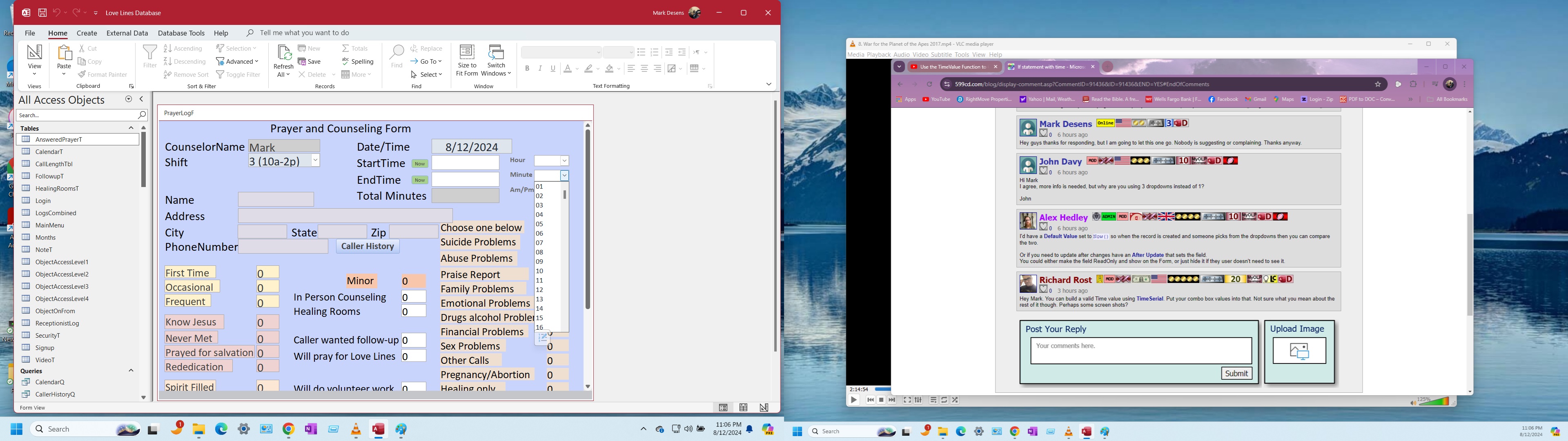
Hi guys, ok i left for several hours now I'm back and thanks for replying. So here is a screen shot. in the upper right corner are the three combo boxes. top is the hour middle that's open is the minutes and bottom is the am/pm. I am going to watch the video of timevalue and the others that you suggest. The if statement possibly is too long. So I think i'm deciding to use two more combo boxes. the hour and minutes and leave the am/pm alone. Sorry no screen shot for that. example. that start time will have the first two for the am. then the other two for the pm. Compare if the time is before 12pm then the am part is visible. after 12pm the pm part is visible and the am is hiding.  This is the best I can explain it.
Mark Desens OP  @Reply  
      
2 years ago

Mark Desens OP  @Reply  
      
2 years ago
Gentleman the matter is solved. On the way to my second job where the database is. Instead of having any code I thought of just adding to the minutes dropdown menu the minutes 1 - 60 am and pm both, and get rid of the am/pm. Thanks for helping.

This thread is now CLOSED. If you wish to comment, start a NEW discussion in Access Forum.
 

Next Unseen

 
New Feature: Comment Live View


The following is a paid advertisement
Computer Learning Zone is not responsible for any content shown or offers made by these ads.
 

Learn
 
Access - index
Excel - index
Word - index
Windows - index
PowerPoint - index
Photoshop - index
Visual Basic - index
ASP - index
Seminars
More...
Customers
 
Login
My Account
My Courses
Lost Password
Memberships
Student Databases
Change Email
Info
 
Latest News
New Releases
User Forums
Topic Glossary
Tips & Tricks
Search The Site
Code Vault
Collapse Menus
Help
 
Customer Support
Web Site Tour
FAQs
TechHelp
Consulting Services
About
 
Background
Testimonials
Jobs
Affiliate Program
Richard Rost
Free Lessons
Mailing List
PCResale.NET
Order
 
Video Tutorials
Handbooks
Memberships
Learning Connection
Idiot's Guide to Excel
Volume Discounts
Payment Info
Shipping
Terms of Sale
Contact
 
Contact Info
Support Policy
Mailing Address
Phone Number
Fax Number
Course Survey
Email Richard
[email protected]
Blog RSS Feed    YouTube Channel

LinkedIn
Copyright 2026 by Computer Learning Zone, Amicron, and Richard Rost. All Rights Reserved. Current Time: 5/1/2026 5:42:01 PM. PLT: 1s